> ## Documentation Index
> Fetch the complete documentation index at: https://help.dingtalk.io/llms.txt
> Use this file to discover all available pages before exploring further.
# Exclusive OpenAPI overview
> Learn about DingTalk OA Approval's exclusive OpenAPIs for Smart OA customers. Applicable scenarios include building a self-hosted Approval Center, process handover, and process center integration. Covers activation steps, billing rules, and FAQs.
## 1. Feature overview
To meet developers' needs for personalized app development, DingTalk OA Approval has been rolling out a set of exclusive OpenAPIs for Smart OA customers since September 1, 2024. These exclusive OpenAPIs deliver richer capabilities, address more personalized business requirements, and support internal app development across a wide range of scenarios. We encourage developers to use these OpenAPIs effectively to build a healthier DingTalk open ecosystem.
## 2. Applicable scenarios
DingTalk may add, modify, or remove the scope or specific features of the following APIs to comply with laws, regulations, policy adjustments, or regulatory directives, or to safeguard the security of DingTalk services. The APIs actually available to customers are subject to the content published on the DingTalk Open Platform at the time.
| OpenAPI name | OpenAPI details | Applicable scenario |
| -------------------------------------------------------------------------------------------------------------------------------------------------- | ---------------------------------------------------------------------------------------------------------------------------------------------------------------------------------------------------------------------------------------------------------------------------------------------------------------------------------------------------------------------------------------------------- | ------------------------------------------------------- |
| Query the pending task list for an Approval Center user | Call this API to query the list of pending approval tasks for a specified user in your organization (including official OA Approval tasks and approval tasks synced from third-party business systems to DingTalk). Helps organizations build their own Approval Center. | Self-hosted Approval Center |
| Query the processed task list for an Approval Center user | Call this API to query the list of processed approval tasks for a specified user in your organization (including official OA Approval tasks and approval tasks synced from third-party business systems to DingTalk). Helps organizations build their own Approval Center. | Self-hosted Approval Center |
| Query the list of instances initiated by an Approval Center user | Call this API to query the list of approval instances initiated by a specified user in your organization (including official OA Approval instances and approval instances synced from third-party business systems to DingTalk). Helps organizations build their own Approval Center. | Self-hosted Approval Center |
| Query the list of instances received by an Approval Center user | Call this API to query the list of approval instances received by a specified user in your organization (including official OA Approval instances and approval instances synced from third-party business systems to DingTalk). Helps organizations build their own Approval Center. | Self-hosted Approval Center |
| Batch accept or decline approval tasks | Call this API to batch process approval tasks with different approval instance IDs and task node IDs, using the specified userId, task result, and comment. | Self-hosted Approval Center |
| Admin queries the pending task list for a specified employee | This API provides a pending task query service for organization admins. The admin (managerUserId) can query all pending OA approval tasks for the current approver's userId. Pending task queries are supported for both current and former employees. | Process handover solution |
| Admin batch transfers pending tasks for a specified employee | Building on the query API for transferable tasks, an admin can batch transfer tasks to other current employees in the organization. The original assignee can be a current or former employee, while the transferee must be a current employee in the organization. | Process handover solution |
| Create or update a business group | Call this API to sync business group information from a third-party system to DingTalk OA Approval and generate a corresponding second-level business source group under the OA Approval category in DingTalk To-Do. When you later sync pending tasks to DingTalk, you can specify the business group the to-do task belongs to. | Process center integration (custom business groups) |
| Delete a business group | Call this API to delete group information synced from a third-party system to DingTalk OA Approval, and simultaneously delete the corresponding second-level category under the OA Approval category in DingTalk To-Do. To-do data under the deleted category is moved to the \[Other] group under the OA Approval category. | Process center integration (custom business groups) |
| Save an externally integrated approval template in the process center (supports featureConfig such as approval hosting and custom business groups) | Call this API to sync proprietary approval template data from a third-party business system to DingTalk OA Approval. Supports custom integration configuration of multiple advanced feature modules at the template level, such as approval hosting, custom business groups, and custom quick approval. | Process center integration (approval page hosting mode) |
| Save an externally integrated approval instance in the process center (supports featureConfig such as approval hosting and custom business groups) | Call this API to sync proprietary approval instance data from a third-party business system to DingTalk OA Approval. Supports custom integration configuration of multiple advanced feature modules at the instance level, such as approval hosting, custom business groups, and custom quick approval. | Process center integration (approval page hosting mode) |
| Save an externally integrated approval task in the process center (supports featureConfig such as custom quick approval) | Call this API to let a third-party system configure a callback API for approval tasks. Approvers can then perform approval actions directly in the DingTalk Approval To-Do Center. The Approval To-Do Center calls back to the third-party system, which updates task information upon receiving the callback and syncs the new task information back to the Approval Center, forming a closed loop. | Process center integration (custom business groups) |
### 1. Self-hosted Approval Center
An organization has multiple business systems (either self-developed or third-party) whose approval tasks are already integrated with the DingTalk Approval Center. The organization wants to leverage DingTalk OA Approval's open capabilities to build its own Approval Center with features such as filtering by source and batch approval:

### 2. Process handover solution
For organizations that want to leverage DingTalk OA Approval's open capabilities to implement DingTalk official OA approval process handover within their own business systems. This enables admins to batch transfer approval tasks to other users in the organization.
Admin queries the pending task list for a specified employee:

Admin batch transfers pending tasks to other users in the organization:

### 3. Process center integration (custom business groups)
For organizations that want to centralize approval tasks from multiple third-party systems in the DingTalk Approval Center for a one-stop, immersive approval experience. They also want DingTalk To-Do to support custom business categories and one-click approval on the list page, delivering a superior experience for users—especially management with heavy approval workloads.
Custom business categories in the To-Do Center make it easier to review to-dos sourced from third-party business systems:

Quick approval is supported on the To-Do Center list page for pending tasks originating from third-party business systems:

### 4. Process center integration (approval page hosting mode)
An organization has its own process engine in its business system and wants to integrate using its proprietary OA approval model. However, it lacks an H5 details page and wants to reuse DingTalk's official OA approval details page while customizing the approval action area. This unifies approval form structure and styling across different business systems, providing users with a consistent experience across mobile, PC, and tablet. The buttons in the approval action area can be customized (Accept, Decline, transfer, Print, and more).
Third-party proprietary OA approvals can use the official details page style:
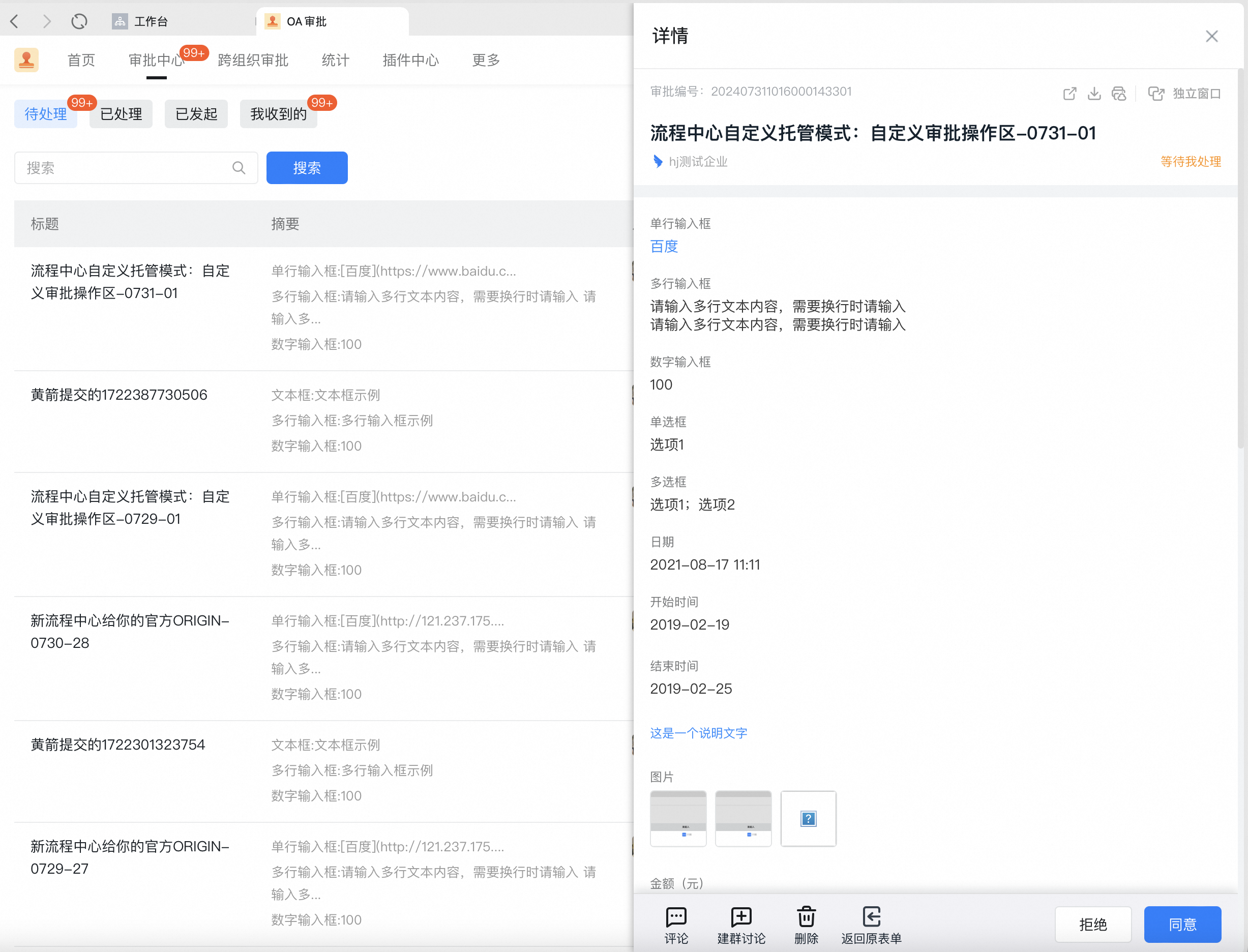
The mobile details page also supports customizing the approval action area:

Third-party businesses can customize the configuration and rendering of approval action area buttons (Accept, Decline, and more), and can display third-party business error message details:

## 3. Steps
For the exclusive OpenAPIs above, Standard Edition customers must **upgrade to Smart OA** before they can apply to use them. Some customers who joined the public beta before September 1, 2024, already have access to call these OpenAPIs. The rules are as follows:
| Customer type | Joined public beta | Impact |
| ------------------------- | ------------------ | ----------------------------------------------------------------------------------------------------------------------------------- |
| Smart OA customer | Yes | Not affected; continue calling as usual |
| Smart OA customer | No | Can call after applying for API permissions |
| Standard Edition customer | Yes | Cannot call. You must upgrade to Smart OA and apply for API permissions to resume calls. See the permission application steps below |
| Standard Edition customer | No | Cannot call. You must upgrade to Smart OA and apply for API permissions before calling. See the permission application steps below |
Permission application path: **Developer Backend** > App Development > DingTalk App > Create a new app or select an existing app > Click the app > \[Manage permissions] > \[OA Approval], then select the required permissions:

## 4. FAQ
Standard Edition DingTalk customers cannot use Smart OA's exclusive OpenAPIs. You must first **upgrade to Smart OA** before you can call these APIs. Calling exclusive OpenAPIs consumes your Smart OA OpenAPI quota.
Starting September 1, 2024, developers can view the newly launched exclusive OpenAPIs in the Open Platform developer documentation and the **Developer Backend**.
## 5. Related documents
Overview of four solutions for integrating enterprise business systems with DingTalk OA Approval
Initiated by the business system, with the business system details page opened for approval within DingTalk