> ## Documentation Index
> Fetch the complete documentation index at: https://help.dingtalk.io/llms.txt
> Use this file to discover all available pages before exploring further.
# DingTalk process page integration
> Guides Organization Admins and developers on integrating DingTalk OA Approval processes and pages with third-party business systems such as ERP, CRM, and finance systems to deliver a unified entry point, data interoperability, and process coordination.
## 1. Feature overview
This manual guides Organization Admins and developers on how to integrate **Approval processes and pages in the DingTalk OA system** with **third-party business systems (such as ERP, CRM, and finance systems)** to deliver a unified entry point, data interoperability, and process coordination. Integration raises your organization's level of office automation, eliminates duplicate data entry, and improves cross-system collaboration efficiency.
## 2. Applicable scenarios
Kick off a process from your business system, call the official DingTalk OA Approval APIs to create a DingTalk OA Approval process, and open the DingTalk Approval detail page on the DingTalk side to handle the process.
## 3. Business flow
The overall interaction flow between the business system and the DingTalk side is shown below:
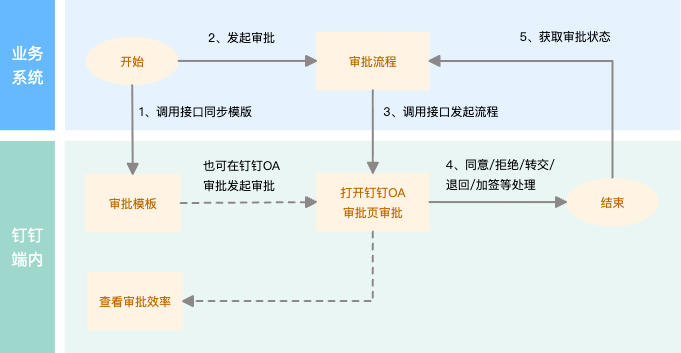
## 4. Result
### 1. Kick off a process from the business system to create an OA Approval process
The business system calls the DingTalk OA Approval API to kick off an Approval and automatically create a DingTalk OA Approval process:

### 2. Open the official OA Approval detail page from the DingTalk OA Approval list to approve
Tap an Approval form in the DingTalk OA Approval List to open the official detail page for processing:

### 3. Open the official OA Approval detail page from DingTalk To-Do to approve
Tap a To-Do task in the DingTalk To-Do Center to open the official detail page for processing:

## 5. Development flow
The API interaction flow between an Internal app and DingTalk OA Approval is shown below:

### Integration flow overview
This document walks through creating an Internal app and using the official OA Approval APIs — creating and updating official approval templates, kicking off, undoing, and commenting on Approval instances, accepting, declining, and transferring Approval tasks, uploading and downloading Approval Attachments, and subscribing to official OA Approval instance and Approval task callback events — to implement the scenario of kicking off from the business system and opening the official OA Approval detail page inside the DingTalk client for integration.
Prerequisite: Complete the **Create app** flow.
Step 1: Go to the app detail page and obtain the app's client ID and Client Secret.
Step 2: Apply for API permissions — apply for the "OA Approval" permissions.
Step 3: Obtain the app's Access credential by **getting the access token for an Internal app**. When calling the API, the access token authenticates the caller.
Step 4: Call the OA Approval APIs:
1. **Create an official OA Approval template:** An Admin can create one manually in the OA Admin Console, or the business system can call the new Server API — **Create or update an approval form template** — to obtain the template's unique code `processCode`. If you did not save the template code `processCode` returned by the API, sign in to the DingTalk Admin Console to view it.
The approval template code can be viewed in the template Settings of the Admin Console:

```json theme={"theme":{"light":"github-light","dark":"github-dark"}}
{
"name": "Integrate using DingTalk OA Approval processes and pages",
"description": "Kick off a process from the business system, call the official DingTalk OA Approval APIs to create a DingTalk OA Approval process, and open the DingTalk Approval detail page on the DingTalk side to handle the process.",
"templateConfig": {
"disableStopProcessButton": false,
"disableFormEdit": false,
"disableHomepage": false,
"hidden": false
},
"formComponents": [
{
"componentType": "TextField",
"props": {
"label": "Single-line input", // Component Title
"placeholder": "Please enter", // Input Tips
"componentId": "TextField_17EZKEGSOCTC0", // Component id, unique within the Form, no business semantics
"required": false, // Required; Optional by Default
"bizAlias": "staffId" // Component business identifier, unique within the Form; use either this or componentId
}
},
{
"componentType": "TextareaField",
"props": {
"label": "Multi-line input",
"placeholder": "Please enter Multi-line text Content; to insert a line break, use \r\n", // Input Tips
"componentId": "TextareaField_17EZKEGSOCTC0",
"required": false
}
},
{
"componentType": "NumberField",
"props": {
"label": "Number input",
"placeholder": "Please enter a Number",
"componentId": "NumberField_108PIFZM21F40",
"required": false,
"unit": "CNY", // Number unit
"defaultValue": "10" // Default
}
},
{
"componentType": "DDSelectField",
"props": {
"options": [ // Selectable options List
{
"value": "Option 1", // Option display name
"key": "option_0" // Unique key within the component; Optional — the system generates one by Default
},
{
"value": "Option 2",
"key": "option_1"
},
{
"value": "Option 3",
"key": "option_2"
},
{
"key": "other", // Special key for the Other option
"value": "Other"
}
],
"label": "Select",
"placeholder": "Please Select",
"componentId": "DDSelectField_14T8M4EKXAV40",
"required": false
}
},
{
"componentType": "DDMultiSelectField",
"props": {
"options": [
{
"value": "Option 1",
"key": "option_0"
},
{
"value": "Option 2",
"key": "option_1"
},
{
"value": "Option 3",
"key": "option_2"
},
{
"key": "other", // Special key for the Other option
"value": "Other"
}
],
"label": "Multiselect",
"placeholder": "Please Select",
"componentId": "DDMultiSelectField_1XJ7NG1GSD6O0",
"required": false
}
},
{
"componentType": "DDDateField",
"props": {
"unit": "hour", // Date format, Enum values (hour, day)
"format": "yyyy-MM-dd HH:mm", // Date format, Optional; hour maps to yyyy-MM-dd HH:mm, day maps to yyyy-MM-dd HH:mm
"bizAlias": "",
"label": "Date",
"placeholder": "Please Select",
"componentId": "DDDateField_SQL0DF3MS9C0",
"required": false,
"defaultValue": "2021-12-21 17:46" // Default
}
},
{
"componentType": "DDDateRangeField",
"props": {
"unit": "hour",
"format": "yyyy-MM-dd HH:mm",
"bizAlias": "",
"label": "[\"Start time\",\"End time\"]",
"placeholder": "Please Select",
"componentId": "DDDateRangeField_7MPG14N3OOO0",
"duration": true, // Whether to automatically Calculate the duration
"required": false
}
},
{
"componentType": "TextNote",
"props": {
"link": "https://www.dingtalk.io/", // Hyperlink
"notPrint": "0",
"bizAlias": "",
"componentId": "TextNote_13RP7230RAF40",
"content": "Description text" // Description text
}
},
{
"componentType": "PhoneField",
"props": {
"mode": "phone", // Enum values: phone_tel — mobile and landline; phone — mobile; tel — landline
"label": "Phone",
"placeholder": "Please enter",
"componentId": "PhoneField_Y0XWOX6ZP6O0",
"required": false
}
},
{
"componentType": "DDPhotoField",
"props": {
"label": "Image",
"componentId": "DDPhotoField_P50A0HMHB280",
"required": false
}
},
{
"componentType": "MoneyField",
"props": {
"upper": "0", // Whether the amount must be written in uppercase (0 = no, 1 = yes); uppercase by Default
"label": "Amount (CNY)",
"placeholder": "Please enter the amount",
"componentId": "MoneyField_L1PP26ZDV400",
"required": false
}
},
{
"componentType": "DDAttachment",
"props": {
"label": "Attachment",
"componentId": "DDAttachment_18U4QTOWLMPS0",
"required": false
}
},
{
"componentType": "InnerContactField",
"props": {
"label": "Contact",
"placeholder": "Please Select",
"componentId": "InnerContactField_162USP4V1BC00",
"choice": "1", // Enum values: 1 = Multiselect supported, 0 = Select only; Default 0
"required": false,
"bizAlias": ""
}
},
{
"componentType": "DepartmentField",
"props": {
"multiple": false, // Whether Multiselect is supported; true = Multiselect, false = Select
"label": "Department",
"placeholder": "Please Select",
"componentId": "DepartmentField_1GY5JSPOCY000",
"required": false
}
},
{
"componentType": "RelateField",
"props": {
"label": "Related Approval form",
"placeholder": "Please Select",
"componentId": "RelateField_5X1DL4KMKUW0",
"required": false,
"bizAlias": "",
"availableTemplates": [ // List of approval templates that can be related; empty means instances of all approval templates can be related
{
"name": "Official OA Approval - POP - 0328 - Date range 7", // Name of the Approval form that can be related
"processCode": "PROC-AF45DE4C-7520-4842-9128-EB7BD0A4EA85" // formCode of the Approval form that can be related
}
]
}
},
{
"componentType": "AddressField",
"props": {
"addressModel": "district", // Enum values: city = province/city, district = province/city/district, street = province/city/district/street
"bizAlias": "",
"label": "Province/City/District",
"componentId": "AddressField_1P9H21H8R2LC0",
"required": false
}
},
{
"componentType": "StarRatingField",
"props": {
"limit": 5, // Enum values: 5-point scale, 10-point scale
"label": "Rating",
"placeholder": "Please enter",
"componentId": "StarRatingField_10E5NHTA2W0G0",
"required": false,
"bizAlias": ""
}
},
{
"children": [ // List of child components inside the detail; child components follow each component's Standard Attributes
{
"componentType": "TextField",
"props": {
"label": "Single-line input",
"placeholder": "Please enter",
"componentId": "TextField_1UE1ZY1A28AO0",
"required": false
}
},
{
"componentType": "MoneyField",
"props": {
"payEnable": false,
"upper": "0",
"bizAlias": "",
"label": "Amount (CNY)",
"placeholder": "Please enter the amount",
"componentId": "MoneyField_1S85G4YLMM5C0",
"required": false
}
},
{
"componentType": "NumberField",
"props": {
"unit": "CNY",
"payEnable": false,
"bizAlias": "",
"label": "Number input",
"placeholder": "Please enter a Number",
"componentId": "NumberField_1XP6AWG50SE80",
"required": false
}
}
],
"componentType": "TableField",
"props": {
"tableViewMode": "table", // Detail entry mode; Enum values: list = List, table = Spreadsheet
"verticalPrint": true, // Detail Print orientation; true = vertical, false = horizontal
"statField": [ // Configure totals for Number and Amount components
{
"componentId": "MoneyField_1S85G4YLMM5C0",
"label": "Amount (CNY)"
},
{
"componentId": "NumberField_1XP6AWG50SE80",
"label": "Number input"
}
],
"bizAlias": "",
"label": "Spreadsheet",
"componentId": "TableField_1MLEPEAQSXHC0"
}
}
]
}
```
2. Once the approval template is created, users can view and edit the official OA Approval form template, view and search template Data, and export or delete template Data in the DingTalk OA Approval Admin Console.
3. **Kick off an official OA Approval instance:** Users can kick off an Approval manually via the official OA Approval App, or the business system can call the new Server API — **Kick off an approval instance** — with the template code `processCode` to kick off an Approval instance and obtain the Approval instance's `instanceId`.
```json theme={"theme":{"light":"github-light","dark":"github-dark"}}
{
"processCode": "PROC-C512D64A-60F6-4F83-B708-xxx",
"originatorUserId": "manager98xx",
"deptId": -1,
"microappAgentId": 348925476,
"formComponentValues": [
{
"name": "Date",
"value": "2021-08-17"
},
{
"name": "[\"Start time\",\"End time\"]",
"value": "[\"2019-02-19\",\"2019-02-25\"]"
},
{
"name": "ID Card",
"value": "xxxx"
},
{
"name": "Image",
"value": "[\"http://url1\",\"http://url2\",\"http://url3\"]"
},
{
"name": "Spreadsheet",
"value": "[[{\"name\":\"Single-line input\",\"value\":\"[Baidu](https://www.baidu.com/)\"},{\"name\":\"Number input\",\"value\":\"100\"}]]"
},
{
"name": "Amount (CNY)",
"value": "100"
},
{
"name": "Attachment",
"value": "[{\"spaceId\": \"163xxxx658\", \"fileName\": \"2644.JPG\", \"fileSize\": \"333\", \"fileType\": \"jpg\", \"fileId\": \"643xxxx140\"}]"
},
{
"name": "Province/City/District",
"value": "Beijing,Beijing,Hedong District"
},
{
"name": "Rating",
"value": "5"
},
{
"name": "Text Box",
"value": "Text Box example"
}
],
"approvers": [
{
"actionType": "NONE",
"userIds": [
"manager98xx"
]
},
{
"actionType": "OR",
"userIds": [
"manager98xx"
]
}
]
}
```
4. Once the Approval instance is kicked off, users can go to the DingTalk Approval Center to view the four Approval lists (Pending, Handled, Kicked off, Received), search Approval instance Data, perform Approval Actions, and more.
5. **Add an Approval comment Attachment:** To add an Approval comment Attachment, first Upload the File to the Approval Drive Space, then call the new Server API — **Add an approval comment**. For a detailed guide, see: **Comment on and undo an Approval process**.
1. Call the new Server API — **Get Approval Drive Space info** — to obtain Upload Permissions for the Drive Space and retrieve the Approval Drive Space's spaceId.
2. Call the Client-side JSAPI — **Upload an attachment to Drive / Select a file from Drive** — to obtain the File's basic info. This flow uses **JSAPI Explorer** for the demonstration.
3. Once you have the Approval Drive Space's spaceId, use the Approval instance's `instanceId` to call the new Server API — **Add an approval comment** — to add a comment to the Approval form.
```json theme={"theme":{"light":"github-light","dark":"github-dark"}}
{
"commentUserId": "manager98xx",
"processInstanceId": "DQ7-X2EESQunrozGEe_xxx",
"text": "Test adding an Approval comment",
"file": {
"attachments": [
{
"spaceId": "817447xxx",
"fileSize": "173404",
"fileId": "6660150xxx",
"fileName": "Comment attachment.jpg",
"fileType": "jpg"
}
],
"photos": [
"https://help-static-aliyun-doc.aliyuncs.com/assets/img/zh-CN/9227796361/p352432.png"
]
}
}
```
6. **Preview and Download an Approval Attachment:** To preview or download an Attachment, call the Server API — **Authorize Approval Drive file Download** — and the **Authorize Approval Attachment preview** API to authorize the Approval Drive File, then call the Server API — **Download Attachment** — to obtain the file's `downloadUri` for Download. For a detailed guide, see: **Action flow for Approval Attachments**.
7. **Accept or decline an Approval task:** approvers can accept or decline an Approval task manually via the DingTalk Approval Center or the DingTalk To-Do Center, or the business system can call the new Server API — **Get a single approval instance's details** — with the Approval instance's `instanceId` to retrieve the Approval instance's details and the `taskId` of each Approval task node.
8. With the Approval instance's `instanceId` and the corresponding task node `taskId`, call the new Server API — **Accept or decline an approval task** — to act on the Approval task. Once every Approval node accepts, the Approval form is approved.
```json theme={"theme":{"light":"github-light","dark":"github-dark"}}
{
"actionerUserId": "manager98xx",
"processInstanceId": "fsTunaLIRyeRMrddA1YwZQ0964170020xxxx",
"remark": "Accept",
"taskId": 8333450,
"result": "agree",
"file": {
"attachments": [
{
"space_id": "817447xxxx",
"file_size": "173404",
"file_id": "6660150xxxx",
"file_name": "Comment attachment.jpg",
"file_type": "jpg"
}
],
"photos": [
"https://help-static-aliyun-doc.aliyuncs.com/assets/img/zh-CN/9227796361/p352432.png"
]
}
}
```
9. Undo an official OA Approval instance: after reviewing an Approval, if the submitted Approval form is wrong and needs to be undone, use the Approval instance's `instanceId` to call the new Server API — **Undo an approval instance** — to Undo the Approval form.
```json theme={"theme":{"light":"github-light","dark":"github-dark"}}
{
"isSystem": true,
"processInstanceId": "oKPAxjtgSP-AqeVTk-xxxx",
"operatingUserId": "manager98xx",
"remark": "Undo the Approval instance"
}
```
10. When the status of an Approval form changes, OA Approval can push callback events such as **Approval task status change** and **Approval instance status change** to the business system, allowing enterprise apps to integrate more deeply with the DingTalk platform for information sharing and business coordination. For a detailed guide, see: **event subscription operations guide**.
## 6. APIs used
### 1. Approval form
| API | Description | New standard (new Server API) |
| ---------------------------------------------------------- | ------------------------------------------------------------------------------------------------------------------------------------------- | -------------------------------------------------------------- |
| Create or update an approval template | Create or update an OA Approval process form template; you can specify the list of form components and generate a Default Approval process. | **Create or update an approval form template** |
| Get a form schema | Get the schema info of the corresponding form by processCode. | **Get a form schema** |
| Get the node info of an Approval form process | Get the node info of an Approval form process. | **Get the node info of an Approval form process** |
| Get the list of approval forms visible to a specified user | Get the paginated list of approval forms visible to a User by their user ID. | **Get the list of approval forms visible to a specified user** |
| Get all manageable forms for the current organization | Get all manageable approval forms for the current organization. | **Get all manageable forms for the current organization** |
### 2. Approval instance
| API | Description | New standard (new Server API) |
| ---------------------------------------- | ---------------------------------------------------------------------------------------------- | -------------------------------------------- |
| Kick off an approval instance | Kick off an OA Approval instance. | **Kick off an approval instance** |
| Get a single approval instance's details | Get the details of an Approval instance by its ID. | **Get a single approval instance's details** |
| Undo an approval instance | Undo a kicked-off Approval instance. | **Undo an approval instance** |
| Add an approval comment | Add a comment to an Approval instance. | **Add an approval comment** |
| Get the list of approval instance IDs | Get the list of approval instance IDs for the related Departments within the permission scope. | **Get the list of approval instance IDs** |
### 3. Approval Drive Space and Attachments
| API | Description | New standard (new Server API) |
| -------------------------------------- | -------------------------------------------------------------------------------------------------------- | ------------------------------------------ |
| Get Approval Drive Space info | Get the Approval Drive Space's ID and grant the current User permission to Upload Attachments. | **Get Approval Drive Space info** |
| Authorize Approval Attachment preview | Authorize the preview of an Approval Attachment. | **Authorize Approval Attachment preview** |
| Authorize Approval Drive file Download | Grant Approval Drive Space Download Permissions for a Drive File by Drive Space spaceId and file fileId. | **Authorize Approval Drive file Download** |
| Download Attachment | Get Approval file Download Authorization and generate a Download Link. | **Download Attachment** |
### 4. Approval task
| API | Description | New standard (new Server API) |
| ----------------------------------- | -------------------------------------------------------------------------------------------------------- | --------------------------------------- |
| Accept or decline an approval task | Handle a single Approval task by the specified template ID, instance ID, Approval node ID, and approver. | **Accept or decline an approval task** |
| Get a user's pending approval count | Get the count of pending Approvals for a User by user ID. | **Get a user's pending approval count** |
| Transfer an OA Approval task | Transfer an OA Approval task. | **Transfer an OA Approval task** |
### 5. Approval callback events
#### 5.1 Callback events for Internal app types
| callback event | Description | New standard (new Server API) |
| ----------------------------------------------------- | ----------------------------------------------------------------------------------------------------------------------------------------------------------- | --------------------------------------------------------- |
| Approval instance started, ended, terminated, deleted | When an Approval instance is started, ended, terminated, or deleted, the DingTalk server pushes an Approval instance event to the developer's callback URL. | **Approval instance started, ended, terminated, deleted** |
| Approval task started, ended, canceled | Content pushed to subscribers when an Approval task is started, ended, or canceled. | **Approval task started, ended, canceled** |
#### 5.2 Callback events for Third-party enterprise apps
| callback event | Description | New standard (new Server API) |
| ------------------------------------------- | --------------------------------------------------------------------------------------------------------------------------------------------------------------------------------------------------------------------------------------------------------------------------------------------------------------------------------------------------------------------------------------------------------------------------------------------------------- | ----------------------------------------------- |
| Approval instance status change (broadcast) | Approval broadcast event scenario: an Approval form template that Belongs to a certain ISV or the official OA Approval app may also need to be authorized to another ISV for system integration. Once the organization's Authorization is obtained via the "get Approval instance data" JSAPI, whenever the corresponding instance or task status of an authorized approval template changes, a callback is pushed to every ISV that has been authorized. | **Approval instance status change (broadcast)** |
| Approval task status change (broadcast) | Approval broadcast event scenario: an Approval form template that Belongs to a certain ISV or the official OA Approval app may also need to be authorized to another ISV for system integration. Once the organization's Authorization is obtained via the "get Approval instance data" JSAPI, whenever the corresponding instance or task status of an authorized approval template changes, a callback is pushed to every ISV that has been authorized. | **Approval task status change (broadcast)** |
| Approval instance status change (targeted) | Approval targeted event scenario: for an official OA Approval created by an ISV via an Open API, or an "ISV suite" template created by a User in the OA Admin Console, the Approval template Belongs to the ISV. As a result, when the corresponding instance or task status is changed by a User on the DingTalk side or by a third party via API, the callback is pushed in a targeted way to the ISV app the template Belongs to. | **Approval instance status change (targeted)** |
| Approval task status change (targeted) | Approval targeted event scenario: for an official OA Approval created by an ISV via an Open API, or an "ISV suite" template created by a User in the OA Admin Console, the Approval template Belongs to the ISV. As a result, when the corresponding instance or task status is changed by a User on the DingTalk side or by a third party via API, the callback is pushed in a targeted way to the ISV app the template Belongs to. | **Approval task status change (targeted)** |
## 7. Related documents
Overview of the four solutions for integrating enterprise business systems with DingTalk OA Approval
The business system kicks off the process; its detail page opens inside the DingTalk client for Approval