> ## Documentation Index
> Fetch the complete documentation index at: https://help.dingtalk.io/llms.txt
> Use this file to discover all available pages before exploring further.
# Third-party process and page integration
> Configure third-party process and page integration in DingTalk OA Approval to connect processes and pages from external business systems, enabling data exchange, process sharing, and a unified interface.
## 1. Feature overview
As enterprise digitalization deepens, more organizations need to integrate their OA systems with third-party business systems such as ERP, CRM, and finance systems. **Third-party process and page integration** enables data exchange, process sharing, and a unified operation interface, improving overall office efficiency and management collaboration. This guide walks developers and system administrators through configuring **third-party process and page integration** on the OA platform, so you can quickly implement system integration.
## 2. Applicable scenarios
Initiate a process from a business system and call DingTalk's native OA Approval APIs to create a DingTalk OA Approval process. Then, open the business system's approval detail page inside DingTalk to process the approval.
## 3. Operation flow
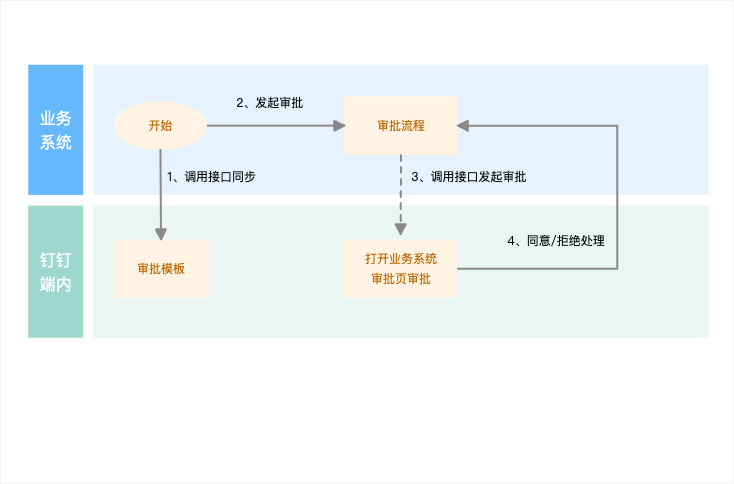
The end-to-end interaction between the business system and DingTalk is shown below:
## 4. Result preview
### 1. Open the business system's approval detail page from the DingTalk OA Approval list
Take a business trip request as an example. From the DingTalk OA Approval list, tap the approval form to open the business system's detail page directly for processing:

### 2. Open the business system's approval detail page from DingTalk To-Do
In DingTalk To-Do Center, tap a to-do task to open the business system's detail page for processing:

## 5. Development flow
The following example uses an Internal app developed by an organization to implement this integration. The business system initiates the approval, and its detail page opens inside DingTalk for processing. The implementation flow is shown below. **(Note: in this scenario, approval tasks are synchronized in step 5.)**

### Integration flow overview
This document walks through creating an Internal app and using APIs provided by the OA Approval Process Center to create, update, and delete third-party approval templates; create and update approval instances; create, update, and query approval to-do tasks; and clean up OA Approval data. It shows how the business system initiates the approval and how the business system's detail page opens inside DingTalk for this integration scenario.
Prerequisite: complete the **Create app** flow.
Step 1: Go to the app details page and obtain the Client ID and Client Secret.
Step 2: Apply for the API permission, specifically the "OA Approval" permission.
Step 3: Obtain the app's access credential by **retrieving the access token for the Internal app**. The access token is used to authenticate the caller when invoking the API.
Step 4: Call the OA Approval-related APIs:
1. **Sync approval template data to DingTalk:** Call the new Server API — **Create or update approval template** — to obtain the unique template code `processCode`.
Note: In this scenario, you do not need to configure the `processFeatureConfig` Process Center integration settings. By default, approvals are handled by opening the business system's detail page.
```json theme={"theme":{"light":"github-light","dark":"github-dark"}}
{
"name": "Integrate DingTalk OA using third-party process and page",
"description": "DingTalk OA Approval supports pushing approval tasks from external systems (self-developed or third-party systems purchased by the organization) to the DingTalk Approval app, so users can view and process all approvals in one place for a unified approval experience.",
"formComponents": [
{
"componentType": "TextField",
"props": {
"componentId": "TextField-1",
"label": "Single-line input",
"required": true,
"bizAlias": "TextField-bizAlias",
"disabled": false
}
},
{
"componentType": "TextareaField",
"props": {
"placeholder": "Please enter",
"label": "Multi-line input"
}
},
{
"componentType": "NumberField",
"props": {
"placeholder": "Please enter a number",
"label": "Number input",
"id": "NumberField-1"
}
},
{
"componentType": "DDSelectField",
"props": {
"options": [ // List of available options
{
"value": "Option 1", // Display name of the option
"key": "option_0" // Unique key within the component. Optional; generated by the system by default
},
{
"value": "Option 2",
"key": "option_1"
},
{
"value": "Option 3",
"key": "option_2"
},
{
"key": "other", // Special key for the "Other" option
"value": "Other"
}
],
"label": "Single-select",
"placeholder": "Please select",
"componentId": "DDSelectField_1",
"required": false
}
},
{
"componentType": "DDMultiSelectField",
"props": {
"options": [
{
"value": "Option 1",
"key": "option_0"
},
{
"value": "Option 2",
"key": "option_1"
},
{
"value": "Option 3",
"key": "option_2"
},
{
"key": "other", // Special key for the "Other" option
"value": "Other"
}
],
"label": "Multiselect",
"placeholder": "Please select",
"componentId": "DDMultiSelectField_1",
"required": false
}
},
{
"componentType": "DDDateField",
"props": {
"unit": "小时", // Date unit. Enum values: 小时 (Hour), 天 (Day)
"format": "yyyy-MM-dd HH:mm", // Date format. Optional. Hour: yyyy-MM-dd HH:mm; Day: yyyy-MM-dd
"bizAlias": "",
"label": "Date",
"placeholder": "Please select",
"componentId": "DDDateField_1",
"required": false,
"defaultValue": "2021-12-21 17:46" // Default value
}
},
{
"componentType": "DDDateRangeField",
"props": {
"unit": "天",
"format": "yyyy-MM-dd",
"bizAlias": "",
"label": "[\"Start time\",\"End time\"]",
"placeholder": "Please select",
"componentId": "DDDateRangeField_1",
"duration": true, // Whether to automatically calculate the duration
"durationLabel": "Duration", // Display text for the calculated duration
"required": false
}
},
{
"componentType": "TextNote",
"props": {
"link": "https://www.dingtalk.io/", // Hyperlink
"notPrint": "0",
"bizAlias": "",
"componentId": "TextNote_1",
"content": "This is an explanatory note" // Explanatory text
}
},
{
"componentType": "DDPhotoField",
"props": {
"label": "Image",
"componentId": "DDPhotoField_1",
"required": false
}
},
{
"componentType": "MoneyField",
"props": {
"upper": "0", // Whether to display the amount in uppercase (0: no, 1: yes). Uppercase is enabled by default
"label": "Amount (CNY)",
"placeholder": "Please enter an amount",
"componentId": "MoneyField_1",
"required": false
}
},
{
"children": [
{
"componentType": "TextField",
"props": {
"label": "Single-line input",
"placeholder": "Please enter",
"componentId": "TextField_1UE1ZY1A28AO0",
"required": false
}
},
{
"componentType": "MoneyField",
"props": {
"upper": "0",
"bizAlias": "",
"label": "Amount (CNY)",
"placeholder": "Please enter an amount",
"componentId": "MoneyField_1S85G0",
"required": false
}
},
{
"componentType": "NumberField",
"props": {
"unit": "CNY",
"bizAlias": "",
"label": "Number input",
"placeholder": "Please enter a number",
"componentId": "NumberField_1XP6A",
"required": false
}
}
],
"componentType": "TableField",
"props": {
"tableViewMode": "table",
"verticalPrint": true,
"statField": [
{
"componentId": "MoneyField_1S85G0",
"label": "Amount (CNY)"
},
{
"componentId": "NumberField_1XP6A",
"label": "Number input"
}
],
"bizAlias": "table",
"label": "Spreadsheet",
"componentId": "TableField_1MLEPEA"
}
},
{
"componentType": "DDAttachment",
"props": {
"label": "Attachment",
"componentId": "DDAttachment_1",
"required": false
}
},
{
"componentType": "InnerContactField",
"props": {
"label": "Contact",
"placeholder": "Please select",
"componentId": "InnerContactField_1",
"choice": "1", // Enum values: 1 = multiselect supported, 0 = single-select. Default: 0
"required": false,
"bizAlias": ""
}
},
{
"componentType": "DepartmentField",
"props": {
"multiple": false, // Whether multiselect is supported. true: multiselect, false: single-select
"label": "Department",
"placeholder": "Please select",
"componentId": "DepartmentField_1",
"required": false
}
},
{
"componentType": "RelateField",
"props": {
"label": "Associated approval form",
"placeholder": "Please select",
"componentId": "RelateField_1",
"required": false,
"bizAlias": "",
"availableTemplates": [ // List of approval templates that can be associated. If empty, instances of all approval templates can be associated
]
}
},
{
"componentType": "AddressField",
"props": {
"addressModel": "district", // Enum values: city (province and city), district (province, city, and district), street (province, city, district, and street)
"bizAlias": "",
"label": "Province/City/District",
"componentId": "AddressField_1",
"required": false
}
},
{
"componentType": "StarRatingField",
"props": {
"limit": 5, // Enum values: 5-point scale, 10-point scale
"label": "Rating",
"placeholder": "Please enter",
"componentId": "StarRatingField_1",
"required": false,
"bizAlias": ""
}
}
],
"templateConfig": {
"hiddenProcess": true,
"createInstanceMobileUrl": "https://www.dingtalk.io",
"createInstancePcUrl": "https://www.dingtalk.io",
"templateEditUrl": "https://www.dingtalk.io",
"disableSendCard": false
}
}
```
2. If you did not save the `processCode`, call the **Get template code** API to retrieve it.
3. After the approval template is created, go to the DingTalk OA Approval Admin Console to view third-party approval form templates, view or search template data, and export or delete template data.
4. Sync approval instance data to DingTalk: using the template code `processCode`, call the new Server API — **Create instance** — to initiate an approval instance and obtain the approval instance `processInstanceId`.
```json theme={"theme":{"light":"github-light","dark":"github-dark"}}
{
"formComponentValueList": [
{
"name": "Single-line input",
"value": "DingTalk"
},
{
"name": "Multi-line input",
"value": "Please enter multi-line text. Use a line break when needed.\r\nPlease enter multi-line text. Use a line break when needed.\r\n"
},
{
"name": "Number input",
"value": "100"
},
{
"name": "Single-select",
"value": "Option 1"
},
{
"name": "Multiselect",
"value": "[\"Option 1\",\"Option 2\"]"
},
{
"name": "Date",
"value": "2021-08-17 11:11"
},
{
"name": "[\"Start time\",\"End time\"]",
"value": "[\"2019-02-19 11:11\",\"2019-02-25 11:11\"]"
},
{
"name": "Image",
"value": "[\"https://img.alicdn.com/imgextra/i3/O1CN01TDKbCW28HuskT5vnR_!!6000000007908-2-tps-2724-650.png\",\"https://img.alicdn.com/imgextra/i3/O1CN01TDKbCW28HuskT5vnR_!!6000000007908-2-tps-2724-650.png\",\"http://url3\"]"
},
{
"name": "Spreadsheet",
"value": "[{\"name\":\"Single-line input\",\"value\":\"[DingTalk\"},{\"name\":\"Number input\",\"value\":\"100\"}]]"
},
{
"name": "Amount (CNY)",
"value": "100"
},
{
"name": "Attachment",
"value": "[{\"spaceId\": \"163xxxx658\", \"fileName\": \"2644.JPG\", \"fileSize\": \"333\", \"fileType\": \"jpg\", \"fileId\": \"643xxxx140\"}]"
},
{
"name": "Contact",
"value": "[\"0135185610551036178639\"]"
},
{
"name": "Associated approval form",
"value": "[\"9XCLWKxNTom6W_u88iKbug09641720074458\", \"9XCLWKxNTom6W_u88iKbug09641720074458\"]"
},
{
"name": "Phone",
"value": "18015586666"
},
{
"name": "Province/City/District",
"value": "Beijing,Beijing,Hedong District"
},
{
"name": "Rating",
"value": "5"
},
{
"name": "Department",
"value": "714738614"
}
],
"title": "Integrate DingTalk OA using third-party process and page",
"processCode": "PROC-39B555F8-FFC6-4CCC-AC5F-xxx",
"originatorUserId": "manager9814",
"url": "http://www.dingtalk.io",
"notifiers": [
{
"userid": "manager9814",
"position": "start"
}
],
"bizData": "{\"apiKey\":\"apiKey\",\"appUuid\":\"appUuid\",\"version\":\"1\"}"
}
```
5. After the approval instance is created, go to the DingTalk Approval Center to view the four approval lists (Pending, Processed, Initiated, Received), search approval instance data, and perform approval actions.
6. Sync approval task data to DingTalk: using the approval instance `processInstanceId` and the `tasks` to-do list, call the **Create Process Center pending task** API to sync approval node information from the third-party system to DingTalk OA Approval, obtain the `taskId` of each to-do item, and generate the corresponding DingTalk to-do tasks. Note: In this scenario, synced approval tasks are handled by opening the business system's detail page.
```json theme={"theme":{"light":"github-light","dark":"github-dark"}}
{
"processInstanceId": "zG1X1zwFTEiwzI0JB5w38A0964172381_xxxx",
"activityId": "activityId_xxx",
"tasks": [
{
"userId": "manager9814",
"url": "https://www.dingtalk.io"
}
]
}
```
7. After the pending task is created, call the **Query OA approval tasks integrated via Process Center** API to query the user's running approval tasks.
8. Sync approval task status to DingTalk: using the approval instance `processInstanceId` and the approval to-do `taskId`, call the **Update Process Center task status** API to sync status updates for your own approval to-dos. In scenarios such as parallel approval (OR-sign), call the **Batch cancel OA Approval pending tasks** API to set all running to-do items under an approval instance to CANCELED in bulk.
9. Sync approval instance status to DingTalk: using the approval instance `processInstanceId`, instance `status`, and instance `result`, call the **Update instance status** or **Batch update instance status** API to update the instance status.
10. Finally, to clean up approval template data, call the **Delete template** API to delete the approval template created for the organization. Instances and to-do tasks created under that template are deleted as well.
## 6. APIs used
### 1. Approval form
| API | Description | New specification (new Server API) |
| ---------------------------------- | --------------------------------------------------------------------------------------------------------------------- | -------------------------------------- |
| Create or update approval template | Creates or updates an approval template. | **Create or update approval template** |
| Get template code | Queries the `process_code` by template name. | **Get template code** |
| Delete template | Deletes an approval template created for the organization, along with all instances and to-do tasks created under it. | **Delete template** |
### 2. Approval instance
| API | Description | New specification (new Server API) |
| ---------------------------- | ---------------------------------------------------- | ---------------------------------- |
| Create instance | Creates an approval instance without a process flow. | **Create instance** |
| Update instance status | Updates the instance status. | **Update instance status** |
| Batch update instance status | Updates the status of instances in bulk. | **Batch update instance status** |
### 3. Process Center tasks
| API | Description | New specification (new Server API) |
| ----------------------------------------------------- | --------------------------------------------- | --------------------------------------------------------- |
| Create Process Center pending task | Creates an OA Approval to-do task. | **Create Process Center pending task** |
| Query OA approval tasks integrated via Process Center | Queries the user's running approval tasks. | **Query OA approval tasks integrated via Process Center** |
| Update Process Center task status | Updates the status of a to-do task. | **Update Process Center task status** |
| Batch cancel Process Center pending tasks | Cancels pending Process Center tasks in bulk. | **Batch cancel Process Center pending tasks** |
## 7. Related documents
Overview of the four solutions for integrating enterprise business systems with DingTalk OA Approval
The business system initiates the approval, and the official OA Approval detail page opens inside DingTalk for processing