> ## Documentation Index
> Fetch the complete documentation index at: https://help.dingtalk.io/llms.txt
> Use this file to discover all available pages before exploring further.

# Operator Manual

> DingTalk OA Approval Operator Manual: role descriptions and core actions for approvers, handlers, and CC recipients, including how to receive and process To-Do forms, perform Approval actions, and set Approval delegates.

## 1. Role descriptions

<Note>
  In DingTalk OA Approval, operators in the Approval process include approvers, handlers, and CC recipients.

  Approver permissions:

  Receive Approval forms pending Approval.

  Perform actions such as Accept, Decline, transfer, return, sign request, and Comments.

  Download Approval form details within their management scope.

  Set Approval delegates.

  Handler permissions:

  Receive Approval forms pending handling.

  Perform actions such as Submit, transfer, return, sign request, and Comments.

  Download Approval form details within their management scope.

  Set Approval delegates.

  CC recipient permissions:

  Receive CC'd Approval forms.

  Perform Comments actions.

  Download Approval form details within their management scope.

  **Note**: The Approval process is configured by the organization's Approval Admin.
</Note>

## 2. Core actions

### 1. Receiving pending forms

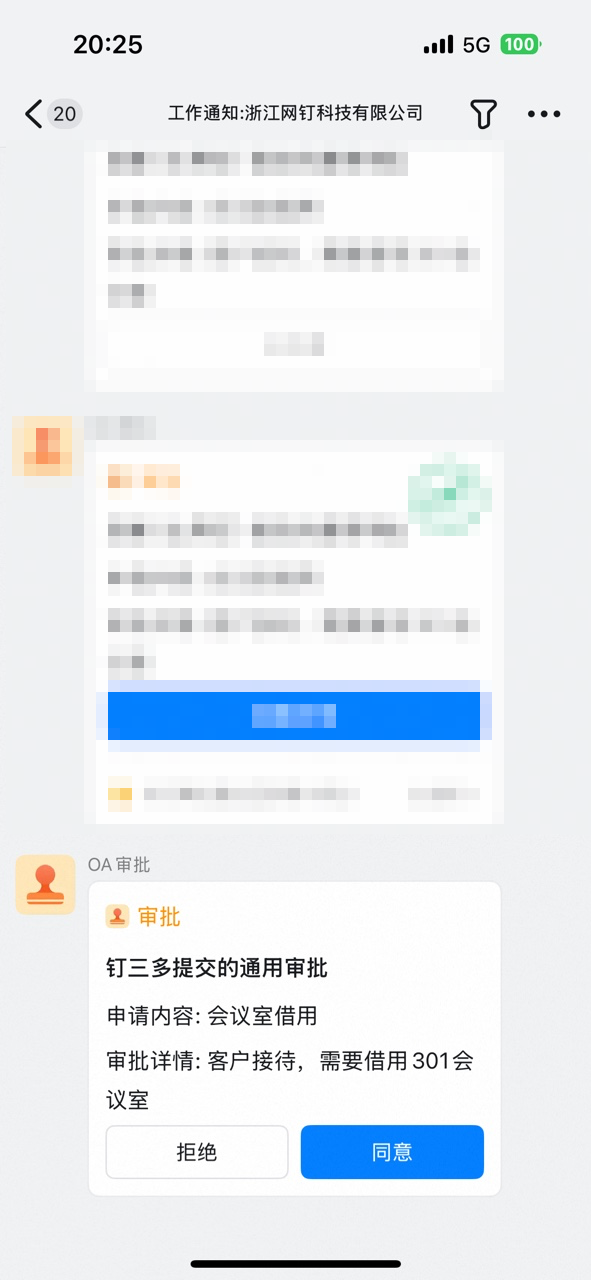
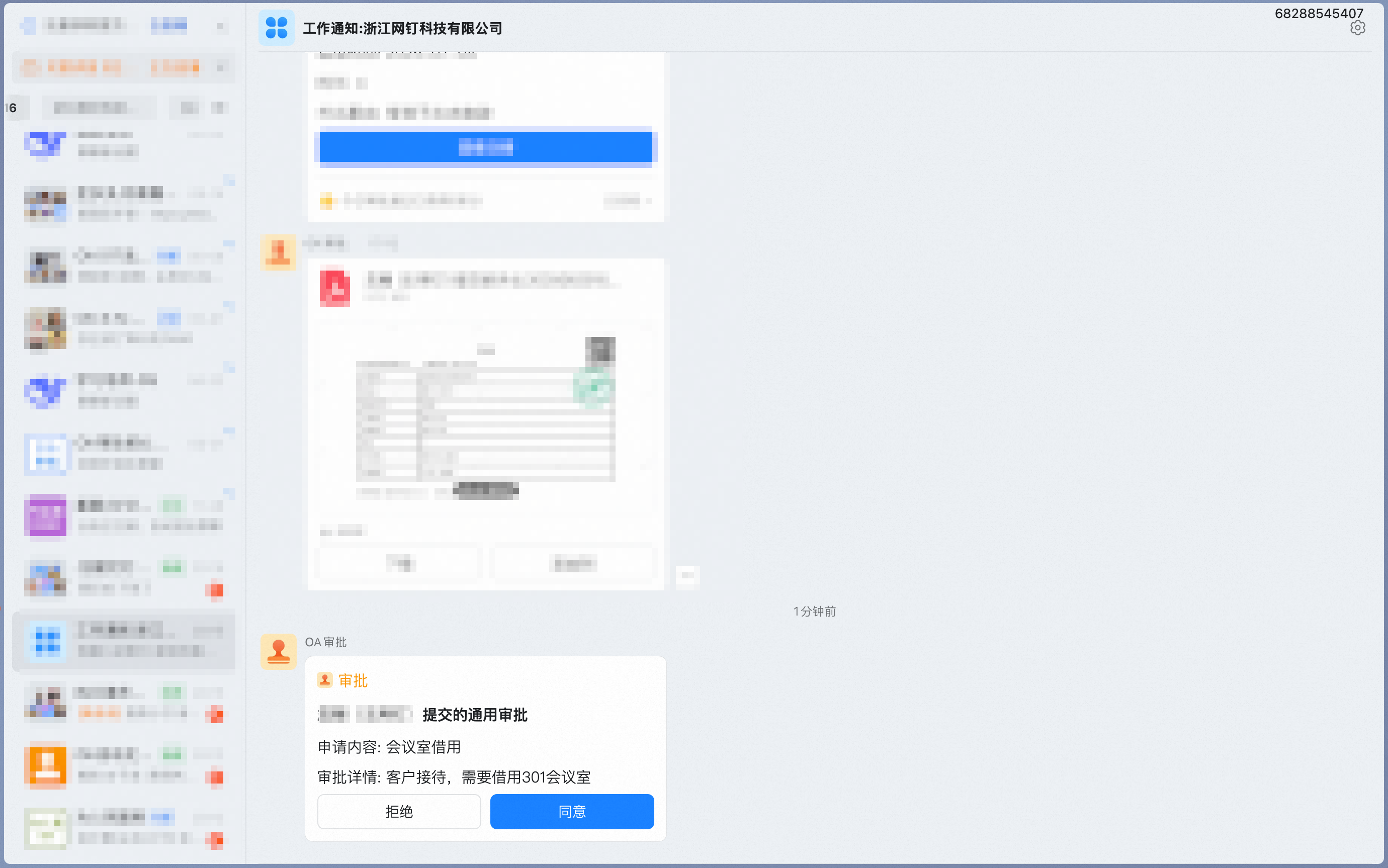
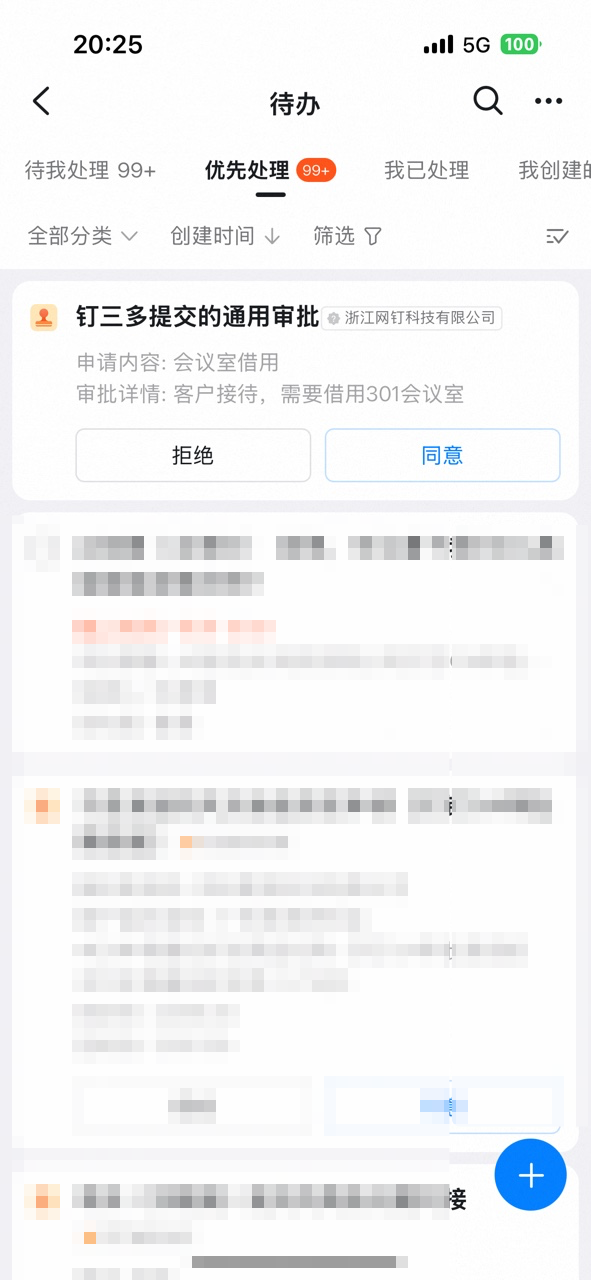
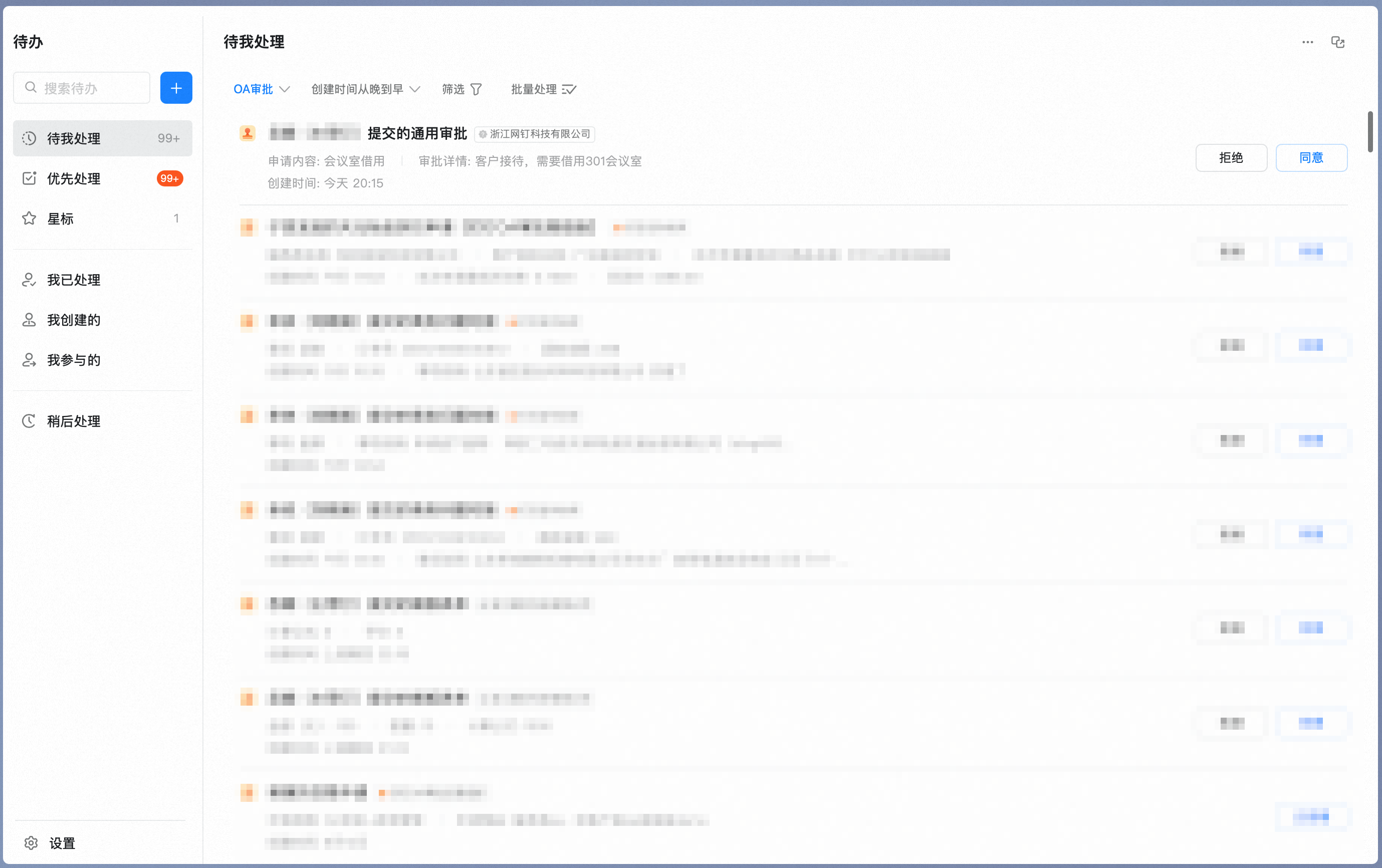
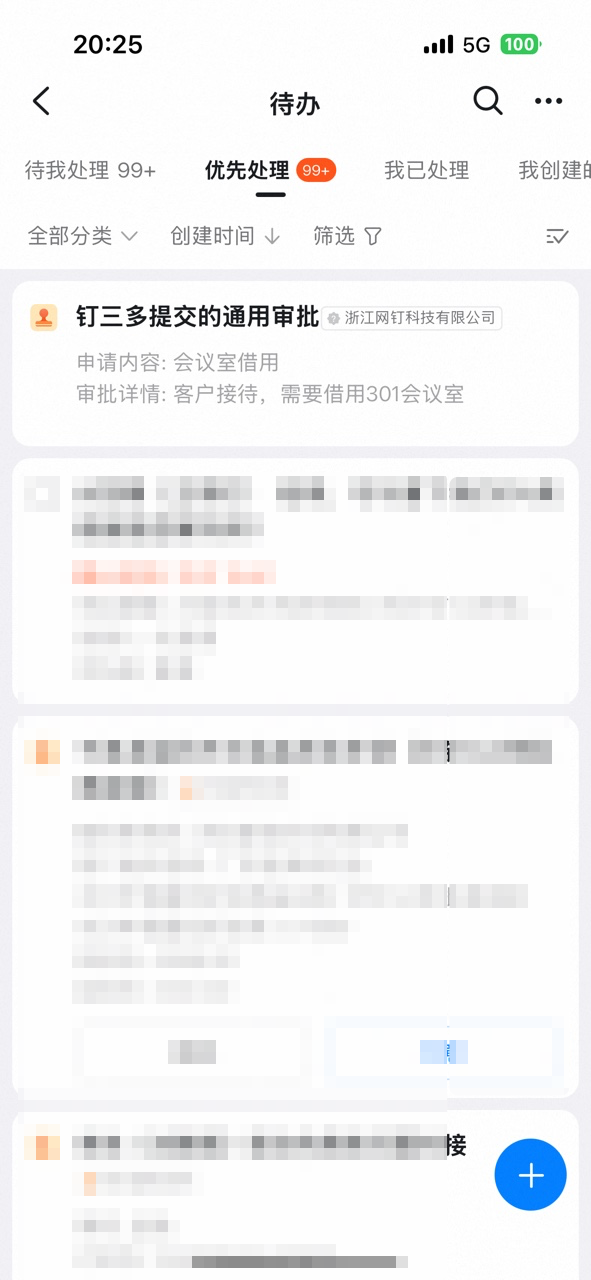
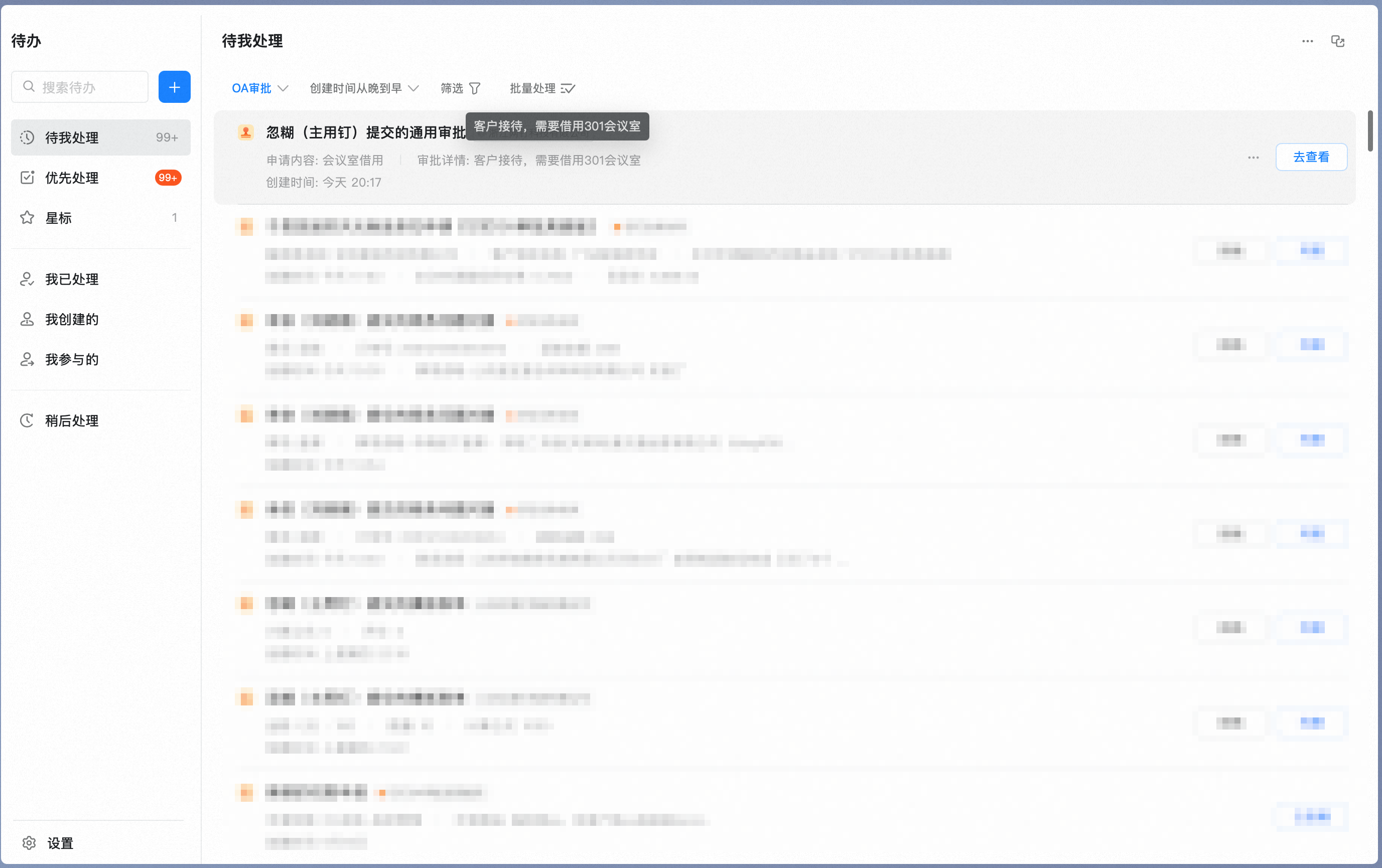
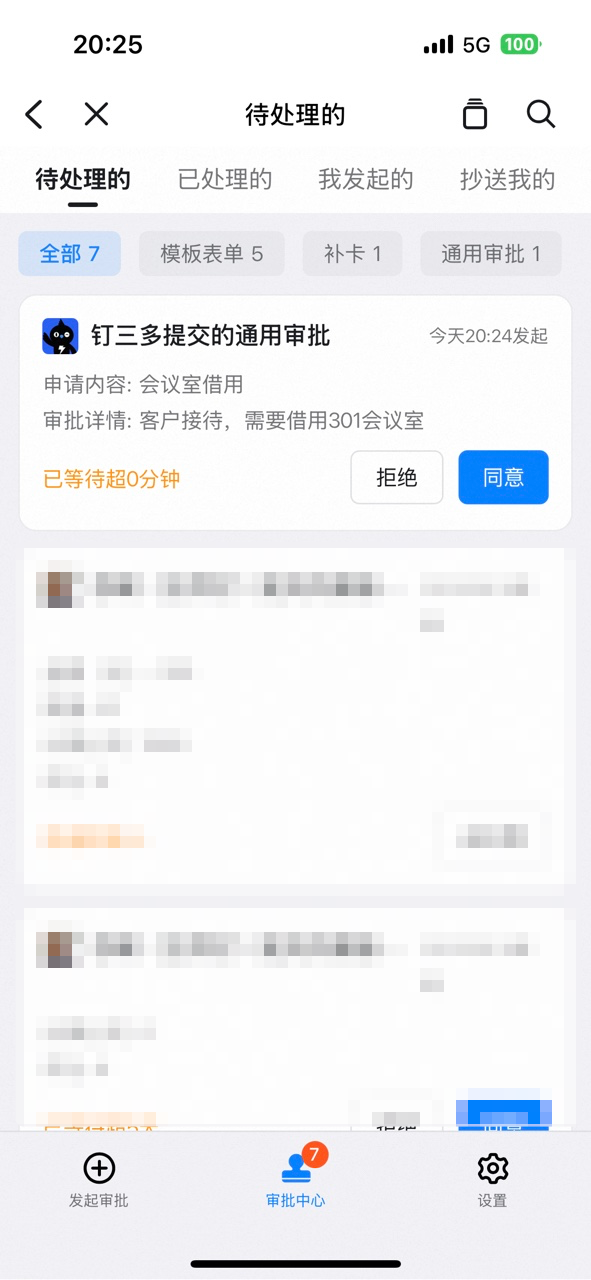
* Approver: Receives pending Approval forms in the Approval Center, Work Notifications, and To-Do.

* Handler: Receives pending Approval forms in the Approval Center, Work Notifications, and To-Do.

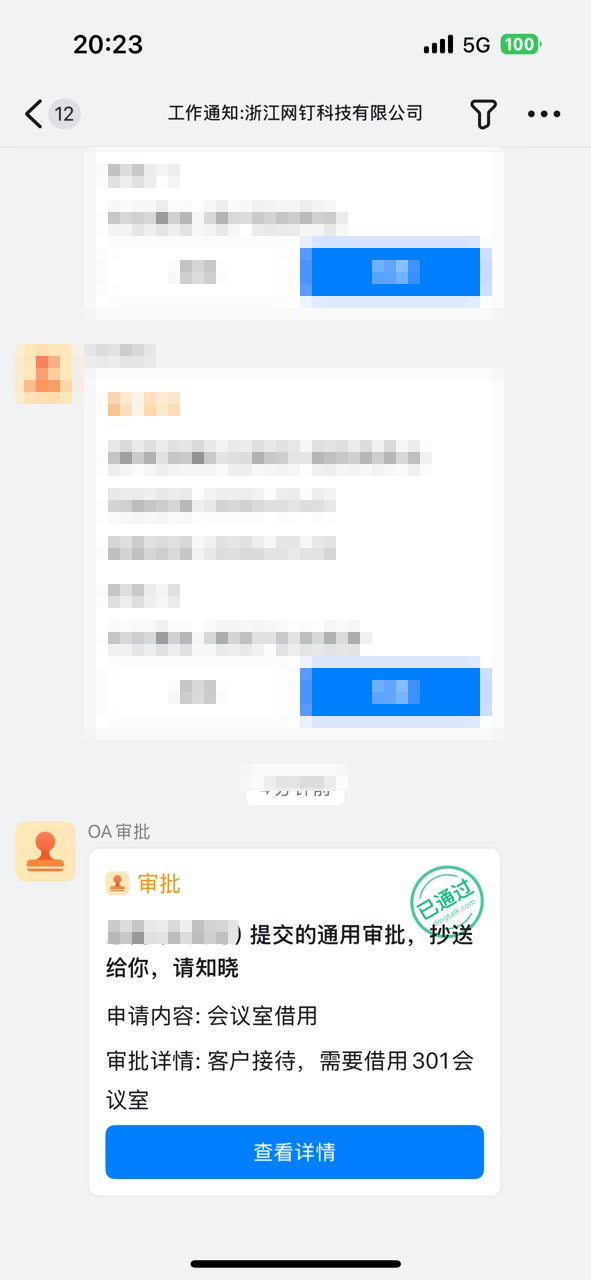
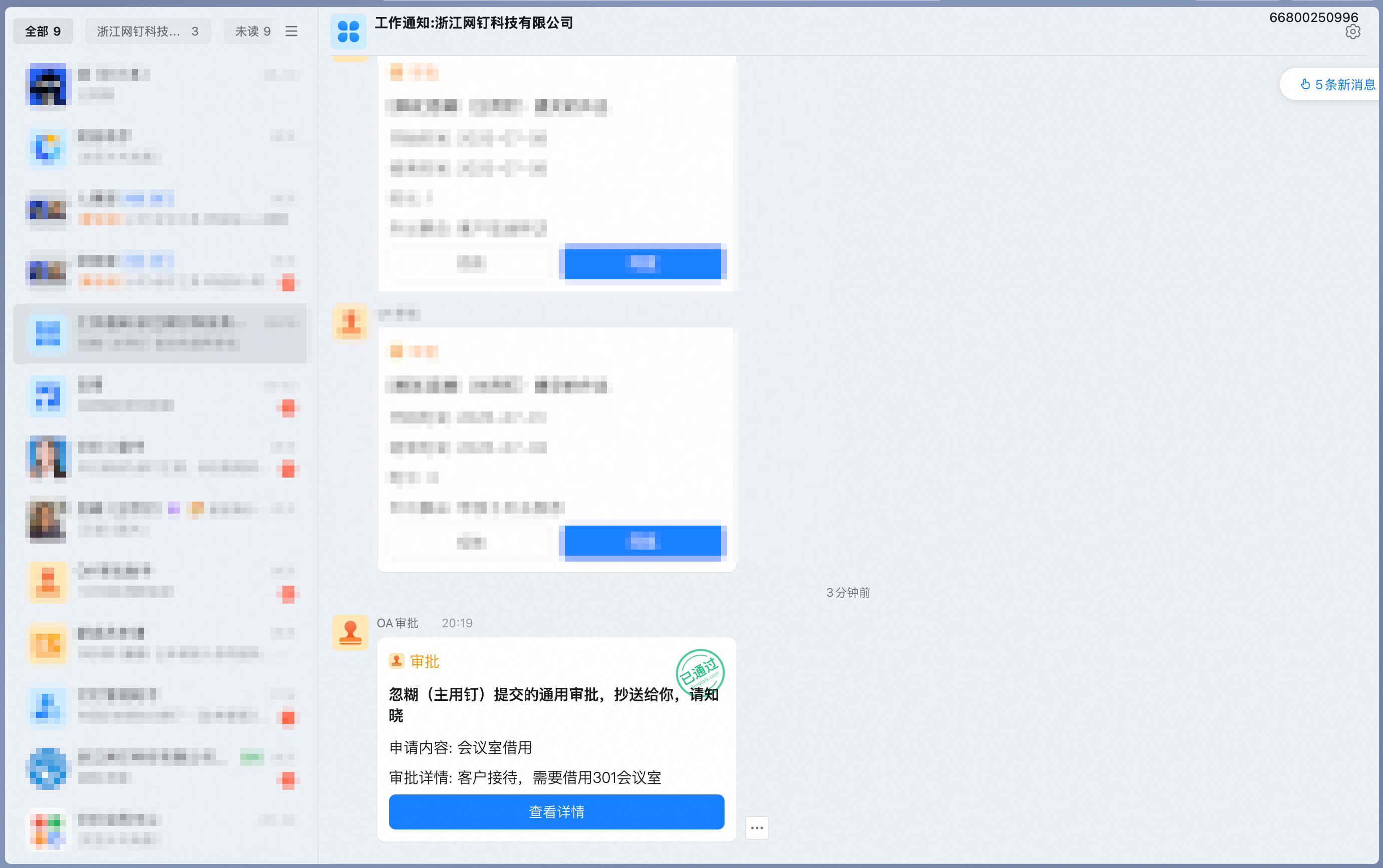
* CC recipient: Receives CC'd Approval forms in the Approval Center and Work Notifications.

<Steps>
  <Step title="Approver - Approval Center">
    <div className="flex gap-4">
      <div className="flex-1">
        <p className="text-center text-sm font-semibold mb-2">Operator View</p>

        <Frame>
          ![Approver view in the Approval Center](https://alidocs.oss-cn-zhangjiakou.aliyuncs.com/res/1X3lE5j84PMMXlJb/img/7d2788bf-a6c4-4a50-8bfa-33d1cc69600c.png)
        </Frame>
      </div>

      <div className="flex-1">
        <p className="text-center text-sm font-semibold mb-2">Mobile</p>

        <Frame>
          ![Approval Center on mobile](https://alidocs.oss-cn-zhangjiakou.aliyuncs.com/res/1X3lE5j84PMMXlJb/img/6729a486-176c-4b40-9738-f914cd1a0b39.png)
        </Frame>
      </div>

      <div className="flex-1">
        <p className="text-center text-sm font-semibold mb-2">Desktop</p>

        <Frame>
          ![Approval Center on desktop](https://alidocs.oss-cn-zhangjiakou.aliyuncs.com/res/1X3lE5j84PMMXlJb/img/aae4dc5e-4fbf-4a1b-9382-9208be9b6061.png)
        </Frame>
      </div>
    </div>
  </Step>

  <Step title="Approver - Work Notifications">
    <div className="flex gap-4">
      <div className="flex-1">
        <p className="text-center text-sm font-semibold mb-2">Operator View</p>

        <Frame>
          ![Approver view in Work Notifications](https://alidocs.oss-cn-zhangjiakou.aliyuncs.com/res/1X3lE5j84PMMXlJb/img/4cf63fcf-e97f-4c71-aaac-94c10356b83e.png)
        </Frame>
      </div>

      <div className="flex-1">
        <p className="text-center text-sm font-semibold mb-2">Mobile</p>

        <Frame>
          ![Work Notifications on mobile](https://alidocs.oss-cn-zhangjiakou.aliyuncs.com/res/1X3lE5j84PMMXlJb/img/09982ce7-42ef-4b61-ad7d-fd94da6eda8a.png)
        </Frame>
      </div>

      <div className="flex-1">
        <p className="text-center text-sm font-semibold mb-2">Desktop</p>

        <Frame>
          ![Work Notifications on desktop](https://alidocs.oss-cn-zhangjiakou.aliyuncs.com/res/1X3lE5j84PMMXlJb/img/fd957892-2af1-4ff0-a2f7-868dc2d86034.png)
        </Frame>
      </div>
    </div>
  </Step>

  <Step title="Approver - To-Do">
    <div className="flex gap-4">
      <div className="flex-1">
        <p className="text-center text-sm font-semibold mb-2">Operator View</p>

        <Frame>
          ![Approver view in To-Do](https://alidocs.oss-cn-zhangjiakou.aliyuncs.com/res/1X3lE5j84PMMXlJb/img/58c62d2e-b117-4f39-99f5-a90ac5f8d56c.png)
        </Frame>
      </div>

      <div className="flex-1">
        <p className="text-center text-sm font-semibold mb-2">Mobile</p>

        <Frame>
          ![To-Do on mobile](https://alidocs.oss-cn-zhangjiakou.aliyuncs.com/res/1X3lE5j84PMMXlJb/img/bef3b1bd-f861-4f9a-ba84-980d43fe9d7b.png)
        </Frame>
      </div>

      <div className="flex-1">
        <p className="text-center text-sm font-semibold mb-2">Desktop</p>

        <Frame>
          ![To-Do on desktop](https://alidocs.oss-cn-zhangjiakou.aliyuncs.com/res/1X3lE5j84PMMXlJb/img/45a46deb-6258-499c-b3cc-527e23c9df09.png)
        </Frame>
      </div>
    </div>
  </Step>

  <Step title="Handler - Approval Center">
    <div className="flex gap-4">
      <div className="flex-1">
        <p className="text-center text-sm font-semibold mb-2">Operator View</p>

        <Frame>
          ![Handler view in the Approval Center](https://alidocs.oss-cn-zhangjiakou.aliyuncs.com/res/1X3lE5j84PMMXlJb/img/ef716526-8855-425b-890b-fbe203501545.png)
        </Frame>
      </div>

      <div className="flex-1">
        <p className="text-center text-sm font-semibold mb-2">Mobile</p>

        <Frame>
          ![Handler view on mobile](https://alidocs.oss-cn-zhangjiakou.aliyuncs.com/res/1X3lE5j84PMMXlJb/img/d94a376d-0a99-488d-be16-b2cf7e4be3b6.png)
        </Frame>
      </div>

      <div className="flex-1">
        <p className="text-center text-sm font-semibold mb-2">Desktop</p>

        <Frame>
          ![Handler view on desktop](https://alidocs.oss-cn-zhangjiakou.aliyuncs.com/res/1X3lE5j84PMMXlJb/img/9cc5e888-6c65-48c8-a1f1-a2c2fea80c5c.png)
        </Frame>
      </div>
    </div>
  </Step>

  <Step title="CC recipient - Approval Center">
    <div className="flex gap-4">
      <div className="flex-1">
        <p className="text-center text-sm font-semibold mb-2">Operator View</p>

        <Frame>
          ![CC recipient view in the Approval Center](https://alidocs.oss-cn-zhangjiakou.aliyuncs.com/res/1X3lE5j84PMMXlJb/img/970a94bd-30e4-4028-9fb5-0557c9499124.png)
        </Frame>
      </div>

      <div className="flex-1">
        <p className="text-center text-sm font-semibold mb-2">Mobile</p>

        <Frame>
          ![CC recipient view on mobile](https://alidocs.oss-cn-zhangjiakou.aliyuncs.com/res/1X3lE5j84PMMXlJb/img/992c5789-9586-4f8d-99ce-9773fe034260.png)
        </Frame>
      </div>

      <div className="flex-1">
        <p className="text-center text-sm font-semibold mb-2">Desktop</p>

        <Frame>
          ![CC recipient view on desktop](https://alidocs.oss-cn-zhangjiakou.aliyuncs.com/res/1X3lE5j84PMMXlJb/img/9b7b7329-31df-4887-bb51-d488dfe5241e.png)
        </Frame>
      </div>
    </div>
  </Step>

  <Step title="CC recipient - Work Notifications">
    <div className="flex gap-4">
      <div className="flex-1">
        <p className="text-center text-sm font-semibold mb-2">Operator View</p>

        <Frame>
          ![CC recipient view in Work Notifications](https://alidocs.oss-cn-zhangjiakou.aliyuncs.com/res/1X3lE5j84PMMXlJb/img/32d74ab4-e7ae-4347-9891-5b2f7229ff9c.png)
        </Frame>
      </div>
    </div>
  </Step>
</Steps>

### 2. Actions

| **Operator** | **Core Action**                                                                                                                                                                                                                                                                                                                                                                                                                                                                                                                                       | **Description**                                                                                                                                                                                                                                                                  |
| ------------ | ----------------------------------------------------------------------------------------------------------------------------------------------------------------------------------------------------------------------------------------------------------------------------------------------------------------------------------------------------------------------------------------------------------------------------------------------------------------------------------------------------------------------------------------------------- | -------------------------------------------------------------------------------------------------------------------------------------------------------------------------------------------------------------------------------------------------------------------------------- |
| approver     | Accept                                                                                                                                                                                                                                                                                                                                                                                                                                                                                                                                                | The current Step is passed and the process moves on to the next Step.<br />    <br />If it is the last Step, the current Approval is passed and the status changes to Approval Complete.<br />    <br />After you accept, the Approval form moves from Pending to Processed.     |
| Decline      | The current Step is not passed and the current Approval is declined.<br />    <br />After you decline, the Approval form moves from Pending to Processed.                                                                                                                                                                                                                                                                                                                                                                                             |                                                                                                                                                                                                                                                                                  |
| transfer     | When the approver's position changes but the process has not yet been adjusted, the approver can transfer manually.<br />    <br />After you click transfer, Select a User from the Contacts within the Organization to receive the current Approval Step.<br />    <br />After the transfer, the Approval form moves from Pending to Processed.                                                                                                                                                                                                      |                                                                                                                                                                                                                                                                                  |
| sign request | When an approver needs to be added temporarily, the approver can initiate a sign request manually.<br />    <br />After you click sign request, choose pre-sign or post-sign.<br />    <br />Pre-sign: Add the sign request before the current approver; the current Approval form moves from Pending to Processed.<br />        <br />Post-sign: Add the sign request after the current approver; the current Approval form does not move, and after Approval is complete, it flows to the sign-request recipient automatically.<br />        <br /> |                                                                                                                                                                                                                                                                                  |
| return       | When a previous approver or the initiator needs to supplement information, the approver can return the form manually.<br />    <br />After you click return, choose the Step to return to.<br />    <br />Once the approver or initiator at the returned Step completes their Approval, the form must be re-approved level by level.<br />    <br />After the return, the Approval form moves from Pending to Processed.<br />    <br />                                                                                                              |                                                                                                                                                                                                                                                                                  |
| Comments     | Add Comments on the Approval form. Comments are interleaved with the Approval Steps.                                                                                                                                                                                                                                                                                                                                                                                                                                                                  |                                                                                                                                                                                                                                                                                  |
| handler      | Submit                                                                                                                                                                                                                                                                                                                                                                                                                                                                                                                                                | The current Step action is complete and the process moves on to the next Step.<br />    <br />If it is the last Step, the current Approval ends and the status changes to Approval Complete.<br />    <br />After you submit, the Approval form moves from Pending to Processed. |
| Save         | The current Step action is saved temporarily and remains at the current Step.<br />    <br />After you save, the Approval form does not move.                                                                                                                                                                                                                                                                                                                                                                                                         |                                                                                                                                                                                                                                                                                  |
| CC           | Read                                                                                                                                                                                                                                                                                                                                                                                                                                                                                                                                                  | Once the CC recipient views the Approval details, the status changes to Read.                                                                                                                                                                                                    |

#### Action interface examples

<div className="flex gap-4">
  <div className="flex-1">
    <p className="text-center text-sm font-semibold mb-2">Desktop action interface</p>

    <Frame>
      ![Desktop action interface](https://alidocs.oss-cn-zhangjiakou.aliyuncs.com/res/1X3lE5j84PMMXlJb/img/755e60ad-90a4-4bd6-ae41-ebbb9065d57f.png?x-oss-process=image/crop,x_650,y_241,w_1349,h_648/ignore-error,1)
    </Frame>
  </div>

  <div className="flex-1">
    <p className="text-center text-sm font-semibold mb-2">Mobile action interface</p>

    <Frame>
      ![Mobile action interface](https://alidocs.oss-cn-zhangjiakou.aliyuncs.com/res/1X3lE5j84PMMXlJb/img/87e097a6-f0d2-428b-a15b-131df1fa0557.png?x-oss-process=image/crop,x_678,y_255,w_960,h_455/ignore-error,1)
    </Frame>
  </div>
</div>

### 3. Setting an Approval delegate

<Note>
  While you are on leave, if someone temporarily needs to approve on your behalf, use **Set Approval Delegate**.
</Note>

In the "..." menu at the top right of **OA Approval**, click **Set Delegate**.

<Frame>
  ![Set Delegate entry in OA Approval](https://alidocs.oss-cn-zhangjiakou.aliyuncs.com/res/1X3lE5j84PMMXlJb/img/f89814ec-f567-462b-b665-54f6fc670696.png)
</Frame>

Set the delegate, delegation period, and the Approval forms to delegate. You can set different delegates for different Approval Types.

<Frame>
  ![Delegate configuration page](https://alidocs.oss-cn-zhangjiakou.aliyuncs.com/res/1X3lE5j84PMMXlJb/img/3b4d39c5-8230-4b4d-a555-bf4dcfe93d1d.png)
</Frame>

Once configured, scroll to the bottom and click **Submit**.

<Frame>
  ![Submit button at the bottom of the delegate page](https://alidocs.oss-cn-zhangjiakou.aliyuncs.com/res/1X3lE5j84PMMXlJb/img/544f5810-2785-4d69-8b97-1894daa8deff.png)
</Frame>

After a successful Submit, you are redirected to **Delegate Records**. If your leave plan changes on short notice, click Undo.

<Frame>
  ![Delegate Records page with Undo option](https://alidocs.oss-cn-zhangjiakou.aliyuncs.com/res/1X3lE5j84PMMXlJb/img/b6ab94ec-2a97-4327-8739-f56744db2108.png)
</Frame>