> ## Documentation Index
> Fetch the complete documentation index at: https://help.dingtalk.io/llms.txt
> Use this file to discover all available pages before exploring further.
# Employee quickstart
> DingTalk Attendance employee quickstart guide: learn how to clock in per organization rules, submit attendance requests such as overtime, view personal attendance statistics, and get familiar with the Attendance app.
## 1. Feature overview
DingTalk Attendance provides organizations with a simple, efficient, and smart employee attendance management solution. With the Attendance app, employees can easily clock in, submit overtime requests, and complete other actions based on the rules set by their organization, helping the organization improve attendance management efficiency.
## 2. Use cases
* Employees who take part in daily attendance clock-in within the organization.
* Employees who submit leave requests, business trip requests, overtime requests, makeup clock-in requests, or other actions.
## 3. Workflow
### 3.1 Attendance clock-in
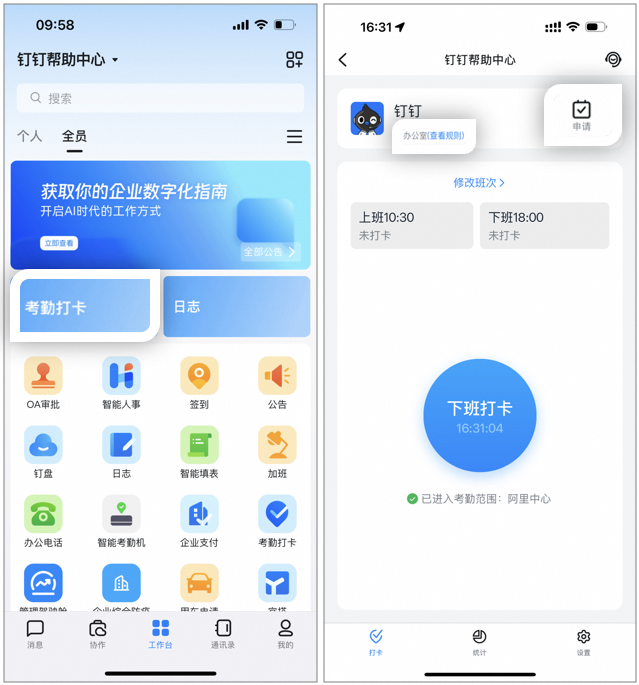
* Clock-in path: Open **DingTalk mobile > Workbench >** and go to the **Attendance** app. Based on your attendance schedule, tap the **Clock-in** button to complete the clock-in.
* View attendance rules or the attendance group owner: Open **DingTalk mobile > Workbench >** and go to the **Attendance** app, then tap **View Rules** at the top.
### 3.2 Submit overtime, makeup clock-in, and other approval requests
* Attendance request path: Open **DingTalk mobile > Workbench >** and go to the **Request** page in the **Attendance** app. Submit requests as needed, including makeup clock-in, leave request, overtime, out-of-office, and more.
* View historical request records: Open **DingTalk mobile > Workbench >** and go to **Attendance > Request > Request Records**.

**Notes:**
The Request page is configured by the Organization Admin. The page you see and the requests you can submit may vary.
### 3.3 Data statistics
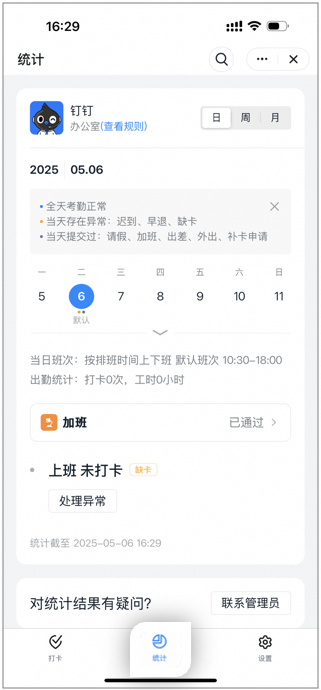
* View your attendance: Go to **DingTalk mobile > Workbench >** and open the **Attendance** app, then tap **Statistics** to view your attendance, including late arrivals, early leaves, missed clock-ins, and other records. (This path is visible only if the Admin allows employees to view attendance data.)
* Handle your attendance errors: Go to **DingTalk mobile > Workbench >** and open the **Attendance** app, tap **Statistics >** tap the error **attendance date > Handle Error**.
### 3.4 Personal settings
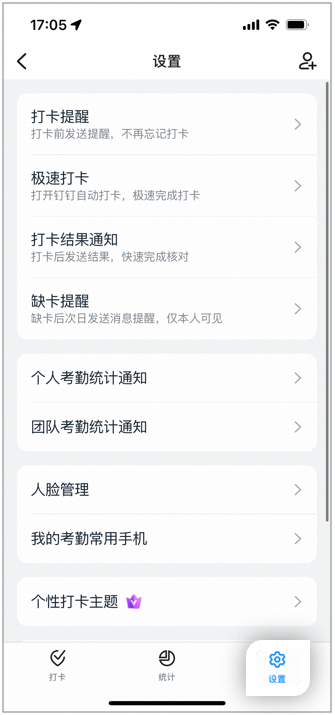
Go to **DingTalk mobile > Workbench >** and open the **Attendance** app **> Settings**. Customize options such as clock-in reminder, Quick Check-in, clock-in result notification, missed clock-in reminder, personal attendance statistics notifications, face management, and more.
**Notes:**
If you are an Organization Admin and want to learn how to configure attendance, overtime, leave, and other attendance settings, see [**Admin quickstart for Attendance**](/attendance/admin-quick-start).
## 4. FAQ
If your organization has subscribed to the DingTalk Attendance Enterprise plan or Professional plan, the Organization Admin can define the scope of attendance data that employees can view. The specific fields you can view depend on your organization's settings. For details, contact your Organization Admin.