> ## Documentation Index
> Fetch the complete documentation index at: https://help.dingtalk.io/llms.txt
> Use this file to discover all available pages before exploring further.
# Attendance management reminders
> Learn about DingTalk attendance management reminders. Admins can enable attendance report notifications to stay on top of team attendance and send one-click clock-in reminders to reduce missed clock-ins.
## 1. Overview
In DingTalk Attendance, Admins can enable attendance report notifications to stay informed about team attendance. They can also send one-click reminders to prompt employees to clock in, effectively reducing missed clock-ins.
## 2. Use cases
* **Team attendance statistics:** Help Organization Admins quickly review weekly and monthly team attendance and abnormal attendance data.
* **Daily clock-in reminders:** For organizations that enforce strict adherence to fixed shifts, set daily reminders before work starts and after work ends to help employees build good clock-in habits and avoid attendance issues caused by forgotten clock-ins.
## 3. How to use
### Enable attendance group statistics reminders to stay informed about team attendance
**Attendance admins, organization owners, and department managers** can go to **DingTalk mobile app > Workbench > Attendance > Settings > Personal Settings**, enable **Team attendance statistics notification**, and customize the reminder time. The system pushes the team attendance report at the specified time, including overall data and abnormal data, helping Admins stay updated on team attendance.
**Notes:**
1. Daily reports are enabled by default. Weekly and monthly reports can be enabled manually.
2. Team attendance statistics can be pushed through both in-app Chats and DingMail.

### Send one-click clock-in reminders to reduce missed clock-ins
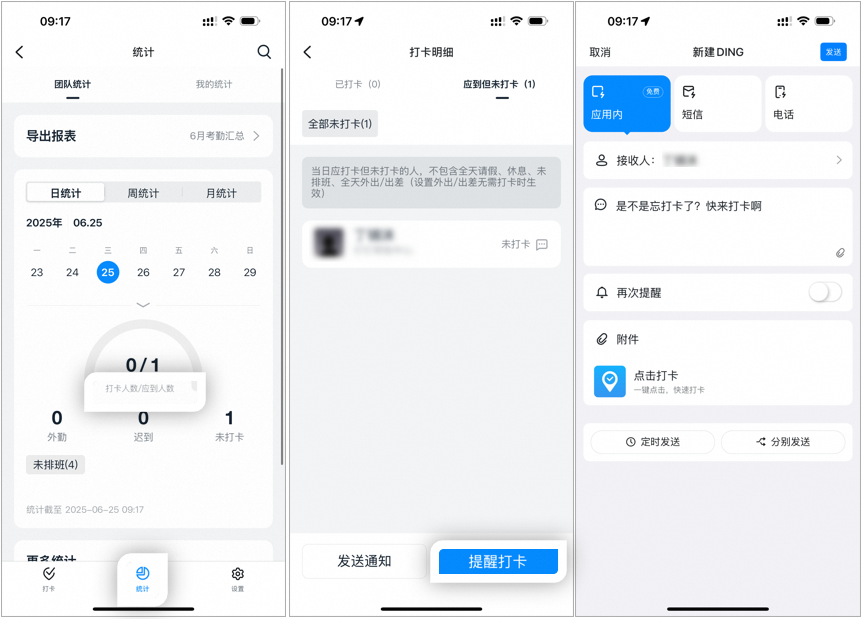
**Admins** can go to **DingTalk mobile app > Workbench > Attendance > Statistics > Clocked-in / Expected** and send a one-click **Clock-in reminder** to employees who were scheduled to work that day but have not clocked in. You can customize the reminder content and choose **Scheduled DING** or **Whisper mode**, as well as **In-app DING**, **SMS DING**, or **Phone DING**.
**About "Expected but not clocked in":**
Refers to employees who were scheduled to clock in that day but did not. This excludes those on all-day leave, on rest days, without a scheduled shift, or on all-day external work / business trips (when external work / business trip is set to not require clock-in).