> ## Documentation Index
> Fetch the complete documentation index at: https://help.dingtalk.io/llms.txt
> Use this file to discover all available pages before exploring further.
# Shift management
> Manage attendance shifts in DingTalk: configure shift times, clock-in periods, and flexible rules for efficient attendance management.
## 1. Overview
DingTalk offers powerful attendance and shift management features. Organizations can flexibly configure shift rules based on actual needs. Setting up shifts properly enables more efficient attendance management.
## 2. Use cases
Suitable for organizations where different users work on different shifts.
## 3. Procedure
### Mobile
Admins with the required permissions can go to **DingTalk mobile app > Workbench > Attendance > Settings > More settings > Shift management > Add/Edit/Delete shift**.

### Desktop
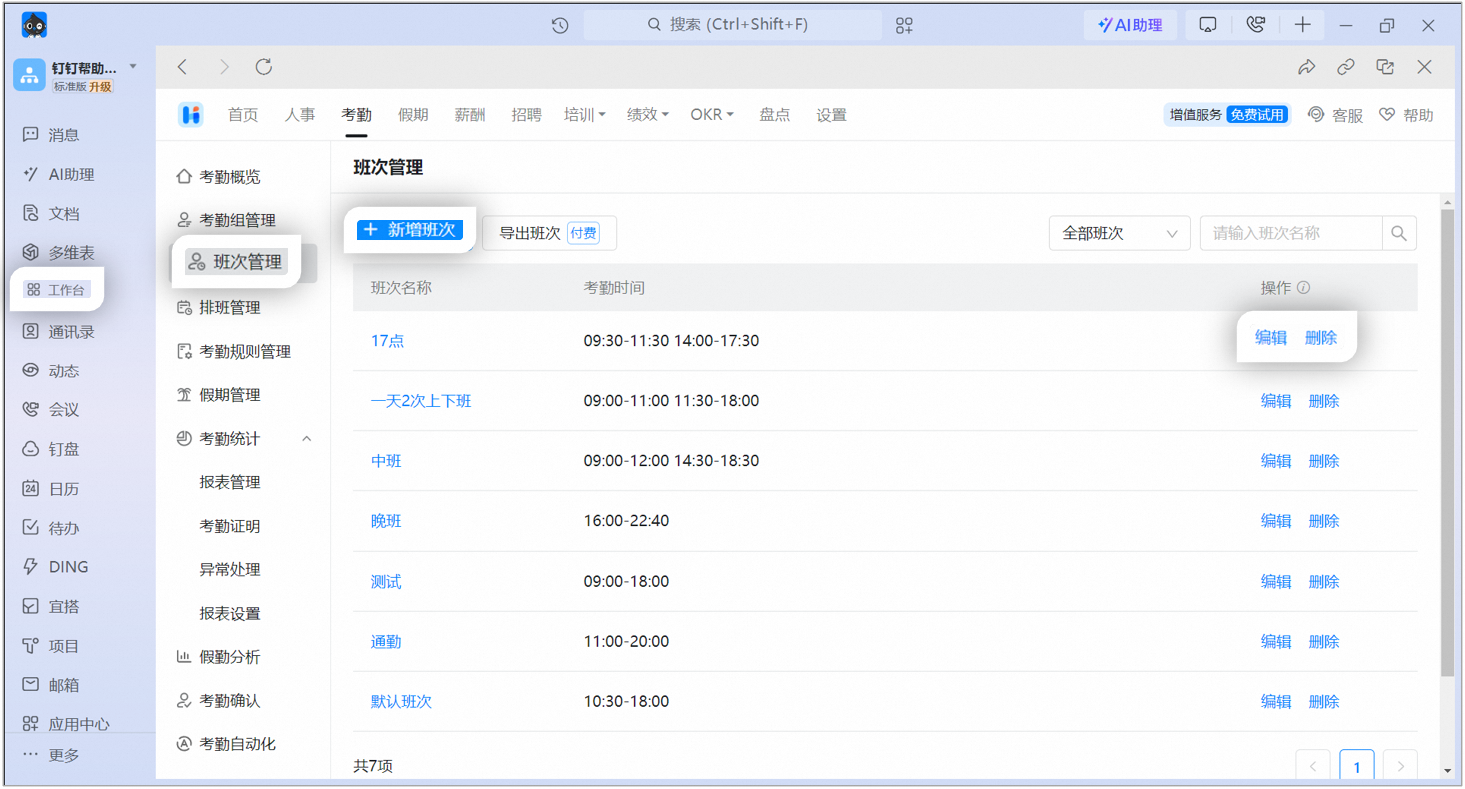
Admins with the required permissions can go to **DingTalk desktop app > Workbench > Attendance > Shift management > Add/Edit/Delete shift**.
## 4. Shift settings
| **Field name** | **Description** |
| ----------------- | -------------------------------------------------------------------------------------------------------------------------------------------------------------------------------------------------------------------------------------------------------------------------------------------------- |
| Shift name | Set a name for the shift based on your organization's needs. |
| Shift owner | Only Admins with attendance permissions can be selected as shift owners. Shift owners can edit and delete shifts. |
| Work hours | Set clock-in times based on your organization's work hours. |
| Clock-in period | Set the earliest and latest clock-in times allowed for users. |
| Break time | Turn on break time and set break periods. Multiple break periods are supported. Break time within a shift is not counted as working hours. |
| Flexible clock-in | Flexible clock-in offers three modes: **allow late arrival and late departure, allow early arrival and early departure; allow a few minutes of late arrival or early departure without marking it as an error; and allow late arrival the next day after late departure**. Click here for details. |
| Error rules | Set the number of minutes that qualifies as severe late arrival or absenteeism-level late arrival. |
## 5. FAQs
You can create up to 8,000 shifts.
No. Shift names must be unique.
No. Shifts cannot be added or deleted in bulk.
Custom sorting is not supported. Shifts are listed in the following order: numbers, letters, and Chinese characters.
Only the Super Admin or a Sub Admin with attendance permissions can edit shifts. Contact an Admin with the required permissions to go to [**Admin Console**](https://oa.dingtalk.io) > **Security and permissions > Manage permissions** and configure the **Super Admin/Sub Admin**.