> ## Documentation Index
> Fetch the complete documentation index at: https://help.dingtalk.io/llms.txt
> Use this file to discover all available pages before exploring further.
# Statistics field descriptions
> Learn the meaning and calculation rules of DingTalk attendance statistics fields, including basic statistics fields and custom field settings. Get answers to common questions such as how attendance days are calculated, so you can manage attendance data flexibly.
## 1. Feature overview
To meet the diverse attendance statistics needs of organizations, DingTalk provides basic attendance statistics fields for daily use as well as customizable field options, allowing organizations to compile attendance data more flexibly.
## 2. Use cases
Scenarios in which organizations have personalized requirements for attendance statistics reports.
## 3. Workflow
The Admin goes to **DingTalk on desktop > Workbench > Attendance > Attendance statistics > Report settings > Field management**, and then clicks **Edit** on the target field. Fields can be edited in two modes: **Option mode** and **Expert mode**.
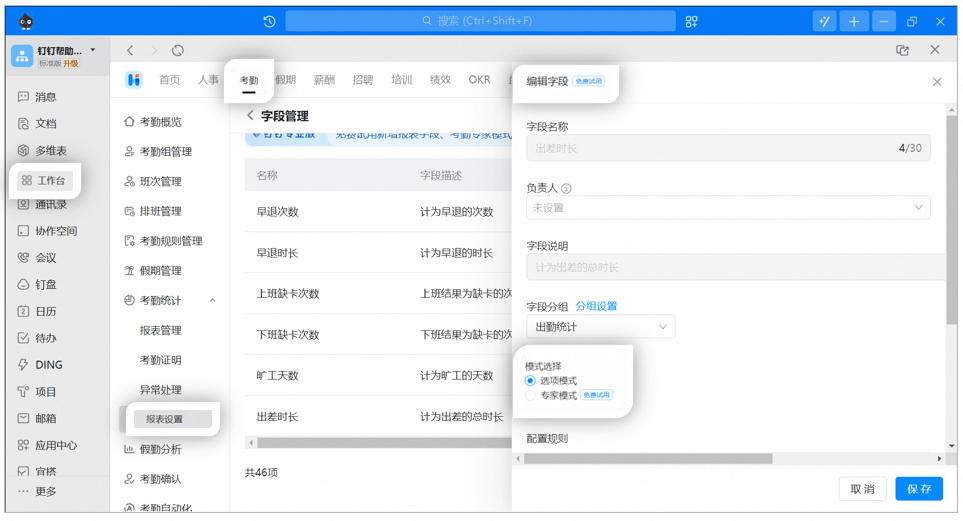
**Notes:**
1. **Option mode**: Use Option mode to edit rules for built-in fields such as required attendance days, attendance days, working hours, and attendance shift.
2. **Expert mode**: Organizations can create custom functions to meet personalized statistics rules. The system provides operators, fields, and functions to build the calculation logic your organization needs.
3. **Expert mode** requires DingTalk Pro. It supports creating annual reports and exporting data across multiple months or by year to meet personalized attendance needs.
4. To watch the introduction Video for attendance **Expert mode**, **click here**.
## 4. Field descriptions
### Fixed fields
* **Name, attendance group, Department, Employee ID, and Job Title** are fixed fields. They appear in all reports and **cannot** be **deleted** or **edited** in the report.
### Basic fields
| **Basic field** | **Description** |
| ------------------------ | ------------------------------------------------------------------------------------------------------------------------------------------------------------------------------------------------------------------------------------------------------------------------------------- |
| Clock-in time | The valid clock-in time when the Employee starts and ends work. Includes: Work start 1 clock-in time, Work end 1 clock-in time, Work start 2 clock-in time, Work end 2 clock-in time, Work start 3 clock-in time, Work end 3 clock-in time. |
| Clock-in result | The attendance result generated based on the Employee's clock-in records and attendance time. Includes: Work start 1 clock-in result, Work end 1 clock-in result, Work start 2 clock-in result, Work end 2 clock-in result, Work start 3 clock-in result, Work end 3 clock-in result. |
| Associated Approval form | Approval forms related to attendance, such as leave requests, business trips, and makeup clock-ins. |
### Attendance statistics fields
| **Attendance statistics field** | **Description** |
| ------------------------------- | --------------------------------------------------------------------------------------------------------------------------------------------------------------------------------------------------------- |
| Required attendance days | The number of scheduled workdays within the statistics period. Statutory holidays, rest days, and unscheduled days within the period are not counted as required attendance days. |
| Makeup clock-in count | The number of approved makeup clock-ins for the Employee within the statistics period. |
| Attendance shift | The shift the Employee works on the day. |
| Attendance days | The number of days the Employee clocked in within the statistics period. Supports custom rules for attendance days. |
| Rest days | The number of rest days the Employee clocked in within the statistics period. Supports custom rules for attendance days. |
| Working hours | The Employee's total clock-in duration. Supports custom rules. |
| Business trip duration | The total business trip duration within shift hours for all approved business trips of the Employee during the statistics period. (Note: Data for business trip companions is also synced automatically.) |
| Out-of-office duration | The total out-of-office duration within shift hours for all approved out-of-office requests of the Employee during the statistics period. |
| Attendance result | The Employee's Daily clock-in result. |
| Shift | The shift assigned to the Employee for the day. |
### Error statistics fields
| **Error statistics field** | **Description** |
| -------------------------------- | ------------------------------------------------------------------------------------------------------------- |
| Late arrival count | The number of times the Employee was counted as late arrival within the statistics period. |
| Late arrival duration | The total duration of late arrivals for the Employee within the statistics period. |
| Severe late arrival count | The number of times the Employee was counted as severe late arrival within the statistics period. |
| Severe late arrival duration | The total duration of severe late arrivals for the Employee within the statistics period. |
| Absent late arrival count | The number of times the Employee was counted as absenteeism due to late arrival within the statistics period. |
| Early leave count | The number of early leaves at the end of work for the Employee within the statistics period. |
| Early leave duration | The total duration of early leaves for the Employee within the statistics period. |
| Work start missed clock-in count | The number of missed clock-ins at the start of work for the Employee within the statistics period. |
| Work end missed clock-in count | The number of missed clock-ins at the end of work for the Employee within the statistics period. |
| Absent late arrival days | The number of days the Employee was counted as absenteeism due to late arrival within the statistics period. |
### Leave statistics fields
| **Leave statistics field** | **Description** |
| -------------------------- | -------------------------------------------------------------------------------------------- |
| leave request | The total duration of approved leave requests for the Employee within the statistics period. |
### Overtime statistics fields
| **Overtime statistics field** | **Description** |
| --------------------------------- | ------------------------------------------------------------------------------------------------------------------------ |
| Overtime Approval form statistics | The total overtime duration on workdays, rest days, and holidays for the Employee within the approval statistics period. |
| Workday overtime | The total approved workday overtime duration for the Employee within the statistics period. |
| Rest day overtime | The total approved rest day overtime duration for the Employee within the statistics period. |
| Holiday overtime | The total approved holiday overtime duration for the Employee within the statistics period. |
## 5. FAQ
Attendance days are calculated based on the attendance day rules set by the Admin. If no rules are set, the system default applies: attendance is counted whenever there is a clock-in, regardless of whether the day is a rest day or a scheduled workday. To customize attendance day rules, the Admin goes to **DingTalk on desktop > Workbench > Attendance > Attendance statistics > Report settings > Field management** and clicks **Edit** on the **Attendance days** field.
If the monthly summary report does not include the required attendance days field, the Admin needs to add it first. Admin path: **DingTalk on desktop > Workbench > Attendance > Attendance statistics > Report settings > Field management > Required attendance days > Edit**, and then Save.
**Notes:**
1. Flexible working hours do not count toward required attendance days.
2. Days without scheduling are not counted as required attendance days.
3. The legacy attendance report does not support setting required attendance day statistics rules. Switch to the new attendance report to configure them.