> ## Documentation Index
> Fetch the complete documentation index at: https://help.dingtalk.io/llms.txt
> Use this file to discover all available pages before exploring further.

# How to Set or Change Member Permissions

> Assign or change DingTalk Drive permissions precisely by file and by person on desktop or mobile, with notes on edge cases — protecting data assets while keeping the right people in collaboration.

DingTalk Drive supports precise permission assignment by file and by person, helping protect data assets.

## Desktop

Open the DingTalk Drive home page, **Team Files** on the Docs home page, or **My Files (from DingTalk Drive)** under My Docs. Find the target file or folder, click **...** for more options, and select **Permission Management**.

![](https://alidocs.oss-cn-zhangjiakou.aliyuncs.com/res/8oLl952DemZ1glap/img/8167195e-c2e7-435a-b44d-32fdf51cb039.png?x-oss-process=image/crop,x_0,y_69,w_3456,h_2165/ignore-error,1)

Click **Add Collaborator**, then select the specified group, person, or department to grant access.
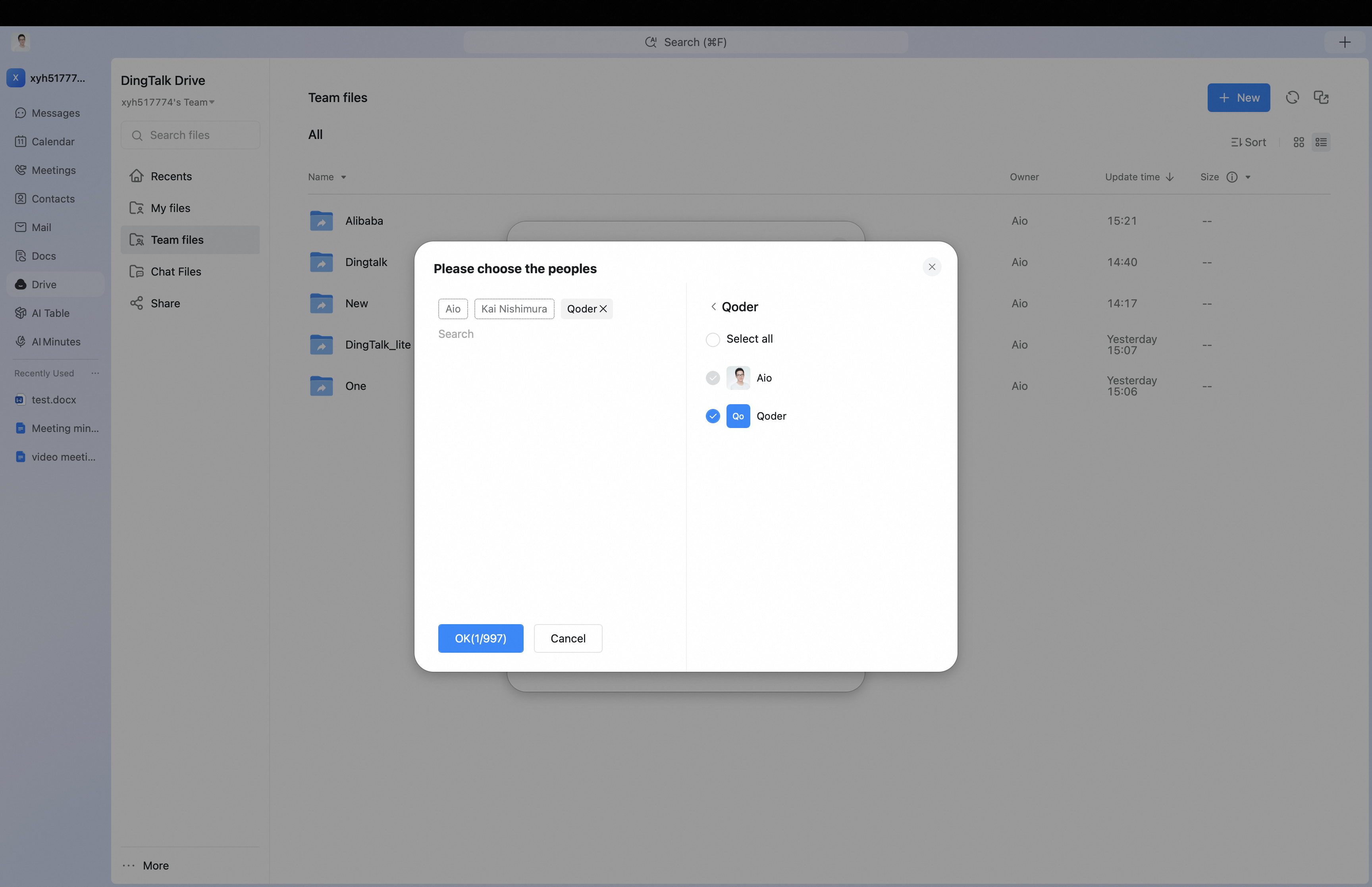
![](https://alidocs.oss-cn-zhangjiakou.aliyuncs.com/res/8oLl952DemZ1glap/img/d1ce55d3-2a0e-4ef2-987b-e158aed0d693.png)

After collaborators are added, you can modify permissions for people, groups, or departments that already have access.

![](https://alidocs.oss-cn-zhangjiakou.aliyuncs.com/res/8oLl952DemZ1glap/img/fa62770c-44a3-4f4f-a137-6437a51f4718.png?x-oss-process=image/crop,x_0,y_69,w_3456,h_2165/ignore-error,1)

## Mobile

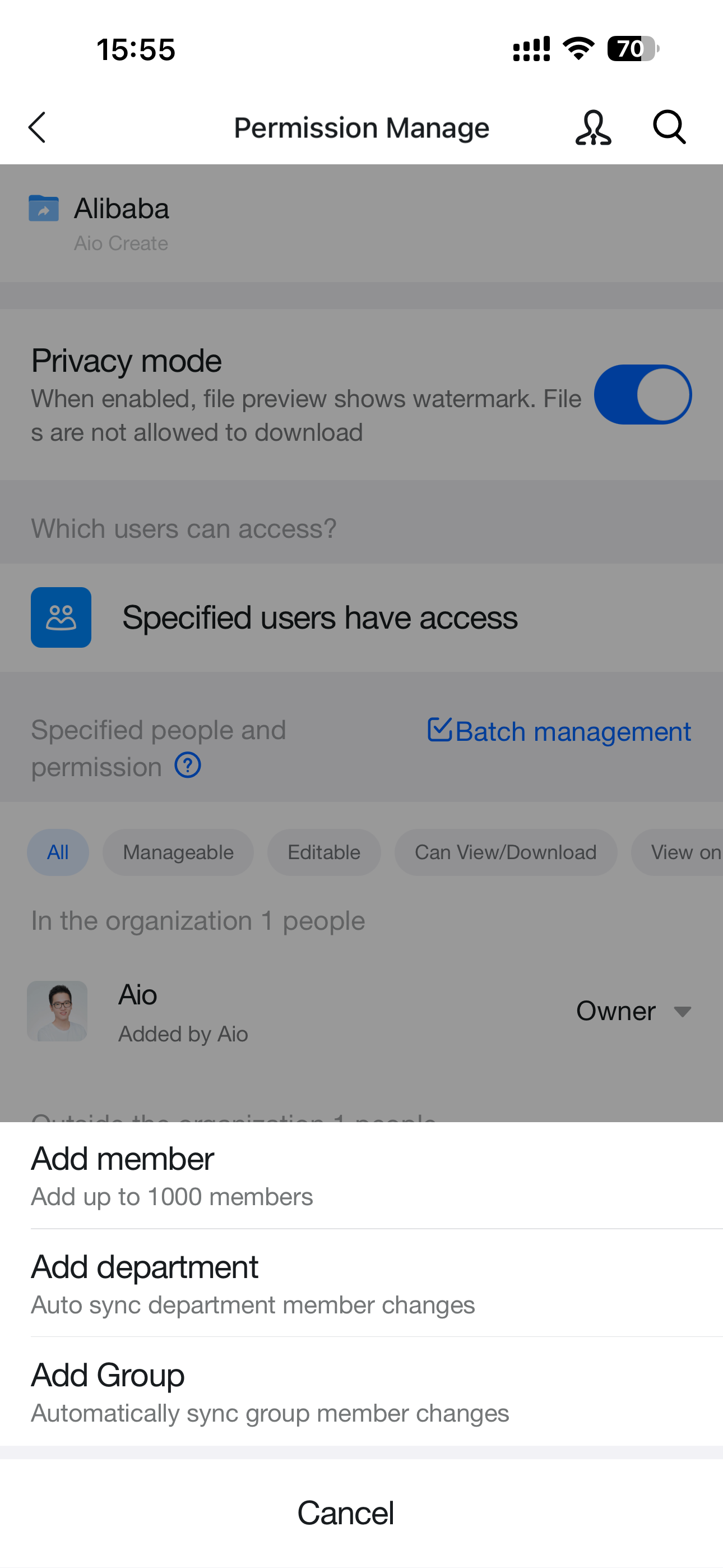
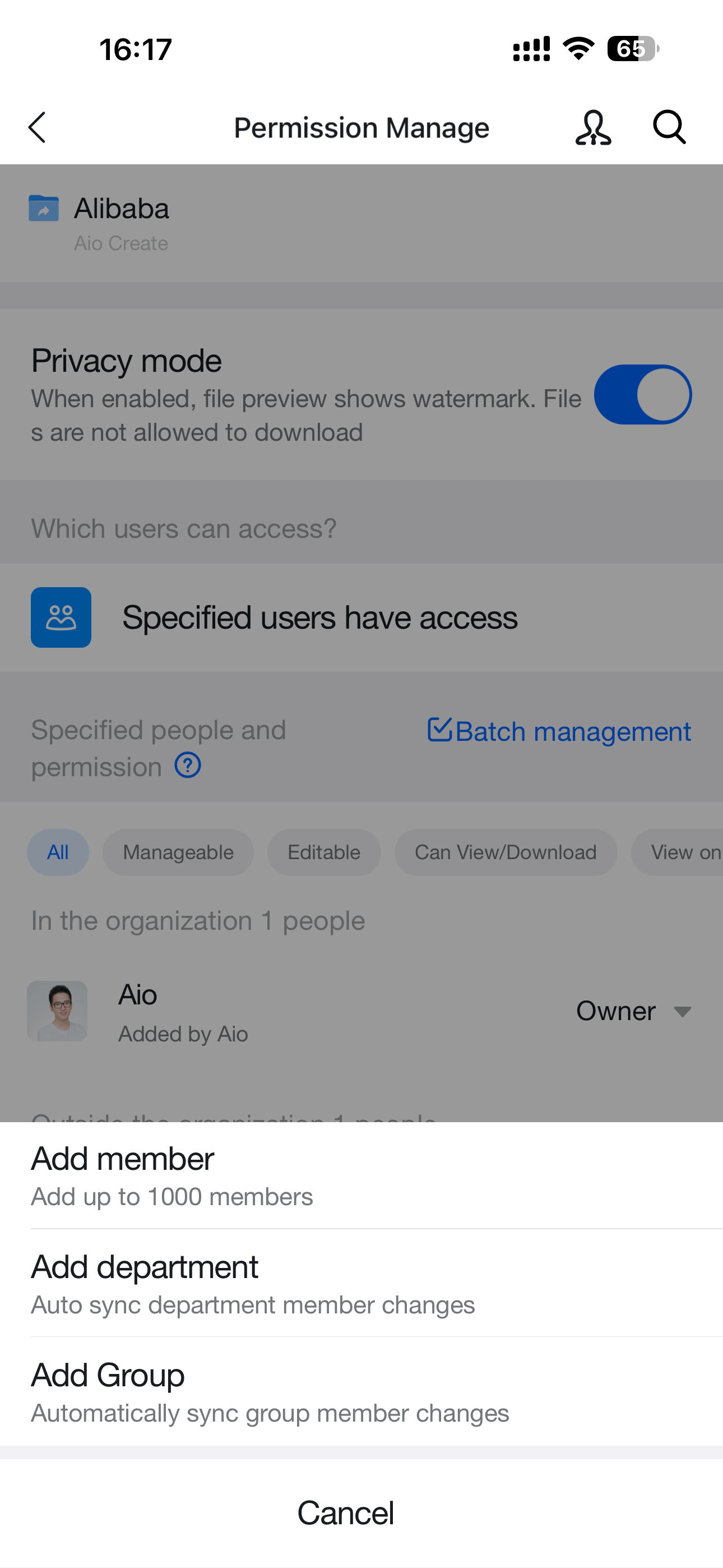
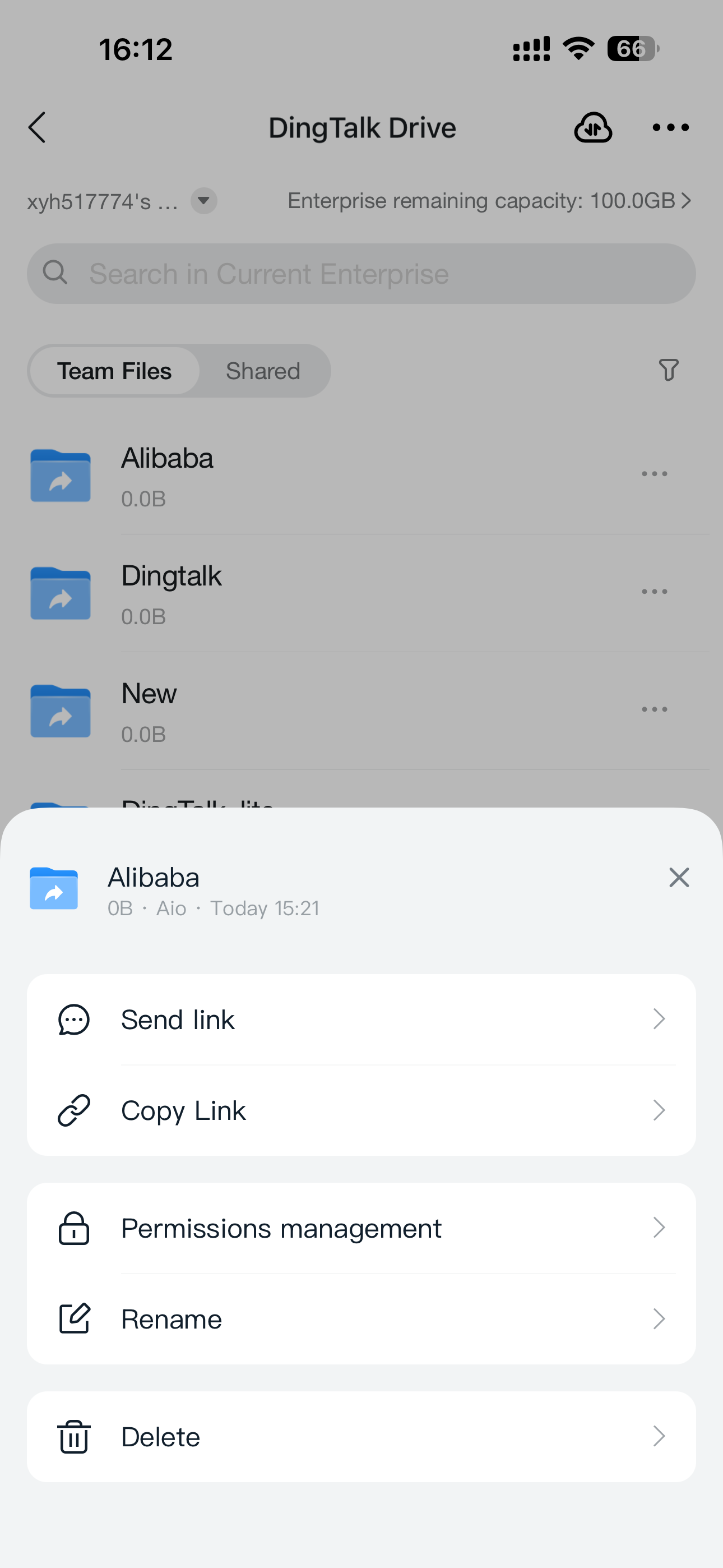
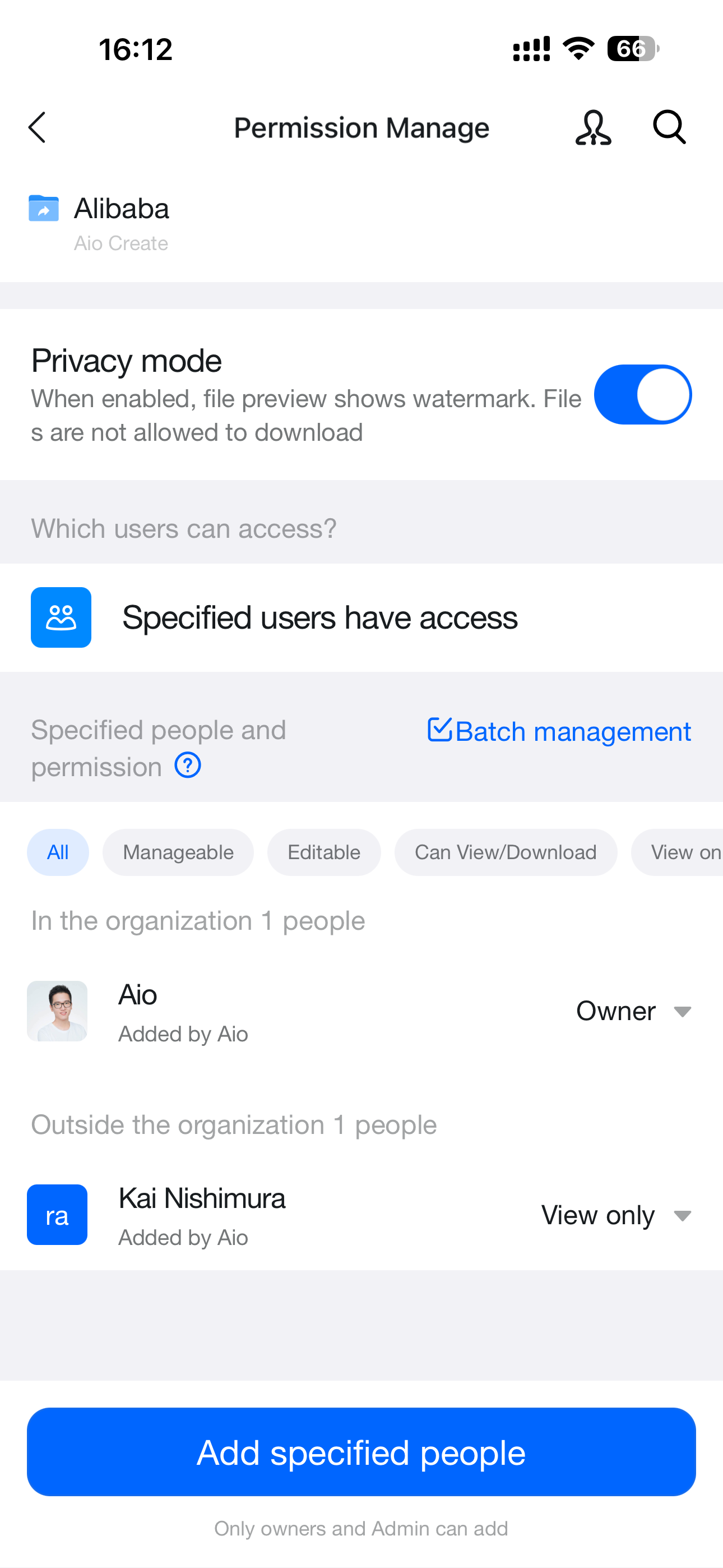
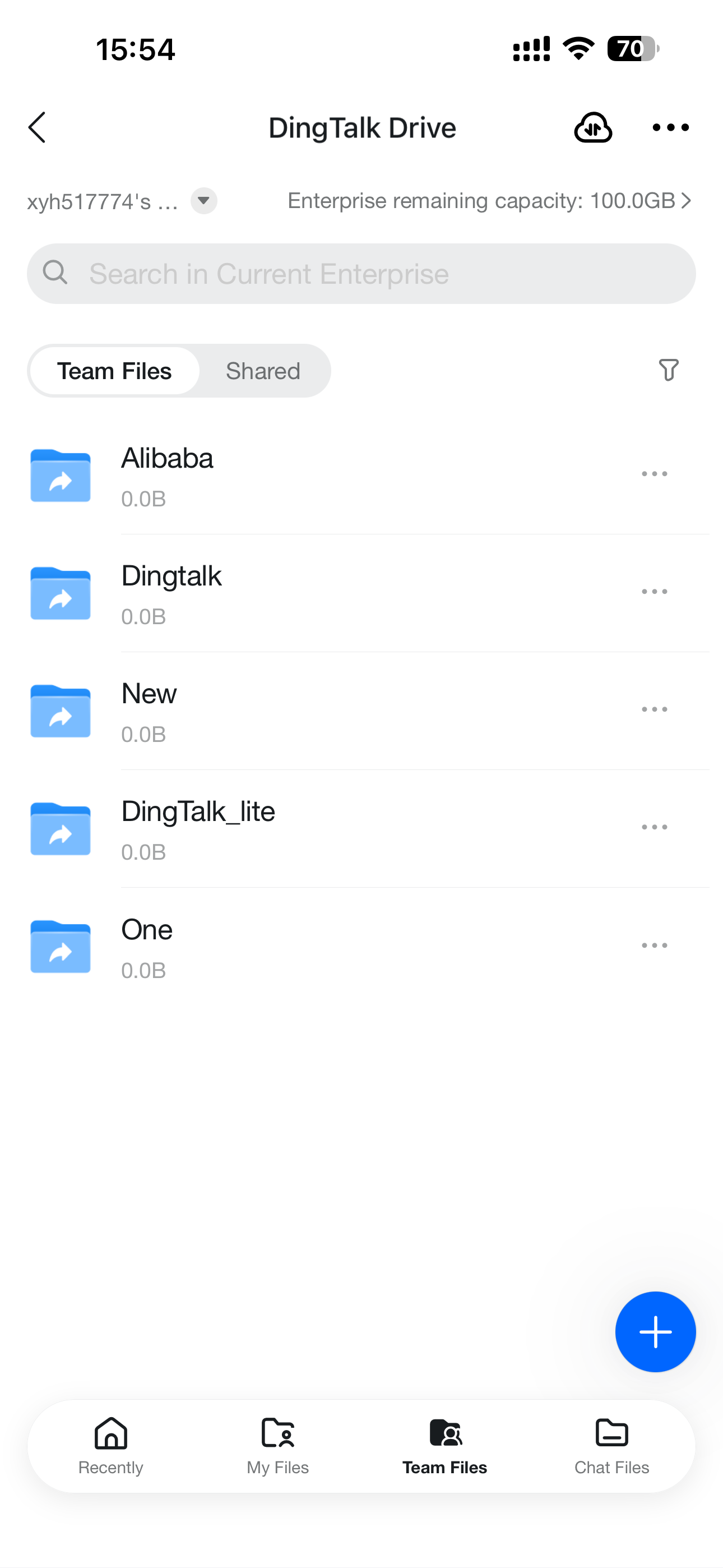
Open the DingTalk Drive home page, **Team Files** on the Docs home page, or **My Files (from DingTalk Drive)** under My Docs. Find the target file or folder, tap **...** for more options, select **Permission Management**, and then tap **Add Collaborator**.

<div style={{display: 'flex', gap: '12px', justifyContent: 'center', flexWrap: 'wrap', margin: '16px 0'}}>
  <img src="https://alidocs.oss-cn-zhangjiakou.aliyuncs.com/res/8oLl952DemZ1glap/img/4be08b25-7875-4056-9ee3-1d0a9b059cc7.png" alt="IMG_5030.png" style={{width: '32%', minWidth: '180px', borderRadius: '8px', boxShadow: '0 2px 12px rgba(0,0,0,0.08)', margin: 0}} />

  <img src="https://alidocs.oss-cn-zhangjiakou.aliyuncs.com/res/8oLl952DemZ1glap/img/06727e3e-b108-44bb-bdbf-c890730547d4.png" alt="IMG_5029.png" style={{width: '32%', minWidth: '180px', borderRadius: '8px', boxShadow: '0 2px 12px rgba(0,0,0,0.08)', margin: 0}} />

  <img src="https://alidocs.oss-cn-zhangjiakou.aliyuncs.com/res/8oLl952DemZ1glap/img/4a92626f-5eb9-413b-9b23-8778c4fcc7f3.png" alt="IMG_5031.png" style={{width: '32%', minWidth: '180px', borderRadius: '8px', boxShadow: '0 2px 12px rgba(0,0,0,0.08)', margin: 0}} />
</div>

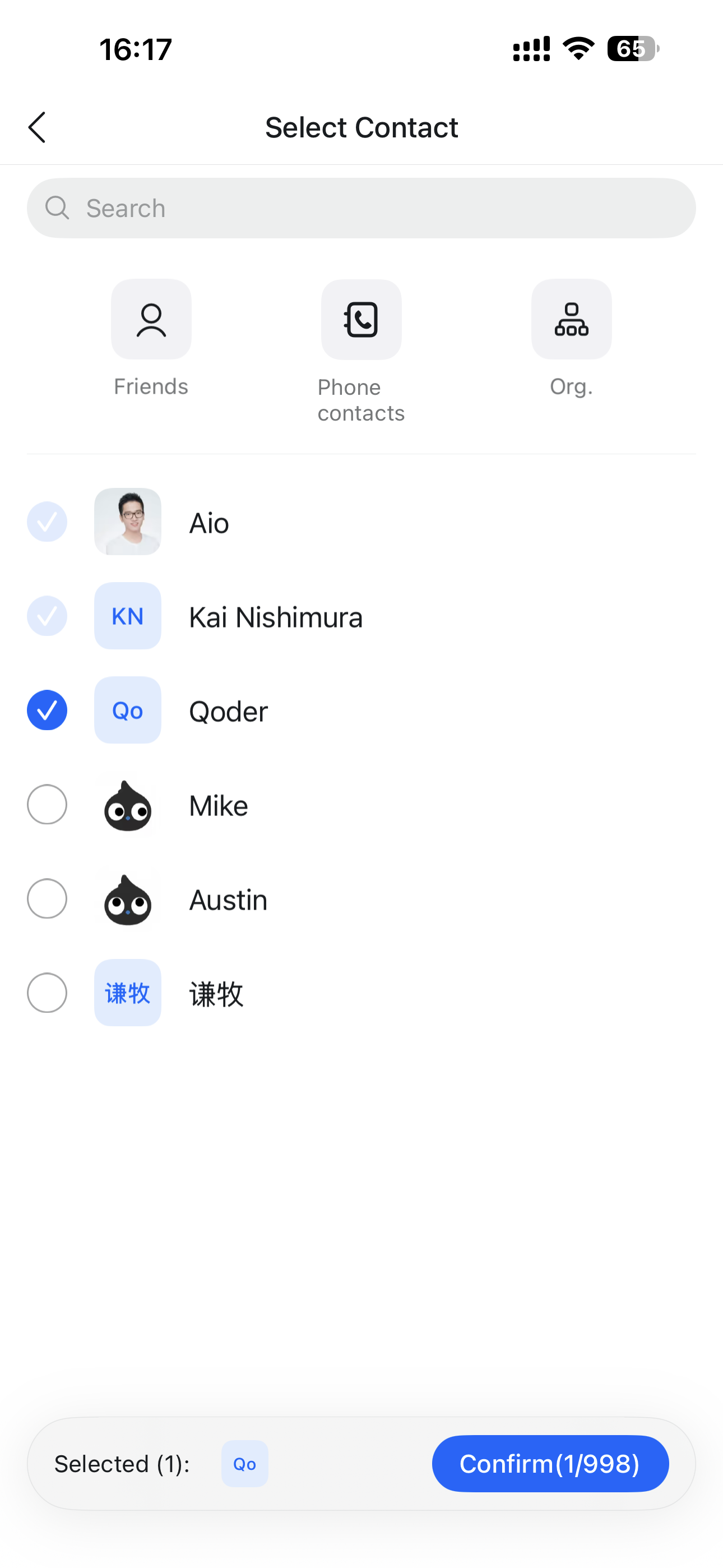
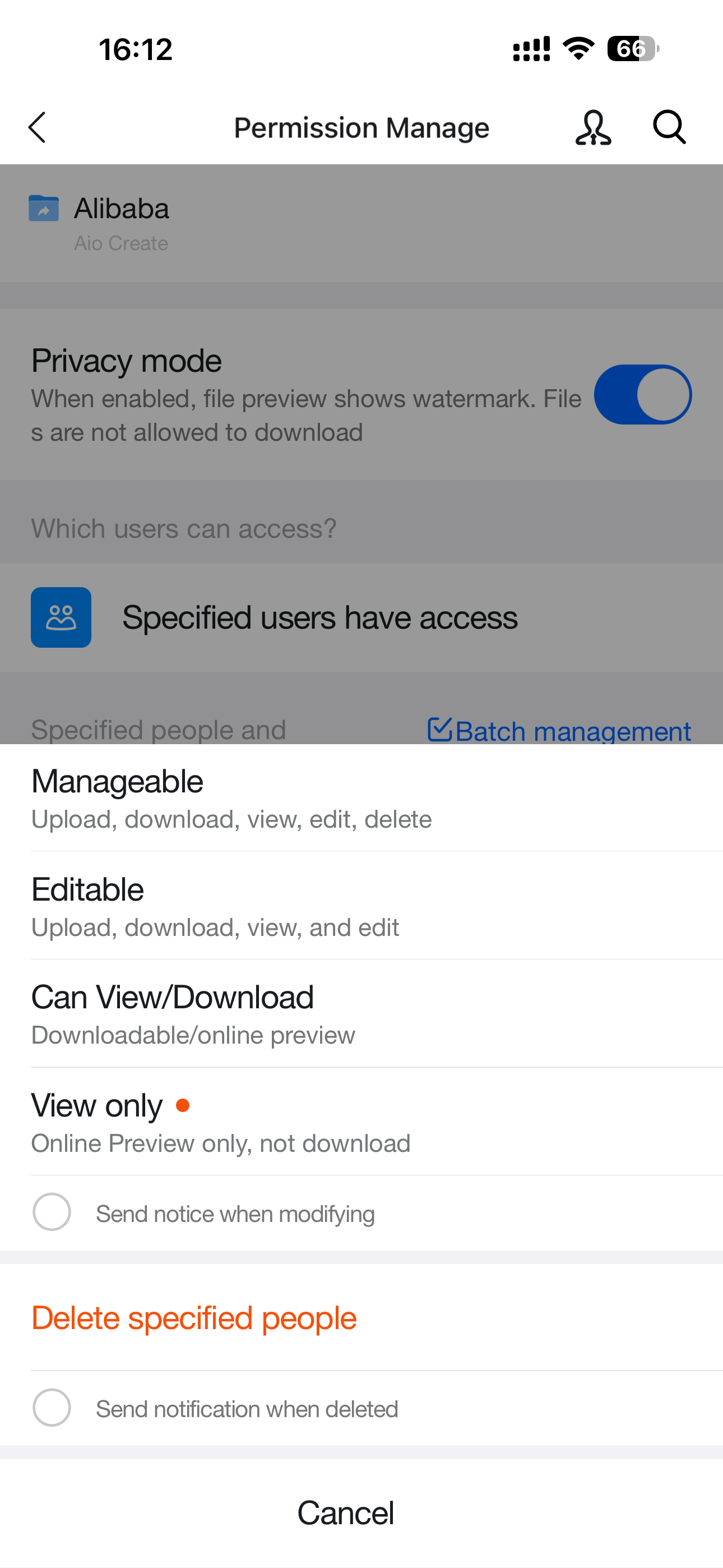
Select the specified group, person, or department to grant access, then choose the corresponding permission level: **Can manage**, **Can edit**, **Can view/download**, or **View only**.

<div style={{display: 'flex', gap: '12px', justifyContent: 'center', flexWrap: 'wrap', margin: '16px 0'}}>
  <img src="https://alidocs.oss-cn-zhangjiakou.aliyuncs.com/res/8oLl952DemZ1glap/img/c3ffc01b-558c-4735-b601-c1bc439b62f9.png" alt="IMG_5041.png" style={{width: '32%', minWidth: '180px', borderRadius: '8px', boxShadow: '0 2px 12px rgba(0,0,0,0.08)', margin: 0}} />

  <img src="https://alidocs.oss-cn-zhangjiakou.aliyuncs.com/res/8oLl952DemZ1glap/img/257cc8bb-4485-48f8-a227-9a3c33c5a4b6.png" alt="IMG_5042.png" style={{width: '32%', minWidth: '180px', borderRadius: '8px', boxShadow: '0 2px 12px rgba(0,0,0,0.08)', margin: 0}} />

  <img src="https://alidocs.oss-cn-zhangjiakou.aliyuncs.com/res/8oLl952DemZ1glap/img/0c99c992-520b-4382-b99f-fda2b57bfea3.png" alt="IMG_5043.png" style={{width: '32%', minWidth: '180px', borderRadius: '8px', boxShadow: '0 2px 12px rgba(0,0,0,0.08)', margin: 0}} />
</div>

You can also use **Permission Management** to modify permissions for people, groups, or departments that already have access.

<div style={{display: 'flex', gap: '12px', justifyContent: 'center', flexWrap: 'wrap', margin: '16px 0'}}>
  <img src="https://alidocs.oss-cn-zhangjiakou.aliyuncs.com/res/8oLl952DemZ1glap/img/2fe38b21-c659-4d10-a81f-3d425fce81ce.png" alt="IMG_5040.png" style={{width: '32%', minWidth: '180px', borderRadius: '8px', boxShadow: '0 2px 12px rgba(0,0,0,0.08)', margin: 0}} />

  <img src="https://alidocs.oss-cn-zhangjiakou.aliyuncs.com/res/8oLl952DemZ1glap/img/629ada30-45f2-44be-ba86-0ae3f73482ec.png" alt="IMG_5038.png" style={{width: '32%', minWidth: '180px', borderRadius: '8px', boxShadow: '0 2px 12px rgba(0,0,0,0.08)', margin: 0}} />

  <img src="https://alidocs.oss-cn-zhangjiakou.aliyuncs.com/res/8oLl952DemZ1glap/img/763a9d3c-c4b8-4c45-9683-04a12f37e9a9.png" alt="IMG_5039.png" style={{width: '32%', minWidth: '180px', borderRadius: '8px', boxShadow: '0 2px 12px rgba(0,0,0,0.08)', margin: 0}} />
</div>

## Notes

* Authorization information can be sent to the other party through DingTalk chat. The recipient can receive the authorization message immediately and can change permissions directly in the chat box.

* If the specified target is a group or department, the system automatically syncs membership changes for that group or department.

![](https://alidocs.oss-cn-zhangjiakou.aliyuncs.com/res/8oLl952DemZ1glap/img/364ec8d6-80ba-4544-8343-6f5948a7d1ce.png?x-oss-process=image/crop,x_0,y_69,w_3456,h_2165/ignore-error,1)