> ## Documentation Index
> Fetch the complete documentation index at: https://help.dingtalk.io/llms.txt
> Use this file to discover all available pages before exploring further.

# カレンダーとは

> DingTalkカレンダーはチャット・メール・To Doと連携する時間管理ツールです。的確な予定通知、会議グループの自動作成、リスト/日/週/月/3日間の各ビューの表示を解説します。

DingTalkカレンダーは、チャット、メール、To Doと連携する時間管理ツールです。コミュニケーションコストを削減し、チームコラボレーションがよりスムーズかつ効率的になります。

![](https://alidocs.oss-cn-zhangjiakou.aliyuncs.com/res/4jKqm0by9a1kbnw1/img/a2455749-067e-47c5-8689-3be2a0b4d439.png)

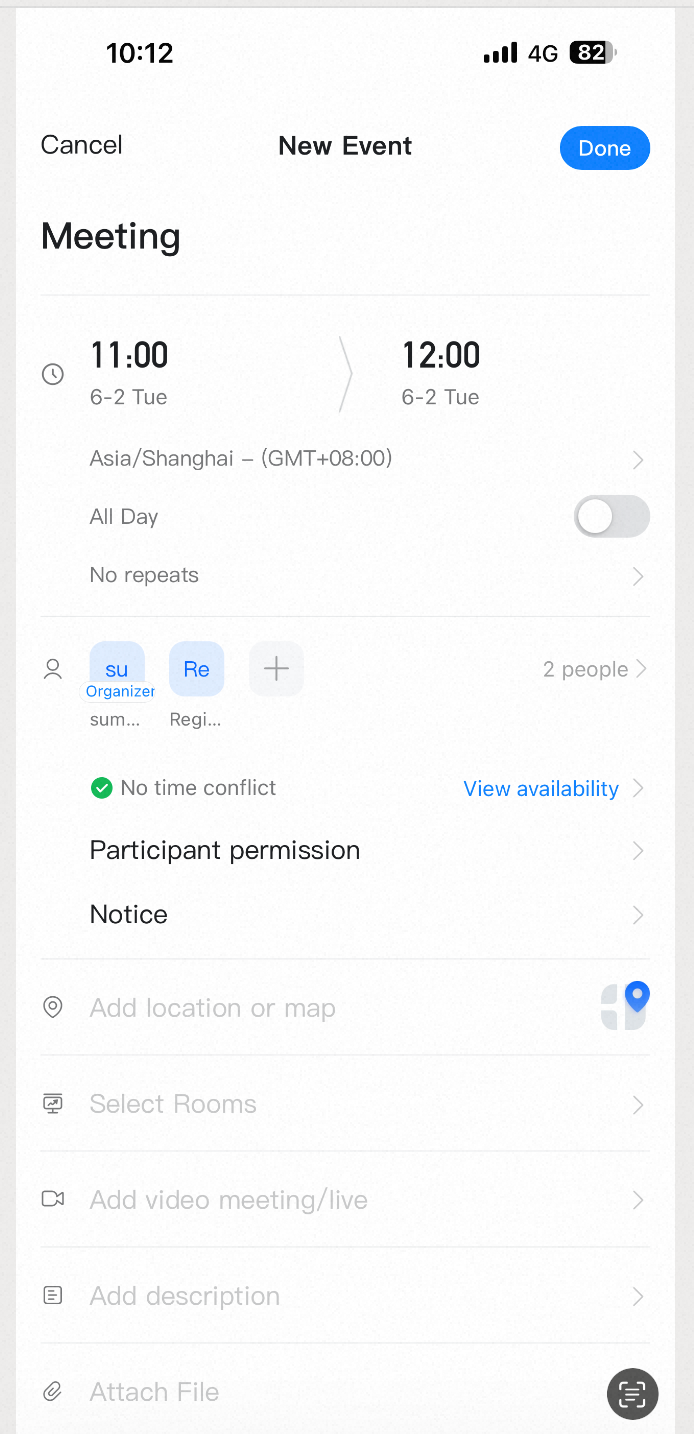
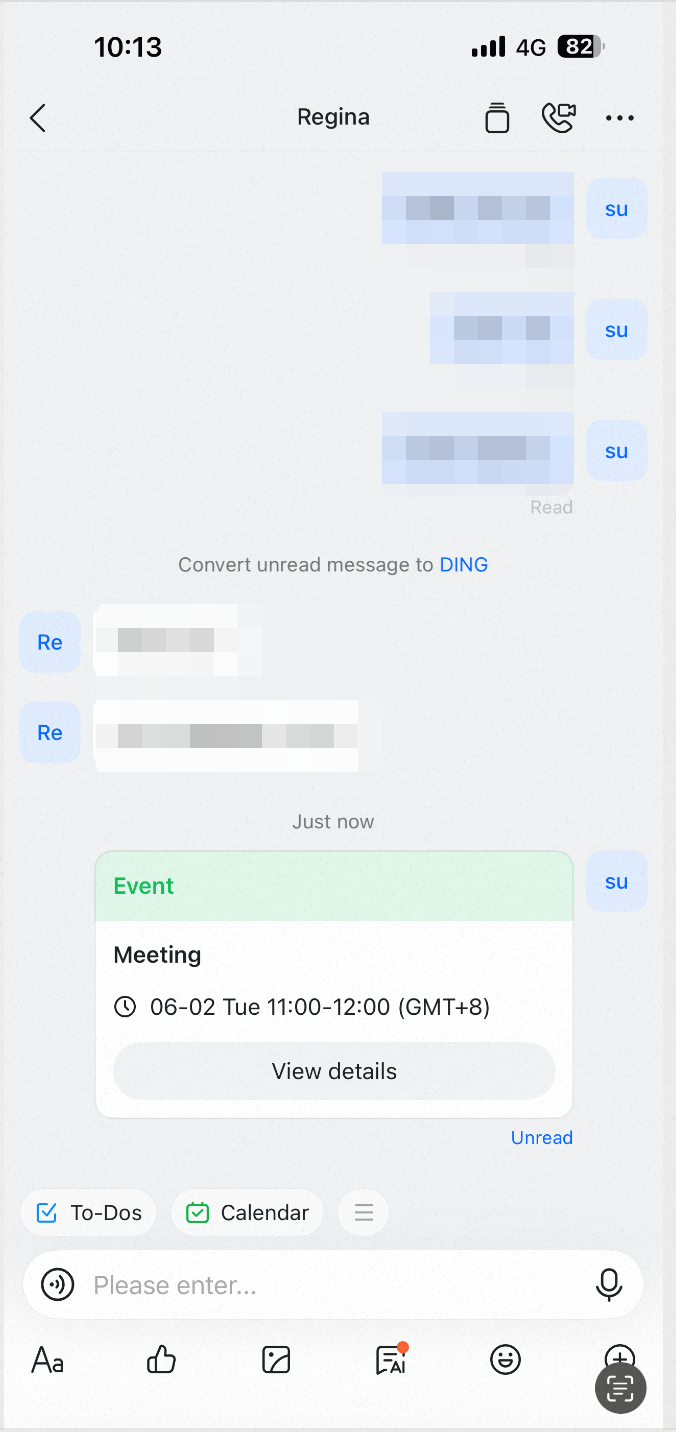
## 的確な会議の予定通知

ワンクリックで会議の予定を作成できます。招待は各参加者のチャットに直接届くため、全員が確実に情報を受け取れます。

<div style={{display: 'flex', gap: '12px', justifyContent: 'center', flexWrap: 'wrap', margin: '16px 0'}}>
  <img src="https://alidocs.oss-cn-zhangjiakou.aliyuncs.com/res/4jKqm0by9a1kbnw1/img/e499a2bb-99e5-4e92-8d52-103631ee0d17.png" alt="image.png" style={{width: '32%', minWidth: '180px', borderRadius: '8px', boxShadow: '0 2px 12px rgba(0,0,0,0.08)', margin: 0}} />

  <img src="https://alidocs.oss-cn-zhangjiakou.aliyuncs.com/res/4jKqm0by9a1kbnw1/img/70e2ae6e-e70c-425f-8a97-a250e09f27ec.png" alt="image.png" style={{width: '32%', minWidth: '180px', borderRadius: '8px', boxShadow: '0 2px 12px rgba(0,0,0,0.08)', margin: 0}} />
</div>

## 会議グループの自動作成

予定から会議グループを自動的に作成できます。会議の前後における準備、コミュニケーション、コラボレーションをより円滑に進められます。

<div style={{display: 'flex', gap: '12px', justifyContent: 'center', flexWrap: 'wrap', margin: '16px 0'}}>
  <img src="https://alidocs.oss-cn-zhangjiakou.aliyuncs.com/res/4jKqm0by9a1kbnw1/img/aa1f3dc7-b253-4038-bb7c-f12ee18d179d.png" alt="image.png" style={{width: '32%', minWidth: '180px', borderRadius: '8px', boxShadow: '0 2px 12px rgba(0,0,0,0.08)', margin: 0}} />
</div>

## 複数のカレンダービュー

DingTalk カレンダーでは、PC版にリスト・日・週・月の4つのビューがあり、モバイル版ではリスト・日・月に加え、モバイルにより適した3日間ビューも利用できます。これにより、予定や計画の確認がより簡単かつスムーズになります。
<div style={{display: 'flex', gap: '12px', justifyContent: 'center', flexWrap: 'wrap', margin: '16px 0'}}>
  <img src="https://alidocs.oss-cn-zhangjiakou.aliyuncs.com/res/4jKqm0by9a1kbnw1/img/48cc61a2-1b6a-4b00-a996-233439893253.png" alt="日历1.png" style={{width: '32%', minWidth: '180px', borderRadius: '8px', boxShadow: '0 2px 12px rgba(0,0,0,0.08)', margin: 0}} />
</div>
