> ## Documentation Index
> Fetch the complete documentation index at: https://help.dingtalk.io/llms.txt
> Use this file to discover all available pages before exploring further.
# Create Package
> Package and build exclusive DingTalk Apps for Android, iOS, Windows, and Mac from the Admin Console using the standard version baseline.
Provides customer administrators with the ability to independently package and build exclusive Apps across four platforms (Android, iOS, Windows, and Mac).
***
## II. User Guide
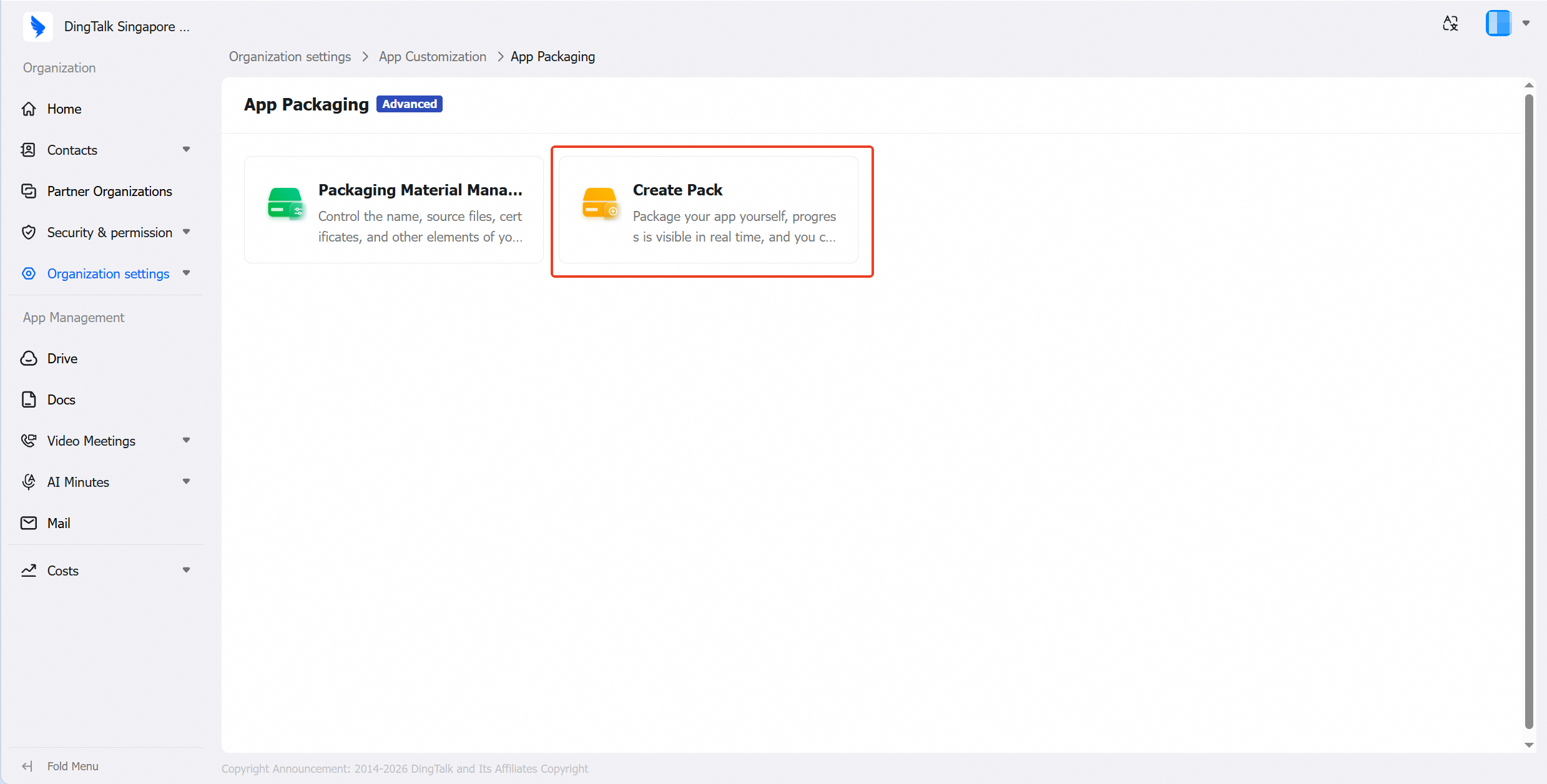
In the left navigation pane, go to **Organization settings > App Customization > App Packaging > Create Pack**
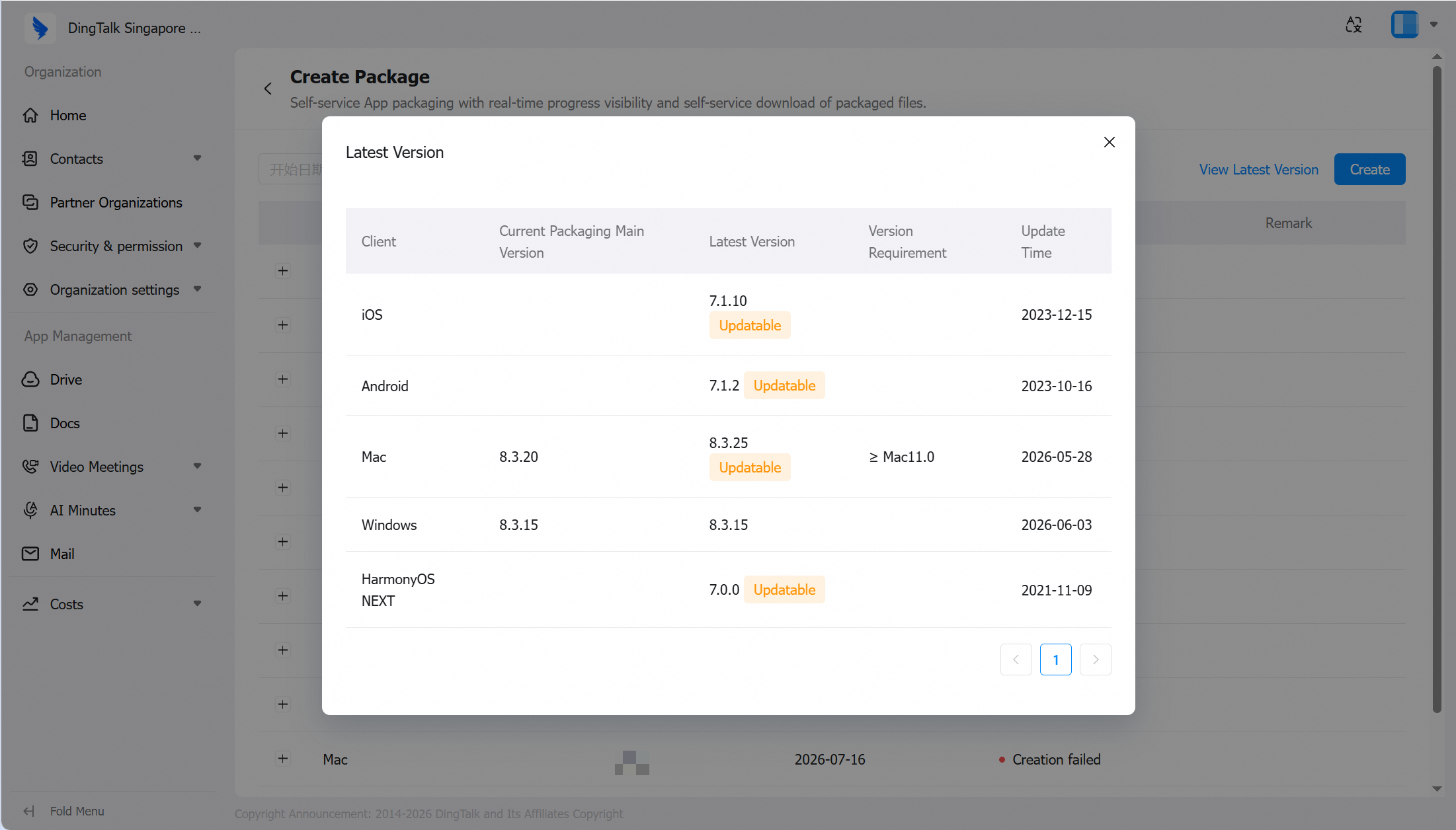
 * In the top-right corner of the Create Package page, view the new version.
* The exclusive App uses the standard DingTalk version number as the packaging baseline. Click the latest version to view the current primary packaging version and the latest version across all five platforms. Generally, the exclusive App lags behind the standard DingTalk release by approximately 3 weeks.
* In the top-right corner of the Create Package page, view the new version.
* The exclusive App uses the standard DingTalk version number as the packaging baseline. Click the latest version to view the current primary packaging version and the latest version across all five platforms. Generally, the exclusive App lags behind the standard DingTalk release by approximately 3 weeks.
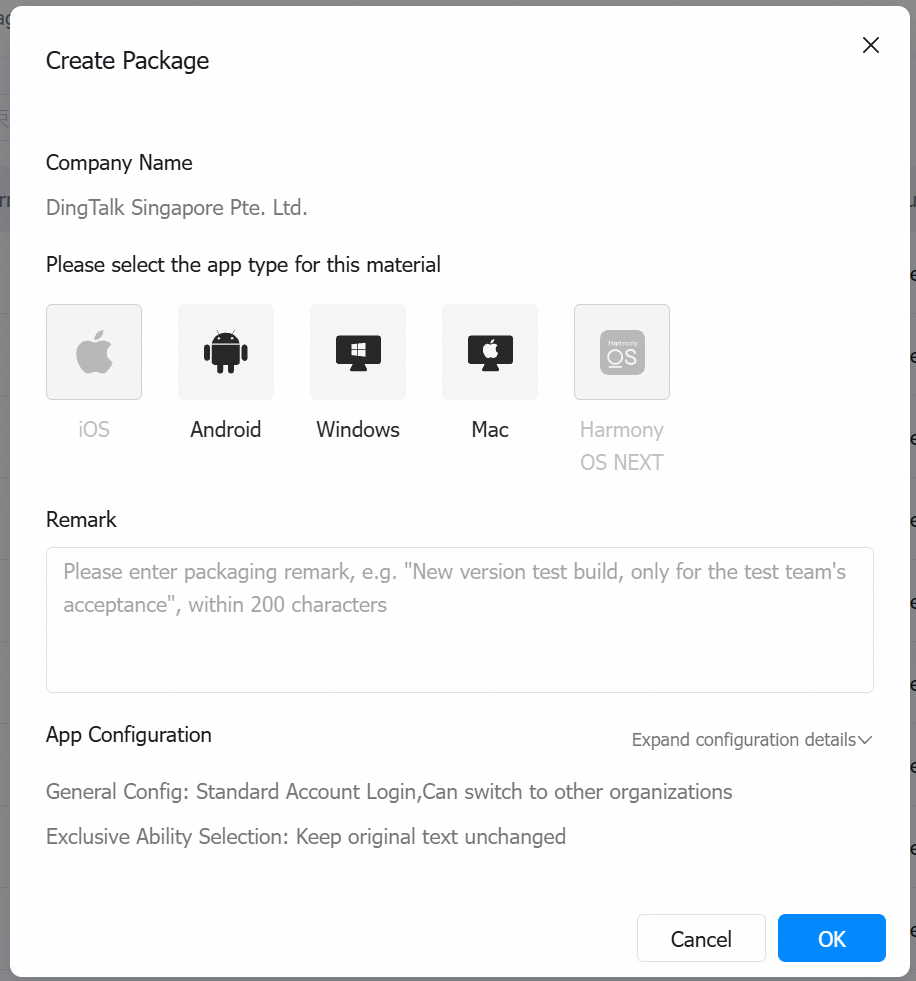
 * After clicking **Create**, select the client type(s) to build. If the assets for the selected client have not passed review, the build cannot proceed.
* You can select a single platform or check multiple platforms simultaneously.
* You can add packaging notes, which will be saved in the packaging records.
* The App configuration summary can be viewed via the dropdown, but cannot be edited on this page. To modify the configuration, go to the **App Configuration** page.
* **Note:** If iOS uses the Apple ABM/UAD packaging and distribution method, the build cannot be created from the Admin Console (a message will prompt "ABM/UAD settings prevent creation"). Contact your service provider to have DingTalk handle the packaging and submission for review. Once approved, the exclusive App will appear under the customer's Apple Business account.
* After clicking **Create**, select the client type(s) to build. If the assets for the selected client have not passed review, the build cannot proceed.
* You can select a single platform or check multiple platforms simultaneously.
* You can add packaging notes, which will be saved in the packaging records.
* The App configuration summary can be viewed via the dropdown, but cannot be edited on this page. To modify the configuration, go to the **App Configuration** page.
* **Note:** If iOS uses the Apple ABM/UAD packaging and distribution method, the build cannot be created from the Admin Console (a message will prompt "ABM/UAD settings prevent creation"). Contact your service provider to have DingTalk handle the packaging and submission for review. Once approved, the exclusive App will appear under the customer's Apple Business account.
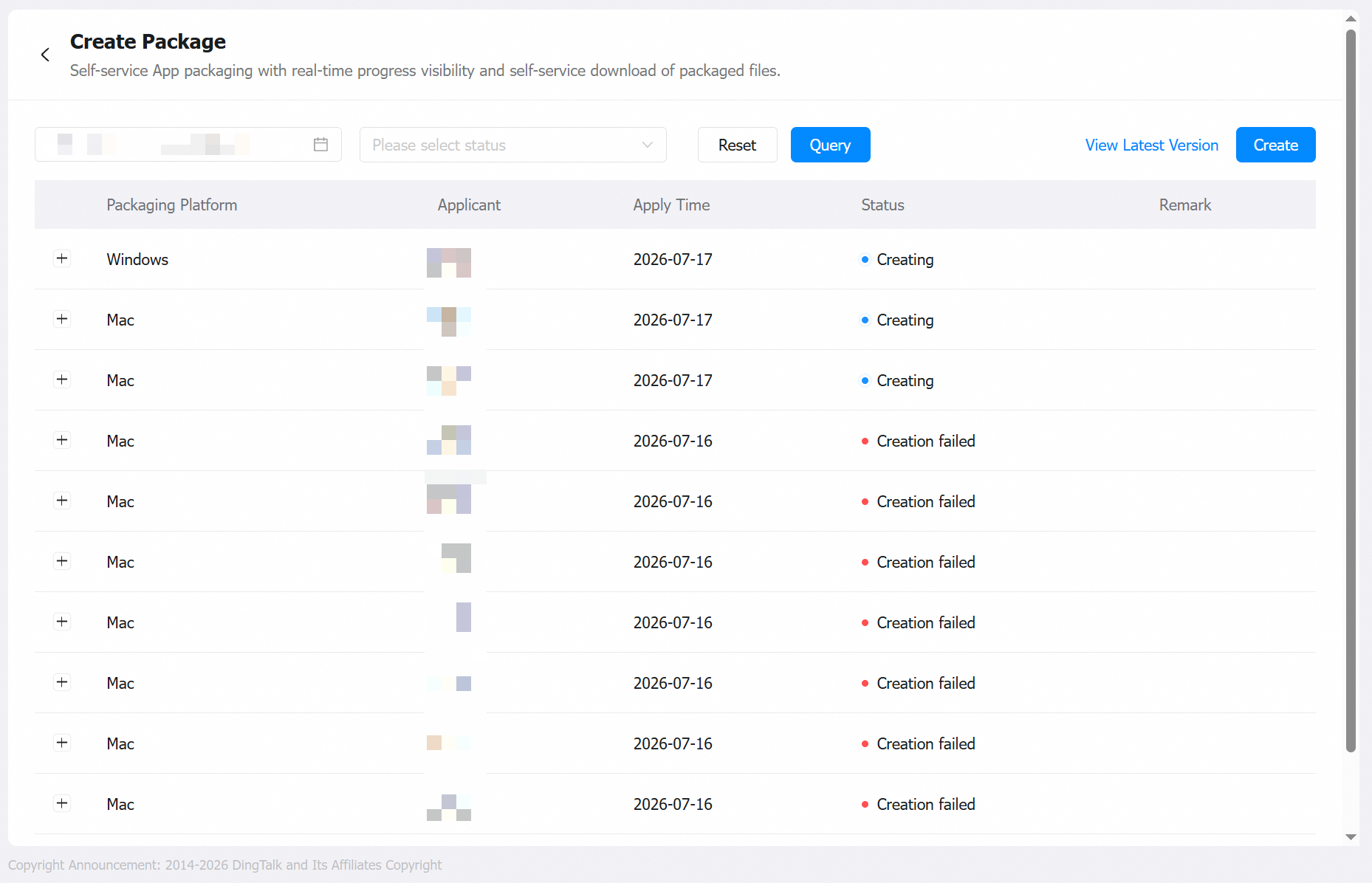
 * After submitting a packaging request, you can view the current packaging records and status. Upon successful creation, the administrator will be notified and can view the download link or QR code from the Admin Console for distribution.
* When the installation package involves multiple operating systems or architectures, multiple installation packages will be generated separately.
* After successful creation, click **View** to obtain the installation package link for the corresponding client.
* If creation fails, click **View** to see the failure reason and the associated operation logs.
* After submitting a packaging request, you can view the current packaging records and status. Upon successful creation, the administrator will be notified and can view the download link or QR code from the Admin Console for distribution.
* When the installation package involves multiple operating systems or architectures, multiple installation packages will be generated separately.
* After successful creation, click **View** to obtain the installation package link for the corresponding client.
* If creation fails, click **View** to see the failure reason and the associated operation logs.
 The packaging requirements vary by client type. Refer to the details below:
| Client | Estimated Packaging Time | Description |
| -------------- | ------------------------ | ----------------------------------------------------------------------------------------------------------------- |
| iOS (In-House) | 30 minutes | Packaging is subject to resource scheduling and may occasionally fail. If creation fails, try re-packaging first. |
| Android | 30 minutes | |
| Windows | Within 60 minutes | |
| Mac | Within 60 minutes | |
***
## III. Q\&A
**Prerequisites:** None
**Supported Scope:** No version dependency
**Enforcement Method:**
* Desktop: After setup is complete, employees whose primary organization is this enterprise can use the app after downloading and installing the created App.
* Mobile: After setup is complete, employees whose primary organization is this enterprise can use the app after downloading and installing the created App.
### Q1: Differences between ABM, UAD, and In-House packaging
| | In-House Distribution | Apple Business Management (ABM) | Unlisted App Distribution (UAD) — Recommended |
| ------------- | --------------------------------------------------------------------------------------------------------------------------------------------------------------------------------------------------------------------------------------------------------------------------------------------------- | -------------------------------------------------------------------------------------------------------------------------------------------------------------------------------------------------------------------------------------------------------------------------------------- | -------------------------------------------------------------------------------------------------------------------------------------------------------------------------------------------------------------------------------------------------------------------------------- |
| Overview | Can be distributed to any device — simply download and install via a URL. No App Store review required. Users must manually trust the app before use. | The app must be submitted to App Store Connect for review. It is not listed on the App Store; instead, it is linked to the organization's Apple Business Management account. After approval, users install it directly via redemption codes without needing to manually trust the app. | The app must be submitted to App Store Connect for review. It is not listed on the App Store. After approval, a public download link is enabled.[https://developer.apple.com/support/unlisted-app-distribution/](https://developer.apple.com/support/unlisted-app-distribution/) |
| Prerequisites | Organization must have an Apple Enterprise account(Apple has stopped accepting new Enterprise account applications since 2019) | Apply for a Company-level Developer account (\$99)Apply for an Apple Business Management account | Apply for a Company-level Developer account (\$99) |
| Features | 1. No Apple review required2. Short packaging cycle3. Quick and easy installation4. First-time installation requires manual app trust5. Can only prompt for updates — silent updates not supported | 1. No distribution limits, no expiration2. Requires Apple review — longer launch cycle3. Install via redemption codes or distribution platform4. Silent updates only | 1. Install via public download link — no redemption codes needed2. Supports overseas distribution3. No distribution limits, no expiration4. Requires Apple review — UAD requires separate application, longer launch cycle5. Silent updates only |
| Risks | 1. Apple enforces strict controls — certificates risk being revoked.2. **Certificates and P12 files must be renewed annually** (including but not limited to APNs, VoIP, etc.). Once expired, users cannot continue using the app. P12 files affect users' push notifications and VoIP call alerts. | Certificates and P12 files should be renewed annually (including but not limited to APNs, VoIP, etc.)Expiration impact: **App cannot be packaged or updated to new versions. P12 files affect users' push notifications.** | Certificates and P12 files should be renewed annually (including but not limited to APNs, VoIP, etc.)Expiration impact: **App cannot be packaged or updated to new versions. P12 files affect users' push notifications.** |
| Operations | Customer creates packaging certificates independently(3 P12 files, 11 provisioning profiles) | Customer creates packaging certificates independently(3 P12 files, 11 provisioning profiles) | Customer creates packaging certificates independently(3 P12 files, 11 provisioning profiles)Account holder must apply for UAD separately |
### Q2: Can the exclusive App be published on the App Store?
No. To avoid distribution risks associated with publishing on app marketplaces (especially the Apple App Store) and the risk of telecom resource resale, as well as the requirement for the delivered customer to establish an independent operating entity with full licensing and qualifications, exclusive Apps cannot be published on the App Store.
The packaging requirements vary by client type. Refer to the details below:
| Client | Estimated Packaging Time | Description |
| -------------- | ------------------------ | ----------------------------------------------------------------------------------------------------------------- |
| iOS (In-House) | 30 minutes | Packaging is subject to resource scheduling and may occasionally fail. If creation fails, try re-packaging first. |
| Android | 30 minutes | |
| Windows | Within 60 minutes | |
| Mac | Within 60 minutes | |
***
## III. Q\&A
**Prerequisites:** None
**Supported Scope:** No version dependency
**Enforcement Method:**
* Desktop: After setup is complete, employees whose primary organization is this enterprise can use the app after downloading and installing the created App.
* Mobile: After setup is complete, employees whose primary organization is this enterprise can use the app after downloading and installing the created App.
### Q1: Differences between ABM, UAD, and In-House packaging
| | In-House Distribution | Apple Business Management (ABM) | Unlisted App Distribution (UAD) — Recommended |
| ------------- | --------------------------------------------------------------------------------------------------------------------------------------------------------------------------------------------------------------------------------------------------------------------------------------------------- | -------------------------------------------------------------------------------------------------------------------------------------------------------------------------------------------------------------------------------------------------------------------------------------- | -------------------------------------------------------------------------------------------------------------------------------------------------------------------------------------------------------------------------------------------------------------------------------- |
| Overview | Can be distributed to any device — simply download and install via a URL. No App Store review required. Users must manually trust the app before use. | The app must be submitted to App Store Connect for review. It is not listed on the App Store; instead, it is linked to the organization's Apple Business Management account. After approval, users install it directly via redemption codes without needing to manually trust the app. | The app must be submitted to App Store Connect for review. It is not listed on the App Store. After approval, a public download link is enabled.[https://developer.apple.com/support/unlisted-app-distribution/](https://developer.apple.com/support/unlisted-app-distribution/) |
| Prerequisites | Organization must have an Apple Enterprise account(Apple has stopped accepting new Enterprise account applications since 2019) | Apply for a Company-level Developer account (\$99)Apply for an Apple Business Management account | Apply for a Company-level Developer account (\$99) |
| Features | 1. No Apple review required2. Short packaging cycle3. Quick and easy installation4. First-time installation requires manual app trust5. Can only prompt for updates — silent updates not supported | 1. No distribution limits, no expiration2. Requires Apple review — longer launch cycle3. Install via redemption codes or distribution platform4. Silent updates only | 1. Install via public download link — no redemption codes needed2. Supports overseas distribution3. No distribution limits, no expiration4. Requires Apple review — UAD requires separate application, longer launch cycle5. Silent updates only |
| Risks | 1. Apple enforces strict controls — certificates risk being revoked.2. **Certificates and P12 files must be renewed annually** (including but not limited to APNs, VoIP, etc.). Once expired, users cannot continue using the app. P12 files affect users' push notifications and VoIP call alerts. | Certificates and P12 files should be renewed annually (including but not limited to APNs, VoIP, etc.)Expiration impact: **App cannot be packaged or updated to new versions. P12 files affect users' push notifications.** | Certificates and P12 files should be renewed annually (including but not limited to APNs, VoIP, etc.)Expiration impact: **App cannot be packaged or updated to new versions. P12 files affect users' push notifications.** |
| Operations | Customer creates packaging certificates independently(3 P12 files, 11 provisioning profiles) | Customer creates packaging certificates independently(3 P12 files, 11 provisioning profiles) | Customer creates packaging certificates independently(3 P12 files, 11 provisioning profiles)Account holder must apply for UAD separately |
### Q2: Can the exclusive App be published on the App Store?
No. To avoid distribution risks associated with publishing on app marketplaces (especially the Apple App Store) and the risk of telecom resource resale, as well as the requirement for the delivered customer to establish an independent operating entity with full licensing and qualifications, exclusive Apps cannot be published on the App Store.