> ## Documentation Index
> Fetch the complete documentation index at: https://help.dingtalk.io/llms.txt
> Use this file to discover all available pages before exploring further.
# Online Document Control
> Manage online document security by controlling copy-paste, export, and sharing actions, and apply policies to specific employees or departments.
Organizations can manage operations related to online documents, including controlling actions such as copy-paste, export, and sharing.
***
## II. User Guide
### 1. Admin Console Navigation
In the left navigation pane, go to **Security & permission > Security > Data Protection > Online Document Control**
 ### 2. Administrator — No Rules Configured
Online Document Control includes multiple capabilities, covering both mobile and desktop clients and involving various document operations.
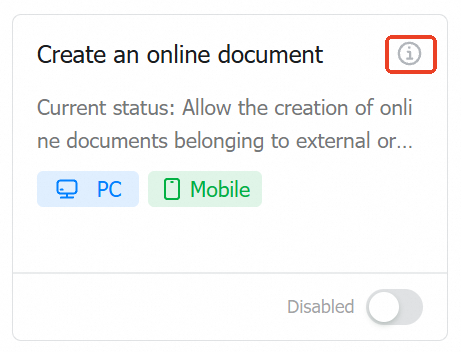
Taking "Create online document" as an example:
When disabled, the behavior is consistent with the default DingTalk experience.
### 2. Administrator — No Rules Configured
Online Document Control includes multiple capabilities, covering both mobile and desktop clients and involving various document operations.
Taking "Create online document" as an example:
When disabled, the behavior is consistent with the default DingTalk experience.
 ### 3. Administrator — Configuring Rules
Click the info icon to preview the effect of the card configuration.
### 3. Administrator — Configuring Rules
Click the info icon to preview the effect of the card configuration.
 Toggle the switch and click **Confirm** in the dialog to enable the feature.
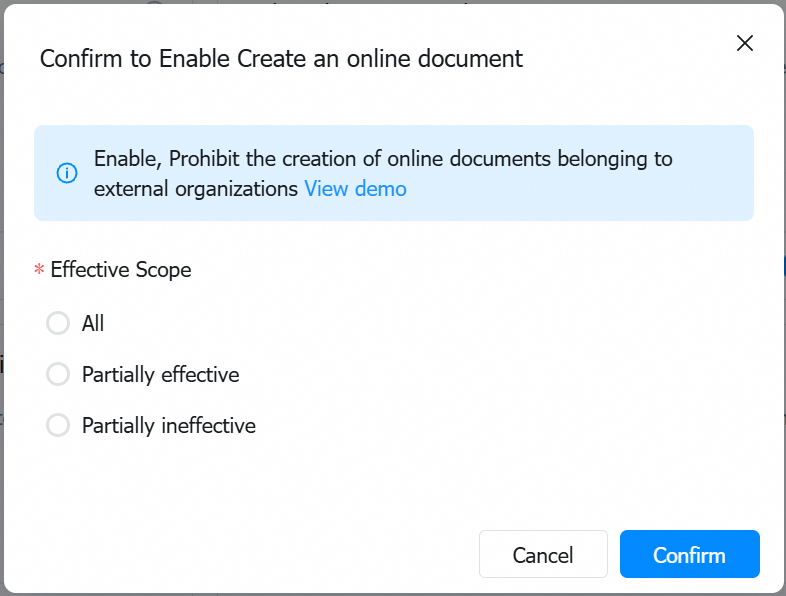 The feature applies to all employees by default.
Click **Edit** to configure the applicable scope — specify which employees the policy applies to or excludes.
For example, to apply the policy only to the Engineering Department, select **Specific Employees**, then use the contact picker to select the department.
The contact picker also supports selection by role, giving administrators flexibility to configure as needed.
### 4. Employee — Under Policy Enforcement
Taking "Prohibit the use of online documents" as an example: when an employee attempts to create an online document, they will see the prompt shown in the image.
The feature applies to all employees by default.
Click **Edit** to configure the applicable scope — specify which employees the policy applies to or excludes.
For example, to apply the policy only to the Engineering Department, select **Specific Employees**, then use the contact picker to select the department.
The contact picker also supports selection by role, giving administrators flexibility to configure as needed.
### 4. Employee — Under Policy Enforcement
Taking "Prohibit the use of online documents" as an example: when an employee attempts to create an online document, they will see the prompt shown in the image.
 ***
## III. Q\&A
| **Prerequisites** | Version 8.3.15 and above |
| ---------------------- | ----------------------------------------------- |
| **Supported Scope** | All four platforms (Windows, Mac, Android, iOS) |
| **Enforcement Method** | Takes effect immediately |
***
## III. Q\&A
| **Prerequisites** | Version 8.3.15 and above |
| ---------------------- | ----------------------------------------------- |
| **Supported Scope** | All four platforms (Windows, Mac, Android, iOS) |
| **Enforcement Method** | Takes effect immediately |


