> ## Documentation Index
> Fetch the complete documentation index at: https://help.dingtalk.io/llms.txt
> Use this file to discover all available pages before exploring further.

# 用查找记录发送组合字段通知

> 通过AI表格自动化流程，您可以将AI表格中的多行记录整合到一个消息卡片中，并发送给指定的人员或群组。

通过AI表格自动化流程，您可以将AI表格中的**多行记录整合到一个消息卡片中**，并发送给指定的人员或群组。

## 适用场景

* **多任务同步：** 通过自动化消息，将AI表格中分配给不同成员的多行任务记录汇总到一个消息卡片中，发送至群聊或个人，方便成员快速查看各自的任务安排。
* **数据预警：** 当数据表中多项数据到达设定值时，自动化可自动汇总这些记录，通过消息卡片发送给相关负责人。

## 例1:定时发送本周任务进度

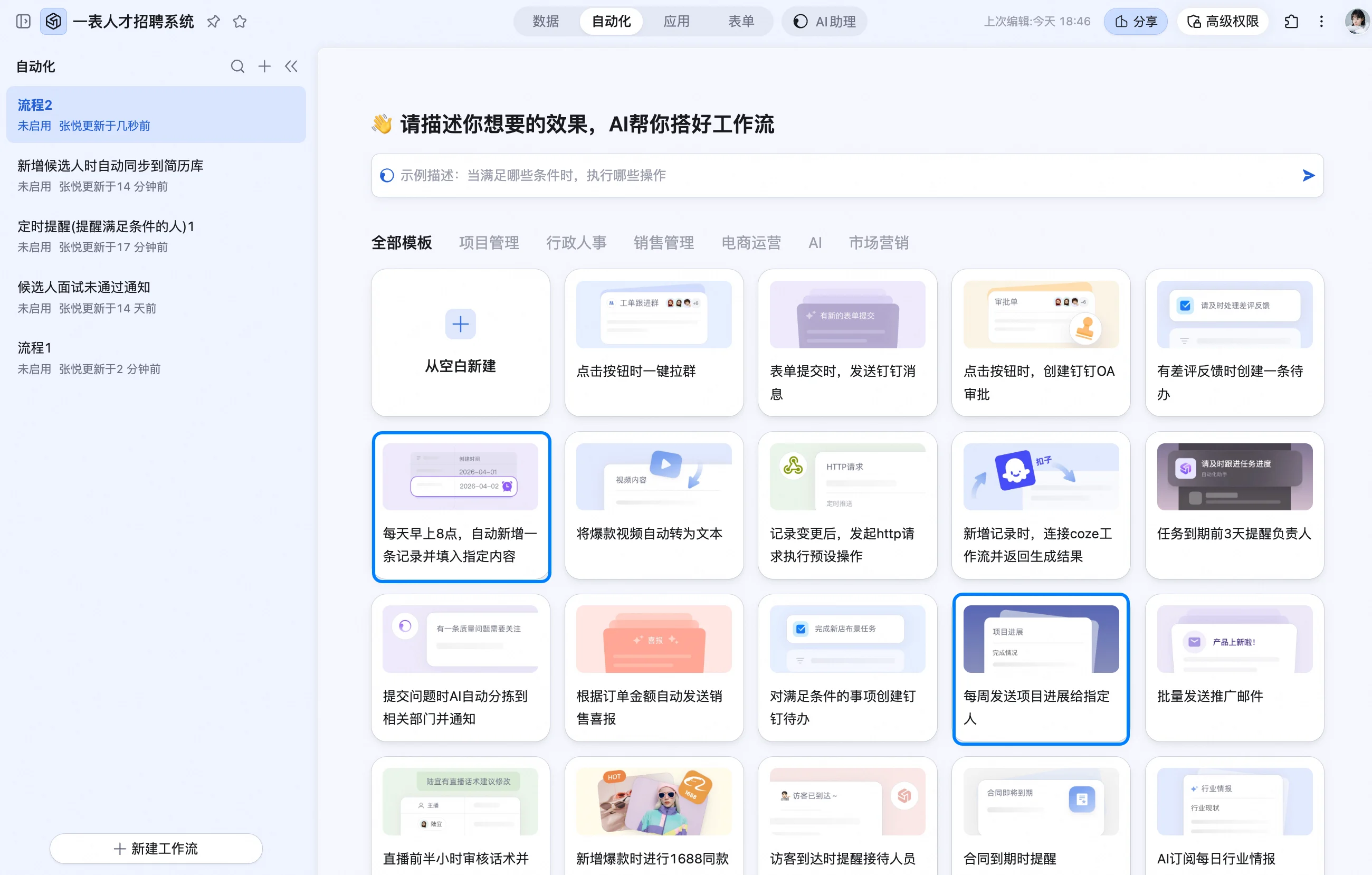
创建一个新的空白流程，或使用模版预设好的流程，进入自动化配置页面。

该自动化流程的核心步骤是“查找记录”，流程依次为：触发条件➡️查找记录➡️发送消息到指定用户或群

<img src="https://mintcdn.com/dingtalk-8c0f98e2/ibah_7iYMOhNKsx4/zh/aitable/automation/lookup-record-notification/images/image_DZK7idjAn0.png?fit=max&auto=format&n=ibah_7iYMOhNKsx4&q=85&s=a89481fb829a6a7f0df0e13ff833bec2" alt="" width="2600" height="1658" data-path="zh/aitable/automation/lookup-record-notification/images/image_DZK7idjAn0.png" />

### 配置“查找记录”执行动作

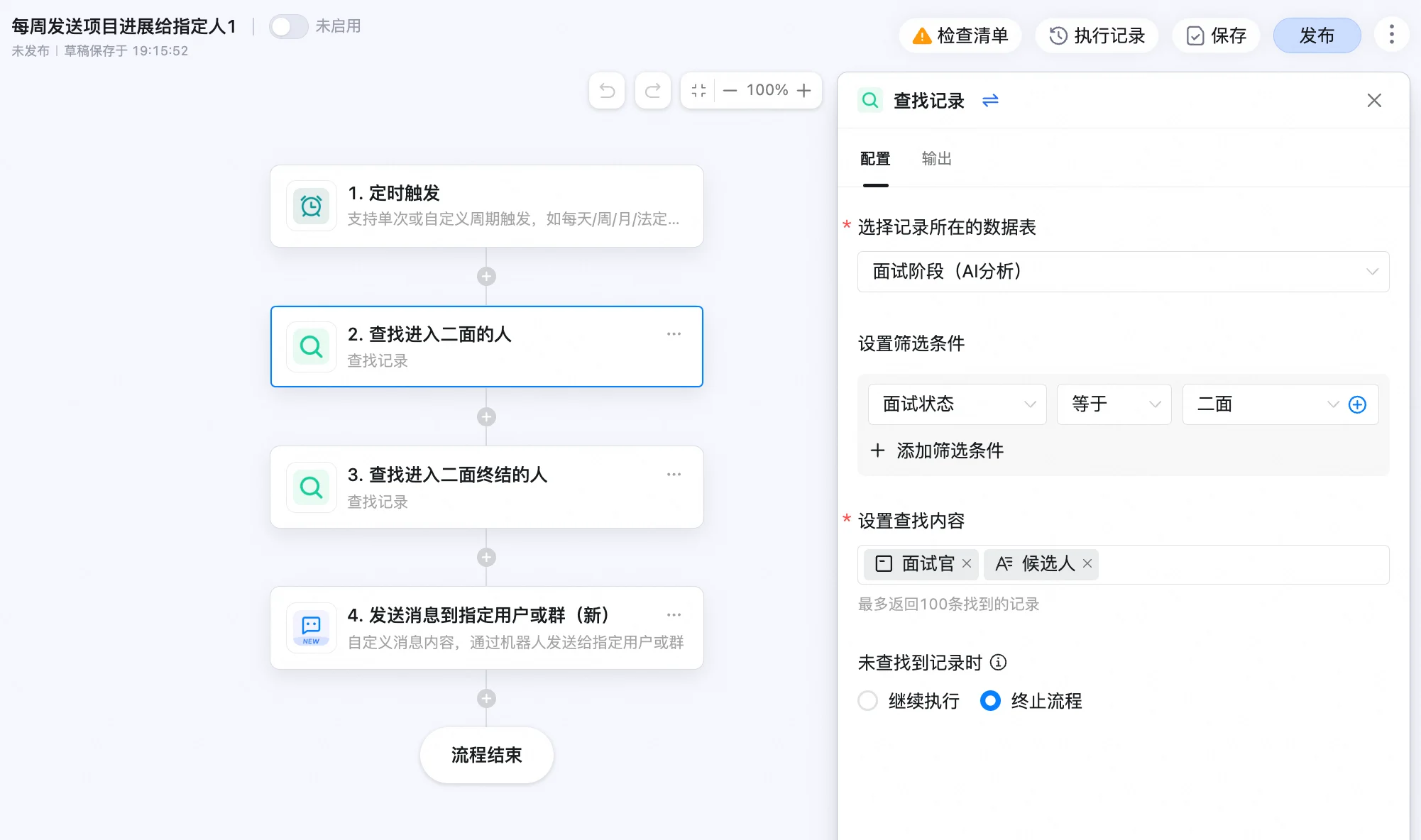
在发送多行记录前，必须先通过“查找记录”步骤来筛选出符合条件的记录，才能在后续的消息发送中引用这些记录的内容。具体操作包括：

* **设置筛选条件**：确定并找出满足特定条件的记录。
* **设置查找内容**：选择您希望在消息卡片中展示的字段。

如果未找到任何记录，选择**终止流程**。

<img src="https://mintcdn.com/dingtalk-8c0f98e2/ibah_7iYMOhNKsx4/zh/aitable/automation/lookup-record-notification/images/image_L9BC9BDODT.png?fit=max&auto=format&n=ibah_7iYMOhNKsx4&q=85&s=dd56acf598c9007c5b6b66989560f01a" alt="" width="2002" height="1184" data-path="zh/aitable/automation/lookup-record-notification/images/image_L9BC9BDODT.png" />

### 配置“发送消息到指定用户或群”执行动作

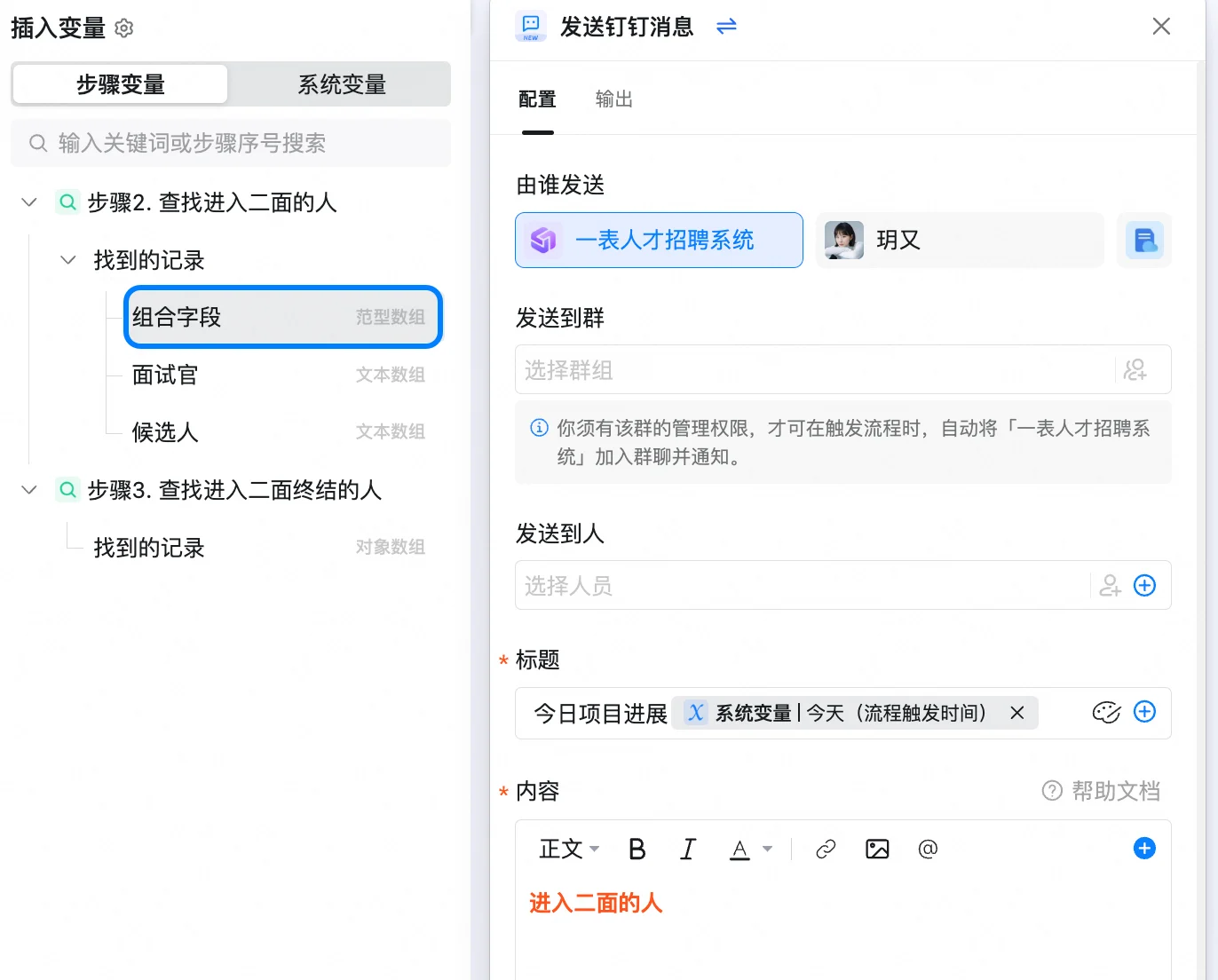
您可以选择多个人员或群组作为消息接收者，并自定义消息卡片的标题和内容。

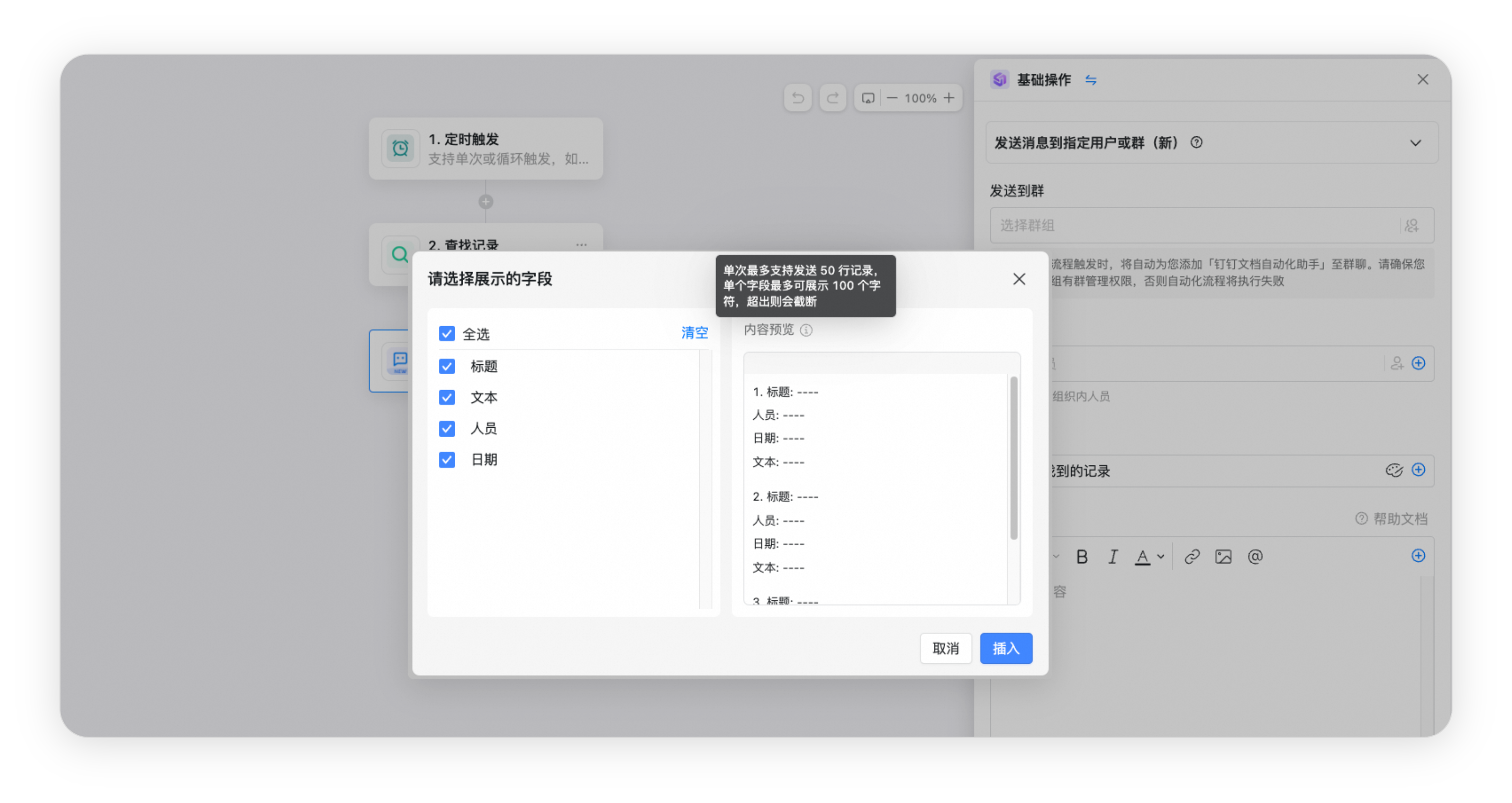
在编辑内容时，通过点击\*\*⊕\*\*图标引用前一步查找的结果，既可以选择单个字段，也可以选择组合字段。

<img src="https://mintcdn.com/dingtalk-8c0f98e2/ibah_7iYMOhNKsx4/zh/aitable/automation/lookup-record-notification/images/image_jmapVmXsYv.png?fit=max&auto=format&n=ibah_7iYMOhNKsx4&q=85&s=88eed3faee15c029a1d973780a4bd8b2" alt="" width="1372" height="1104" data-path="zh/aitable/automation/lookup-record-notification/images/image_jmapVmXsYv.png" />

<img src="https://mintcdn.com/dingtalk-8c0f98e2/ibah_7iYMOhNKsx4/zh/aitable/automation/lookup-record-notification/images/image_pUWTTnLAkw.png?fit=max&auto=format&n=ibah_7iYMOhNKsx4&q=85&s=d6c8e9a8a34a0f14d50c7cf420c2c6b8" alt="" width="1170" height="786" data-path="zh/aitable/automation/lookup-record-notification/images/image_pUWTTnLAkw.png" />

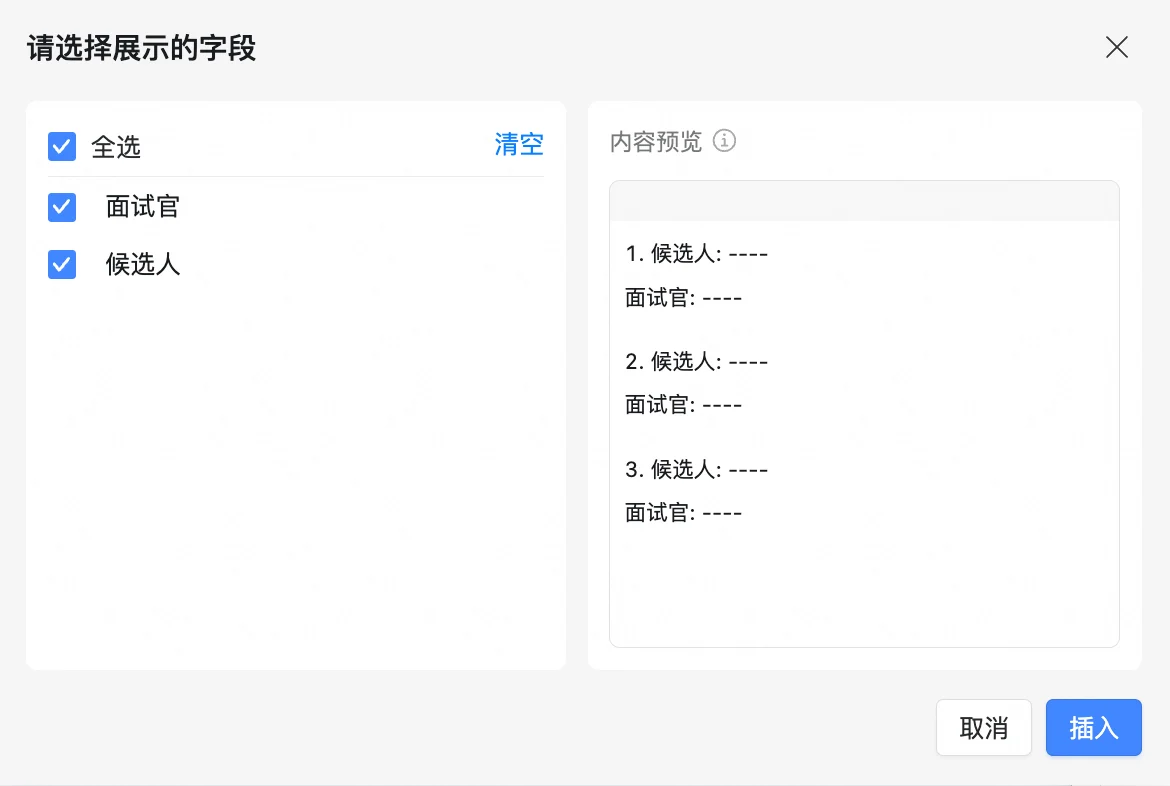
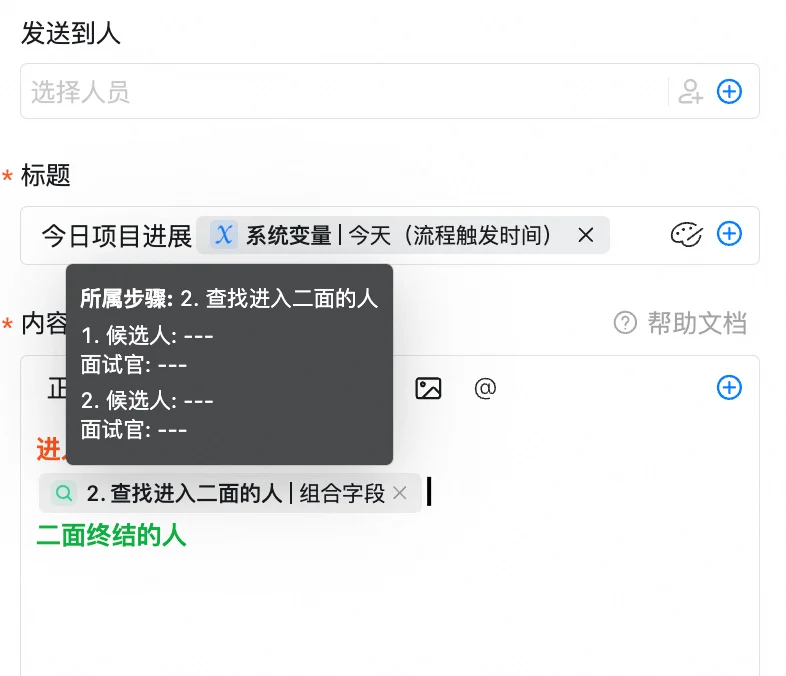
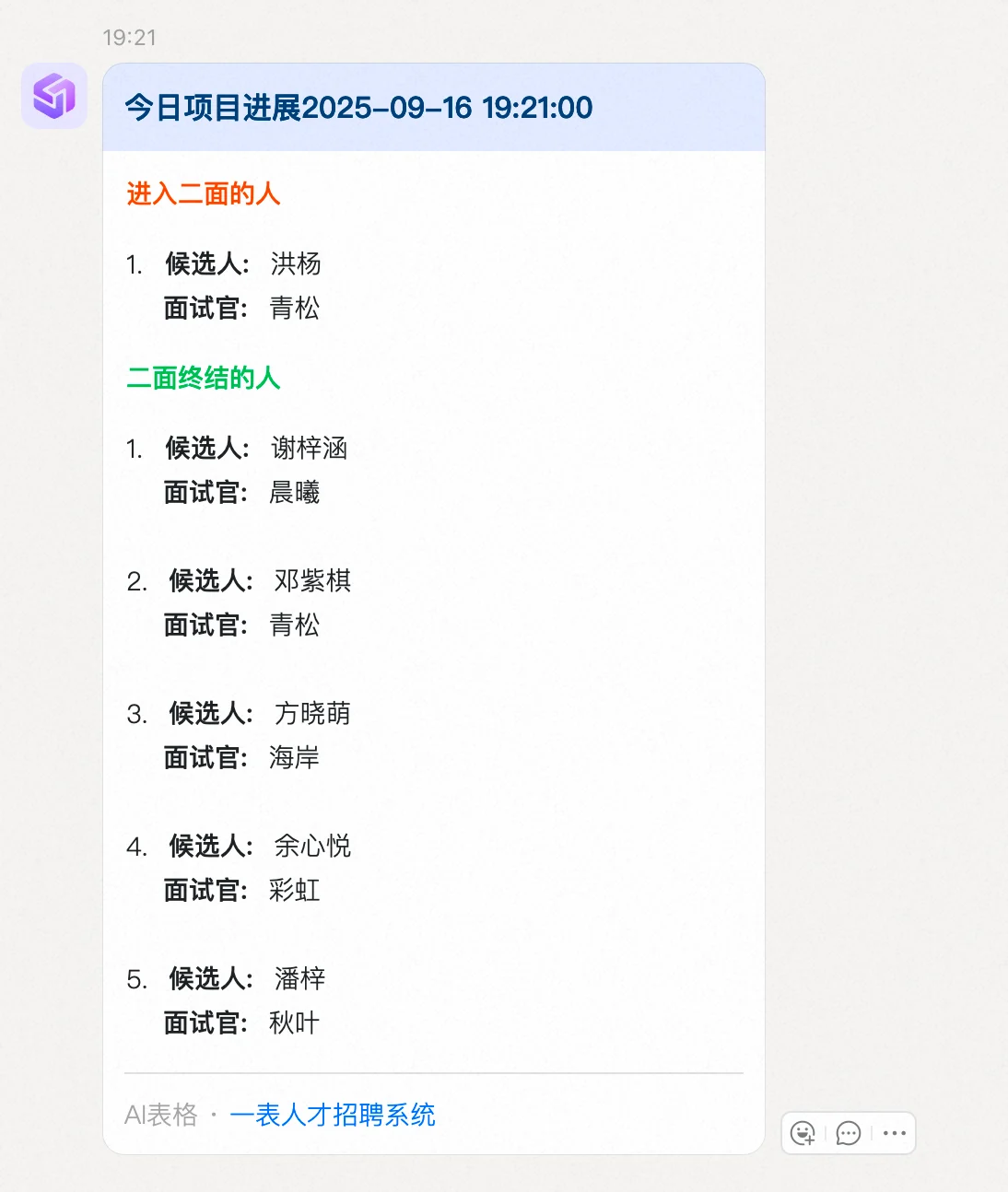
当选择组合字段时，您勾选字段的顺序将决定这些字段在消息卡片上的展示顺序，右侧预览会实时更新以反映当前的选择顺序。将鼠标悬停在引用内容上，也可以查看顺序预览。

<img src="https://mintcdn.com/dingtalk-8c0f98e2/ibah_7iYMOhNKsx4/zh/aitable/automation/lookup-record-notification/images/image_FT3YilrsKX.png?fit=max&auto=format&n=ibah_7iYMOhNKsx4&q=85&s=6cf404400d7220e57e4fc0a7fff2cb67" alt="" width="786" height="676" data-path="zh/aitable/automation/lookup-record-notification/images/image_FT3YilrsKX.png" />

<img src="https://mintcdn.com/dingtalk-8c0f98e2/ibah_7iYMOhNKsx4/zh/aitable/automation/lookup-record-notification/images/image_u9-V5P1rk4.png?fit=max&auto=format&n=ibah_7iYMOhNKsx4&q=85&s=5fd2cf5c7ed735a8a53bf0a45ee2d936" alt="" width="1094" height="1294" data-path="zh/aitable/automation/lookup-record-notification/images/image_u9-V5P1rk4.png" />

## 常见问题

#### **问：发送多行记录时，为什么会有显示不完整？**

答：需要注意，发送的内容行数不能超过50行，单个字段最多只展示100个字符。

<img src="https://mintcdn.com/dingtalk-8c0f98e2/xO03NH38rdRn13UM/zh/aitable/automation/lookup-record-notification/images/basil-cobalt.png?fit=max&auto=format&n=xO03NH38rdRn13UM&q=85&s=4f08d4db6670b7905dc79ae50b7d8511" alt="" width="3049" height="1620" data-path="zh/aitable/automation/lookup-record-notification/images/basil-cobalt.png" />