> ## Documentation Index
> Fetch the complete documentation index at: https://help.dingtalk.io/llms.txt
> Use this file to discover all available pages before exploring further.

# 在消息卡片上添加按钮

> 自动化流程中，执行动作「发送消息到指定用户或群」时，可以在消息卡片底部添加按钮，信息接收者可通过按钮直接在消息卡片中完成链接跳转或触发自动化流程，提升交互效率。

## 功能介绍

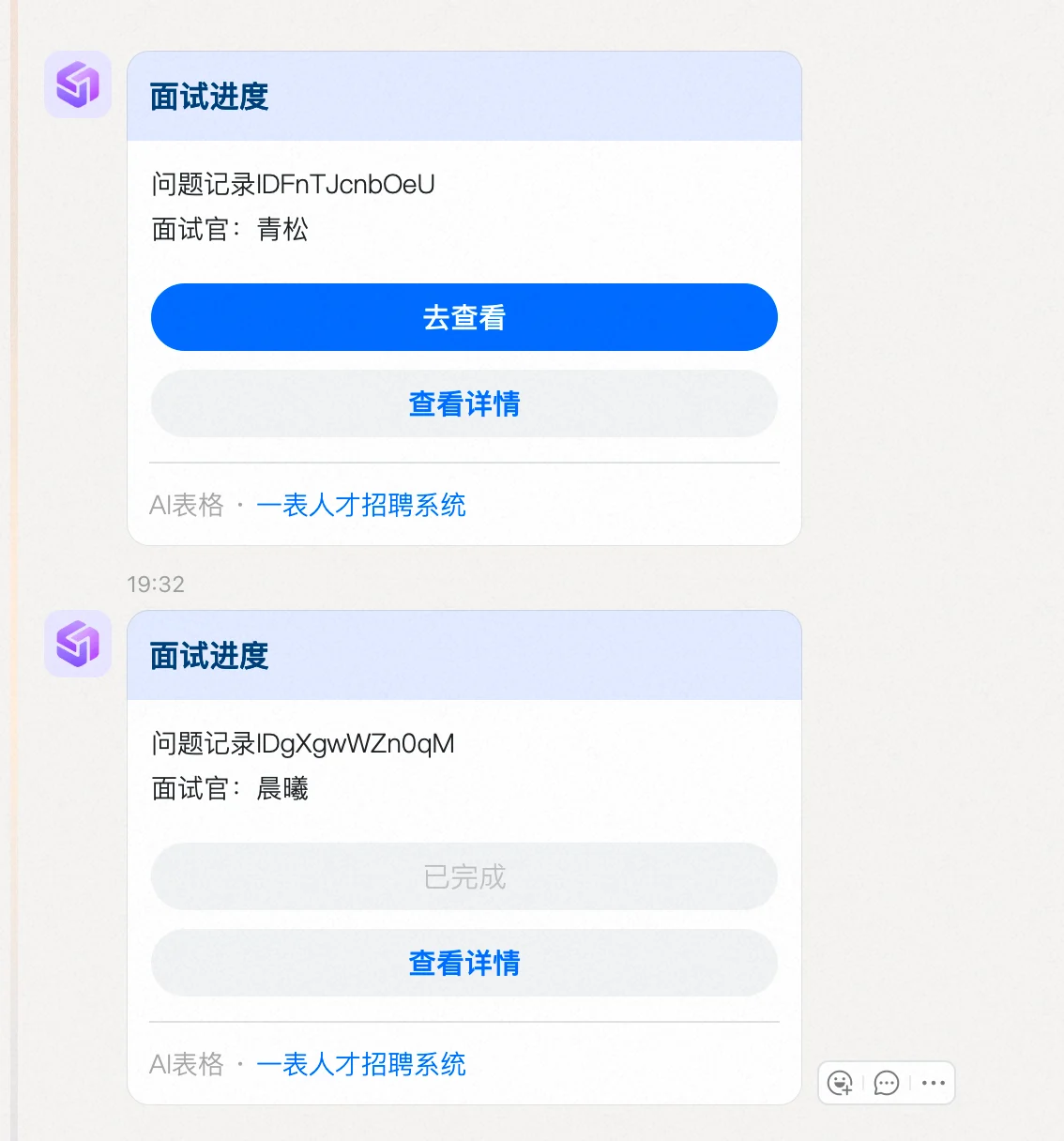
自动化流程中，执行动作「**发送消息到指定用户或群**」时，可以在消息卡片**底部添加按钮**，信息接收者可通过按钮直接在消息卡片中完成**链接跳转**或**触发自动化流程**，提升交互效率。

## 使用方法

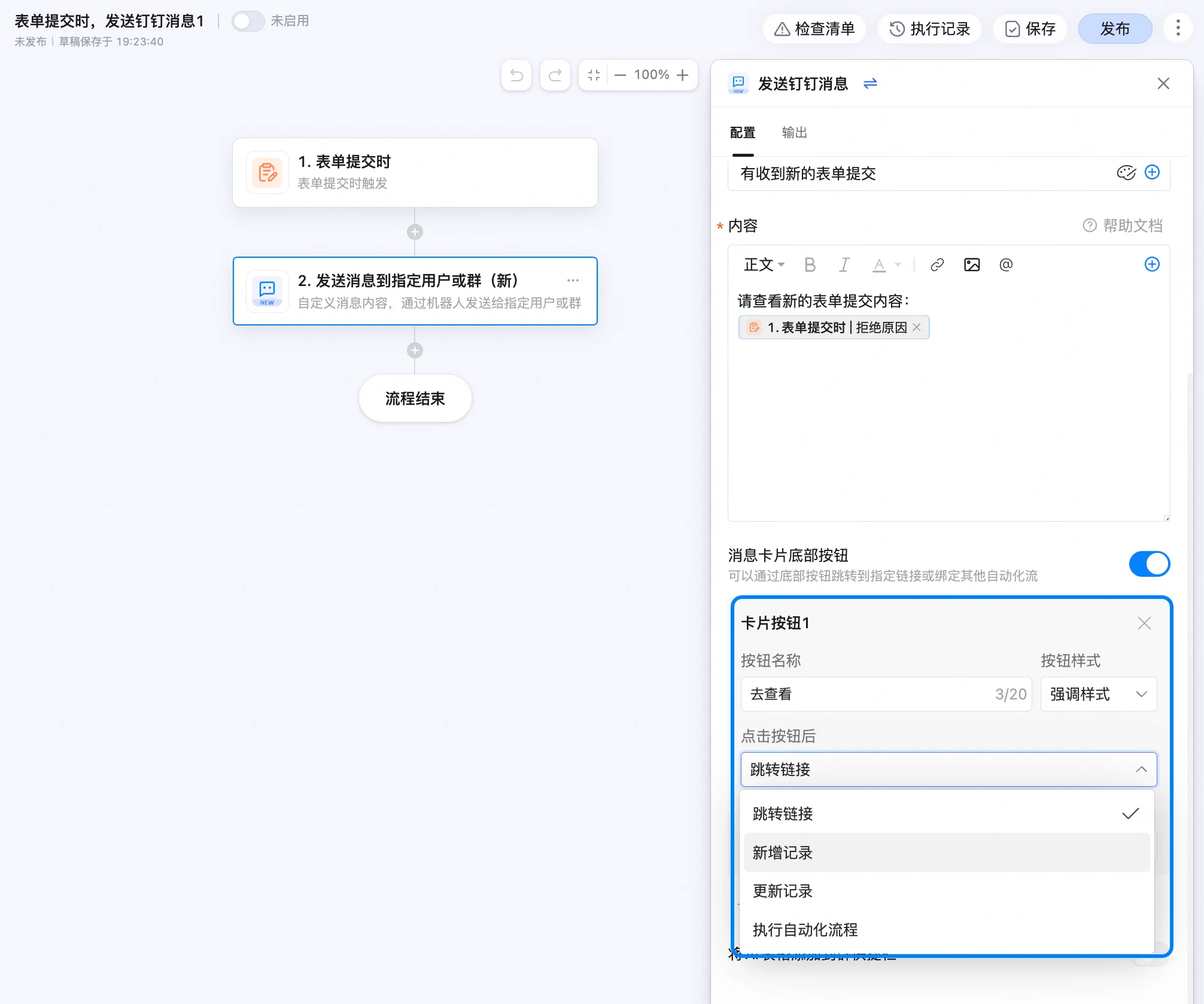
创建一个自动化流程，配置触发条件后，选择执行动作「**发送消息到指定用户或群**」，在右侧配置页面的最下方“添加按钮”。

<img src="https://mintcdn.com/dingtalk-8c0f98e2/ibah_7iYMOhNKsx4/zh/aitable/automation/message-card-buttons/images/image_Z-2A05z3rt.png?fit=max&auto=format&n=ibah_7iYMOhNKsx4&q=85&s=e5e4bc4a6aa4be7bec15e0b6e0918219" alt="" width="2012" height="1678" data-path="zh/aitable/automation/message-card-buttons/images/image_Z-2A05z3rt.png" />

<img src="https://mintcdn.com/dingtalk-8c0f98e2/ibah_7iYMOhNKsx4/zh/aitable/automation/message-card-buttons/images/image_rbdZDIHtd0.png?fit=max&auto=format&n=ibah_7iYMOhNKsx4&q=85&s=b0e8f15a04e75f43a2ea42b571c24024" alt="" width="1134" height="1216" data-path="zh/aitable/automation/message-card-buttons/images/image_rbdZDIHtd0.png" />

### 配置底部按钮

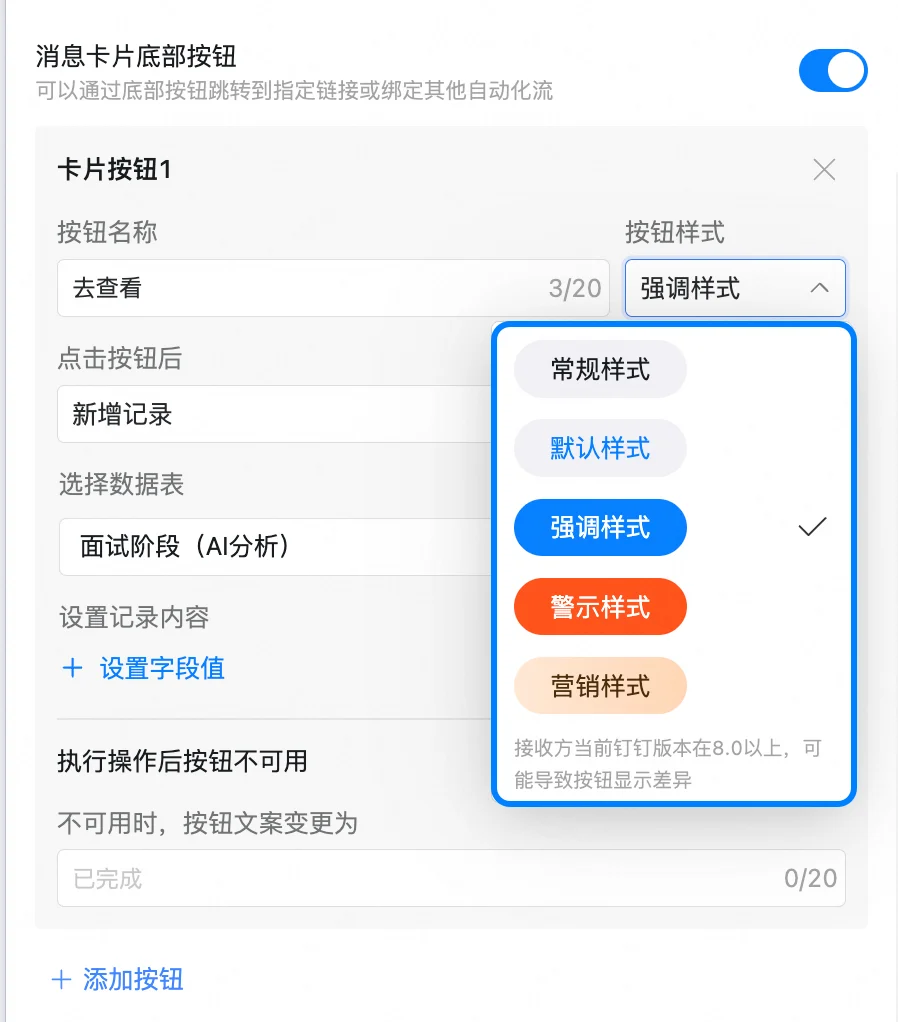
按钮支持配置：

* **按钮文字：** 自定义按钮上显示的文本内容。
* **按钮样式：** 提供“默认”、“强调”和“警示”三种样式选择。
* **点击按钮后：** 提供“跳转链接”和“执行自动化流程”两种操作。

<img src="https://mintcdn.com/dingtalk-8c0f98e2/ibah_7iYMOhNKsx4/zh/aitable/automation/message-card-buttons/images/image_NjecxmcEmj.png?fit=max&auto=format&n=ibah_7iYMOhNKsx4&q=85&s=bcffda515fdd941c7cb48ef301fe20a3" alt="" width="898" height="1022" data-path="zh/aitable/automation/message-card-buttons/images/image_NjecxmcEmj.png" />

### 点击按钮后的触发动作

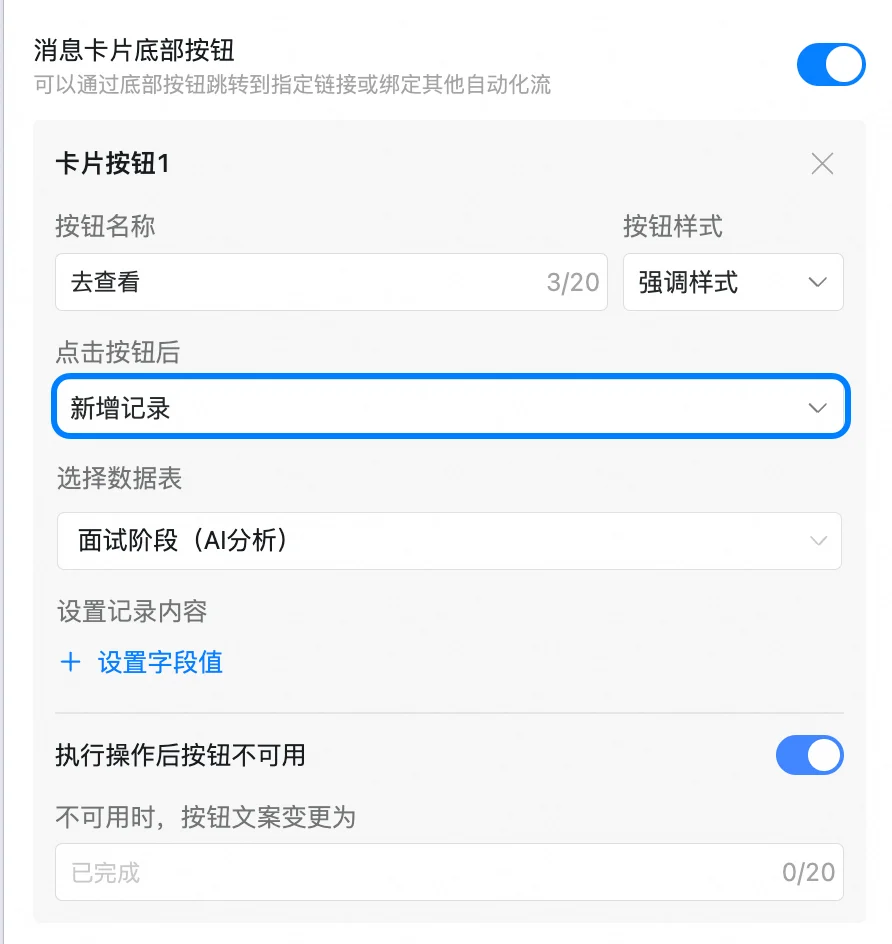
#### 新增记录

通过点击按钮跳转到指定的页面。

链接地址支持输入超链接，也可以插入AI表格的相关变量，如各个字段、系统变量等。

可设置按钮仅可点击一次

<img src="https://mintcdn.com/dingtalk-8c0f98e2/ibah_7iYMOhNKsx4/zh/aitable/automation/message-card-buttons/images/image_GpIT0xgGp_.png?fit=max&auto=format&n=ibah_7iYMOhNKsx4&q=85&s=1569b08420e2818d642ad8fedd081331" alt="" width="892" height="944" data-path="zh/aitable/automation/message-card-buttons/images/image_GpIT0xgGp_.png" />

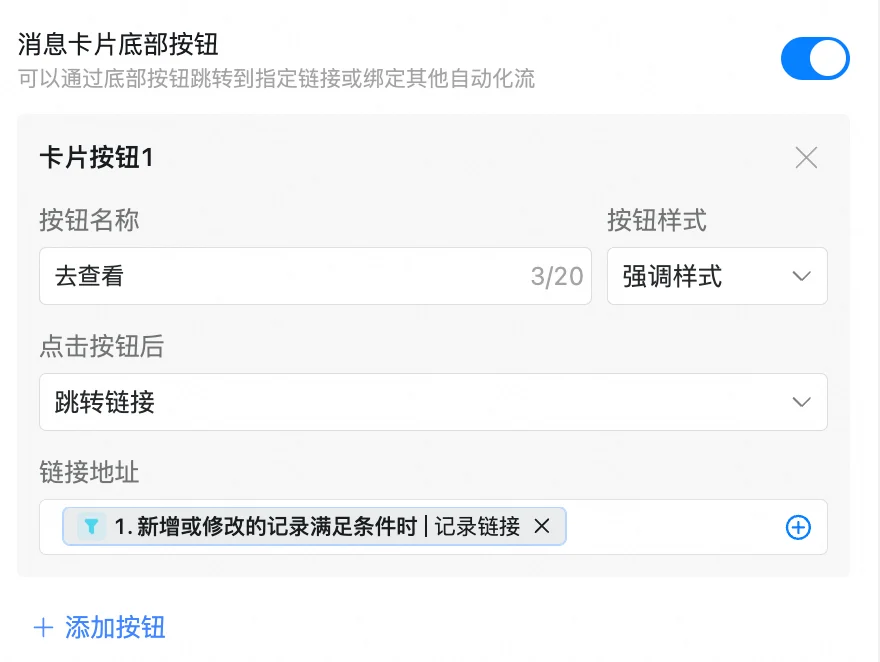
#### 跳转链接

通过点击按钮跳转到指定的页面。

链接地址支持输入超链接，也可以插入AI表格的相关变量，如各个字段、系统变量等。

不可设置按钮仅可点击一次

<img src="https://mintcdn.com/dingtalk-8c0f98e2/ibah_7iYMOhNKsx4/zh/aitable/automation/message-card-buttons/images/image_aeAGav7woL.png?fit=max&auto=format&n=ibah_7iYMOhNKsx4&q=85&s=e401a678788bef859b330d491a0142ef" alt="" width="880" height="662" data-path="zh/aitable/automation/message-card-buttons/images/image_aeAGav7woL.png" />

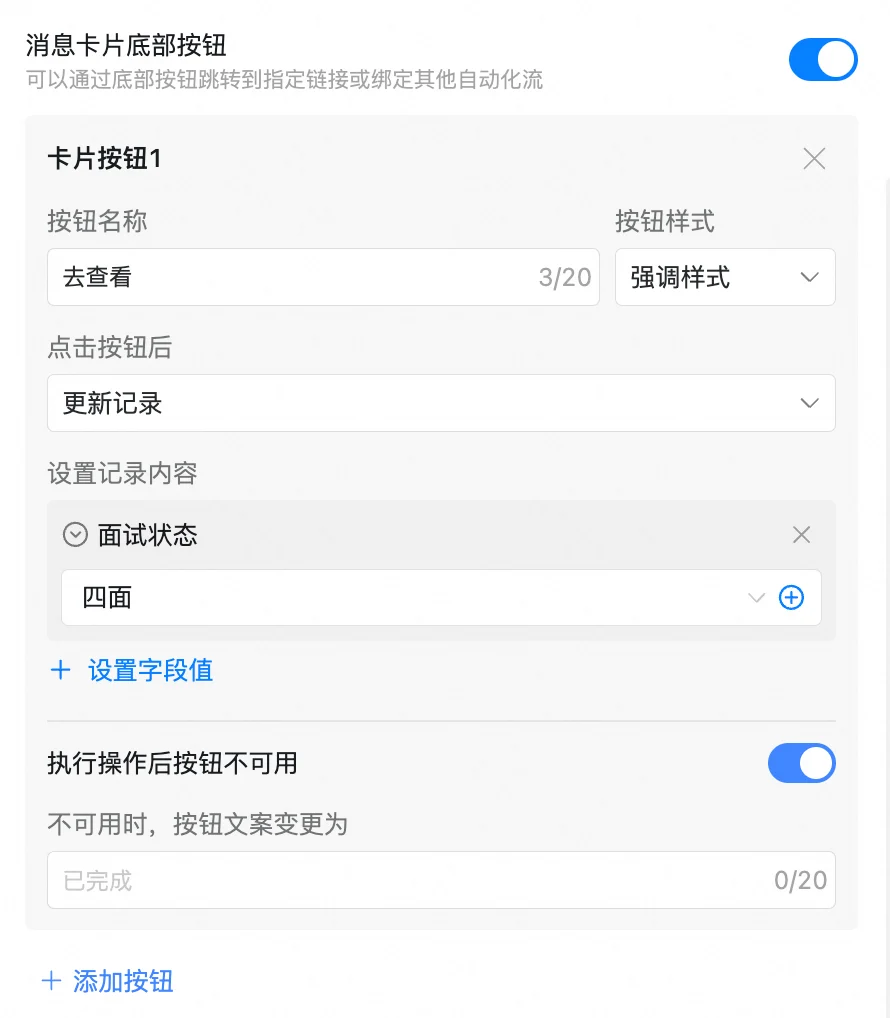
#### 更新记录

通过点击按钮可更新记录到数据表

可设置按钮仅可点击一次

<img src="https://mintcdn.com/dingtalk-8c0f98e2/ibah_7iYMOhNKsx4/zh/aitable/automation/message-card-buttons/images/image_lBTY1pd3O-.png?fit=max&auto=format&n=ibah_7iYMOhNKsx4&q=85&s=4e0d5068184dd231aab99b60be2778bc" alt="" width="890" height="1018" data-path="zh/aitable/automation/message-card-buttons/images/image_lBTY1pd3O-.png" />

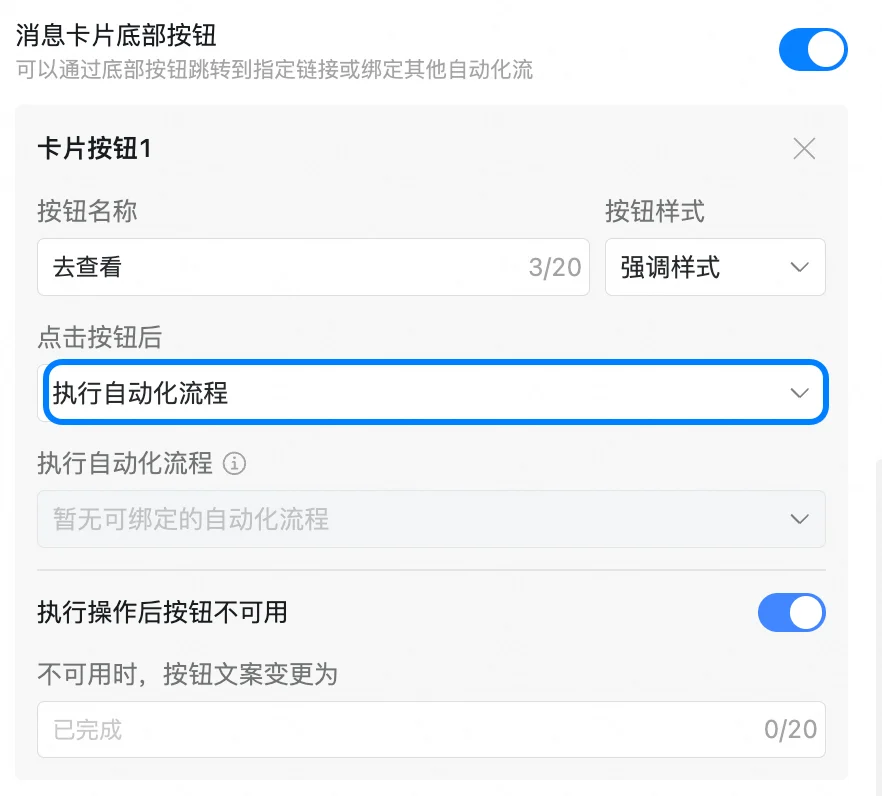
#### 执行自动化流程

通过点击按钮触发其他自动化流程。

**需要注意：**

* 可绑定的自动化流程必须是以“点击按钮时”为触发条件的。
* 可绑定的自动化流程必须是已配置好且开启的。

具体的按钮字段配置请参照[按钮](/zh/aitable/fields/field-types/button)。
<img src="https://mintcdn.com/dingtalk-8c0f98e2/ibah_7iYMOhNKsx4/zh/aitable/automation/message-card-buttons/images/image_ZYaxY7ccwH.png?fit=max&auto=format&n=ibah_7iYMOhNKsx4&q=85&s=b8168a775a8afd3fd01158171df76eb7" alt="" width="882" height="796" data-path="zh/aitable/automation/message-card-buttons/images/image_ZYaxY7ccwH.png" />

## 常见问题

* **问：一个消息卡片中最多可以添加几个按钮？**

  答：最多3个。
* **问：配置链接跳转后为什么会运行失败？**

  答：插入的链接要确保为正确的链接格式，否则可能会导致运行失败。