> ## Documentation Index
> Fetch the complete documentation index at: https://help.dingtalk.io/llms.txt
> Use this file to discover all available pages before exploring further.
# 考勤申诉
> 钉钉考勤安全增强版申诉能力介绍:设置「识别作弊禁止打卡」后员工被误拦可拍照发起申诉,管理员审核通过后打卡生效,附员工与管理员操作路径。
申诉是考勤安全增强版的能力。购买增强版并设置「识别作弊禁止打卡」后,员工打卡作弊就会被拦截;此时员工如果觉得是误拦,可以发起申诉,**管理员审核通过后此次打卡就会生效**。
## 员工使用路径
打卡被拦截后,员工可点击 **申诉** 按钮,拍照并填写申诉理由后,选择某个管理员发送给对方。
 ## 管理员使用路径
收到员工发来的卡片后,点击 **处理** 进入详情页,选择 **同意** 或 **拒绝** 申诉。
## 管理员使用路径
收到员工发来的卡片后,点击 **处理** 进入详情页,选择 **同意** 或 **拒绝** 申诉。
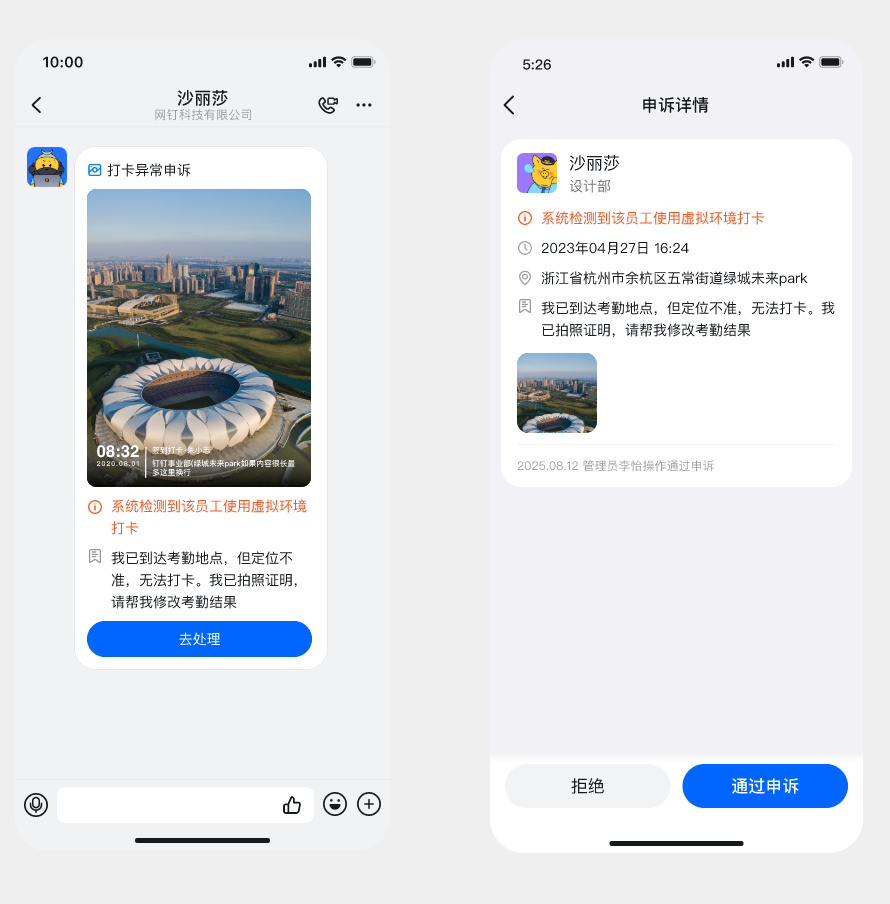 主动进入 **考勤打卡 → 统计 → 防作弊 → 申诉记录**,查看所有申诉记录,包括待处理和历史已处理的。
