> ## Documentation Index
> Fetch the complete documentation index at: https://help.dingtalk.io/llms.txt
> Use this file to discover all available pages before exploring further.
# 自动对班匹配
> 钉钉考勤自动对班匹配案例:支持「根据上班打卡时间匹配」与「根据上班和下班打卡时间匹配」两种方式,适配倒班、跨天班及非跨天班的自动排班场景。
自动对班功能有「根据上班打卡时间匹配」和「根据上班和下班打卡时间匹配」两种方式,具体案例如下。
## 一、根据上班打卡时间匹配
根据员工 **第 1 次上班打卡** 匹配班次,适用于倒班、跨天班。
**示例:** 考勤组内有白班 8:00–20:00、夜班 20:00–次日 8:00,自动对班时段设置为上班前 2 小时。则员工 06:00–08:00 上班打卡,自动对班结果为白班;18:00–20:00 上班打卡,自动对班结果为夜班。
 ## 二、根据上班和下班打卡时间匹配
根据员工 **第 1 次和最后 1 次打卡** 匹配班次,适用于上班时间相同的非跨天班。
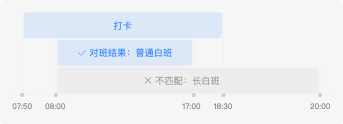
**示例:** 考勤组内有长白班 8:00–20:00、普通白班 8:00–17:00,员工当天打卡时间为 7:50 和 18:30,则自动对班结果为普通白班。
## 二、根据上班和下班打卡时间匹配
根据员工 **第 1 次和最后 1 次打卡** 匹配班次,适用于上班时间相同的非跨天班。
**示例:** 考勤组内有长白班 8:00–20:00、普通白班 8:00–17:00,员工当天打卡时间为 7:50 和 18:30,则自动对班结果为普通白班。