> ## Documentation Index
> Fetch the complete documentation index at: https://help.dingtalk.io/llms.txt
> Use this file to discover all available pages before exploring further.
# 隐藏网格
> 在表格处理中,为了使表格的呈现效果干净整洁,通常可使用隐藏表格的功能,将工作表以外的表格框线暂时隐藏。
在表格处理中,为了使表格的呈现效果干净整洁,通常可使用隐藏表格的功能,将工作表以外的表格框线暂时隐藏。
| |
| ---------------------------------------------------------------------------------------------------------------------------------------------------------------------------- |
|  |
| |
## 操作说明
## 如何隐藏网格
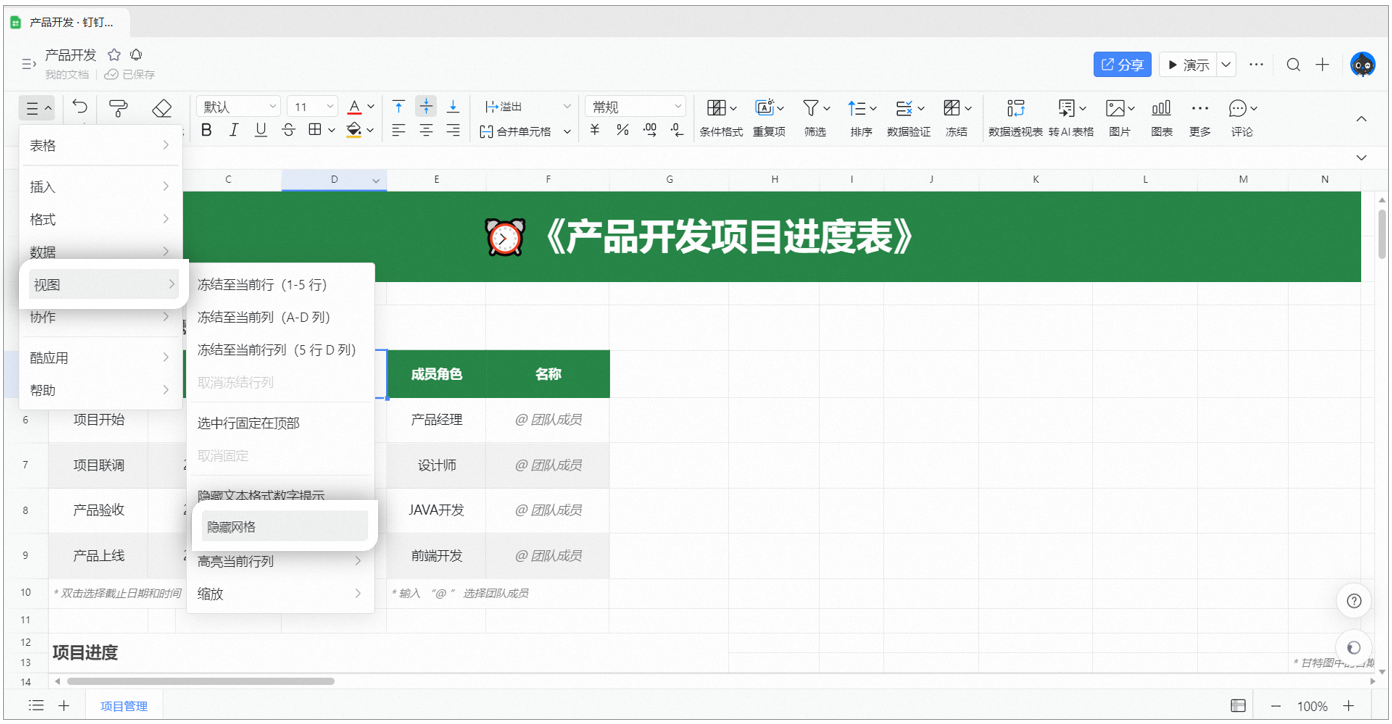
选中工作表的任意单元格,点击顶部导航栏菜单—>视图—>隐藏网格即可
## 如何取消网格隐藏
选中工作表的某个单元格,点击顶部导航栏菜单—>视图—>显示网格即可
***
|
| |
## 操作说明
## 如何隐藏网格
选中工作表的任意单元格,点击顶部导航栏菜单—>视图—>隐藏网格即可
## 如何取消网格隐藏
选中工作表的某个单元格,点击顶部导航栏菜单—>视图—>显示网格即可
***