> ## Documentation Index
> Fetch the complete documentation index at: https://help.dingtalk.io/llms.txt
> Use this file to discover all available pages before exploring further.
# 如何开启共享屏幕?
> 会中共享整个屏幕、单个窗口或局部区域,支持注释、共享音频、主讲人在参与者间切换。
屏幕共享是会议中常用的功能,参会人可以 **一键共享桌面**、分享课程或文件等,为 **远程会议** 带来极大的便利。
***
## 电脑端开启共享屏幕
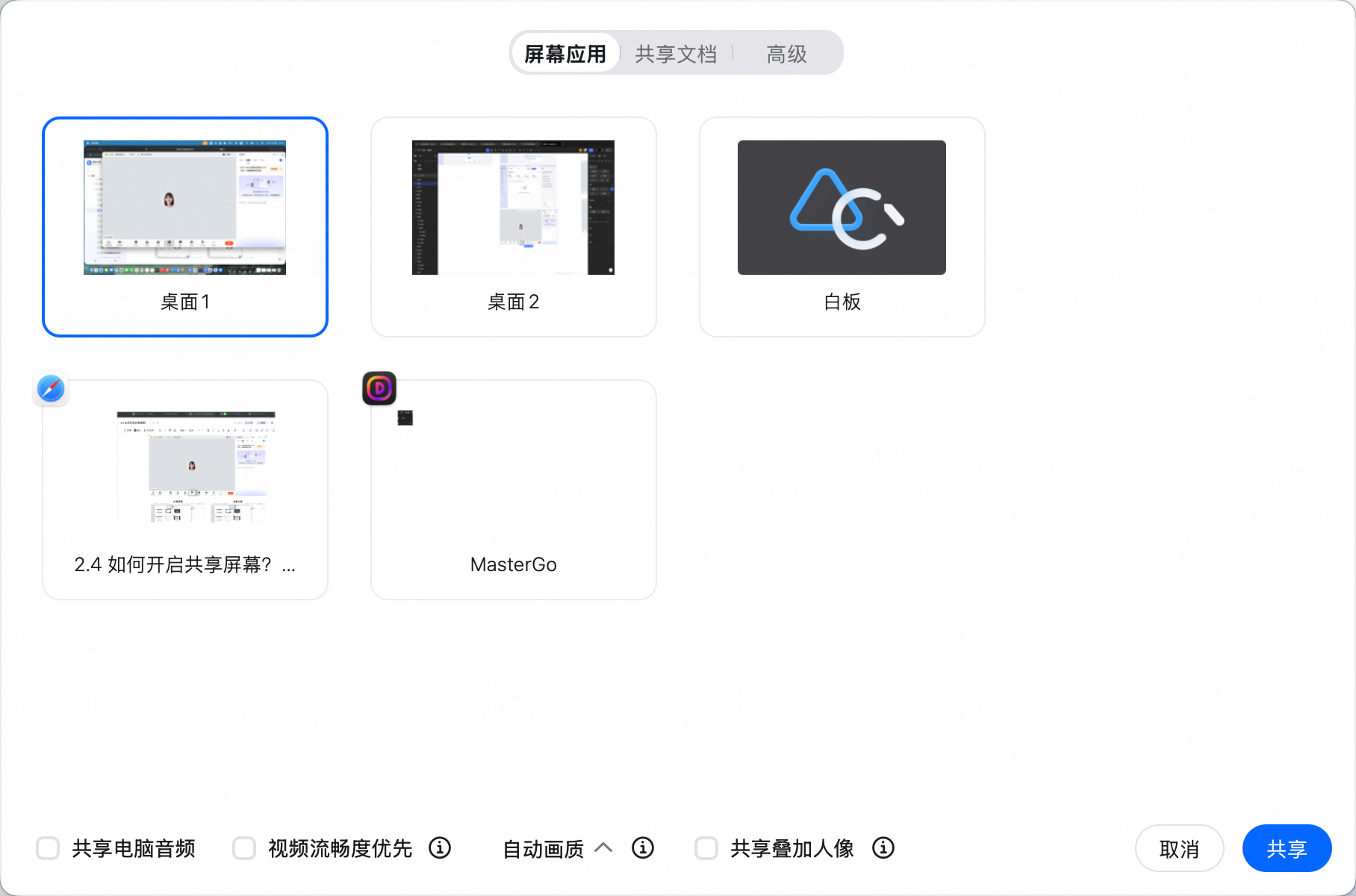
PC端 **会议进行** 界面>>单击屏幕下方菜单栏中的 **共享** 图标,进入共享面板。有如下两种共享模式可供选择:
* **共享桌面**:与参会成员共享当前桌面的内容 ,可以选择想要共享的窗口或者桌面。也可以选择共享 **白板;**
* **共享文档**:共享选中的钉钉文档,支持文档协同编辑、切换自由浏览与跟随双模式。具体功能介绍可见[**如何使用共享文档?**](https://docs.dingtalk.io/i/p/Y7kmbokZp3pgGLq2/docs/ZX6GRezwJl7DpGYesb90qEQ0VdqbropQ?dontjump=true\&utm_source=dingdoc_doc\&utm_medium=dingdoc_doc_plugin_url)
可以选择共享的配置:
* **共享电脑音频**:在进行共享桌面时,可选择是否共享电脑音频,共享音频后,参会人可听到共享人电脑发出的声音;
* **视频流畅度优先**:共享内容中有播放视频文件时,可勾选此选项以提升流畅度。
开启桌面共享功能后,所有成员都能观看到共享的内容

**共享屏幕**
**共享文档**

### 共享工具条功能
共享屏幕时,会在屏幕上方显示 **工具条**,支持以下功能:
**移动工具条**:可以通过拖动最左侧的
**共享** 图标,进入共享面板。有如下两种共享模式可供选择:
* **共享桌面**:与参会成员共享当前桌面的内容 ,可以选择想要共享的窗口或者桌面。也可以选择共享 **白板;**
* **共享文档**:共享选中的钉钉文档,支持文档协同编辑、切换自由浏览与跟随双模式。具体功能介绍可见[**如何使用共享文档?**](https://docs.dingtalk.io/i/p/Y7kmbokZp3pgGLq2/docs/ZX6GRezwJl7DpGYesb90qEQ0VdqbropQ?dontjump=true\&utm_source=dingdoc_doc\&utm_medium=dingdoc_doc_plugin_url)
可以选择共享的配置:
* **共享电脑音频**:在进行共享桌面时,可选择是否共享电脑音频,共享音频后,参会人可听到共享人电脑发出的声音;
* **视频流畅度优先**:共享内容中有播放视频文件时,可勾选此选项以提升流畅度。
开启桌面共享功能后,所有成员都能观看到共享的内容

**共享屏幕**

**共享文档**

### 共享工具条功能
共享屏幕时,会在屏幕上方显示 **工具条**,支持以下功能:
**移动工具条**:可以通过拖动最左侧的 图标,来改变工具条的位置防止遮挡。

***
## 手机端开启共享屏幕
移动端 **会议进行** 界面>>点击屏幕下方菜单栏中的**共享** 图标>>选择共享屏幕,或者共享文档([**如何使用共享文档?**](https://docs.dingtalk.io/i/p/Y7kmbokZp3pgGLq2/docs/ZX6GRezwJl7DpGYesb90qEQ0VdqbropQ?dontjump=true\&utm_source=dingdoc_doc\&utm_medium=dingdoc_doc_plugin_url))。

图标,来改变工具条的位置防止遮挡。

***
## 手机端开启共享屏幕
移动端 **会议进行** 界面>>点击屏幕下方菜单栏中的**共享** 图标>>选择共享屏幕,或者共享文档([**如何使用共享文档?**](https://docs.dingtalk.io/i/p/Y7kmbokZp3pgGLq2/docs/ZX6GRezwJl7DpGYesb90qEQ0VdqbropQ?dontjump=true\&utm_source=dingdoc_doc\&utm_medium=dingdoc_doc_plugin_url))。
