> ## Documentation Index
> Fetch the complete documentation index at: https://help.dingtalk.io/llms.txt
> Use this file to discover all available pages before exploring further.
# 消息发送与接收类型
> 介绍机器人发送消息支持的类型与数据格式,并说明机器人接收消息的数据格式。
本文介绍了通过机器人发送消息的类型与数据格式,并详细介绍了机器人接收消息的数据格式。
## 机器人发送消息
### 消息类型
发送机器人消息的方式有2种,通过**接口发送**机器人消息和通过**Webhook发送**机器人消息。不同的方式,支持的消息类型和数据格式不同。
推荐使用接口方式发送消息。
| 消息类型 | 接口方式发送机器人消息 | Webhook 方式发送机器人消息 |
| ------------ | ----------- | ----------------- |
| Text文本类型 | ✅ | ✅ |
| Markdown类型 | ✅ | ✅ |
| 图片Image类型 | ✅ | ❌ |
| ActionCard类型 | ✅ | ✅ |
| FeedCard类型 | ❌ | ✅ |
| Link链接消息 | ✅ | ✅ |
| Audio语音类型 | ✅ | ❌ |
| File文件类型 | ✅ | ❌ |
| Video视频类型 | ✅ | ❌ |
### 方式一:接口方式
### 重要
* 人与机器人会话中机器人消息:支持图片、语音、文件**收发**能力。
* 群聊会话中机器人消息:图片、语音、视频、文件**发送**能力\*\*,但群聊中用户无法@机器人发送语音、视频、文件给机器人\*\*。
#### 适用接口
* [批量发送人与机器人会话中机器人消息](/zh/open/development/chatbots-send-one-on-one-chat-messages-in-batches)
* [机器人发送群聊消息](/zh/open/development/the-robot-sends-a-group-message)
#### 数据格式
* **消息模板Key**:消息模板Key是开发者发送消息时需要用到的一个唯一标识。它可以在编写程序代码时,能快速地指向一个事先设定好的消息模板。
* **消息模板参数**:用于在消息模板中替换预定义占位符的实际数据。例如,当你有一个`sampleText`消息模板Key时,此时你需要定义`content`字段的值。
* **示例**:提供了企业内部应用机器人在**群内**发送**文本类型**的 HTTP 示例代码:
* 消息模板Key: `"msgKey" : "sampleText"`
* 消息模板参数: `"msgParam" : "{\"content\":\"钉钉,让进步发生\"}"`
详情参考[机器人发送群聊消息](/zh/open/development/the-robot-sends-a-group-message)。
```http theme={"theme":{"light":"github-light","dark":"github-dark"}}
POST /v1.0/robot/groupMessages/send HTTP/1.1
Host:api.dingtalk.io
x-acs-dingtalk-access-token:
Content-Type:application/json
{
"msgParam" : "{\"content\":\"钉钉,让进步发生\"}",
"msgKey" : "sampleText",
"openConversationId" : "cid6KeBBLov********",
"robotCode" : "dingue4kfzdxbyn*******"
}
```
| 消息类型 | 消息模板Key | 消息模板参数 | 说明 |
| ----------------- | -------------------------------------------------------------------------------------------------------------------------------------------------------------------------------------------------------------------------------------------------------------------------------------------------------------------------------------------------- | --------------------------------------------------------------------------------------------------------------------------------------------------------------------------------------------------------------------------------------------- | ----------------------------------------------------------------------------------------------------------------------------------------------------------------------------------------------------------------------------------------------------------------------------------------------------------- |
| 文本类型 | sampleText | `{ "content": "xxxx" }` | |
| Markdown类型 | sampleMarkdown | `{ "title": "xxxx", "text": "xxxx" }` | |
| 图片类型 | sampleImageMsg | `{ "photoURL": "xxxx" }` | **说明** photoURL可填写图片的完整URL路径,也可填写图片的mediaId。mediaId可通过[上传媒体文件](/zh/open/development/upload-media-files)接口,获取`media_id`参数值。 |
| 链接类型 | sampleLink | `{ "text": "消息内容测试", "title": "sampleLink消息测试", "picUrl": "@lADOADmaWMzazQKA", "messageUrl": "http://dingtalk.io" }` | 链接消息。 |
| ActionCard类型 | sampleActionCard | `{ "title": "测试标题", "text": "内容测试", "singleTitle": "查看详情", "singleURL": "https://open.dingtalk.com" }` | 卡片消息:一个按钮。一个按钮 |
| sampleActionCard2 | `{ "title": "消息标题测试", "text": "消息正文测试", "actionTitle1": "一个按钮", "actionURL1": "https://www.taobao.com", "actionTitle2": "两个按钮", "actionURL2": "https://www.tmall.com" }` | 卡片消息:竖向二个按钮。两个按钮竖直按钮 | |
| sampleActionCard3 | `{ "title": "消息标题测试", "text": "消息内容测试", "actionTitle1": "第一个按钮的文本", "actionURL1": "第一个按钮触发的url", "actionTitle2": "第二个按钮的文本", "actionURL2": "第二个按钮触发的url", "actionTitle3": "第三个按钮的文本", "actionURL3": "第三个按钮触发的url" }` | 卡片消息:竖向三个按钮。 | |
| sampleActionCard4 | `{ "title":"消息标题测试", "text":"消息内容测试", "actionTitle1":"第一个按钮的文本", "actionURL1":"第一个按钮触发的url", "actionTitle2":"第二个按钮的文本", "actionURL2":"第二个按钮触发的url", "actionTitle3":"第三个按钮的文本", "actionURL3":"第三个按钮触发的url", "actionTitle4":"第四个按钮的文本", "actionURL4":"第四个按钮触发的url" }` | 卡片消息:竖向四个按钮。 | |
| sampleActionCard5 | `{ "title":"消息标题测试", "text":"消息内容测试", "actionTitle1":"第一个按钮的文本", "actionURL1":"第一个按钮触发的url", "actionTitle2":"第二个按钮的文本", "actionURL2":"第二个按钮触发的url", "actionTitle3":"第三个按钮的文本", "actionURL3":"第三个按钮触发的url", "actionTitle4":"第四个按钮的文本", "actionURL4":"第四个按钮触发的url", "actionTitle5":"第五个按钮的文本", "actionURL5":"第五个按钮触发的url" }` | 卡片消息:竖向五个按钮。 | |
| sampleActionCard6 | `{ "title": "xxxx", "text": "xxxx", "buttonTitle1":"xxxxx", "buttonUrl1":"xxxxx", "buttonTitle2":"xxxxx", "buttonUrl2":"xxxxx" }` | 卡片消息:横向二个按钮。横向按钮 | |
| 语音类型 | sampleAudio | `{ "mediaId": "@IR_P********nFkfhsisbf4A", "duration":"xxxxx" }` | 语音消息: - **mediaId**:通过[上传媒体文件](/zh/open/development/upload-media-files)接口,获取`media_id`参数值。 **说明** 支持ogg、amr格式。 - **duration**:语音消息时长,单位毫秒。 image |
| 文件类型 | sampleFile | `{ "mediaId":"@lAz*********shRs5m2pRL", "fileName":"表格.xlsx", "fileType":"xlsx" }` | 文件消息: - **mediaId**:通过[上传媒体文件](/zh/open/development/upload-media-files)接口,获取`media_id`参数值。 - **fileName**:文件名称。 - **fileType**:文件类型。 **说明** 文件类型,支持xlsx、pdf、zip、rar、doc、docx格式。 image |
| 视频类型 | sampleVideo | `{ "duration":"999", "videoMediaId":"$iQEL**********AXNSs6QPPAAABhKN2L3EEzTcTB84BFM7iCAAJomlt", "videoType":"mp4", "picMediaId":"$igE**********tAFzQUABtoAIYQBpAtR3SICqrQ7ZX0nEJzAKxUDzwAAAYSjdi2cBM02vwcACAAJomltCgQ" }` | 视频消息: - **duration**:语音消息时长,单位秒。 - **videoMediaId**:通过[上传媒体文件](/zh/open/development/upload-media-files)接口,获取`media_id`参数值。 - **videoType**:视频类型,支持mp4格式。 - **picMediaId**:视频封面图,通过[上传媒体文件](/zh/open/development/upload-media-files)接口,获取`media_id`参数值。 - **height**:视频展示高度,单位px。 - **width**:视频展示宽度,单位px。 |
#### Markdown支持的语法
> 对于消息类型 sampleMarkdown 的markdown语法的补充说明。
```text theme={"theme":{"light":"github-light","dark":"github-dark"}}
标题
# 一级标题
## 二级标题
### 三级标题
#### 四级标题
##### 五级标题
###### 六级标题
引用
> A man who stands for nothing will fall for anything.
文字加粗、斜体
**bold**
*italic*
链接
[this is a link](http://name.com)
图片

无序列表
- item1
- item2
有序列表
1. item1
2. item2
换行
\n (建议\n前后分别加2个空格)
```
### 方式二:Webhook方式
webhook方式只支持在群聊会话。
Webhook发送消息的实现方式,请参考[机器人回复/发送消息](/zh/open/dingstart/robot-reply-and-send-messages)和[创建自定义机器人](/zh/open/dingstart/custom-bot-creation-and-installation)。
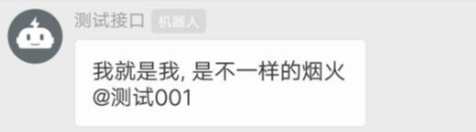
#### 文本text类型
```json theme={"theme":{"light":"github-light","dark":"github-dark"}}
{
"at": {
"atMobiles": [
"180xxxxxx"
],
"atUserIds": [
"user123"
],
"isAtAll": false
},
"text": {
"content": "我就是我, @180xxxxxx 是不一样的烟火"
},
"msgtype": "text"
}
```
| **参数** | **是否必填** | **类型** | **说明** |
| --------- | -------- | ------- | --------------------------------------------------------------- |
| msgtype | 是 | String | text。 |
| content | 是 | String | 消息文本。 |
| atMobiles | 否 | Array | 被@人的手机号。 **说明** 在content里添加@人的手机号,且只有在群内的成员才可被@,非群内成员手机号会被脱敏。 |
| atUserIds | 否 | Array | 被@人的用户userid。 **说明** 在content里添加@人的userId。 |
| isAtAll | 否 | Boolean | @所有人是true,否则为false。 |
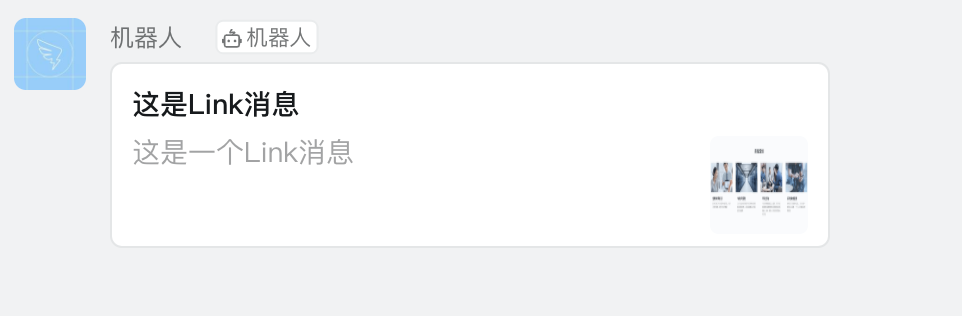
#### 链接Link类型
该类型不支持@人。
```json theme={"theme":{"light":"github-light","dark":"github-dark"}}
{
"msgtype": "link",
"link": {
"text": "这个即将发布的新版本,创始人xx称它为红树林。而在此之前,每当面临重大升级,产品经理们都会取一个应景的代号,这一次,为什么是红树林",
"title": "时代的火车向前开",
"picUrl": "https://img.alicdn.com/tfs/TB1NwmBEL9TBuNjy1zbXXXpepXa-2400-1218.png",
"messageUrl": "https://open.dingtalk.com/document/"
}
}
```
| **参数** | **参数类型** | 是否必填 | **说明** |
| ---------- | -------- | ---- | --------------------------------------------------------------------------------------------------------------------------------- |
| msgtype | String | 是 | 消息类型,此时固定为:link。 |
| title | String | 是 | 消息标题。 |
| text | String | 是 | 消息内容,如果太长只会部分展示。 |
| messageUrl | String | 是 | 点击消息跳转的URL,打开方式如下: - 移动端,在钉钉客户端内打开 - PC端 - 默认侧边栏打开 - 希望在外部浏览器打开,参考[消息链接说明](/zh/open/development/message-link-description)。 |
| picUrl | String | 否 | 图片URL。 |
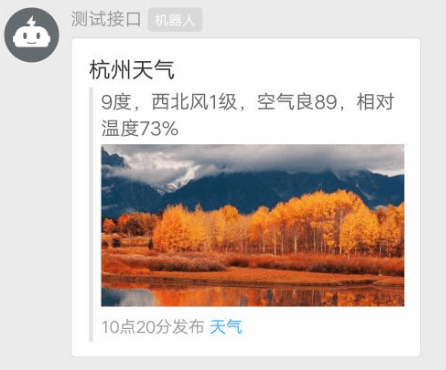
#### Markdown类型
```json theme={"theme":{"light":"github-light","dark":"github-dark"}}
{
"msgtype": "markdown",
"markdown": {
"title":"杭州天气",
"text": "#### 杭州天气 @150XXXXXXXX \n> 9度,西北风1级,空气良89,相对温度73%\n> 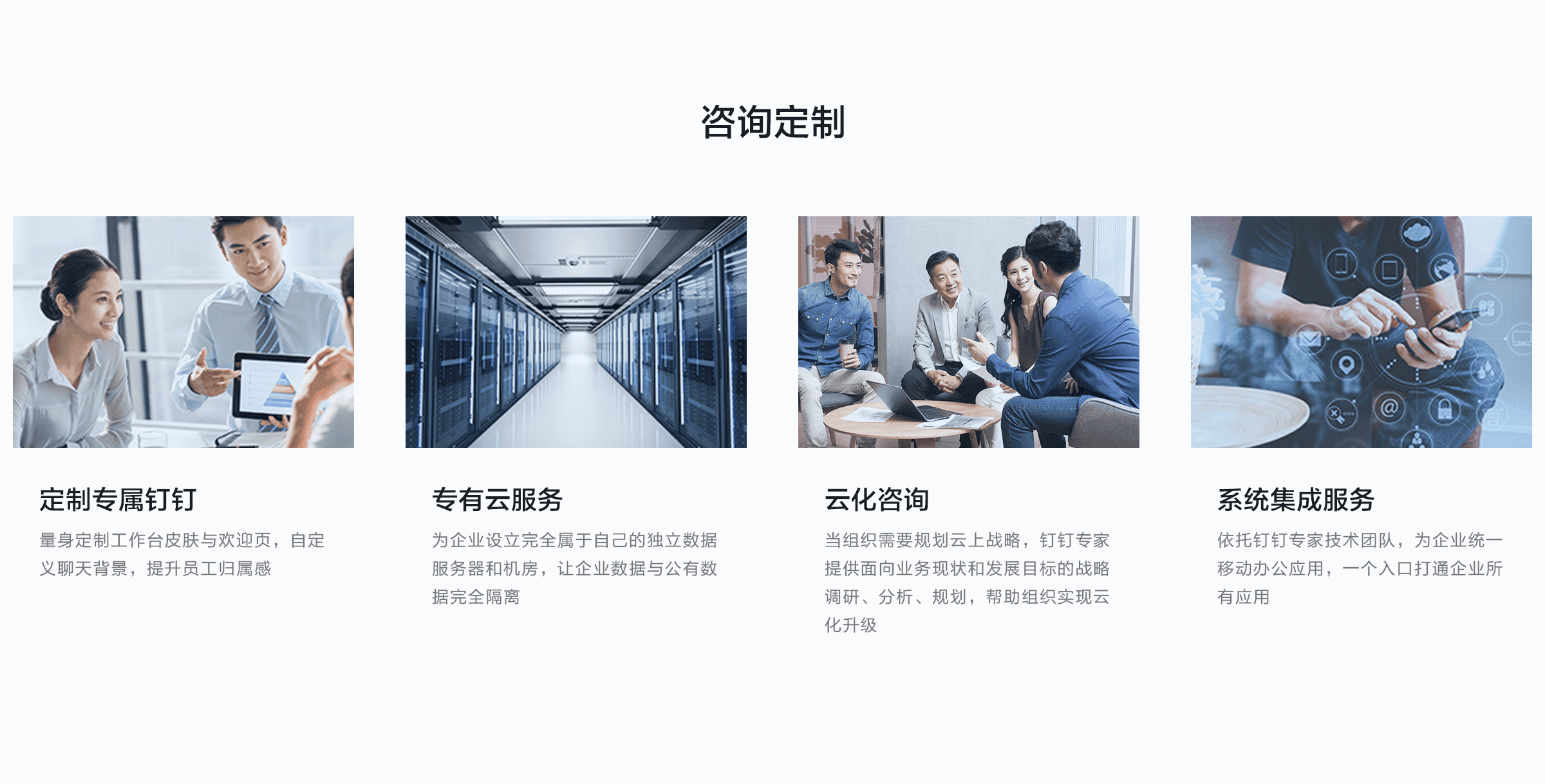\n> ###### 10点20分发布 [天气](https://www.dingalk.com) \n"
},
"at": {
"atMobiles": [
"150XXXXXXXX"
],
"atUserIds": [
"user123"
],
"isAtAll": false
}
}
```
| **参数** | **是否必填** | **类型** | **说明** |
| --------- | -------- | ------- | ------------------------------------------------------------- |
| msgtype | 是 | String | 消息类型,此时固定为:markdown。 |
| title | 是 | String | 首屏会话透出的展示内容。 |
| text | 是 | String | Markdown格式的消息内容。 |
| atMobiles | 否 | Array | 被@人的手机号。 **说明** 在text内容里要有@人的手机号,只有在群内的成员才可被@,非群内成员手机号会被脱敏。 |
| atUserIds | 否 | Array | 被@人的用户userid。 **说明** 在 text 中添加@人的userId。 |
| isAtAll | 否 | Boolean | @所有人是true,否则为false。 |
目前只支持Markdown语法的子集,支持的元素如下:
```text theme={"theme":{"light":"github-light","dark":"github-dark"}}
标题
# 一级标题
## 二级标题
### 三级标题
#### 四级标题
##### 五级标题
###### 六级标题
引用
> A man who stands for nothing will fall for anything.
文字加粗、斜体
**bold**
*italic*
链接
[this is a link](https://www.dingtalk.io/)
图片

无序列表
- item1
- item2
有序列表
1. item1
2. item2
```
#### ActionCard类型
* **整体跳转ActionCard类型**
```json lines theme={"theme":{"light":"github-light","dark":"github-dark"}}
{
"msgtype": "actionCard",
"actionCard": {
"title": "打造一间咖啡厅",
"text": " \n #### 乔布斯 20 年前想打造的苹果咖啡厅 \n\n Apple Store 的设计正从原来满满的科技感走向生活化,而其生活化的走向其实可以追溯到 20 年前苹果一个建立咖啡馆的计划",
"singleTitle" : "阅读全文",
"btnOrientation": "0",
"singleURL" : "https://www.dingtalk.io/"
}
}
```
| **参数** | **是否必填** | **类型** | **说明** |
| -------------- | -------- | ------ | -------------------------------------------------------------------------------------------------------------------------------- |
| msgtype | 是 | String | 消息类型,此时固定为:actionCard。 |
| title | 是 | String | 首屏会话透出的展示内容。 |
| text | 是 | String | markdown格式的消息。 **说明** 如果需要实现 @ 功能 ,在 text 内容中添加 @ 用户的 userId。例如:@manager7675 |
| singleTitle | 是 | String | 单个按钮的标题。 |
| singleURL | 是 | String | 点击消息跳转的URL,打开方式如下: - 移动端,在钉钉客户端内打开 - PC端 - 默认侧边栏打开 - 希望在外部浏览器打开,参考[消息链接说明](/zh/open/development/message-link-description)。 |
| btnOrientation | 否 | String | 按钮排列方式: - **0**:按钮竖直排列 - **1**:按钮横向排列 |
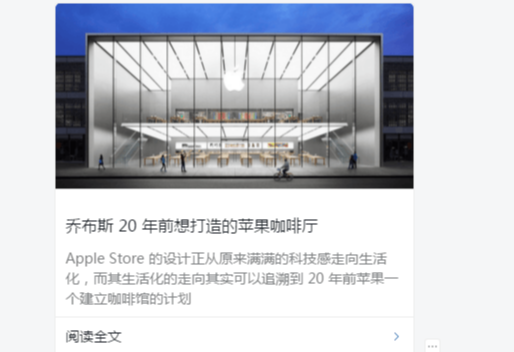
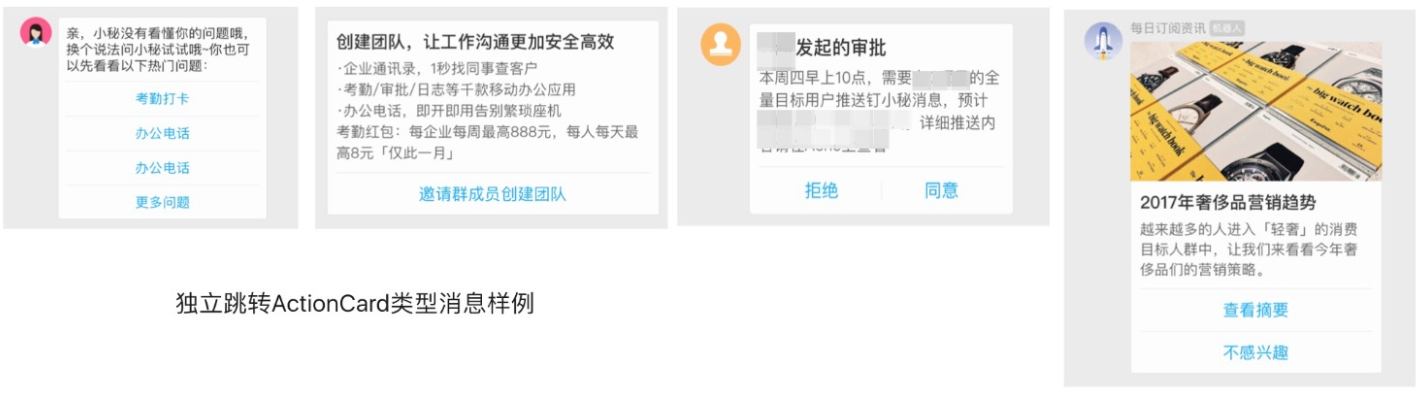
* **独立跳转ActionCard类型**
```json lines theme={"theme":{"light":"github-light","dark":"github-dark"}}
{
"msgtype": "actionCard",
"actionCard": {
"title": "乔布斯 20 年前想打造一间苹果咖啡厅,而它正是 Apple Store 的前身",
"text": " \n\n #### 乔布斯 20 年前想打造的苹果咖啡厅 \n\n Apple Store 的设计正从原来满满的科技感走向生活化,而其生活化的走向其实可以追溯到 20 年前苹果一个建立咖啡馆的计划",
"btnOrientation": "0",
"btns": [
{
"title": "内容不错",
"actionURL": "https://www.dingtalk.io/"
},
{
"title": "不感兴趣",
"actionURL": "https://www.dingtalk.io/"
}
]
}
}
```
| **参数** | **是否必填** | **类型** | **说明** |
| -------------- | -------- | ------ | ------------------------------------------------------------------------------------------------------------------------------- |
| msgtype | 是 | String | actionCard。 |
| title | 是 | String | 首屏会话透出的展示内容。 |
| text | 是 | String | markdown格式的消息内容。 **说明** 如果需要实现 @ 功能 ,在 text 内容中添加 @ 用户的 userId。例如:@manager7675 |
| btns | 是 | Array | 按钮。 |
| title | 是 | String | 按钮标题。 |
| actionURL | 是 | String | 击按钮触发的URL,打开方式如下: - 移动端,在钉钉客户端内打开 - PC端 - 默认侧边栏打开 - 希望在外部浏览器打开,参考[消息链接说明](/zh/open/development/message-link-description)。 |
| btnOrientation | 否 | String | 按钮排列顺序。 **0**:按钮竖直排列 **1**:按钮横向排列 |
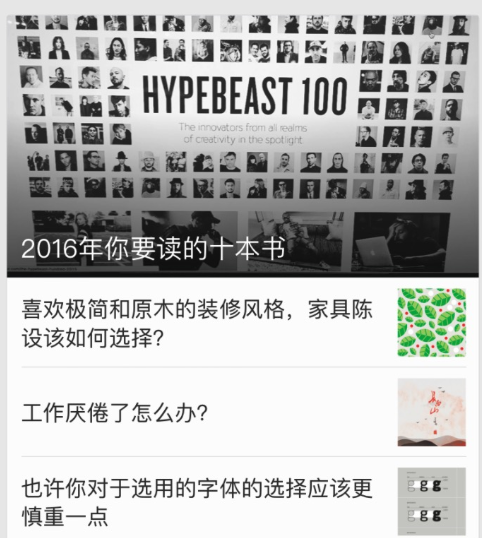
#### FeedCard类型
该类型不支持@人。
```json theme={"theme":{"light":"github-light","dark":"github-dark"}}
{
"msgtype": "feedCard",
"feedCard": {
"links": [
{
"title": "时代的火车向前开1",
"messageURL": "https://www.dingtalk.io/",
"picURL": "https://img.alicdn.com/tfs/TB1NwmBEL9TBuNjy1zbXXXpepXa-2400-1218.png"
},
{
"title": "时代的火车向前开2",
"messageURL": "https://www.dingtalk.io/",
"picURL": "https://img.alicdn.com/tfs/TB1NwmBEL9TBuNjy1zbXXXpepXa-2400-1218.png"
}
]
}
}
```
| **参数** | **是否必填** | **类型** | **说明** |
| ---------- | -------- | ------ | ------------------------------------------------------------------------ |
| msgtype | 是 | String | feedCard。 |
| title | 是 | String | 单条信息文本。 |
| messageURL | 是 | String | 点击单条信息到跳转链接,详情参考[消息链接说明](/zh/open/development/message-link-description)。 |
| picURL | 是 | String | 单条信息后面图片的URL。 |
当不想回复消息到群里时,回复格式如下:
```json theme={"theme":{"light":"github-light","dark":"github-dark"}}
{
"msgtype": "empty"
}
```
## 机器人接收消息
当用户@群机器人或与机器人发送单聊消息时,钉钉会把机器人接收到的消息发送到开发者设置的机器人回调服务。
### 消息体
本示例以 text 文本类型为例:如果你使用 HTTP 回调的方式,使用 POST 请求接收钉钉推送的消息。
```json theme={"theme":{"light":"github-light","dark":"github-dark"}}
{
"senderPlatform": "Mac",
"conversationId": "cid6EUxxxxsg==",
"atUsers": [
{
"dingtalkId": "xxx",
"staffId":"xxx",
"unionId":"edxxx34"
}
],
"chatbotCorpId": "ding9733d095*******6cb783455b",
"chatbotUserId": "$:LWCP_xxxxr5",
"msgId": "msgrK2xxxxU+riw==",
"senderNick": "小钉",
"isAdmin": true,
"senderStaffId": "0147xxxx8602",
"sessionWebhookExpiredTime": 1708332604316,
"createAt": 1708327204136,
"senderCorpId": "ding9733d095*******6cb783455b",
"conversationType": "2",
"senderId": "$:LWCP_v1xxxxBv1MhAv9",
"conversationTitle": "测试群",
"isInAtList": true,
"sessionWebhook": "https://oapi.dingtalk.io/robot/sendBySession?session=66d7c695a9xxxxdeb885",
"text": {
"content": " text"
},
"robotCode": "dingoxxxxdm3k",
"msgtype": "text"
}
```
| **参数** | **类型** | **说明** |
| ------------------------- | --------------- | ------------------------------------------------------------------------------------------------------------------ |
| senderPlatform | String | 消息发送平台。 |
| conversationId | String | 会话ID。 |
| atUsers | Array of Object | 被@人的信息。 - **dingtalkId**:加密的被@用户的id。 - **staffId**:被@用户的userId,外部群中的外部用户此字段为空。 - **unionId**:被@的用户unionid。 |
| chatbotCorpId | String | 加密的机器人所在的企业corpId。 |
| chatbotUserId | String | 加密的机器人ID。 |
| msgId | String | 加密的消息ID。 |
| senderNick | String | 发送者昵称。 |
| isAdmin | Boolean | 是否为管理员: - true:是 - false:否 机器人发布上线后生效,否则不返回。 |
| senderStaffId | String | 企业内部群中@该机器人的成员 userId。 如果发送人非机器人所在企业成员,则此字段为空(比如外部群里外部成员@机器人的情况)。 机器人发布上线后生效。否则不会返回。 |
| senderUnionId | String | 发送人的unionid。 |
| sessionWebhookExpiredTime | Long | 当前会话的Webhook地址过期时间。 |
| createAt | String | 消息的时间戳,单位毫秒。 |
| senderCorpId | String | 企业内部群的发送者当前群的企业corpId。 |
| conversationType | String | 会话类型: - **1**:单聊 - **2**:群聊 |
| senderId | String | 加密的发送者ID。 |
| conversationTitle | String | 群聊时才有的会话标题。 |
| isInAtList | Boolean | 是否在@列表中。 |
| sessionWebhook | String | 当前会话的Webhook地址。 |
| text | Object | 消息文本: - content:机器人接收的消息内容。 该字段仅在消息类型为 text 存在。 |
| msgtype | String | 消息类型: - text:文本消息 - richText:富文本消息 - picture:图片消息 - audio:语音消息 - video:视频消息 - file:文件消息 消息类型的具体格式参看下方**消息类型**。 |
| robotCode | String | 机器人编码。 自定义机器人无 robotCode。 |
### 消息类型
机器人目前支持接收文本、语音、图片、文件、视频、富文本类型消息,下方为机器人接收各种消息类型的字段解释。除消息类型和消息体字段不同之外,其余参数字段与上面表格相同。
#### 文本消息
```json theme={"theme":{"light":"github-light","dark":"github-dark"}}
{
"msgtype": "text",
"text": {
"content": "你好"
}
}
```
| **参数** | **类型** | **说明** |
| ------- | ------ | --------------------------------- |
| msgtype | String | 消息类型: - **text**:文本消息 |
| text | Object | 消息文本: - **content**:机器人接收的消息内容。 |
#### 富文本消息
```json theme={"theme":{"light":"github-light","dark":"github-dark"}}
{
"msgtype": "richText",
"content": {
"richText": [
{
"text": "你好"
},
{
"downloadCode": "mIofN681YE3f*************JkVBG2vhj4Q9、d2tn/t6XxjaB6UxxxxOVnYYbn1aMT/n3JFgb4i64X3TFxxxxGWxJPR/egKS8syvGzxxxxOO/FYLor2Q==",
"type": "picture"
}
]
}
}
```
| 名称 | 类型 | 描述 |
| -------- | --------------- | ---------------------------------------------------------------------------------------------------------------------------------------------------------------------------------------------------------------- |
| msgtype | String | 消息类型: - **richText**:富文本 |
| content | Object | 消息内容。 |
| richText | Array of Object | 富文本列表。 **说明** 消息列表中可以包含: - \*\*text:\*\*文本消息 - **picture**:图片消息 图片文件的下载码downloadCode,可通过调用服务端API-[下载机器人接收消息的文件内容](/zh/open/development/download-the-file-content-of-the-robot-receiving-message)接口获取临时下载链接。 |
#### 图片消息
```json theme={"theme":{"light":"github-light","dark":"github-dark"}}
{
"msgtype": "picture",
"content": {
"downloadCode": "mIofN681YE3f/+m+**********8rs4RGdQAwyVs3B75N7boKf8ep0FBB122u9YY/novFAM9BQrirm4/+avZaCV+6nnZ0Zk="
}
}
```
| **参数** | **类型** | **说明** |
| ------------ | ------ | ---------------------------------------------------------------------------------------------------------------------------------------------- |
| msgtype | String | 消息类型: - **picture**:图片消息 |
| downloadCode | String | 图片文件的下载码,用于换取下载图片的二进制文件,可通过调用服务端API-[下载机器人接收消息的文件内容](/zh/open/development/download-the-file-content-of-the-robot-receiving-message)接口获取临时下载链接。 |
#### 语音消息
群聊会话中,群成员 @机器人时,机器人**不支持**接收语音消息。
```json theme={"theme":{"light":"github-light","dark":"github-dark"}}
{
"msgtype": "audio",
"content": {
"duration": 4000,
"downloadCode": "mIofN681YE3f/+m+Nn***********geqPd7xpJF/9NbOAORDnadz0WbSwWTiYvByBeYDjbg2ecUdno/RGtZ/sqzdvoh00EWw1U6xNqLC3Bk51U+i",
"recognition": "钉钉,让进步发生"
}
}
```
| **参数** | **类型** | **说明** |
| ------------ | ------ | --------------------------------------------------------------------------------------------------------------------------------------------- |
| msgtype | String | 消息类型: - **audio**:语音消息 |
| downloadCode | String | 语音文件的下载码,用于换取下载语音的二进制文件,可通过调用服务端API-[下载机器人接收消息的文件内容](/zh/open/development/download-the-file-content-of-the-robot-receiving-message)口获取临时下载链接。 |
| recognition | String | 语音识别后的文本。 |
| duration | Long | 语音的时长,单位是毫秒。 |
#### 视频消息
群聊会话中,群成员 @机器人时,机器人**不支持**接收视频消息。
```json theme={"theme":{"light":"github-light","dark":"github-dark"}}
{
"msgtype": "video",
"content": {
"duration": 4000,
"downloadCode": "mIofN681YE3f/****************OAORDnadz0WbSwWTiYvByBeYDjbg2ecUdno/RGtZxxxxLC3Bk51U+i",
"videoType": "mp4"
}
}
```
| **参数** | **类型** | **说明** |
| ------------ | ------ | ---------------------------------------------------------------------------------------------------------------------------------------------- |
| msgtype | String | 消息类型: - **video**:视频消息 |
| downloadCode | String | 视频文件的下载码,用于换取下载视频的二进制文件,可通过调用服务端API-[下载机器人接收消息的文件内容](/zh/open/development/download-the-file-content-of-the-robot-receiving-message)接口获取临时下载链接。 |
| videoType | String | 视频文件类型。 |
| duration | Long | 视频的时长,单位是毫秒。 |
#### 文件消息
群聊会话中,群成员 @机器人时,机器人**不支持**接收文件消息。
```json theme={"theme":{"light":"github-light","dark":"github-dark"}}
{
"msgtype": "file",
"content": {
"downloadCode": "mIofN681YE3f*************pJF/9NbOAORDnadxxxxg2ecUdno/RGtZ/sqzdxxxxC3Bk51U+i",
"fileName": "钉钉让进步发生.pdf"
}
}
```
| **参数** | **类型** | **说明** |
| ------------ | ------ | -------------------------------------------------------------------------------------------------------------------------------------------- |
| msgtype | String | 消息类型: - **video**:文件消息 |
| downloadCode | String | 文件的下载码,用于换取下载文件的二进制文件,可通过调用服务端API-[下载机器人接收消息的文件内容](/zh/open/development/download-the-file-content-of-the-robot-receiving-message)接口获取临时下载链接。 |
| fileName | String | 文件名。 |
### 相关内容
如果[创建企业内部应用机器人](/zh/open/dingstart/configure-the-robot-application)时,消息接收模式选择了 HTTP模式,在机器人使用过程中,当机器人收到消息时,此时除了上述的消息体,此时还存在 HTTP header参数,格式如下:
```json theme={"theme":{"light":"github-light","dark":"github-dark"}}
{
"Content-Type": "application/json; charset=utf-8",
"timestamp": "1577262236757",
"sign":"xxxxxxxxxx"
}
```
| **参数** | **说明** |
| --------- | --------------- |
| timestamp | 消息发送的时间戳,单位是毫秒。 |
| sign | 签名值。 |
你需要对 header 中的 timestamp 和 sign 进行验证,用来判断是否是来自钉钉的合法请求,避免其他仿冒钉钉调用开发者的HTTPS服务传送数据,具体验证逻辑如下:
* timestamp 与系统当前时间戳如果相差1小时以上,则认为是非法的请求。
* sign 与开发者自己计算的结果不一致,则认为是非法的请求。
当timestamp和sign同时验证通过,才能认为是来自钉钉的合法请求。
使用HmacSHA256算法计算签名,然后进行Base64 encode,得到最终的签名值,示例如下:
```java theme={"theme":{"light":"github-light","dark":"github-dark"}}
import javax.crypto.Mac;
import javax.crypto.spec.SecretKeySpec;
import org.apache.commons.codec.binary.Base64;
public class Test {
public static void main(String[] args) throws Exception {
Long timestamp = 1577262236757L;
String appSecret = "this is a secret";
String stringToSign = timestamp + "\n" + appSecret;
Mac mac = Mac.getInstance("HmacSHA256");
mac.init(new SecretKeySpec(appSecret.getBytes("UTF-8"), "HmacSHA256"));
byte[] signData = mac.doFinal(stringToSign.getBytes("UTF-8"));
String sign = new String(Base64.encodeBase64(signData));
System.out.println(sign);
}
}
```
| **配置项** | **说明** |
| --------- | ------------------------------------------------------------------------------ |
| timestamp | 当前时间的时间戳,单位毫秒 |
| appSecret | 应用的 Client Secret,详情参考[Client Secret](/zh/open/dingstart/basic-concepts-beta)。 |
### 错误码
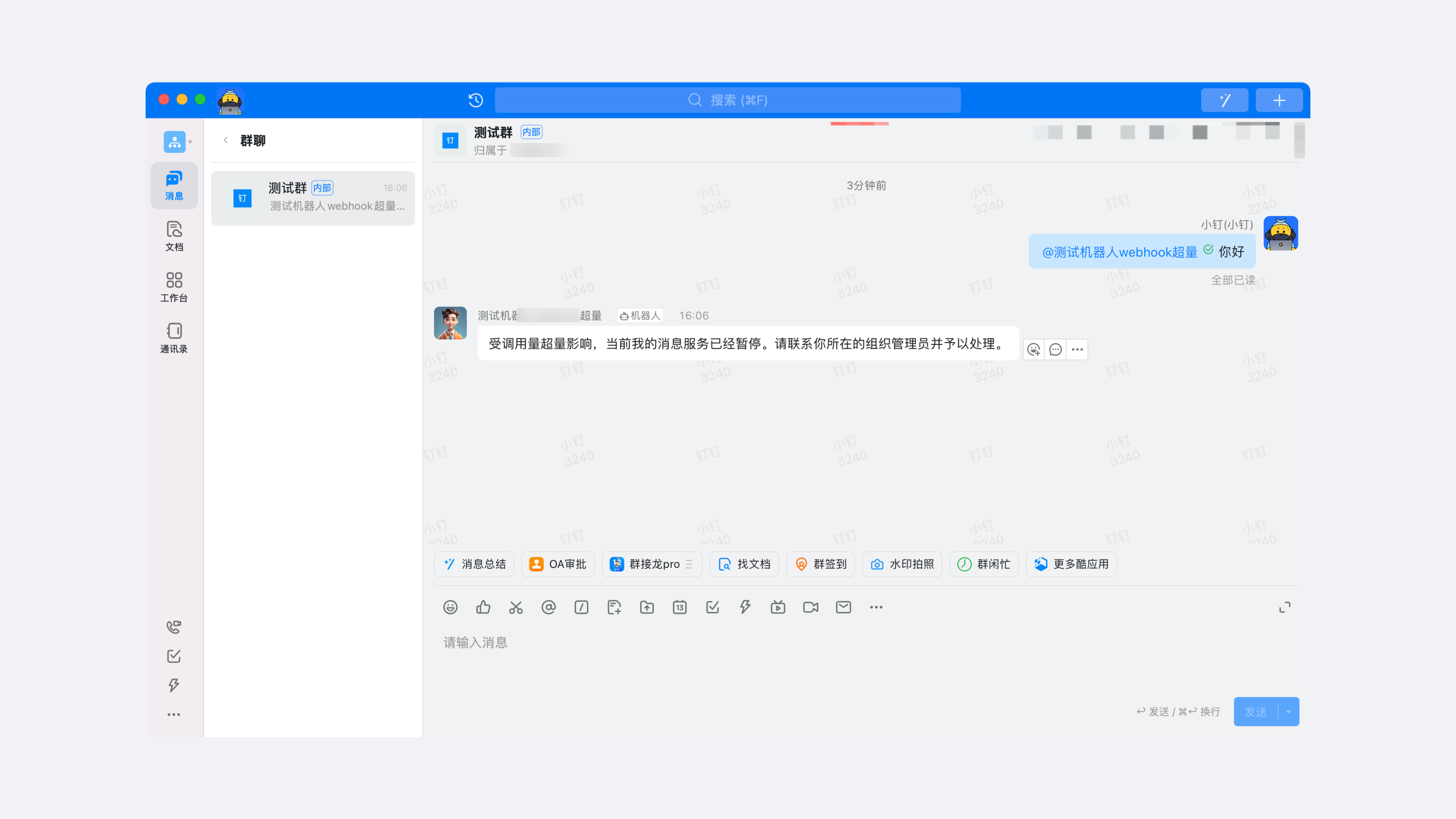
当机器人 Webhook 和 Stream 用量超量后,则会出现以下内容:
#### 错误表现
##### 群聊会话
##### 单聊会话
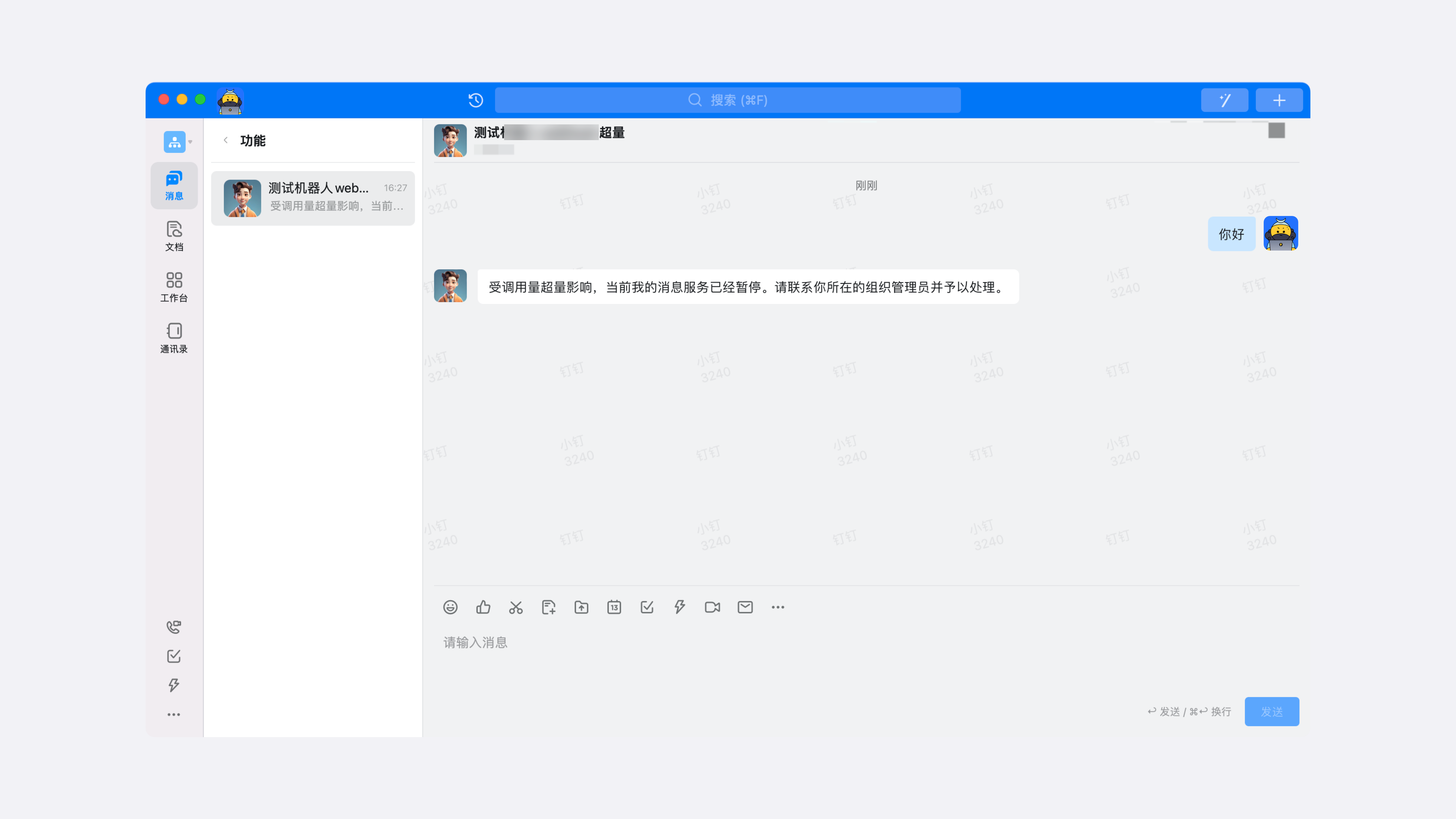
#### 错误说明
| 错误码(errorCode) | 错误信息(errorMessage) | **说明** | 解决方案 |
| -------------- | ------------------------------------------------------------------------------- | -------------------------------------------------------------------------------------- | -------------------------------------------------------------------------------------------------------------------------------------------- |
| 20001 | 受调用量超量影响,当前我的消息服务已经暂停。请联系你所在的组织管理员并予以处理 接收消息中,新增 **errorMessage** 字段,用于展示错误信息。 | - 接收消息中无 text 和 content 字段内容 - 登录[开发者后台](https://open-dev.dingtalk.io/)即可查看调用量。 image | 需要升级钉钉专业版或购买增购包,详情参看[企业增购包购买说明](https://open.dingtalk.com/document/orgapp/purchase-instructions-for-enterprise-additional-purchase-package)。 |
### 相关文档
* 企业机器人发送群聊消息
* 企业机器人发送单聊消息
* 自定义机器人发送群聊消息
* 群模板机器人发送群聊消息