> ## Documentation Index
> Fetch the complete documentation index at: https://help.dingtalk.io/llms.txt
> Use this file to discover all available pages before exploring further.
# 如何导入HAR包的
> 介绍通过浏览器导出 HAR 包并导入分析的完整步骤,用于排查宜搭页面在特定网络环境下的资源加载问题。
中后台系统一般都有强权限控制,有时候排查线上问题不是那么好排查,一般我们会先排查资源问题。
## 举个例子
有用户反馈说,我有个外部系统,在内部网络是好的,不连 VPN 就出现问题了。截图如下:
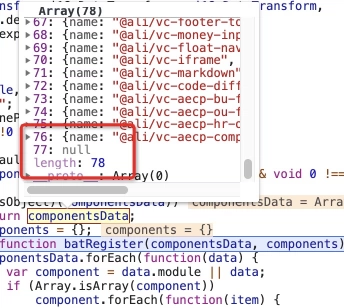
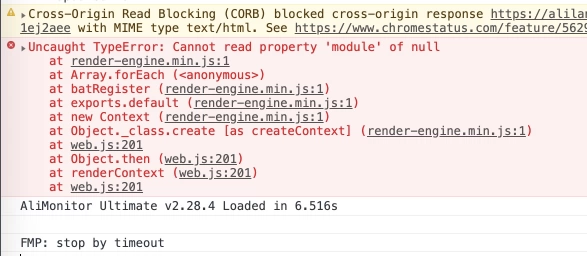
遇到这个问题,怎么查?
## 一般的步骤
要链接、要权限、要各种,然后进去 debug,一顿操作下来,估计时间也过去很久了。
## 用 HAR 包的方式怎么做?
### 步骤 1:告知用户下载 HAR 包。如何下载呢?
1. 在有问题的界面,按下方 GIF 操作。

2. 下载好的 \*\*\*.har 包就是我们想要的文件了。然后把这份文件传给开发者去做分析就好。(敏感页面,请勿采用此方法,此方法可能导致敏感信息泄露)
### 步骤 2:开发者如何通过 HAR 包看 Network?
打开 about:blank,通过上图下载的地方上传就行。
## 例子中的是什么问题呢?
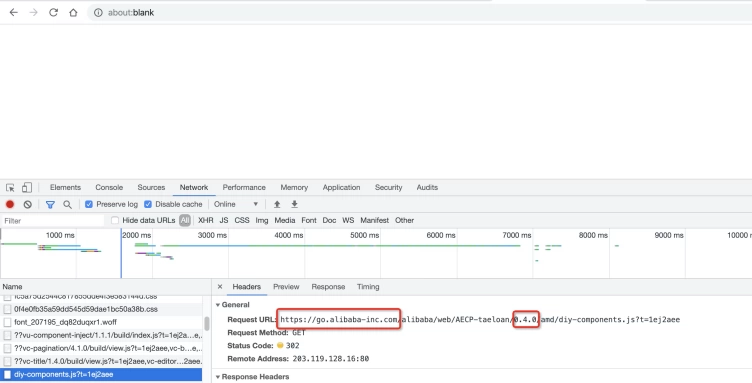
通过 HAR 包中的信息可以发现,访问了内部域名 internal.example.com 的数据,并且用的版本号是 0.4.0 (这个是日常版本)。使用线上版本就能规避这个问题了。
## [Links](https://developers.google.com/web/tools/chrome-devtools/network/reference)