> ## Documentation Index
> Fetch the complete documentation index at: https://help.dingtalk.io/llms.txt
> Use this file to discover all available pages before exploring further.
# 页面生命周期
> 介绍宜搭自定义页面 didMount 与 willUnmount 两个生命周期钩子的触发时机与典型用法,在页面挂载、卸载时执行初始化或清理逻辑。
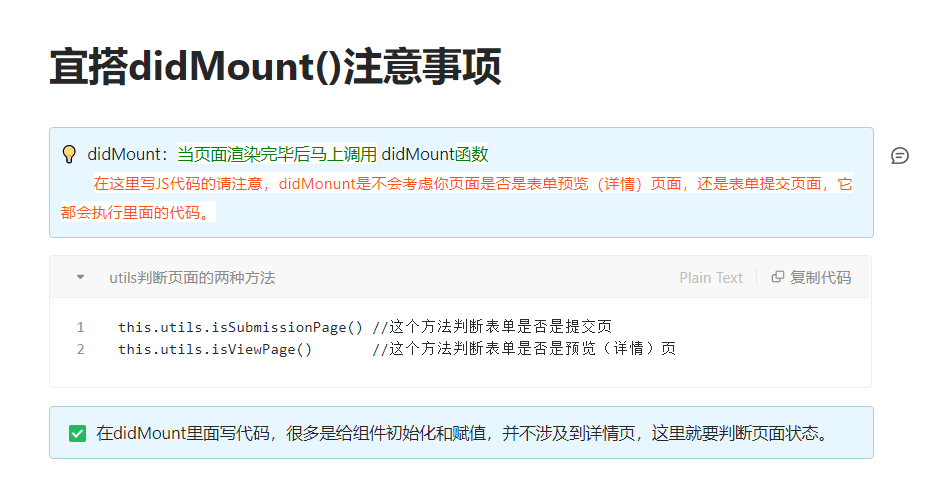
和 React 一样,宜搭的自定义页面也提供了页面生命周期能力,只不过做了简化仅支持以下两个生命周期,用户可以在动作面板中进行相应的 JS 逻辑书写以便在页面挂载或者卸载时进行一些处理:
* **didMount**- 类似 React 的 componentDidMount,会在页面第一次渲染完成后调用;
* **willUnmount**- 类似 React 的 componentWillUnmount,会在页面卸载前调用;
## 使用场景
下面是一个简单的示例展示生命周期的具体使用,我们在动作面板中配置页面生命周期函数,用于进行以下操作:
* 当页面挂载完成后监听 document 的 resize 事件;
* 通过 onResize 方法实时输出当前页面的宽度;
* 当页面卸载前取消 document 的 reisze 事件监听;
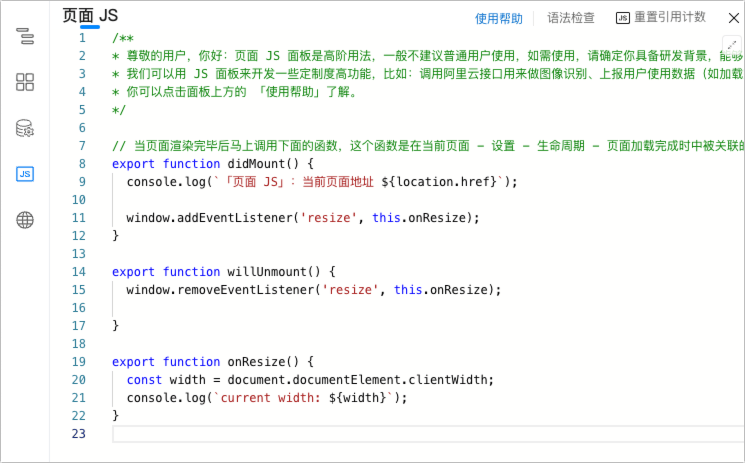
相关代码如下所示:
```js theme={"theme":{"light":"github-light","dark":"github-dark"}}
export function didMount() {
console.log(`「页面 JS」:当前页面地址 ${location.href}`);
window.addEventListener('resize', this.onResize);
}
export function willUnmount() {
window.removeEventListener('resize', this.onResize);
}
export function onResize() {
const width = document.documentElement.clientWidth;
console.log(`current width: ${width}`);
}
```
## 注意事项