> ## Documentation Index
> Fetch the complete documentation index at: https://help.dingtalk.io/llms.txt
> Use this file to discover all available pages before exploring further.

# 应用排序

> 了解如何通过名称、安装日期、使用频率等规则对应用进行排序整理，以提高设备使用效率和用户体验。包括按全部应用、时间、状态排序以及选择表格或网格显示方式的操作步骤。

对应用进行排序整理，能够按照特定规则，例如名称、安装日期、使用频率，对应用进行排列和整理。这种排序能够帮助用户更快速地找到他们需要的应用程序，提高设备的使用效率和用户体验。

## 操作步骤

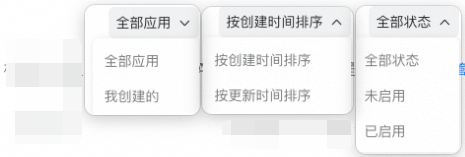
1、可通过全部应用、时间、状态排序。

<Frame>
  ![](https://yida-support.oss-cn-shanghai.aliyuncs.com/static/png/1744019039517-f569d6fc-b98e-4673-b7dc-730eb638bd97.png)
</Frame>

<Frame>
  ![](https://yida-support.oss-cn-shanghai.aliyuncs.com/static/png/1744019162761-c22d8495-04c8-4578-b891-2f6d82639f83.png)
</Frame>

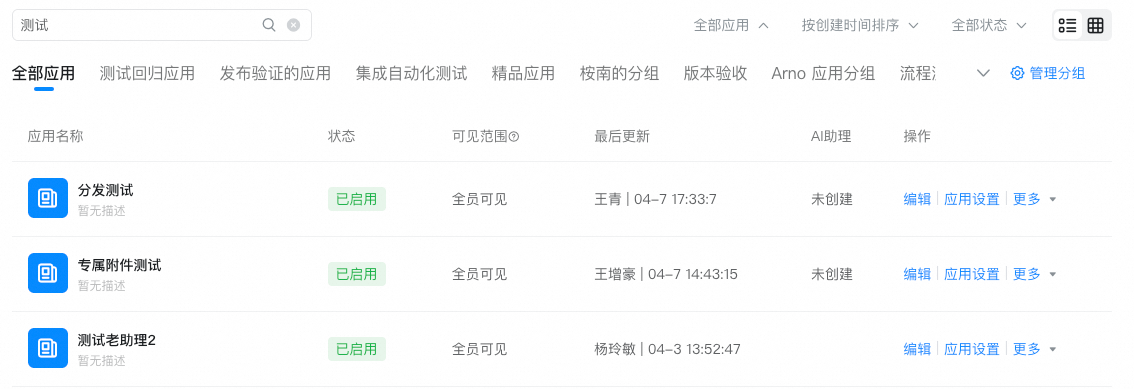
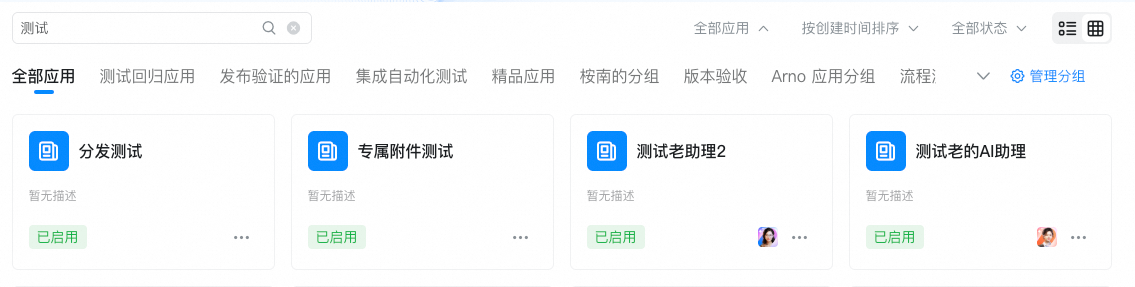
2、点击

<img className="inline-icon" src="https://yida-support.oss-cn-shanghai.aliyuncs.com/static/png/1744019226163-87807eed-90e6-4a29-ab10-0a2ccb411c58.png" width="39" alt="" />，可按照表格排列或按照网格排序。

<Frame>
  ![](https://yida-support.oss-cn-shanghai.aliyuncs.com/static/png/1744019267883-cdc908b6-5988-4b86-ac7b-9df4bfbc867c.png)
</Frame>

<Frame>
  ![](https://yida-support.oss-cn-shanghai.aliyuncs.com/static/png/1744019286347-0ce4e9db-9b3e-46d7-91e1-33ed07e7656a.png)
</Frame>