> ## Documentation Index
> Fetch the complete documentation index at: https://help.dingtalk.io/llms.txt
> Use this file to discover all available pages before exploring further.
# JS 动作面板
> 本文介绍了如何在宜搭中使用动作面板编写JS代码,实现业务逻辑或逻辑判断。包括支持的版本、代码输入方法、动作绑定、获取回调函数参数、API使用手册、调试JS代码的方法以及子表单API优化等内容。
| **能力** | **免费版** | **轻享版** | **专业版** | **专属版** |
| ------ | ------- | ------- | ------- | ------- |
| 页面JS代码 | 不支持 | 不支持 | 支持 | 支持 |
## 1. 功能概述
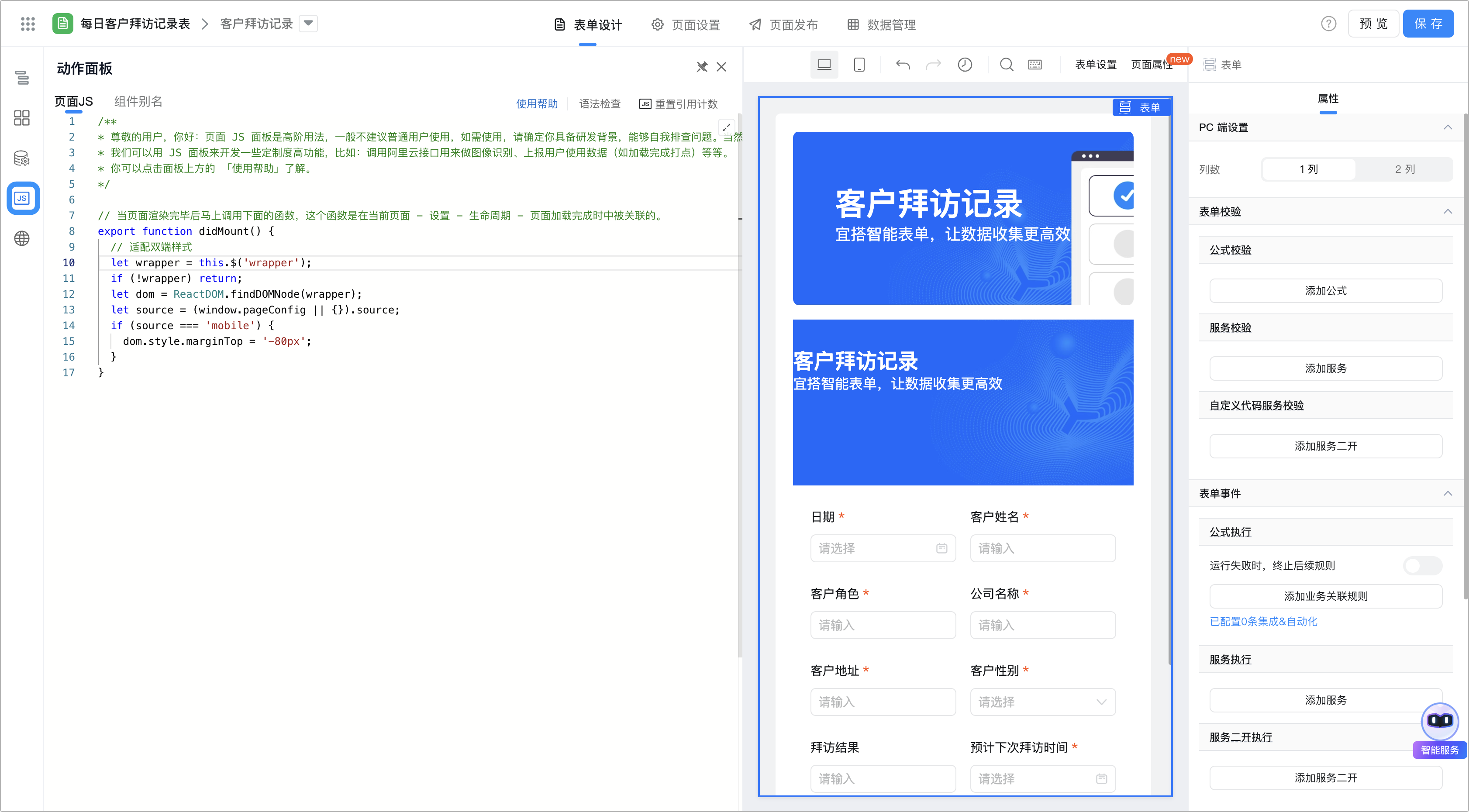
用户可以通过宜搭中的「动作面板」去写 JS 代码,从而实现自己的业务逻辑或逻辑判断。
通过动作面板,您可以「更加方便的组织和复用代码」、「实现复杂交互」。
* 通过JS面板编写的逻辑一般情况下是 不会 对 历史数据 生效的。
## 2. 使用动作面板的代码输入
通过 `export` 的函数,将会被「动作面板」感知,可以在动作面板中选中当前函数,进行调用。
以下代码可参考:
```javascript theme={"theme":{"light":"github-light","dark":"github-dark"}}
/**
* 自定义工具函数,不包括上下文(this)的使用
*/
function something() {
alert('something')
}
/**
* @title 自定义动作 A
* 可以使用上下文(this)
*/
export function custom_action_a() {
alert('custom action a')
}
/**
* @title 自定义动作 B
*/
export function custom_action_b() {
something(); // 调用自定义工具函数
this.custom_action_a(); // 调用自定义动作函数
}
```
**注:**
只有符合 `export function xxx() {}` 的写法才会在组件动作面板中被识别。并且 export 的方法名称不允许重复。
如果希望手动获取或者调用面板里的动作可以直接 this.methodName(); 调用。
### 2.1 使用动作面板的动作绑定
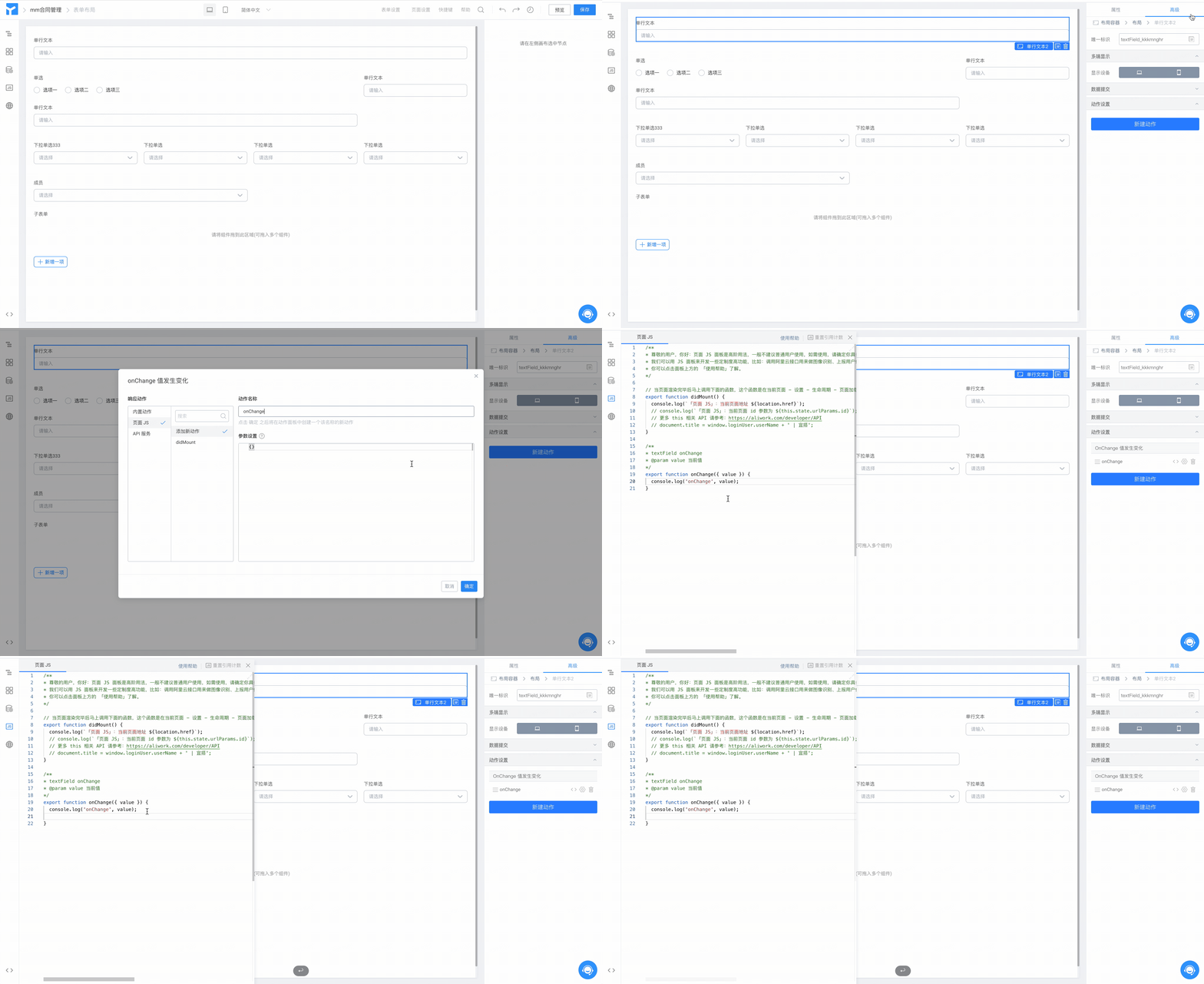
宜搭中,大部分组件支持了动作绑定。
动作绑定,指的是将「组件的动作」和「动作面板中定义的函数」进行绑定。
如图:
### 2.2 获取回调函数参数
获取回调函数中设置参数
#### (1)在动作设置中设置参数
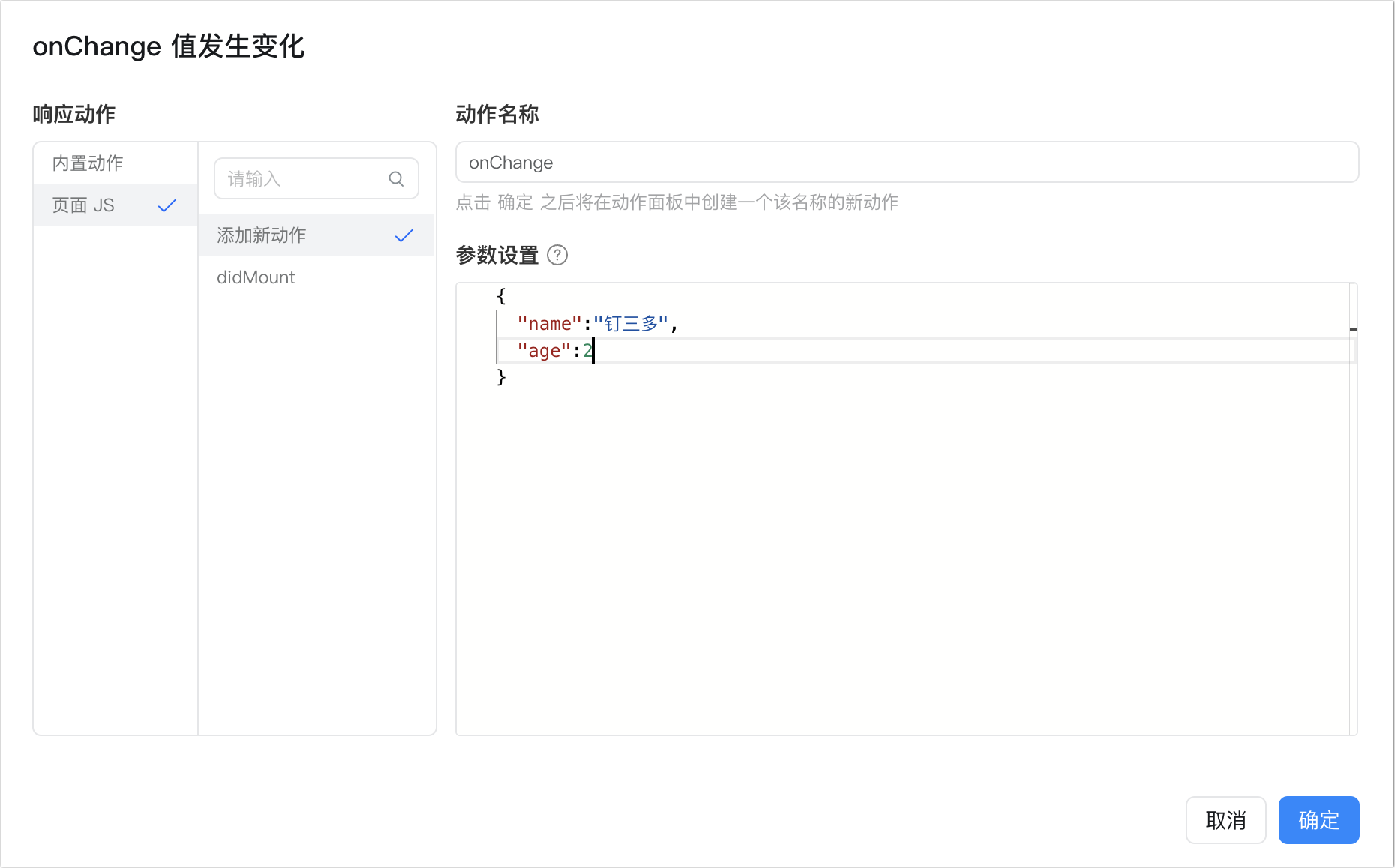
新建动作
#### (2)获取方式,可参考如下代码:
```javascript theme={"theme":{"light":"github-light","dark":"github-dark"}}
export function onClick(){
const { name, age } = this.params
console.log(name,age);
}
```
## 3. API 使用手册
详情请参考:[https://developers.aliwork.com/docs/api/about](/zh/open/yida/api/about)
## 4. 如何调试 JS 代码
我们可以通过 Chrome 的 [Devtools](https://developers.google.cn/web/tools/chrome-devtools/) 来调试(注:如果经常调试,建议通过浏览器访问宜搭)。
常用的是: `Console` 、 `Network` 、 `Elements` 面板。
宜搭的展示页,基于的是 React 技术。所以也可以安装 [React Developer Tools](https://chrome.google.com/webstore/detail/react-developer-tools/fmkadmapgofadopljbjfkapdkoienihi?hl=en) 来调试宜搭的界面。
### 4.1 在代码中使用 `debugger` 关键字
在 JS 函数中,可以使用 `debugger` 关键字,以阻断程序做调试,以下视频演示下如何基础使用 `debugger` 。
### 4.2 如何引用第三方 JS 资源
**请特别注意,要保证自己引用的 JS 资源的安全性**。可参考以下代码:
```javascript theme={"theme":{"light":"github-light","dark":"github-dark"}}
this.utils.loadScript("url", () => {})
// 例如:
export function didMount() {
this.utils.loadScript('https://g.alicdn.com/code/lib/qrcodejs/1.0.0/qrcode.min.js').then(() => {
var qrcode = new QRCode(document.getElementById('qrcode'), {
text: "https://www.yidaapps.com",
width: 128,
height: 128,
colorDark : "#000000",
colorLight : "#ffffff",
correctLevel : QRCode.CorrectLevel.H
});
});
}
```
### 4.3 如何学习 JS
* 宜搭开发者中心
* JavaScript 秘密花园
* JavaScript | MDN
* 书本推荐:《JavaScript高级程序设计》最新版
* 社区: 掘金 、 Stack Overflow 、 Github 等
## 5. 子表单 API 优化
### 5.1 获取子表单数据
```javascript theme={"theme":{"light":"github-light","dark":"github-dark"}}
const subFormInst = this.$('子表单唯一标识');
console.log(subFormInst.getValue()); // 获取子表整体列表数据
// 先获取 行 标识
const items = subFormInst.getItems(); // ["tfitem_1", "tfitem_2"]
items.forEach(item => {
const rowData = subFormInst.getItemValue(item); // 获取行列表数据
console.log(rowData['子表单内部控件的唯一标识']); // 获取指定行内字段数据
});
```
### 5.2 识别子表单变化
子表单数据变更时,除单元格变化引起的数据变更外,公式计算、数据联动或者外部赋值都会触发子表单的 onChange 事件,为了方便用户判断识别,现已引入 changes.fieldId 来标注当前变更的单元格数据信息。
```javascript theme={"theme":{"light":"github-light","dark":"github-dark"}}
// 子表单绑定事件
export function onChange({value, extra}) {
const { formGroupId, from, changes = {} } = extra || {};
// 判断是否是设备字段变化
if (changes.fieldId === '子表单设备字段唯一标识') {
// 此处输入子表变化后的执行逻辑
};
}
```
### 5.3 表格内数据变化时,更新相关行数据
可利用 `updateItemValue` API 接口进行单元格赋值。
例如设备变更时,通过接口补全当前子表单其他信息。
```javascript theme={"theme":{"light":"github-light","dark":"github-dark"}}
// 子表单绑定事件
export function onChange({value, extra}) {
const { formGroupId, from, changes } = extra || {};
if (from === 'setItemValue') return; // 避免使用 updateItemValue 更新子表数据后,再次触发 onChange 陷入死循环
// 单行数据变化
const tableField = this.$('子表单唯一标识');
// 判断是否是设备字段变化
if (changes.fieldId === '子表单设备字段唯一标识') {
getDeviceInfo() // 自定义获取设备信息接口
.then((data) => {
tableField.updateItemValue(formGroupId, {
'numberField_l00o018a': data.price, // 更新设备价格
'textareaField_kysd3grq': data.description, // 更新设备说明
});
})
};
}
```
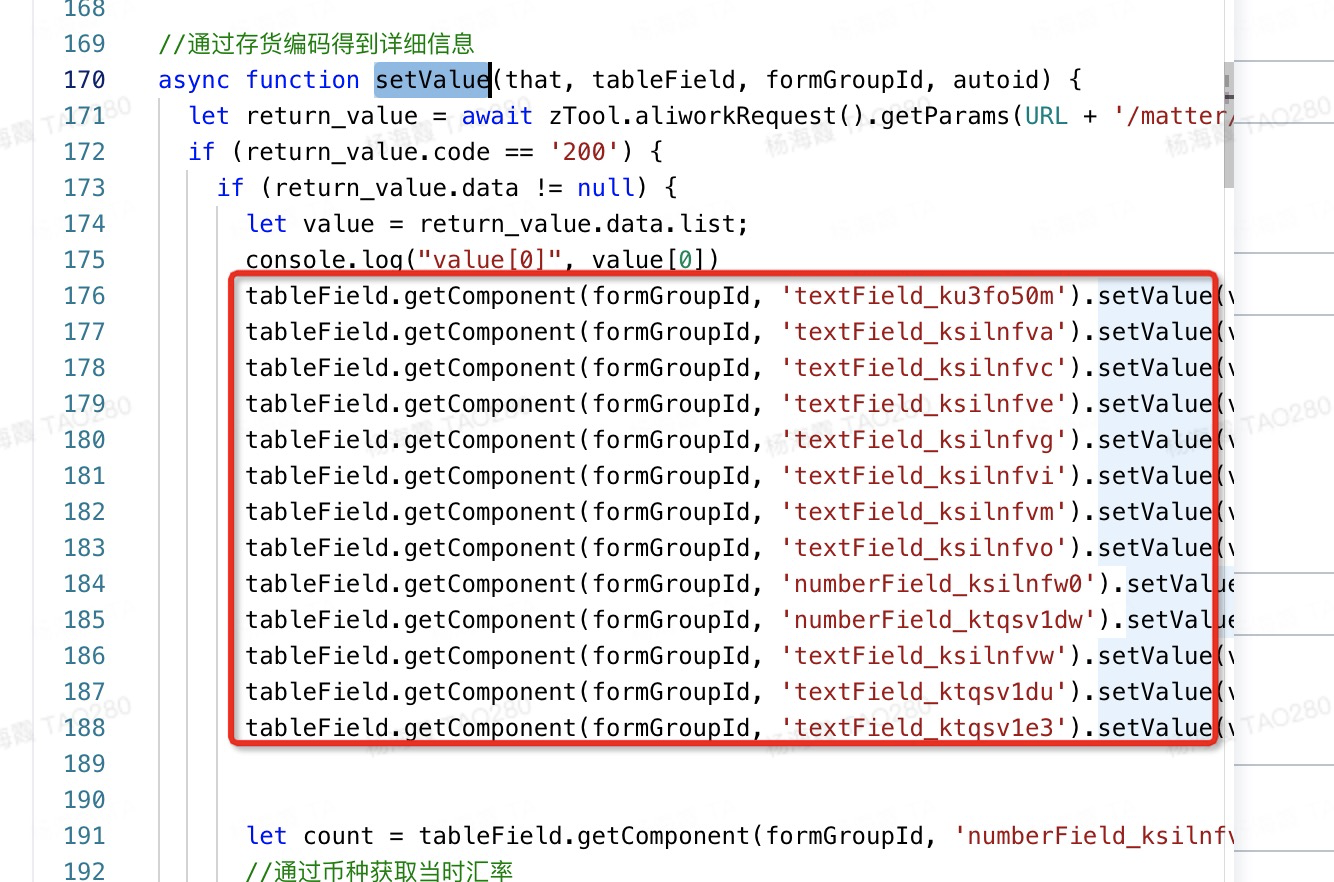
不需要再像之前一样通过 getComponent().setValue 一个个单独赋值。(该赋值方式在异步场景,无法保证更新整个表单值)
## 6. 常见错误
### 6.1 Cannot read property '\$' of undefined.
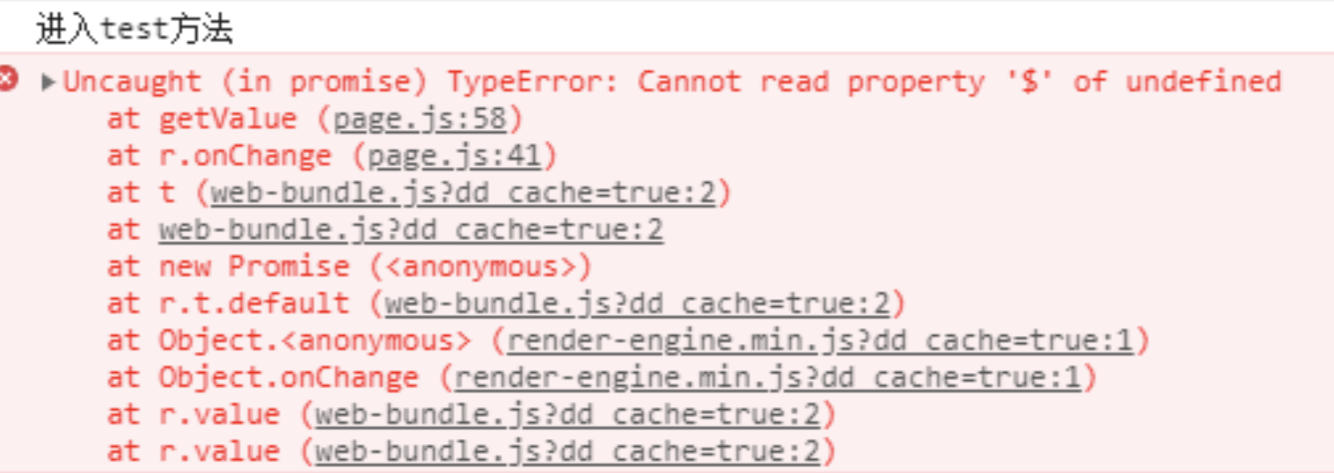
```diff theme={"theme":{"light":"github-light","dark":"github-dark"}}
export function didMount(){
console.log('进入test方法');
- test1() // 调用报错如上图。
+ this.test1() // 正确调用方式。原理很简单,上下文得通过 this. 来传递
}
export function test1(){
console.log(this.$('abc').getValue());
}
```
### 6.2 This request has been blocked; the content must be served over HTTPS
宜搭域名是 [https://www.yidaapps.com](https://www.yidaapps.com) 所以,受到浏览器安全限制,只能请求 https 的接口,不能请求 http 。更加不能请求本地的类似 [http://192.168.xxx](http://192.168.xxx) 的接口。

**特别说明:**
如果需要接口提供服务,需要你的接口必须满足如下情况:
1、满足 HTTPS 协议(合法证书)
2、允许 [www.yidaapps.com](http://www.yidaapps.com) [**跨站访问**](http://www.ruanyifeng.com/blog/2016/04/cors.html)。不然会报:cross site policy 错误。