> ## Documentation Index
> Fetch the complete documentation index at: https://help.dingtalk.io/llms.txt
> Use this file to discover all available pages before exploring further.

# 抄送节点

> 抄送人在审批流程中拥有查看权限，但不参与审批。设置抄送节点可见内容可实现简单权限控制。适用于需要特定人员知晓审批单信息而不必实际审批的情况。

抄送人拥有所在节点的查看审批单权限，同时也支持设置抄送节点所能查看到的表单内容，可以实现一些简单的权限控制。

<Note>
  在审批单的流程链路中不会显示抄送节点。
</Note>

**抄送节点使用场景**：当审批流程发起后，需要对应的人员查看/知晓该审批单，但是无需审批的场景。

<Frame>
  ![](https://yida-support.oss-cn-shanghai.aliyuncs.com/static/png/1729060747418-2dec5d02-5724-45b1-acfd-d8fff7aa6bee.png)
</Frame>

<Frame>
  ![](https://yida-support.oss-cn-shanghai.aliyuncs.com/static/png/1729060812456-5292b6ab-b90e-46fe-8cb4-d6bd750adbf2.png)
</Frame>

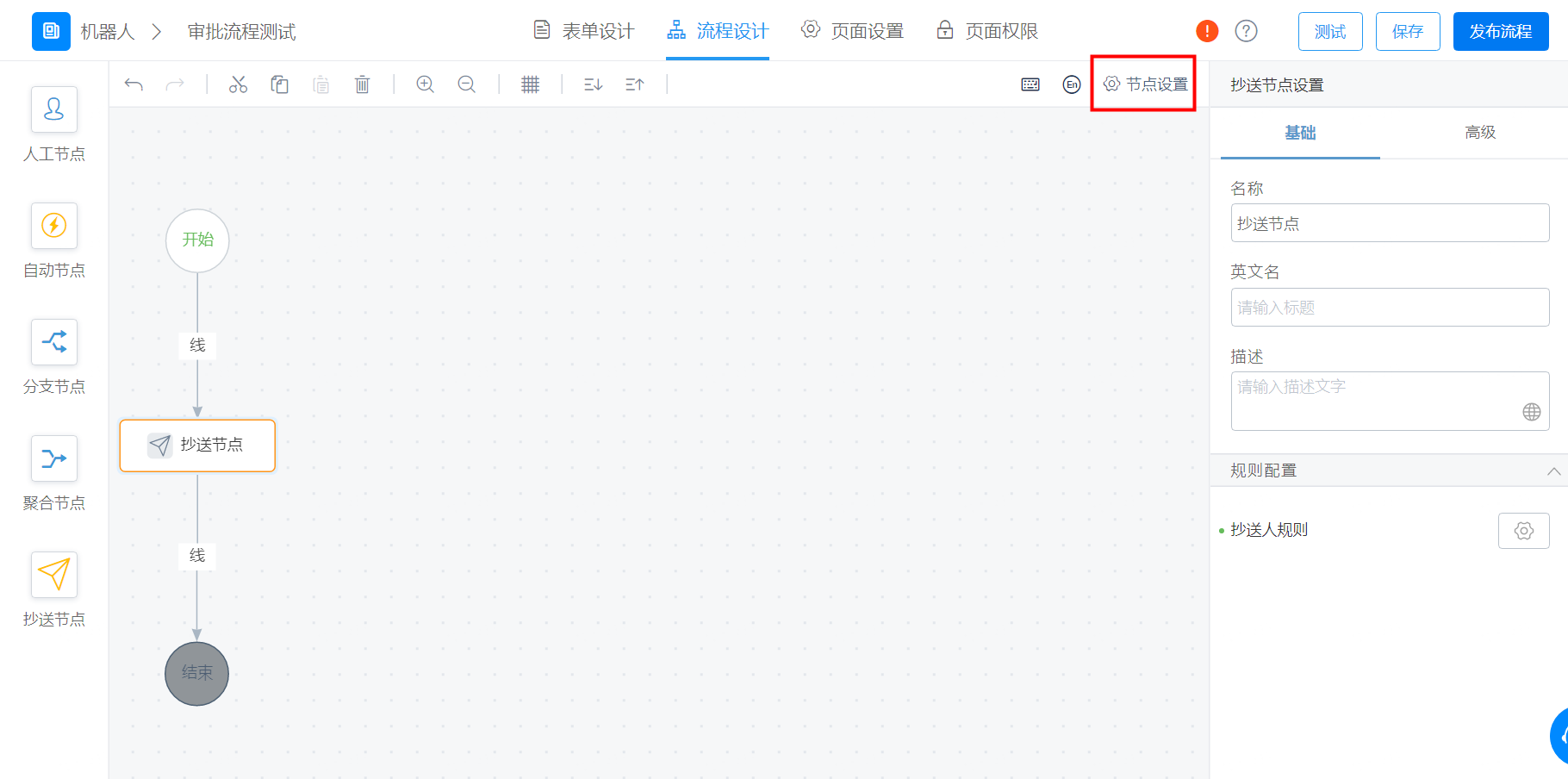
设置抄送人所能看到的表单内容的路径如下：

点击对应的流程表单 > 流程 > 节点设置，如图：

<Frame>
  ![](https://yida-support.oss-cn-shanghai.aliyuncs.com/static/png/1639539387525-7b76e403-1ad0-4127-a714-4ee6a1e51d0c.png)
</Frame>

<Frame>
  ![](https://yida-support.oss-cn-shanghai.aliyuncs.com/static/png/1634699422765-128dbf20-9188-4261-b418-a6c22dc6fe66.png)
</Frame>

**例如**：团队小金库报销系统，需要主管审批和财务审批（这里设置财务角色，只要一个财务审批通过就通过）报销金额，里面有个环节，主管审批完成后需要抄送发消息同步给指定的人员。下面通过设计流程到运行审批整个流程演示如下：

<video controls preload="metadata" poster="https://img.alicdn.com/imgextra/i3/6000000003617/O1CN01UHYIXW1cadGpomVJg_!!6000000003617-0-tbvideo.jpg" src="https://yida-support.oss-cn-shanghai.aliyuncs.com/static/mp4/324176931289.mp4" />