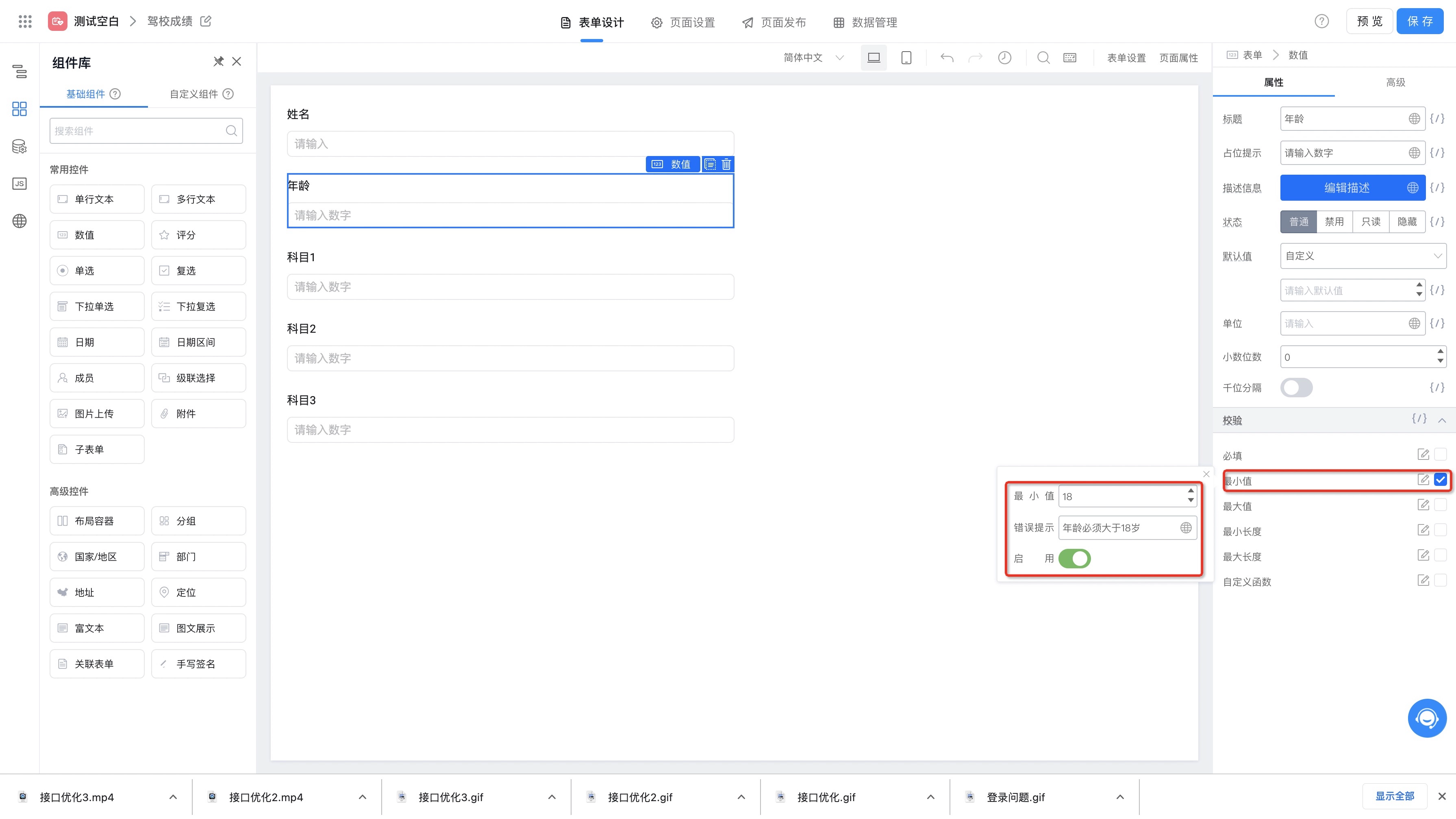
校验设置
宜搭平台提供两种表单设置方案,其设置方案分别如下所示:内置校验规则
宜搭平台为每个表单组件都内置了一些常用的校验规则,用户只要通过简单的设置并启用该规则就可以了,例如上面的最小年纪设置,我们通过如下配置便可轻松实现:
Documentation Index
Fetch the complete documentation index at: /llms.txt
Use this file to discover all available pages before exploring further.
梳理宜搭表单校验能力,包括各表单组件的内置校验规则与自定义校验函数写法,保障提交数据的规范性。


// value 为表单项当前的值,返回boolean类型判断校验是否通过
function validateRule(value: any): boolean;
// 是否以”杭州”开头
function validateRule(value) {
if (/^杭州/.test(value)) {
return true;
}
return false;
export function validate() {
// 执行输入框组件的校验,如果校验失败则在 console 中打印 errors 和 values
this.$('textField_kyz78exp').validate((errors, values) => {
console.log(JSON.stringify({errors, values}, null, 2));
});
}
function validateRule(value) {
return value && /^([0-9]{16}|[0-9]{19})$/.test(value);
}
function validateRule(value) {
if (value && /^([0-9]{16}|[0-9]{19})$/.test(value)) {
let total = 0;
value.split('').reverse().forEach((item, idx) => {
const num = parseInt(item, 10);
total += idx % 2 ? 2 * num - (num > 4 ? 9 : 0) : num;
});
if (total === 0) {
return false;
}
return total % 10 === 0;
}
return false;
}
function validateRule(value) {
if (value && value.length === 18) {
const coeff = [7, 9, 10, 5, 8, 4, 2, 1, 6, 3, 7, 9, 10, 5, 8, 4, 2];
const laststr = ['1', '0', 'X', '9', '8', '7', '6', '5', '4', '3', '2'];
let total = 0;
for(let i = 0; i < 17; ++ i) {
total+= parseInt(value[i], 10) * coeff[i];
}
return value[17] === laststr[total % 11];
}
return false;
}

此页面对您有帮助吗?