Additional attendance rules, including the attendance Allowlist, clock-in rules outside the attendance group, leave-related rules, half-day duration definitions, and photo approval clock-in. Configure all of these on the desktop client under Attendance Rules Management > Other Rules.
The Other Rules section centrally manages the Allowlist, clock-in outside the attendance group, leave rules, half-day duration definitions, and photo approval clock-in. These settings can only be configured on the desktop client. Path: Desktop DingTalk > Workbench > Attendance > Attendance > Attendance Rules Management > Other Rules.
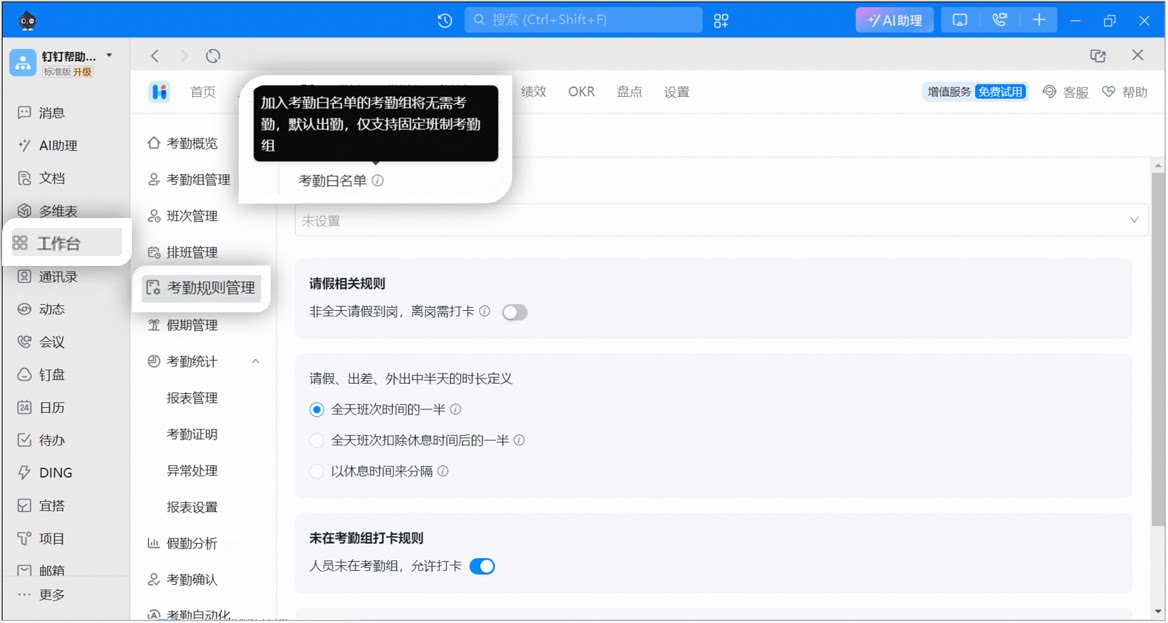
Attendance Allowlist
Overview: Senior executives in the Organization are marked as present by default, and overtime or leave requests are calculated based on shift times.Use case: The Organization has Users who do not need to record attendance and should be marked as present by default.
Attendance groups added to the Allowlist do not require attendance and are marked as present by default. Only fixed shift attendance groups are supported.
Example steps for setting up the attendance Allowlist
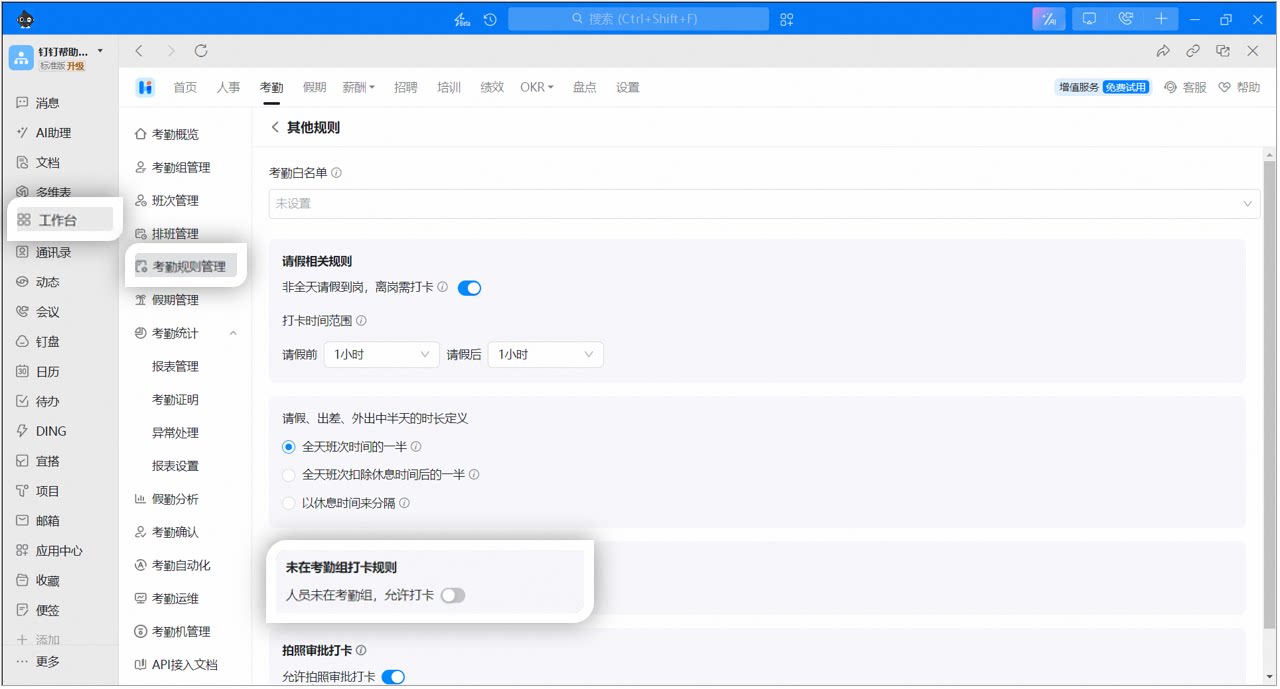
Clock-in rules outside the attendance group
Overview: When enabled, Users who are not in any attendance group can also clock in.Use case: The Organization has Users without fixed working hours who still need to record their working hours.Admins can decide whether Users outside an attendance group are allowed to clock in:
On: Users can clock in, and attendance is calculated based on flexible working hours.
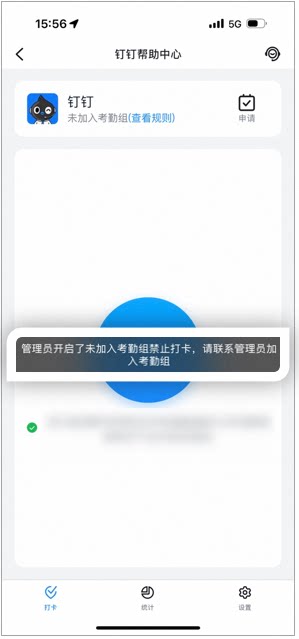
Close: Users outside an attendance group cannot clock in. When they tap to clock in, the Page displays: “The Admin has restricted clock-in for Users not in an attendance group. Please contact the Admin to join an attendance group.”
Set clock-in rules outside the attendance group
Example of the Employee clock-in Page when the option is closed
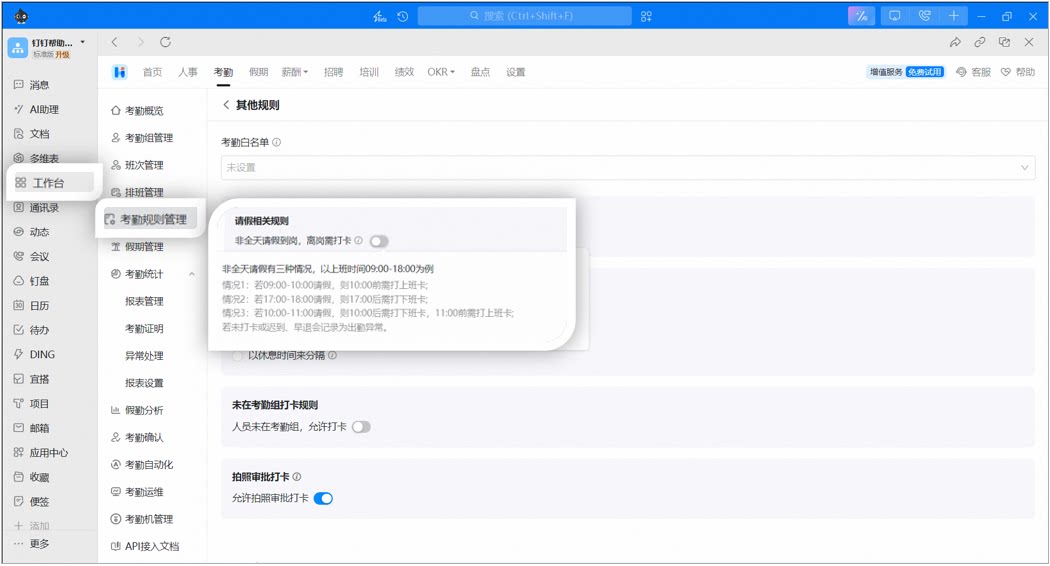
Leave-related rules
Overview: For leave requests that do not cover the full day, Admins can decide whether clock-in is required when leaving or returning, and can set the allowed clock-in time range before and after the leave.Use case: When Users take non-full-day leave, this helps Admins track their working hours accurately.Non-full-day leave falls into three scenarios. Take a 09:00–18:00 shift as an example:
If leave runs from 09:00 to 10:00, clock-in for start of work must be completed before 10:00.
If leave runs from 17:00 to 18:00, clock-out must be completed after 17:00.
If leave runs from 10:00 to 11:00, clock-out must be completed after 10:00 and clock-in must be completed before 11:00.
Missed clock-ins, late arrivals, and early leaves are recorded as attendance errors.
Example steps for setting up leave-related rules
Half-day duration for leave, business trip, and out-of-office
Overview: The half-day duration can be defined in three ways: half of the full-day shift time, half of the full-day shift time excluding breaks, or split by break time.Use case: Organizations can adjust the half-day duration based on actual working hours.
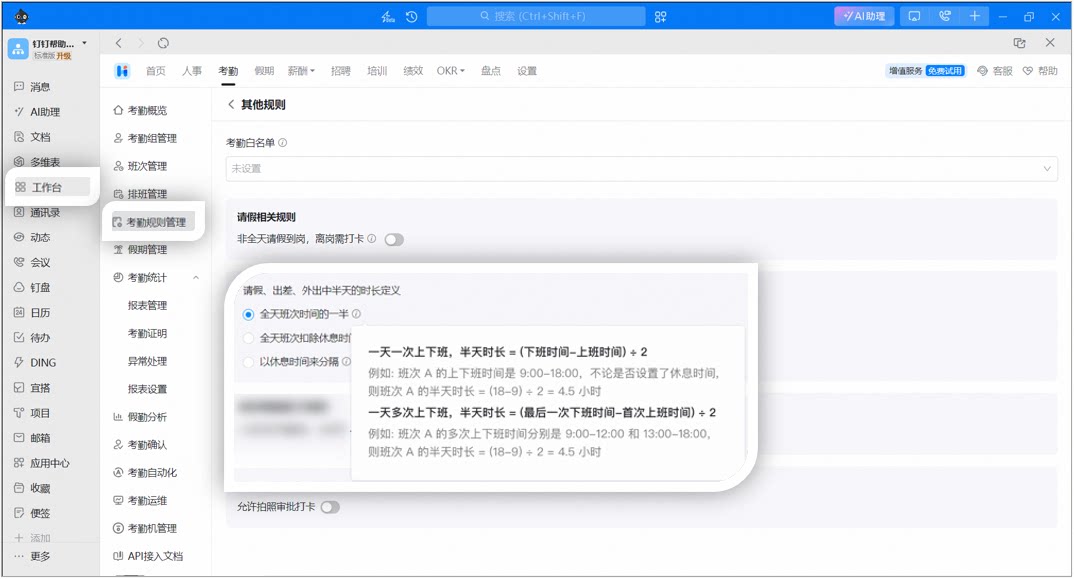
Half of the full-day shift time
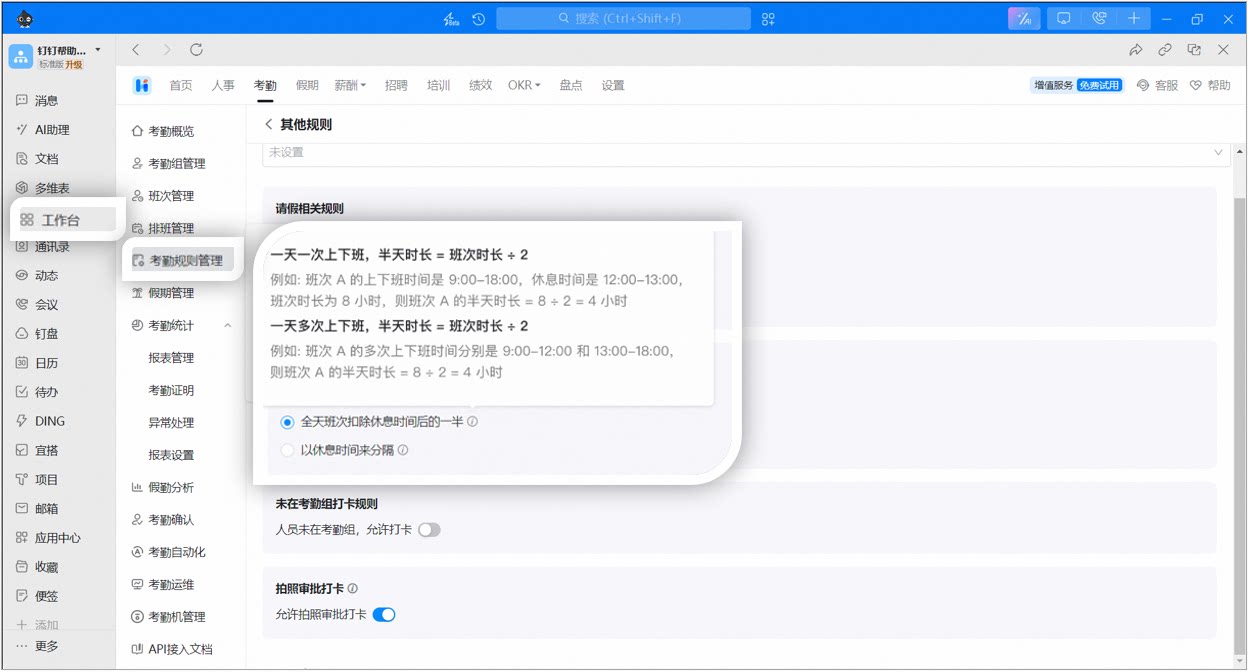
Half of the shift time excluding breaks
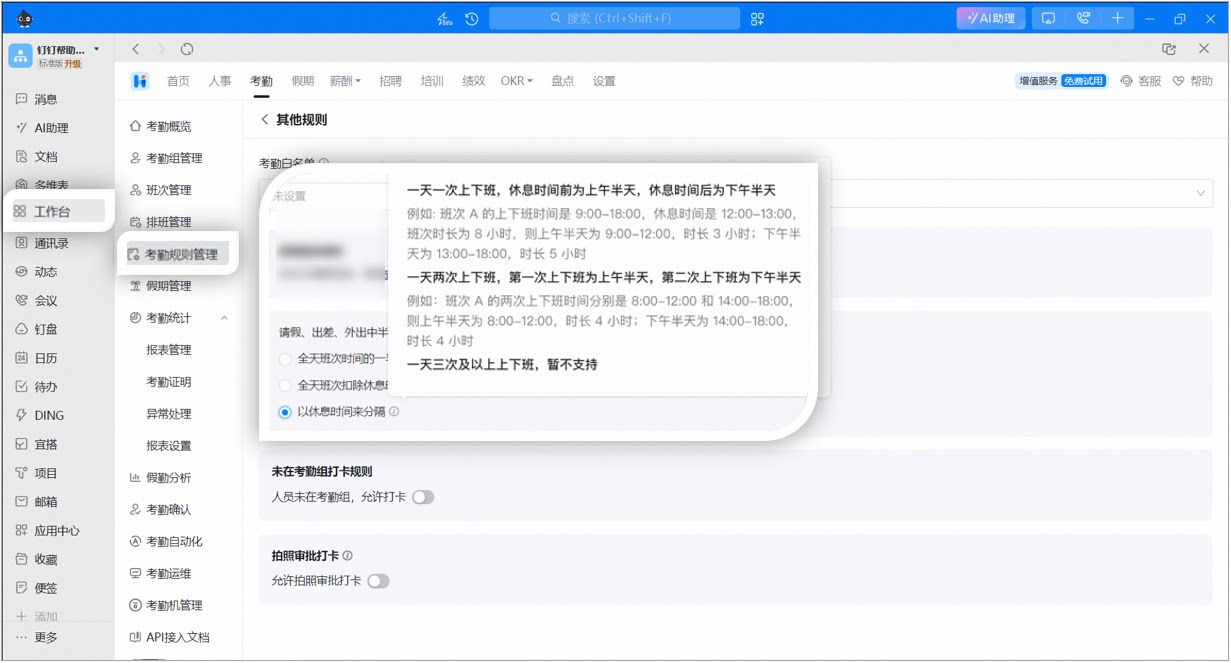
Split by break time
One clock-in/out per day: Half-day duration = (End time − Start time) ÷ 2. For example, shift A runs 9:00–18:00. Regardless of break time, the half-day duration = (18 − 9) ÷ 2 = 4.5 hours.
Multiple clock-ins/outs per day: Half-day duration = (Last end time − First start time) ÷ 2. For example, shift A has clock-in/out periods of 9:00–12:00 and 13:00–18:00, so the half-day duration = (18 − 9) ÷ 2 = 4.5 hours.
Half of the full-day shift time
One clock-in/out per day: Half-day duration = Shift duration ÷ 2. For example, shift A runs 9:00–18:00 with a break from 12:00–13:00. The shift duration is 8 hours, so the half-day duration = 8 ÷ 2 = 4 hours.
Multiple clock-ins/outs per day: Half-day duration = Shift duration ÷ 2. For example, shift A has clock-in/out periods of 9:00–12:00 and 13:00–18:00, so the half-day duration = 8 ÷ 2 = 4 hours.
Half of the shift time excluding breaks
One clock-in/out per day: The time before the break is the morning half-day, and the time after the break is the afternoon half-day. For example, shift A runs 9:00–18:00 with a break from 12:00–13:00. The morning half-day is 9:00–12:00 (3 hours), and the afternoon half-day is 13:00–18:00 (5 hours).
Two clock-ins/outs per day: The first clock-in/out period is the morning half-day, and the second is the afternoon half-day. For example, shift A has two clock-in/out periods of 8:00–12:00 and 14:00–18:00, so the morning half-day is 4 hours and the afternoon half-day is 4 hours.
Three or more clock-ins/outs per day: Not supported.
Split by break time
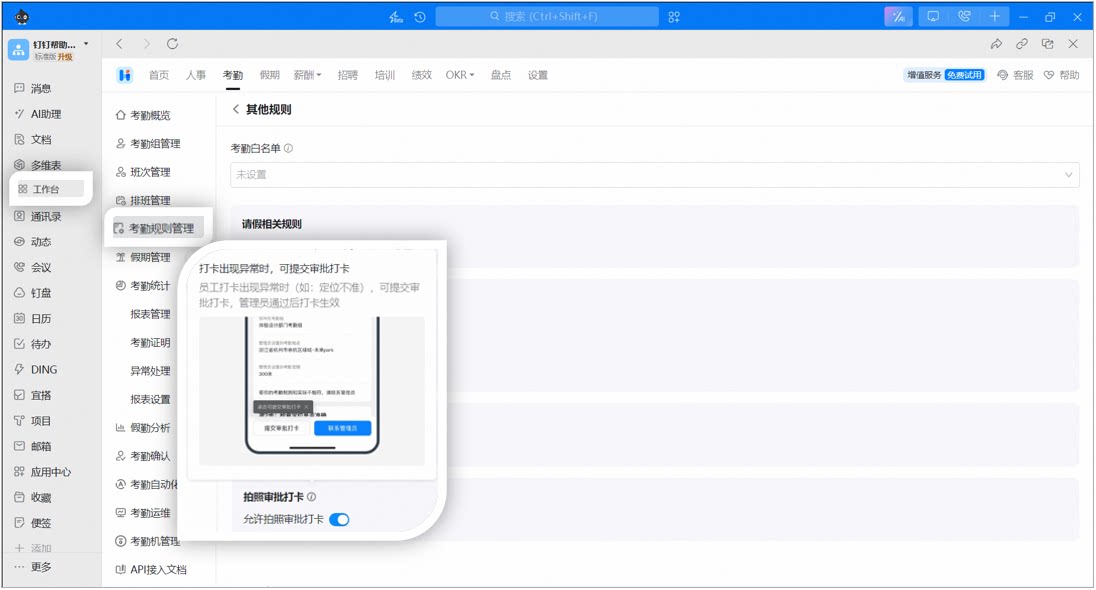
Photo approval clock-in
Overview: When Employees encounter an error during clock-in, they can submit a photo approval clock-in.Use case: The Organization’s attendance Location is underground, has poor network coverage, or similar scenarios.
Once enabled, Employees can submit a photo approval clock-in when an error occurs (for example, inaccurate positioning). The clock-in takes effect after the Admin approves it.
Example steps for setting up photo approval clock-in
Was this page helpful?
{"docsConfig":{"theme":"mint","$schema":"https://mintlify.com/docs.json","name":"DingTalk Help Center","description":"Official help center for DingTalk International — guides, API references, and tutorials.","colors":{"primary":"#0066ff","light":"#3385ff","dark":"#0052cc"},"logo":{"light":"https://help.dingtalk.io/logo/light.svg","dark":"https://help.dingtalk.io/logo/dark.svg","href":"/"},"favicon":"https://mintcdn.com/dingtalk-8c0f98e2/-gG_zvv6IXkTItYa/favicon.ico?fit=max\u0026auto=format\u0026n=-gG_zvv6IXkTItYa\u0026q=85\u0026s=0379048afba937f1ccd8e3a3d7ff252e","appearance":{"default":"system"},"background":{"decoration":"gradient"},"search":{"prompt":""},"seo":{"metatags":{"canonical":"https://help.dingtalk.io","og:type":"website","og:locale":"en_US","og:site_name":"DingTalk Help Center","twitter:card":"summary_large_image","dingtalk:title":"DingTalk 帮助中心","dingtalk:description":"DingTalk 帮助中心 — 指南、API 文档与教程","dingtalk:img":"https://img.alicdn.com/imgextra/i2/O1CN01YT67eU1F0F4n6LlTN_!!6000000000424-2-tps-1024-1024.png","google-site-verification":"4EgfuXkL4_HIpxdhr5IMYiZJoq7XTFARPiv2wALnH0c"},"indexing":"navigable"},"styling":{"codeblocks":{"theme":{"light":"github-light","dark":"github-dark"}},"latex":true},"integrations":{"ga4":{"measurementId":"G-5H09N9EW47"}},"errors":{"404":{"redirect":false}},"contextual":{"options":["copy"],"display":"header"},"navigation":{"languages":[{"language":"en","banner":{"content":"**Announcement:** DingTalk plans for international customers are changing beginning October 21, 2026. [Learn more](/announcements/international-plan-changes-2026)","dismissible":true,"type":"info"},"footer":{"socials":{"x":"https://x.com/DingTalkJapan","instagram":"https://www.instagram.com/dingtalkjapan","linkedin":"https://www.linkedin.com/company/dingtalk"}},"navbar":{"primary":{"type":"button","label":"Download","href":"https://www.dingtalk.io/download/"}},"href":"im/chats-overview"},{"language":"zh","banner":{"content":"**公告**:DingTalk 国际组织商业版本将于 2026 年 10 月 21 日起调整。[查看详情](/zh/announcements/international-plan-changes-2026)","dismissible":true,"type":"info"},"footer":{"socials":{"x":"https://x.com/DingTalkJapan","instagram":"https://www.instagram.com/dingtalkjapan","linkedin":"https://www.linkedin.com/company/dingtalk"}},"navbar":{"primary":{"type":"button","label":"下载","href":"https://www.dingtalk.io/zh/download/"}},"href":"zh/im/chats-overview"},{"language":"ja","banner":{"content":"**お知らせ**:2026年10月21日より、DingTalkグローバル版のプランを改定します。[詳細を見る](/ja/announcements/international-plan-changes-2026)","dismissible":true,"type":"info"},"footer":{"socials":{"x":"https://x.com/DingTalkJapan","instagram":"https://www.instagram.com/dingtalkjapan","linkedin":"https://www.linkedin.com/company/dingtalk"}},"navbar":{"primary":{"type":"button","label":"ダウンロード","href":"https://www.dingtalk.co.jp/download/"}},"href":"ja/im/chats-overview"},{"language":"id","banner":{"content":"**Pengumuman:** Paket DingTalk untuk pelanggan internasional akan berubah mulai 21 Oktober 2026. [Selengkapnya (bahasa Inggris)](/announcements/international-plan-changes-2026)","dismissible":true,"type":"info"},"footer":{"socials":{"x":"https://x.com/DingTalkJapan","instagram":"https://www.instagram.com/dingtalkjapan","linkedin":"https://www.linkedin.com/company/dingtalk"}},"navbar":{"primary":{"type":"button","label":"Unduh","href":"https://www.dingtalk.io/download/"}},"href":"id/im/chats-overview"},{"language":"uz","banner":{"content":"**Pengumuman:** Pelan DingTalk untuk pelanggan antarabangsa akan berubah mulai 21 Oktober 2026. [Ketahui lanjut (bahasa Inggeris)](/announcements/international-plan-changes-2026)","dismissible":true,"type":"info"},"footer":{"socials":{"x":"https://x.com/DingTalkJapan","instagram":"https://www.instagram.com/dingtalkjapan","linkedin":"https://www.linkedin.com/company/dingtalk"}},"navbar":{"primary":{"type":"button","label":"Muat turun","href":"https://www.dingtalk.io/download/"}},"href":"ms/im/chats-overview"}]}},"deployment":{"deploymentMetadataValue":{"subdomain":"dingtalk-8c0f98e2","hasAudioNarration":false,"actualSubdomain":"dingtalk-8c0f98e2","customDomains":["help.dingtalk.io"],"gitSource":{"type":"github","owner":"fuxun2008","repo":"dingtalk-docs","deployBranch":"main","contentDirectory":"","isPrivate":true,"mountPath":"","label":""},"chroma":{"liveDeploymentHistoryId":"6ae0635ddc8e261a8bb5a83f","collectionId":"7732ee56-7e24-4173-b91a-eaa9c9b7dfcd","schemaVersion":"v3","latestBuiltDeploymentHistoryId":"6ae0635ddc8e261a8bb5a83f"},"feedback":{"thumbs":true},"entitlements":{"AI_CHAT":{"status":"DISABLED"}},"buildId":"6aed6ab16ef5b3d55c3e841a","clientVersion":"0.0.4076","searchFilterCounts":[{"language":"en","tag":"Help Docs","count":1175},{"language":"id","tag":"Pusat Bantuan","count":1175},{"language":"ja","tag":"ヘルプドキュメント","count":1175},{"language":"uz","tag":"Pusat Bantuan","count":1175},{"language":"zh","tag":"帮助文档","count":1175},{"language":"en","tag":"Developer Docs","count":577},{"language":"id","tag":"Platform Terbuka","count":577},{"language":"ja","tag":"開発ドキュメント","count":577},{"language":"uz","tag":"Platform Terbuka","count":577},{"language":"zh","tag":"开发文档","count":577},{"language":"en","tag":"YiDA","count":568},{"language":"id","tag":"YiDA","count":568},{"language":"ja","tag":"YiDA","count":568},{"language":"uz","tag":"YiDA","count":568},{"language":"zh","tag":"宜搭","count":568},{"language":"en","tag":"Server API","count":476},{"language":"id","tag":"Server API","count":476},{"language":"ja","tag":"サーバー API","count":476},{"language":"uz","tag":"Server API","count":476},{"language":"zh","tag":"服务端 API","count":476},{"language":"en","tag":"Form Management","count":231},{"language":"id","tag":"Manajemen Formulir","count":231},{"language":"ja","tag":"フォーム管理","count":231},{"language":"uz","tag":"Pengurusan Borang","count":231},{"language":"zh","tag":"表单管理","count":231},{"language":"id","tag":"Dokumen","count":205},{"language":"ja","tag":"ドキュメント","count":205},{"language":"uz","tag":"Dokumen","count":205},{"language":"zh","tag":"文档","count":205},{"language":"en","tag":"Docs","count":180},{"language":"en","tag":"Form Design","count":166},{"language":"id","tag":"Desain Formulir","count":166},{"language":"ja","tag":"フォーム設計","count":166},{"language":"uz","tag":"Reka Bentuk Borang","count":166},{"language":"zh","tag":"表单设计","count":166},{"language":"en","tag":"AI Table","count":161},{"language":"id","tag":"AI Table","count":161},{"language":"uz","tag":"AI Table","count":161},{"language":"zh","tag":"AI 表格","count":161},{"language":"en","tag":"Docs \u0026 files","count":146},{"language":"id","tag":"Dokumen \u0026 file","count":146},{"language":"ja","tag":"Docs とファイル","count":146},{"language":"uz","tag":"Dokumen \u0026 Fail","count":146},{"language":"zh","tag":"文档/文件","count":146},{"language":"ja","tag":"AI テーブル","count":144},{"language":"en","tag":"Attendance","count":143},{"language":"id","tag":"Absensi","count":143},{"language":"ja","tag":"勤怠","count":143},{"language":"uz","tag":"Kehadiran","count":143},{"language":"zh","tag":"考勤","count":143}],"searchSettings":{"maxResults":15}},"assistantConfig":{"enableAskAiButton":false,"enableStarterQuestions":false,"enableContextualStarterQuestions":false,"enableAskAiSearchBar":true},"basePath":"","hasChatPermissions":false,"hasWebMcpPermissions":false,"toggles":[{"name":"kill-isr","enabled":true,"variant":{"name":"disabled","enabled":false,"feature_enabled":true},"impressionData":false},{"name":"agent-mintlify-slack","enabled":true,"variant":{"name":"disabled","enabled":false,"feature_enabled":true},"impressionData":false},{"name":"agent-integrations-settings","enabled":true,"variant":{"name":"disabled","enabled":false,"feature_enabled":true},"impressionData":false},{"name":"rbac-expansion","enabled":true,"variant":{"name":"disabled","enabled":false,"feature_enabled":true},"impressionData":false},{"name":"automations-pr-grouping","enabled":true,"variant":{"name":"disabled","enabled":false,"feature_enabled":true},"impressionData":false},{"name":"custom-prefix","enabled":true,"variant":{"name":"disabled","enabled":false,"feature_enabled":true},"impressionData":false},{"name":"analytics-v7","enabled":true,"variant":{"name":"disabled","enabled":false,"feature_enabled":true},"impressionData":false},{"name":"user-flows-analytics","enabled":true,"variant":{"name":"disabled","enabled":false,"feature_enabled":true},"impressionData":false},{"name":"no-publish-flow","enabled":true,"variant":{"name":"disabled","enabled":false,"feature_enabled":true},"impressionData":false},{"name":"workos-onboarding","enabled":true,"variant":{"name":"disabled","enabled":false,"feature_enabled":true},"impressionData":false},{"name":"llms-txt-v2","enabled":true,"variant":{"name":"disabled","enabled":false,"feature_enabled":true},"impressionData":false},{"name":"snapshot-serving-live","enabled":true,"variant":{"name":"disabled","enabled":false,"feature_enabled":true},"impressionData":false},{"name":"stripTemperatureMiddleware","enabled":true,"variant":{"name":"disabled","enabled":false,"feature_enabled":true},"impressionData":false},{"name":"support-platform-pylon-zendesk","enabled":true,"variant":{"name":"disabled","enabled":false,"feature_enabled":true},"impressionData":false},{"name":"snapshot-serving","enabled":true,"variant":{"name":"disabled","enabled":false,"feature_enabled":true},"impressionData":false},{"name":"instant-rollback","enabled":true,"variant":{"name":"disabled","enabled":false,"feature_enabled":true},"impressionData":false},{"name":"granular-notifications-server","enabled":true,"variant":{"name":"disabled","enabled":false,"feature_enabled":true},"impressionData":false},{"name":"granular-notifications","enabled":true,"variant":{"name":"disabled","enabled":false,"feature_enabled":true},"impressionData":false},{"name":"automations-fable","enabled":true,"variant":{"name":"disabled","enabled":false,"feature_enabled":true},"impressionData":false},{"name":"fixed-ai-action-pricing","enabled":true,"variant":{"name":"disabled","enabled":false,"feature_enabled":true},"impressionData":false},{"name":"automation-resolve-merge-conflict","enabled":true,"variant":{"name":"disabled","enabled":false,"feature_enabled":true},"impressionData":false},{"name":"scoped-publishing","enabled":true,"variant":{"name":"disabled","enabled":false,"feature_enabled":true},"impressionData":false},{"name":"mintql","enabled":true,"variant":{"name":"disabled","enabled":false,"feature_enabled":true},"impressionData":false},{"name":"page-level-analytics","enabled":true,"variant":{"name":"disabled","enabled":false,"feature_enabled":true},"impressionData":false},{"name":"editor-version-history-v2","enabled":true,"variant":{"name":"disabled","enabled":false,"feature_enabled":true},"impressionData":false},{"name":"billing-page-v2","enabled":true,"variant":{"name":"disabled","enabled":false,"feature_enabled":true},"impressionData":false},{"name":"full-page-search","enabled":true,"variant":{"name":"disabled","enabled":false,"feature_enabled":true},"impressionData":false},{"name":"workspace-projects","enabled":true,"variant":{"name":"disabled","enabled":false,"feature_enabled":true},"impressionData":false},{"name":"assistant-v5","enabled":true,"variant":{"name":"disabled","enabled":false,"feature_enabled":true},"impressionData":false},{"name":"fork-pr-previews","enabled":true,"variant":{"name":"disabled","enabled":false,"feature_enabled":true},"impressionData":false},{"name":"revalidation-jwt","enabled":true,"variant":{"name":"disabled","enabled":false,"feature_enabled":true},"impressionData":false},{"name":"workos-sso-scim","enabled":true,"variant":{"name":"disabled","enabled":false,"feature_enabled":true},"impressionData":false},{"name":"hobby-abuse-scan","enabled":true,"variant":{"name":"disabled","enabled":false,"feature_enabled":true},"impressionData":false},{"name":"dashboard-inbox","enabled":true,"variant":{"name":"disabled","enabled":false,"feature_enabled":true},"impressionData":false},{"name":"workos-signup","enabled":true,"variant":{"name":"disabled","enabled":false,"feature_enabled":true},"impressionData":false},{"name":"turbopuffer-dual-write","enabled":true,"variant":{"name":"disabled","enabled":false,"feature_enabled":true},"impressionData":false},{"name":"workos-enabled","enabled":true,"variant":{"name":"disabled","enabled":false,"feature_enabled":true},"impressionData":false},{"name":"approve-review-flow","enabled":true,"variant":{"name":"disabled","enabled":false,"feature_enabled":true},"impressionData":false},{"name":"sso-setup-deadline-banner","enabled":true,"variant":{"name":"disabled","enabled":false,"feature_enabled":true},"impressionData":false},{"name":"turbopuffer-serve","enabled":true,"variant":{"name":"disabled","enabled":false,"feature_enabled":true},"impressionData":false},{"name":"live-agents","enabled":true,"variant":{"name":"disabled","enabled":false,"feature_enabled":true},"impressionData":false},{"name":"comment-mode","enabled":true,"variant":{"name":"disabled","enabled":false,"feature_enabled":true},"impressionData":false}],"googleFontsInlined":false},"customCss":[{"filePath":"custom.css","content":".prose table,main table{border-collapse:separate!important;border-spacing:0;width:100%;margin:1.25rem 0;font-size:14px;line-height:1.6;border:1px solid rgb(229, 231, 235);border-radius:8px;overflow:hidden}.prose table th,main table th{min-width:5em}html.dark .prose table,html.dark main table{border-color:rgb(55, 65, 81)}.prose table thead,main table thead{background-color:rgb(249, 250, 251)}html.dark .prose table thead,html.dark main table thead{background-color:rgba(31, 41, 55, 0.6)}.prose table th,main table th{padding:12px 16px!important;font-weight:600!important;text-align:left!important;color:rgb(17, 24, 39)!important;border-bottom:1px solid rgb(229, 231, 235)!important}html.dark .prose table th,html.dark main table th{color:rgb(243, 244, 246)!important;border-bottom-color:rgb(55, 65, 81)!important}.prose table:not(:has(thead))>tr:first-child,main table:not(:has(thead))>tr:first-child{background-color:rgb(249, 250, 251)}html.dark .prose table:not(:has(thead))>tr:first-child,html.dark main table:not(:has(thead))>tr:first-child{background-color:rgba(31, 41, 55, 0.6)}.prose table td,main table td{padding:10px 16px!important;vertical-align:top;border-bottom:1px solid rgb(243, 244, 246)!important}html.dark .prose table td,html.dark main table td{border-bottom-color:rgba(55, 65, 81, 0.4)!important}.prose table td:first-child,main table td:first-child{padding-inline-start:16px!important;font-weight:500;color:rgb(31, 41, 55)}html.dark .prose table td:first-child,html.dark main table td:first-child{color:rgb(229, 231, 235)}.prose table tbody tr:last-child td,main table tbody tr:last-child td,.prose table>tr:last-child td,main table>tr:last-child td{border-bottom:0!important}.prose table tbody tr:nth-child(even),main table tbody tr:nth-child(even),.prose table:not(:has(thead))>tr:nth-child(even),main table:not(:has(thead))>tr:nth-child(even){background-color:rgba(249, 250, 251, 0.5)}html.dark .prose table tbody tr:nth-child(even),html.dark main table tbody tr:nth-child(even),html.dark .prose table:not(:has(thead))>tr:nth-child(even),html.dark main table:not(:has(thead))>tr:nth-child(even){background-color:rgba(31, 41, 55, 0.25)}.prose table tbody tr:hover,main table tbody tr:hover,.prose table>tr:hover,main table>tr:hover{background-color:rgba(0, 102, 255, 0.05)}html.dark .prose table tbody tr:hover,html.dark main table tbody tr:hover,html.dark .prose table>tr:hover,html.dark main table>tr:hover{background-color:rgba(0, 102, 255, 0.1)}.prose table code,main table code{font-size:0.875em;padding:1px 6px;border-radius:4px}.prose img,main article img{max-height:80vh;max-width:100%;width:auto;height:auto;object-fit:contain;display:block;margin-left:auto;margin-right:auto;border-radius:8px;box-shadow:0 1px 3px rgba(0, 0, 0, 0.08)}html.dark .prose img,html.dark main article img{box-shadow:0 1px 3px rgba(0, 0, 0, 0.4)}@media (max-width: 640px){.prose img,main article img{max-height:none;border-radius:6px}}.prose img.inline-icon,main article img.inline-icon{display:inline-block;width:auto;height:auto;max-height:1.5em;margin:0 3px;vertical-align:text-bottom;border-radius:3px;box-shadow:none}img[src*=\"/logo/icons/\"]{background-color:currentColor!important;-webkit-mask-repeat:no-repeat;mask-repeat:no-repeat;-webkit-mask-position:center;mask-position:center;-webkit-mask-size:contain;mask-size:contain}img[src*=\"/logo/icons/im.svg\"]{-webkit-mask-image:url(/logo/icons/im-glyph.svg);mask-image:url(/logo/icons/im-glyph.svg)}img[src*=\"/logo/icons/cal.svg\"]{-webkit-mask-image:url(/logo/icons/cal-glyph.svg);mask-image:url(/logo/icons/cal-glyph.svg)}img[src*=\"/logo/icons/av.svg\"]{-webkit-mask-image:url(/logo/icons/av-glyph.svg);mask-image:url(/logo/icons/av-glyph.svg)}img[src*=\"/logo/icons/contact.svg\"]{-webkit-mask-image:url(/logo/icons/contact-glyph.svg);mask-image:url(/logo/icons/contact-glyph.svg)}img[src*=\"/logo/icons/mail.svg\"]{-webkit-mask-image:url(/logo/icons/mail-glyph.svg);mask-image:url(/logo/icons/mail-glyph.svg)}img[src*=\"/logo/icons/doc.svg\"]{-webkit-mask-image:url(/logo/icons/doc-glyph.svg);mask-image:url(/logo/icons/doc-glyph.svg)}img[src*=\"/logo/icons/drive.svg\"]{-webkit-mask-image:url(/logo/icons/drive-glyph.svg);mask-image:url(/logo/icons/drive-glyph.svg)}img[src*=\"/logo/icons/table.svg\"]{-webkit-mask-image:url(/logo/icons/table-glyph.svg);mask-image:url(/logo/icons/table-glyph.svg)}img[src*=\"/logo/icons/notes.svg\"]{-webkit-mask-image:url(/logo/icons/notes-glyph.svg);mask-image:url(/logo/icons/notes-glyph.svg)}img[src*=\"/logo/icons/yida.svg\"]{-webkit-mask-image:url(/logo/icons/yida-glyph.svg);mask-image:url(/logo/icons/yida-glyph.svg)}img[src*=\"/logo/icons/att.svg\"]{-webkit-mask-image:url(/logo/icons/att-glyph.svg);mask-image:url(/logo/icons/att-glyph.svg)}img[src*=\"/logo/icons/appr.svg\"]{-webkit-mask-image:url(/logo/icons/appr-glyph.svg);mask-image:url(/logo/icons/appr-glyph.svg)}[data-component-part=\"products-selector-trigger\"]>span{max-width:none!important;overflow:visible!important;text-overflow:clip!important;-webkit-line-clamp:unset!important;display:block!important;white-space:nowrap!important}[data-component-part=\"products-selector-trigger\"]{overflow:visible!important}.nav-tabs-item{white-space:nowrap!important;flex-shrink:0!important}.nav-tabs{flex-wrap:nowrap;overflow:hidden}html.dt-nav-ready .nav-tabs{overflow:visible}#navbar div.flex-1.justify-end{flex-grow:0!important}.dt-more-tab{position:relative;display:inline-flex;align-items:center;gap:6px;height:100%;cursor:pointer;background:none;border:0;padding:0;white-space:nowrap;flex-shrink:0}.dt-more-tab .dt-more-caret{width:12px;height:12px;transition:transform 0.2s ease}.dt-more-tab:hover .dt-more-caret,.dt-more-tab:focus-within .dt-more-caret,.dt-more-tab[aria-expanded=\"true\"] .dt-more-caret{transform:rotate(180deg)}.dt-more-tab.dt-more-active{color:var(--primary, #0066ff)!important}html.dark .dt-more-tab.dt-more-active{color:var(--primary-light, #4d94ff)!important}.dt-more-panel{position:absolute;top:calc(100% + 6px);right:0;z-index:60;min-width:208px;padding:6px;display:none;flex-direction:column;gap:2px;background:#ffffff;border:1px solid rgba(23, 26, 29, 0.1);border-radius:12px;box-shadow:0 12px 32px rgba(23, 26, 29, 0.16), 0 2px 8px rgba(23, 26, 29, 0.08)}html.dark .dt-more-panel{background:#1b1e24;border-color:rgba(255, 255, 255, 0.12);box-shadow:0 12px 32px rgba(0, 0, 0, 0.6), 0 2px 8px rgba(0, 0, 0, 0.4)}.dt-more-panel::before{content:\"\";position:absolute;left:0;right:0;top:-10px;height:10px}.dt-more-tab:hover .dt-more-panel,.dt-more-tab:focus-within .dt-more-panel,.dt-more-panel:hover,.dt-more-tab[aria-expanded=\"true\"] .dt-more-panel{display:flex}.dt-more-panel .dt-more-item{display:flex;align-items:center;gap:10px;padding:8px 10px;border-radius:8px;font-size:14px;font-weight:500;color:var(--gray-700, #374151);white-space:nowrap;text-decoration:none}html.dark .dt-more-panel .dt-more-item{color:rgba(255, 255, 255, 0.75)}.dt-more-panel .dt-more-item:hover{background:rgba(0, 102, 255, 0.08)}.dt-more-panel .dt-more-item.dt-more-item-active{color:var(--primary, #0066ff);background:rgba(0, 102, 255, 0.1)}.dt-more-panel .dt-more-item img{width:18px;height:18px;flex:none}img[src*=\"/logo/icons/dev.svg\"]{-webkit-mask-image:url(/logo/icons/dev-glyph.svg);mask-image:url(/logo/icons/dev-glyph.svg)}img[src*=\"/logo/icons/oa.svg\"]{-webkit-mask-image:url(/logo/icons/oa-glyph.svg);mask-image:url(/logo/icons/oa-glyph.svg)}html.dt-embed #navbar,html.dt-embed #sidebar,html.dt-embed #table-of-contents,html.dt-embed footer{display:none!important}html.dt-embed :where(div):has(>#content-area){padding-top:2.5rem!important}@font-face{font-family:\"DT Yu Gothic\";src:local(\"Yu Gothic Medium\"), local(\"YuGothic Medium\");font-weight:100 500}@font-face{font-family:\"DT Yu Gothic\";src:local(\"Yu Gothic Bold\"), local(\"YuGothic Bold\");font-weight:600 900}html[lang=\"ja\"]{--dt-font-ja: Inter, \"Hiragino Sans\", \"Hiragino Kaku Gothic ProN\", \"DT Yu Gothic\", \"Yu Gothic\", YuGothic, sans-serif}html[lang=\"ja\"] body,html[lang=\"ja\"] :is(h1,h2,h3,h4,h5,h6){font-family:var(--dt-font-ja)}html[lang=\"ja\"] .dt-home{--cjk: var(--dt-font-ja)}#content-area:has(.dt-hide-page-desc) #header>div.prose{display:none}"},{"filePath":"style.css","content":".dt-home{--blue: #0066ff;--blue-deep: #0052cc;--blue-soft: #eaf2ff;--blue-tint: #f4f8ff;--ink: #0d1421;--ink-2: #3d4757;--ink-3: #7a8595;--line: #e9edf3;--line-2: #f0f3f8;--bg: #ffffff;--bg-soft: #f7f9fc;--surface: #ffffff;--surface-glass: rgba(255, 255, 255, 0.82);--eyebrow-bg: #ffffff;--logo-url: url(/logo/dark.svg);--dot-pattern: rgba(13, 20, 33, 0.045);--hero-scrim: radial-gradient(660px 420px at 50% 42%, rgba(247, 249, 252, 0.62), rgba(247, 249, 252, 0.18) 54%, rgba(247, 249, 252, 0) 78%);--hero-tint-1: rgba(0, 102, 255, 0.10);--hero-tint-2: rgba(58, 147, 255, 0.08);--hero-tint-3: rgba(150, 120, 255, 0.06);--radius: 18px;--shadow-sm: 0 1px 2px rgba(13, 20, 33, 0.04), 0 4px 16px rgba(13, 20, 33, 0.04);--shadow-md: 0 8px 30px rgba(13, 20, 33, 0.08);--shadow-blue: 0 12px 40px rgba(0, 102, 255, 0.18);--cjk: \"PingFang SC\", \"Hiragino Sans GB\", \"Microsoft YaHei\", sans-serif;color:var(--ink);background:var(--bg);line-height:1.6;font-family:var(--cjk)}.dt-home *,.dt-home *::before,.dt-home *::after{box-sizing:border-box}.dt-home a{color:inherit;text-decoration:none}.dt-home img,.dt-home svg{display:block}html[data-page-mode=\"custom\"] #navbar{display:none!important}html[data-page-mode=\"custom\"] :where(div):has(>#content-area){padding-top:0!important}html:has(.dt-home),html:has(.dt-home) body{scrollbar-width:none;-ms-overflow-style:none}html:has(.dt-home)::-webkit-scrollbar,html:has(.dt-home) body::-webkit-scrollbar{width:0;height:0;display:none}.dt-home-header{position:sticky;top:0;z-index:50;background:var(--surface-glass);backdrop-filter:saturate(180%) blur(18px);-webkit-backdrop-filter:saturate(180%) blur(18px);border-bottom:1px solid var(--line-2)}.dt-home-nav{max-width:1180px;margin:0 auto;padding:0 28px;height:66px;display:flex;align-items:center;gap:32px}.dt-home .dt-home-brand{display:flex;align-items:center;gap:10px;font-weight:700;letter-spacing:-0.01em;text-decoration:none}.dt-home-brand-logo{display:block;width:95px;height:32px;background:var(--logo-url) no-repeat left center;background-size:contain}.dt-home-brand-sub{color:var(--ink-3);font-weight:500;font-size:13px;border-left:1px solid var(--line);padding-left:11px;margin-left:2px}.dt-home-nav-links{display:flex;gap:28px;margin-left:8px}.dt-home .dt-home-nav-links a{font-size:14.5px;color:var(--ink-2);font-weight:500;transition:color 0.2s;text-decoration:none}.dt-home .dt-home-nav-links a:hover{color:var(--blue)}.dt-home-nav-right{margin-left:auto;display:flex;align-items:center;gap:14px}.dt-home-lang{position:relative}.dt-home-lang-btn{display:flex;align-items:center;gap:6px;font-size:13.5px;color:var(--ink-2);font-weight:600;border:1px solid var(--line);border-radius:99px;padding:7px 11px 7px 13px;cursor:pointer;transition:0.2s;background:var(--surface);font-family:inherit}.dt-home-lang-btn:hover{border-color:var(--blue);color:var(--blue)}.dt-home-lang-label{white-space:nowrap}.dt-home-lang-btn svg{width:15px;height:15px}.dt-home-lang-chev{width:13px!important;height:13px!important;transition:transform 0.2s;opacity:0.7}.dt-home-lang-open .dt-home-lang-btn{border-color:var(--blue);color:var(--blue)}.dt-home-lang-open .dt-home-lang-chev{transform:rotate(180deg)}.dt-home-lang-list{position:absolute;top:calc(100% + 8px);right:0;min-width:176px;background:var(--surface);border:1px solid var(--line);border-radius:13px;box-shadow:var(--shadow-md);padding:6px;list-style:none;margin:0;opacity:0;visibility:hidden;transform:translateY(-6px);transition:0.18s;z-index:60}.dt-home-lang-open .dt-home-lang-list{opacity:1;visibility:visible;transform:none}.dt-home-lang-list li{display:flex;align-items:center;justify-content:space-between;gap:10px;font-size:14px;color:var(--ink-2);font-weight:500;padding:9px 12px;border-radius:9px;cursor:pointer;transition:0.15s;white-space:nowrap}.dt-home-lang-list li:hover{background:var(--blue-tint);color:var(--blue)}.dt-home-lang-list li[aria-selected=\"true\"]{color:var(--blue);font-weight:600;background:var(--blue-soft)}.dt-home-lang-list li[aria-selected=\"true\"]::after{content:\"\\2713\";font-size:12px}.dt-home-navmenu{position:relative;display:none}.dt-home-nav-burger{display:flex;align-items:center;justify-content:center;width:38px;height:38px;border:1px solid var(--line);border-radius:11px;background:var(--surface);color:var(--ink-2);cursor:pointer;transition:0.2s;padding:0}.dt-home-nav-burger:hover{border-color:var(--blue);color:var(--blue)}.dt-home-nav-burger svg{width:22px;height:22px}.dt-home-navmenu-open .dt-home-nav-burger{border-color:var(--blue);color:var(--blue)}.dt-home-nav-panel{position:absolute;top:calc(100% + 8px);right:0;min-width:196px;background:var(--surface);border:1px solid var(--line);border-radius:13px;box-shadow:var(--shadow-md);padding:8px;display:flex;flex-direction:column;gap:2px;opacity:0;visibility:hidden;transform:translateY(-6px);transition:0.18s;z-index:60}.dt-home-navmenu-open .dt-home-nav-panel{opacity:1;visibility:visible;transform:none}.dt-home .dt-home-nav-panel a{font-size:14.5px;color:var(--ink-2);font-weight:500;padding:11px 12px;border-radius:9px;transition:0.15s;text-decoration:none}.dt-home .dt-home-nav-panel a:hover{background:var(--blue-tint);color:var(--blue)}.dt-home .dt-home-nav-panel-cta{margin-top:6px;text-align:center;background:var(--blue);color:#fff!important;font-weight:600;box-shadow:0 4px 14px rgba(0, 102, 255, 0.28)}.dt-home .dt-home-nav-panel-cta:hover{background:var(--blue-deep)}.dt-home .dt-home-btn-primary{background:var(--blue);color:#fff;font-weight:600;font-size:14px;padding:9px 18px;border-radius:99px;transition:0.2s;box-shadow:0 4px 14px rgba(0, 102, 255, 0.28);text-decoration:none}.dt-home .dt-home-btn-primary:hover{background:var(--blue-deep);transform:translateY(-1px)}.dt-home-hero{position:relative;padding:92px 28px 76px;text-align:center;background:radial-gradient(900px 380px at 50% -8%, var(--hero-tint-1), transparent 60%),\n radial-gradient(560px 300px at 12% 18%, var(--hero-tint-2), transparent 60%),\n radial-gradient(560px 300px at 88% 12%, var(--hero-tint-3), transparent 60%);overflow:hidden}.dt-home-hero::before{content:\"\";position:absolute;inset:0;pointer-events:none;z-index:1;background-image:radial-gradient(var(--dot-pattern) 1px, transparent 1px);background-size:26px 26px;-webkit-mask-image:radial-gradient(620px 360px at 50% 30%, #000 0%, transparent 75%);mask-image:radial-gradient(620px 360px at 50% 30%, #000 0%, transparent 75%)}.dt-home-hero-bg{position:absolute;inset:0;z-index:0;overflow:hidden}.dt-home-particle-canvas{position:absolute;inset:0;width:100%;height:100%;display:block}.dt-home-hero-scrim{position:absolute;inset:0;z-index:2;pointer-events:none;background:var(--hero-scrim)}.dt-home-hero-inner{position:relative;z-index:3;max-width:760px;margin:0 auto}.dt-home-eyebrow{display:inline-flex;align-items:center;gap:7px;font-size:13px;font-weight:600;color:var(--blue);background:var(--eyebrow-bg);border:1px solid var(--blue-soft);box-shadow:var(--shadow-sm);padding:6px 14px;border-radius:99px;margin-bottom:24px}.dt-home-eyebrow-dot{width:6px;height:6px;border-radius:50%;background:#22c55e;box-shadow:0 0 0 4px rgba(34, 197, 94, 0.15)}.dt-home-notice{max-width:100%;padding:4px 14px 4px 4px;color:var(--ink-2);font-weight:500;text-decoration:none;transition:border-color 0.2s, box-shadow 0.2s, transform 0.2s}.dt-home-notice:hover{border-color:var(--blue);box-shadow:var(--shadow-blue);transform:translateY(-1px)}.dt-home-notice:focus-visible{outline:2px solid var(--blue);outline-offset:3px}.dt-home-notice-label{flex:none;padding:2px 10px;border-radius:99px;background:var(--blue);color:#fff;font-weight:600}.dt-home-notice-text{min-width:0;overflow:hidden;text-overflow:ellipsis;white-space:nowrap}.dt-home-notice-arrow{flex:none;color:var(--blue);transition:transform 0.2s}.dt-home-notice:hover .dt-home-notice-arrow{transform:translateX(3px)}.dt-home-hero-title{font-weight:700;letter-spacing:-0.02em;font-size:clamp(30px, 5vw, 46px);line-height:1.14;color:var(--ink);margin:0}.dt-home-hero-sub{margin:16px auto 0;font-size:17px;color:var(--ink-2);max-width:100%}.dt-home-search{margin:36px auto 0;max-width:620px;position:relative;z-index:30}.dt-home-search-box{display:flex;align-items:center;gap:12px;background:var(--surface);border:1.5px solid var(--line);border-radius:99px;padding:8px 8px 8px 22px;box-shadow:var(--shadow-md);transition:0.25s;cursor:text}.dt-home-search-box:focus-within{border-color:var(--blue);box-shadow:var(--shadow-blue)}.dt-home-search-ic{width:20px;height:20px;color:var(--ink-3);flex:none}.dt-home-search-box input{flex:1;min-width:0;border:none;outline:none;font-family:var(--cjk);font-size:16px;color:var(--ink);background:transparent}.dt-home-search-box input::placeholder{color:var(--ink-3)}.dt-home-search-go{background:var(--blue);color:#fff;border:none;cursor:pointer;font-family:var(--cjk);font-weight:600;font-size:15px;padding:11px 24px;border-radius:99px;transition:0.2s;flex:none;display:inline-flex;align-items:center;justify-content:center;gap:6px}.dt-home-search-go kbd{font-family:ui-monospace, SFMono-Regular, Menlo, monospace;font-size:11.5px;font-weight:600;color:rgba(255, 255, 255, 0.82);background:rgba(255, 255, 255, 0.16);border:1px solid rgba(255, 255, 255, 0.28);border-radius:5px;padding:2px 6px;letter-spacing:0.02em;user-select:none;line-height:1}.dt-home-search-go:hover{background:var(--blue-deep)}.dt-home-hot{margin-top:18px;display:flex;flex-wrap:nowrap;gap:8px;position:relative;left:50%;transform:translateX(-50%);z-index:1;justify-content:center;align-items:center;width:max-content;max-width:calc(100vw - 56px)}.dt-home-hot-label{font-size:13.5px;color:var(--ink-3);font-weight:500;margin-right:2px;flex:none}.dt-home .dt-home-hot a{font-size:13.5px;color:var(--ink-2);background:var(--surface);border:1px solid var(--line);padding:6px 13px;border-radius:99px;transition:0.2s;font-weight:500;white-space:nowrap;flex:none;text-decoration:none}.dt-home .dt-home-hot a:hover{color:var(--blue);border-color:var(--blue);background:var(--blue-tint)}.dt-home-wrap{max-width:1180px;margin:0 auto;padding:0 28px}.dt-home-block{padding-top:64px;padding-bottom:64px}.dt-home-popular .dt-home-block{padding-top:88px;padding-bottom:88px}.dt-home-sec-head{display:flex;align-items:flex-end;justify-content:space-between;margin-bottom:30px;gap:20px;flex-wrap:wrap}.dt-home-sec-head h2{font-weight:700;font-size:25px;letter-spacing:-0.01em;margin:0}.dt-home-sec-head p{font-size:14.5px;color:var(--ink-3);margin:6px 0 0}.dt-home .dt-home-more{font-size:14px;font-weight:600;color:var(--blue);display:inline-flex;align-items:center}.dt-home .dt-home-more:hover{color:var(--blue-deep)}.dt-home-grid{display:grid;grid-template-columns:repeat(3, 1fr);gap:18px}.dt-home-card{display:block;background:var(--surface);border:1px solid var(--line);border-radius:var(--radius);padding:26px 24px;transition:0.28s cubic-bezier(0.2, 0.7, 0.2, 1);position:relative;overflow:hidden}.dt-home-card::after{content:\"\";position:absolute;inset:0;border-radius:var(--radius);background:linear-gradient(135deg, rgba(0, 102, 255, 0.05), transparent 55%);opacity:0;transition:0.28s}.dt-home-card:hover{border-color:transparent;box-shadow:var(--shadow-md);transform:translateY(-4px)}.dt-home-card:hover::after{opacity:1}.dt-home-card-ico{width:46px;height:46px;border-radius:13px;background:var(--blue-soft);color:var(--blue);display:grid;place-items:center;margin-bottom:16px;transition:0.28s}.dt-home-card-ico svg{width:23px;height:23px}.dt-home-card:hover .dt-home-card-ico{background:var(--blue);color:#fff;transform:scale(1.06) rotate(-3deg)}.dt-home-card h3{font-size:17.5px;font-weight:600;letter-spacing:-0.01em;margin:0}.dt-home-card-desc{font-size:13.5px;color:var(--ink-3);margin:7px 0 0;min-height:38px}.dt-home-card-topics{margin-top:14px;display:flex;flex-direction:column;gap:8px}.dt-home-card-topics span{font-size:13.5px;color:var(--ink-2);display:flex;align-items:center;gap:7px;font-weight:500}.dt-home-card-topics span::before{content:\"\";width:4px;height:4px;border-radius:50%;background:var(--blue);opacity:0.5;flex:none}.dt-home-card-count{position:absolute;top:24px;right:24px;font-size:12.5px;color:var(--ink-3);font-weight:600}.dt-home-popular{background:var(--bg-soft);border-top:1px solid var(--line-2);border-bottom:1px solid var(--line-2)}.dt-home-art-grid{display:grid;grid-template-columns:repeat(3, minmax(0, 1fr));gap:14px}.dt-home-art{display:flex;align-items:center;gap:16px;background:var(--surface);border:1px solid var(--line);border-radius:14px;padding:18px 20px;transition:0.22s;min-width:0}.dt-home-art:hover{border-color:var(--blue);box-shadow:var(--shadow-sm);transform:translateX(4px)}.dt-home-art-num{font-weight:700;font-size:18px;color:var(--blue);width:26px;flex:none;text-align:center}.dt-home-art-info{flex:1;min-width:0}.dt-home-art-info h4{font-size:15px;font-weight:600;letter-spacing:-0.01em;white-space:nowrap;overflow:hidden;text-overflow:ellipsis;margin:0}.dt-home-art-tag{font-size:12.5px;color:var(--ink-3);margin-top:3px;display:block}.dt-home-art-arr{width:18px;height:18px;color:var(--ink-3);flex:none;transition:0.22s}.dt-home-art:hover .dt-home-art-arr{color:var(--blue);transform:translateX(3px)}.dt-home-support{background:linear-gradient(120deg, #0c2a66, #0066ff 70%);color:#fff;border-radius:26px;padding:48px 52px;display:flex;align-items:center;gap:30px;justify-content:space-between;position:relative;overflow:hidden;box-shadow:var(--shadow-blue)}.dt-home-support-txt{flex:1;min-width:0}.dt-home-support-acts{flex:none}.dt-home-support::before{content:\"\";position:absolute;right:-60px;top:-60px;width:300px;height:300px;border-radius:50%;background:radial-gradient(circle, rgba(255, 255, 255, 0.18), transparent 70%)}.dt-home-support-txt h2{font-size:26px;font-weight:700;letter-spacing:-0.01em;margin:0}.dt-home-support-txt p{font-size:15px;color:rgba(255, 255, 255, 0.82);margin:8px 0 0;max-width:440px}.dt-home-support-acts{display:flex;gap:12px;flex-wrap:wrap;position:relative}.dt-home-support-acts a{padding:12px 22px;border-radius:99px;font-weight:600;font-size:14.5px;transition:0.2s}.dt-home-support-acts a.dt-home-support-s1{background:#fff;color:var(--blue-deep)}.dt-home-support-acts a.dt-home-support-s1:hover{transform:translateY(-2px);box-shadow:0 10px 24px rgba(0, 0, 0, 0.2)}.dt-home-support-acts a.dt-home-support-s2{background:rgba(255, 255, 255, 0.14);color:#fff;border:1px solid rgba(255, 255, 255, 0.28)}.dt-home-support-acts a.dt-home-support-s2:hover{background:rgba(255, 255, 255, 0.22)}.dt-home-footer{border-top:1px solid var(--line-2);padding:54px 0 40px;margin-top:8px}.dt-home-foot{display:grid;grid-template-columns:1.4fr repeat(3, 1fr);gap:40px}.dt-home-foot-brand{display:block;width:130px;height:42px;background:var(--logo-url) no-repeat left center;background-size:contain;margin-bottom:14px}.dt-home-foot-tagline{display:block;font-size:13.5px;color:var(--ink-3);max-width:260px;margin:0}.dt-home-foot h5{font-size:13px;font-weight:700;color:var(--ink);margin:0 0 14px;letter-spacing:0.02em}.dt-home-foot ul{list-style:none;display:flex;flex-direction:column;gap:10px;padding:0;margin:0}.dt-home-foot ul a{font-size:13.5px;color:var(--ink-2);transition:0.2s}.dt-home-foot ul a:hover{color:var(--blue)}.dt-home-foot-bottom{max-width:1180px;margin:36px auto 0;padding:22px 28px 0;border-top:1px solid var(--line-2);display:flex;justify-content:space-between;flex-wrap:wrap;gap:12px;font-size:13px;color:var(--ink-3)}.dt-home-foot-bottom a{color:var(--ink-3)}@media (max-width: 900px){.dt-home-grid{grid-template-columns:repeat(2, 1fr)}.dt-home-art-grid{grid-template-columns:repeat(2, minmax(0, 1fr))}.dt-home-foot{grid-template-columns:1fr 1fr}.dt-home-nav-links{display:none}.dt-home-navmenu{display:block}.dt-home .dt-home-btn-primary{display:none}}@media (max-width: 640px){.dt-home-art-grid{grid-template-columns:minmax(0, 1fr)}.dt-home-hot{left:auto;transform:none;width:auto;max-width:100%;justify-content:flex-start;overflow-x:auto;-webkit-overflow-scrolling:touch;scrollbar-width:none;padding-bottom:2px}.dt-home-hot::-webkit-scrollbar{display:none}}@media (max-width: 560px){.dt-home-nav{gap:10px;padding:0 24px;height:60px}.dt-home-brand{font-size:17px;gap:8px}.dt-home-brand-logo{width:76px;height:26px}.dt-home-brand-sub{display:none}.dt-home-nav-right{gap:8px}.dt-home-lang-btn{padding:7px 10px;font-size:13px}.dt-home-btn-primary{padding:8px 15px;font-size:13px}}@media (max-width: 560px){.dt-home-grid{grid-template-columns:1fr}.dt-home-wrap{padding:0 24px}.dt-home-hero{padding:52px 24px 46px}.dt-home-eyebrow{font-size:12px;margin-bottom:18px}.dt-home-hero-title{font-size:28px}.dt-home-hero-sub{font-size:15px}.dt-home-search{margin-top:28px}.dt-home-search-box{padding:7px 7px 7px 18px}.dt-home-search-box input{font-size:15px}.dt-home-search-go{display:none}.dt-home-block{padding-top:46px;padding-bottom:46px}.dt-home-popular .dt-home-block{padding-top:52px;padding-bottom:52px}.dt-home-sec-head{margin-bottom:24px}.dt-home-sec-head h2{font-size:21px}.dt-home-card{padding:22px 20px}.dt-home-art{padding:16px}.dt-home-support{padding:30px 22px;flex-direction:column;align-items:flex-start;gap:20px}.dt-home-support-txt h2{font-size:21px}.dt-home-support-acts{width:100%;flex-direction:column;gap:10px}.dt-home-support-acts a{width:100%;text-align:center}.dt-home-foot{grid-template-columns:1fr 1fr;gap:26px 24px}.dt-home-foot-bottom{flex-direction:column;gap:10px;align-items:flex-start;padding:22px 24px 0}}@media (max-width: 380px){.dt-home-hero-title{font-size:25px}.dt-home-foot{grid-template-columns:1fr}}html.dark .dt-home{--ink: #e8edf5;--ink-2: #b4becf;--ink-3: #7e8a9c;--line: #25303f;--line-2: #1b232f;--bg: #0c1219;--bg-soft: #11171f;--blue-soft: rgba(0, 102, 255, 0.18);--blue-tint: rgba(0, 102, 255, 0.10);--surface: #161d27;--surface-glass: rgba(12, 18, 25, 0.78);--eyebrow-bg: #161d27;--logo-url: url(/logo/dark.svg);--dot-pattern: rgba(255, 255, 255, 0.05);--hero-scrim: radial-gradient(660px 420px at 50% 42%, rgba(12, 18, 25, 0.55), rgba(12, 18, 25, 0.20) 54%, rgba(12, 18, 25, 0) 78%);--hero-tint-1: rgba(0, 102, 255, 0.18);--hero-tint-2: rgba(58, 147, 255, 0.10);--hero-tint-3: rgba(150, 120, 255, 0.08);--shadow-sm: 0 1px 2px rgba(0, 0, 0, 0.4), 0 4px 16px rgba(0, 0, 0, 0.35);--shadow-md: 0 8px 30px rgba(0, 0, 0, 0.45);--shadow-blue: 0 12px 40px rgba(0, 102, 255, 0.32)}html.dark .dt-home .dt-home-card:hover{border-color:var(--line)}.nav-logo{height:2rem;width:6rem;object-fit:contain;object-position:left center}html.dt-404[data-page-mode=\"custom\"] #navbar{display:block!important}@media (max-width: 1023px){html.dt-404[data-page-mode=\"custom\"] :where(div):has(>#content-area){padding-top:4rem!important}}html.dt-404 #content-container>span.absolute.inset-0{height:100%!important}@media (min-height: 560px){html.dt-404 .relative.antialiased.text-gray-500{max-height:100vh;overflow:hidden}}html.dt-404 #error-description{gap:0.5rem!important}html.dt-404 #content-area div:has(>#error-title){gap:1rem!important}"}],"page":{"pagePath":"attendance/other-rules","slug":"/attendance/other-rules","pageMetadata":{"title":"Other rules","description":"Additional attendance rules, including the attendance Allowlist, clock-in rules outside the attendance group, leave-related rules, half-day duration definitions, and photo approval clock-in. Configure all of these on the desktop client under Attendance Rules Management > Other Rules.","polished":true,"href":"/attendance/other-rules"},"description":{"compiledSource":"\"use strict\";\nconst {jsx: _jsx} = arguments[0];\nconst {useMDXComponents: _provideComponents} = arguments[0];\nfunction _createMdxContent(props) {\n const _components = {\n p: \"p\",\n ..._provideComponents(),\n ...props.components\n };\n return _jsx(_components.p, {\n children: \"Additional attendance rules, including the attendance Allowlist, clock-in rules outside the attendance group, leave-related rules, half-day duration definitions, and photo approval clock-in. Configure all of these on the desktop client under Attendance Rules Management > Other Rules.\"\n });\n}\nfunction MDXContent(props = {}) {\n const {wrapper: MDXLayout} = {\n ..._provideComponents(),\n ...props.components\n };\n return MDXLayout ? _jsx(MDXLayout, {\n ...props,\n children: _jsx(_createMdxContent, {\n ...props\n })\n }) : _createMdxContent(props);\n}\nreturn {\n default: MDXContent\n};\n","frontmatter":{},"scope":{}},"pageType":"default","mdx":{"mdxSource":{"compiledSource":"\"use strict\";const{Fragment:_Fragment,jsx:_jsx,jsxs:_jsxs}=arguments[0];const{useMDXComponents:_provideComponents}=arguments[0];function _createMdxContent(props){const _components={img:`img`,li:`li`,p:`p`,strong:`strong`,ul:`ul`,..._provideComponents(),...props.components},{Accordion,AccordionGroup,Frame,Note,Tab,Tabs}=_components;if(!Accordion)_missingMdxReference(`Accordion`,true);if(!AccordionGroup)_missingMdxReference(`AccordionGroup`,true);if(!Frame)_missingMdxReference(`Frame`,true);if(!Note)_missingMdxReference(`Note`,true);if(!Tab)_missingMdxReference(`Tab`,true);if(!Tabs)_missingMdxReference(`Tabs`,true);return _jsxs(_Fragment,{children:[_jsxs(_components.p,{children:[`The `,_jsx(_components.strong,{children:`Other Rules`}),` section centrally manages the Allowlist, clock-in outside the attendance group, leave rules, half-day duration definitions, and photo approval clock-in. `,_jsx(_components.strong,{children:`These settings can only be configured on the desktop client.`}),` Path: `,_jsx(_components.strong,{children:`Desktop DingTalk > Workbench > Attendance > Attendance > Attendance Rules Management > Other Rules`}),`.`]}),`\n`,_jsxs(AccordionGroup,{children:[_jsxs(Accordion,{id:`q1`,title:`Attendance Allowlist`,children:[_jsxs(_components.p,{children:[_jsx(_components.strong,{children:`Overview`}),`: Senior executives in the Organization are marked as present by default, and overtime or leave requests are calculated based on shift times.`]}),_jsxs(_components.p,{children:[_jsx(_components.strong,{children:`Use case`}),`: The Organization has Users who do not need to record attendance and should be marked as present by default.`]}),_jsx(Note,{children:_jsx(_components.p,{children:`Attendance groups added to the Allowlist do not require attendance and are marked as present by default. Only fixed shift attendance groups are supported.`})}),_jsx(Frame,{caption:`Example steps for setting up the attendance Allowlist`,children:_jsx(_components.p,{children:_jsx(_components.img,{src:`https://img.alicdn.com/imgextra/i2/O1CN011AuNFmPG2GL2N1yB_!!6000000003884-2-tps-1168-623.png`,alt:`Set attendance Allowlist`})})})]}),_jsxs(Accordion,{id:`q2`,title:`Clock-in rules outside the attendance group`,children:[_jsxs(_components.p,{children:[_jsx(_components.strong,{children:`Overview`}),`: When enabled, Users who are not in any attendance group can also clock in.`]}),_jsxs(_components.p,{children:[_jsx(_components.strong,{children:`Use case`}),`: The Organization has Users without fixed working hours who still need to record their working hours.`]}),_jsx(_components.p,{children:`Admins can decide whether Users outside an attendance group are allowed to clock in:`}),_jsxs(_components.ul,{children:[`\n`,_jsxs(_components.li,{children:[_jsx(_components.strong,{children:`On`}),`: Users can clock in, and attendance is calculated based on flexible working hours.`]}),`\n`,_jsxs(_components.li,{children:[_jsx(_components.strong,{children:`Close`}),`: Users outside an attendance group cannot clock in. When they tap to clock in, the Page displays: “The Admin has restricted clock-in for Users not in an attendance group. Please contact the Admin to join an attendance group.”`]}),`\n`]}),_jsx(Frame,{caption:`Set clock-in rules outside the attendance group`,children:_jsx(_components.p,{children:_jsx(_components.img,{src:`https://img.alicdn.com/imgextra/i4/O1CN01inpM6NLxgdJ2b86b_!!6000000004139-2-tps-1280-689.png`,alt:`Set clock-in rules outside the attendance group`})})}),_jsx(Frame,{caption:`Example of the Employee clock-in Page when the option is closed`,children:_jsx(_components.p,{children:_jsx(_components.img,{src:`https://img.alicdn.com/imgextra/i1/O1CN01CcwtIsBrjBL0bdkY_!!6000000002271-2-tps-299-639.png`,alt:`Example of the Employee clock-in Page when the option is closed`})})})]}),_jsxs(Accordion,{id:`q3`,title:`Leave-related rules`,children:[_jsxs(_components.p,{children:[_jsx(_components.strong,{children:`Overview`}),`: For leave requests that do not cover the full day, Admins can decide whether clock-in is required when leaving or returning, and can set the allowed clock-in time range before and after the leave.`]}),_jsxs(_components.p,{children:[_jsx(_components.strong,{children:`Use case`}),`: When Users take non-full-day leave, this helps Admins track their working hours accurately.`]}),_jsx(_components.p,{children:`Non-full-day leave falls into three scenarios. Take a 09:00–18:00 shift as an example:`}),_jsxs(_components.ul,{children:[`\n`,_jsx(_components.li,{children:`If leave runs from 09:00 to 10:00, clock-in for start of work must be completed before 10:00.`}),`\n`,_jsx(_components.li,{children:`If leave runs from 17:00 to 18:00, clock-out must be completed after 17:00.`}),`\n`,_jsx(_components.li,{children:`If leave runs from 10:00 to 11:00, clock-out must be completed after 10:00 and clock-in must be completed before 11:00.`}),`\n`]}),_jsx(Note,{children:_jsx(_components.p,{children:`Missed clock-ins, late arrivals, and early leaves are recorded as attendance errors.`})}),_jsx(Frame,{caption:`Example steps for setting up leave-related rules`,children:_jsx(_components.p,{children:_jsx(_components.img,{src:`https://img.alicdn.com/imgextra/i2/O1CN01fDSEbs0BJMJ28B0a_!!6000000002745-2-tps-1050-566.png`,alt:`Set leave-related rules`})})})]}),_jsxs(Accordion,{id:`q4`,title:`Half-day duration for leave, business trip, and out-of-office`,children:[_jsxs(_components.p,{children:[_jsx(_components.strong,{children:`Overview`}),`: The half-day duration can be defined in three ways: `,_jsx(_components.strong,{children:`half of the full-day shift time, half of the full-day shift time excluding breaks, or split by break time.`})]}),_jsxs(_components.p,{children:[_jsx(_components.strong,{children:`Use case`}),`: Organizations can adjust the half-day duration based on actual working hours.`]}),_jsxs(Tabs,{children:[_jsxs(Tab,{title:`Half of the full-day shift time`,id:`half-of-the-full-day-shift-time`,children:[_jsxs(_components.ul,{children:[`\n`,_jsx(_components.li,{children:`One clock-in/out per day: Half-day duration = (End time − Start time) ÷ 2. For example, shift A runs 9:00–18:00. Regardless of break time, the half-day duration = (18 − 9) ÷ 2 = 4.5 hours.`}),`\n`,_jsx(_components.li,{children:`Multiple clock-ins/outs per day: Half-day duration = (Last end time − First start time) ÷ 2. For example, shift A has clock-in/out periods of 9:00–12:00 and 13:00–18:00, so the half-day duration = (18 − 9) ÷ 2 = 4.5 hours.`}),`\n`]}),_jsx(Frame,{caption:`Half of the full-day shift time`,children:_jsx(_components.p,{children:_jsx(_components.img,{src:`https://img.alicdn.com/imgextra/i3/O1CN01i1XgtPLmKVD2BCK5_!!6000000007820-2-tps-1074-579.png`,alt:`Half of the full-day shift time`})})})]}),_jsxs(Tab,{title:`Half of the shift time excluding breaks`,id:`half-of-the-shift-time-excluding-breaks`,children:[_jsxs(_components.ul,{children:[`\n`,_jsx(_components.li,{children:`One clock-in/out per day: Half-day duration = Shift duration ÷ 2. For example, shift A runs 9:00–18:00 with a break from 12:00–13:00. The shift duration is 8 hours, so the half-day duration = 8 ÷ 2 = 4 hours.`}),`\n`,_jsx(_components.li,{children:`Multiple clock-ins/outs per day: Half-day duration = Shift duration ÷ 2. For example, shift A has clock-in/out periods of 9:00–12:00 and 13:00–18:00, so the half-day duration = 8 ÷ 2 = 4 hours.`}),`\n`]}),_jsx(Frame,{caption:`Half of the shift time excluding breaks`,children:_jsx(_components.p,{children:_jsx(_components.img,{src:`https://img.alicdn.com/imgextra/i4/O1CN01C6krKrnj1sE2XE9p_!!6000000002486-2-tps-1249-672.png`,alt:`Half of the shift time excluding breaks`})})})]}),_jsxs(Tab,{title:`Split by break time`,id:`split-by-break-time`,children:[_jsxs(_components.ul,{children:[`\n`,_jsx(_components.li,{children:`One clock-in/out per day: The time before the break is the morning half-day, and the time after the break is the afternoon half-day. For example, shift A runs 9:00–18:00 with a break from 12:00–13:00. The morning half-day is 9:00–12:00 (3 hours), and the afternoon half-day is 13:00–18:00 (5 hours).`}),`\n`,_jsx(_components.li,{children:`Two clock-ins/outs per day: The first clock-in/out period is the morning half-day, and the second is the afternoon half-day. For example, shift A has two clock-in/out periods of 8:00–12:00 and 14:00–18:00, so the morning half-day is 4 hours and the afternoon half-day is 4 hours.`}),`\n`,_jsx(_components.li,{children:`Three or more clock-ins/outs per day: Not supported.`}),`\n`]}),_jsx(Frame,{caption:`Split by break time`,children:_jsx(_components.p,{children:_jsx(_components.img,{src:`https://img.alicdn.com/imgextra/i1/O1CN01WgM9LenD28K2Uxfi_!!6000000006142-2-tps-1231-663.png`,alt:`Split by break time`})})})]})]})]}),_jsxs(Accordion,{id:`q5`,title:`Photo approval clock-in`,children:[_jsxs(_components.p,{children:[_jsx(_components.strong,{children:`Overview`}),`: When Employees encounter an error during clock-in, they can submit a photo approval clock-in.`]}),_jsxs(_components.p,{children:[_jsx(_components.strong,{children:`Use case`}),`: The Organization’s attendance Location is underground, has poor network coverage, or similar scenarios.`]}),_jsx(Note,{children:_jsx(_components.p,{children:`Once enabled, Employees can submit a photo approval clock-in when an error occurs (for example, inaccurate positioning). The clock-in takes effect after the Admin approves it.`})}),_jsx(Frame,{caption:`Example steps for setting up photo approval clock-in`,children:_jsx(_components.p,{children:_jsx(_components.img,{src:`https://img.alicdn.com/imgextra/i3/O1CN017KC6nJbauFC2Dy1m_!!6000000004489-2-tps-1096-590.png`,alt:`Set photo approval clock-in`})})})]})]})]})}function MDXContent(props={}){const{wrapper:MDXLayout}={..._provideComponents(),...props.components};return MDXLayout?_jsx(MDXLayout,{...props,children:_jsx(_createMdxContent,{...props})}):_createMdxContent(props)}return{default:MDXContent};function _missingMdxReference(id,component){throw new Error(`Expected `+(component?`component`:`object`)+\" `\"+id+\"` to be defined: you likely forgot to import, pass, or provide it.\")}","frontmatter":{},"scope":{"codeStyling":{"theme":{"light":"github-light","dark":"github-dark"}},"config":{},"pageMetadata":{"title":"Other rules","description":"Additional attendance rules, including the attendance Allowlist, clock-in rules outside the attendance group, leave-related rules, half-day duration definitions, and photo approval clock-in. Configure all of these on the desktop client under Attendance Rules Management > Other Rules.","polished":true,"href":"/attendance/other-rules"}}},"mdxSourceWithNoJs":null},"mdxExtracts":{"tableOfContents":[],"codeExamples":{}},"jsLinks":["/_mintlify/custom/dingtalk-8c0f98e2/f5c3f6ab2f350c0d/custom-404.js","/_mintlify/custom/dingtalk-8c0f98e2/2315588e4406daf7/embed-mode.js","/_mintlify/custom/dingtalk-8c0f98e2/c231eb7efede7372/nav-overflow.js","/_mintlify/custom/dingtalk-8c0f98e2/83ccd86c0fac2e72/locale-label.js"],"subdomain":"dingtalk-8c0f98e2","siteName":"DingTalk Help Center","title":"Other rules - DingTalk Help Center","navMaps":{"firstHrefInVersion":{},"firstHrefInLanguage":{"en":{"href":"/attendance/other-rules","matchLevel":0},"zh":{"href":"/zh/attendance/other-rules","matchLevel":1},"ja":{"href":"/ja/attendance/other-rules","matchLevel":1},"id":{"href":"/id/attendance/other-rules","matchLevel":1},"uz":{"href":"/ms/im/chats-overview","matchLevel":4}}},"lastModified":"2026-08-24T04:07:01.942Z","originalFileLocation":"attendance/other-rules.mdx","locale":"en"},"headHtml":"\u003cscript data-mint-head>(function(){var d=document.documentElement,p=null;if(!p){try{p=localStorage.getItem(\"isDarkMode\")}catch(e){}if(p==='true')p='dark';else if(p==='false')p='light';if(p!=='light'\u0026\u0026p!=='dark'\u0026\u0026p!=='system')p=\"system\"}var r=p==='system'?(matchMedia(\"(prefers-color-scheme: dark)\").matches?'dark':'light'):p;d.classList.remove(r==='dark'?'light':'dark');d.classList.add(r);d.setAttribute(\"data-theme-preference\",p)})();\u003c/script>\u003cmeta data-mint-head name=\"description\" content=\"Additional attendance rules, including the attendance Allowlist, clock-in rules outside the attendance group, leave-related rules, half-day duration definitions, and photo approval clock-in. Configure all of these on the desktop client under Attendance Rules Management \u0026gt; Other Rules.\">\u003cmeta data-mint-head name=\"application-name\" content=\"DingTalk Help Center\">\u003cmeta data-mint-head name=\"generator\" content=\"Mintlify\">\u003clink data-mint-head rel=\"icon\" type=\"image/png\" sizes=\"192x192\" href=\"/mintlify-assets/_mintlify/favicons/dingtalk-8c0f98e2/Pyy5MOYmlD5qyOij/_generated/favicon/android-chrome-192x192.png\" media=\"(prefers-color-scheme: light)\">\u003clink data-mint-head rel=\"apple-touch-icon\" type=\"image/png\" sizes=\"180x180\" href=\"/mintlify-assets/_mintlify/favicons/dingtalk-8c0f98e2/Pyy5MOYmlD5qyOij/_generated/favicon/apple-touch-icon.png\">\u003clink data-mint-head rel=\"icon\" type=\"image/png\" sizes=\"16x16\" href=\"/mintlify-assets/_mintlify/favicons/dingtalk-8c0f98e2/Pyy5MOYmlD5qyOij/_generated/favicon/favicon-16x16.png\" media=\"(prefers-color-scheme: light)\">\u003clink data-mint-head rel=\"icon\" type=\"image/png\" sizes=\"32x32\" href=\"/mintlify-assets/_mintlify/favicons/dingtalk-8c0f98e2/Pyy5MOYmlD5qyOij/_generated/favicon/favicon-32x32.png\" media=\"(prefers-color-scheme: light)\">\u003clink data-mint-head rel=\"shortcut icon\" type=\"image/x-icon\" href=\"/mintlify-assets/_mintlify/favicons/dingtalk-8c0f98e2/Pyy5MOYmlD5qyOij/_generated/favicon/favicon.ico\" media=\"(prefers-color-scheme: light)\">\u003clink data-mint-head rel=\"icon\" type=\"image/png\" sizes=\"192x192\" href=\"/mintlify-assets/_mintlify/favicons/dingtalk-8c0f98e2/Pyy5MOYmlD5qyOij/_generated/favicon-dark/android-chrome-192x192.png\" media=\"(prefers-color-scheme: dark)\">\u003clink data-mint-head rel=\"icon\" type=\"image/png\" sizes=\"16x16\" href=\"/mintlify-assets/_mintlify/favicons/dingtalk-8c0f98e2/Pyy5MOYmlD5qyOij/_generated/favicon-dark/favicon-16x16.png\" media=\"(prefers-color-scheme: dark)\">\u003clink data-mint-head rel=\"icon\" type=\"image/png\" sizes=\"32x32\" href=\"/mintlify-assets/_mintlify/favicons/dingtalk-8c0f98e2/Pyy5MOYmlD5qyOij/_generated/favicon-dark/favicon-32x32.png\" media=\"(prefers-color-scheme: dark)\">\u003clink data-mint-head rel=\"shortcut icon\" type=\"image/x-icon\" href=\"/mintlify-assets/_mintlify/favicons/dingtalk-8c0f98e2/Pyy5MOYmlD5qyOij/_generated/favicon-dark/favicon.ico\" media=\"(prefers-color-scheme: dark)\">\u003cmeta data-mint-head property=\"og:title\" content=\"Other rules - DingTalk Help Center\">\u003cmeta data-mint-head property=\"og:description\" content=\"Additional attendance rules, including the attendance Allowlist, clock-in rules outside the attendance group, leave-related rules, half-day duration definitions, and photo approval clock-in. Configure all of these on the desktop client under Attendance Rules Management \u0026gt; Other Rules.\">\u003cmeta data-mint-head property=\"og:site_name\" content=\"DingTalk Help Center\">\u003cmeta data-mint-head property=\"og:url\" content=\"https://help.dingtalk.io/attendance/other-rules\">\u003cmeta data-mint-head property=\"og:type\" content=\"website\">\u003cmeta data-mint-head property=\"og:image\" content=\"https://dingtalk-8c0f98e2.mintlify.site/_mintlify/api/og/v2?division=Attendance+rules\u0026amp;title=Other+rules\u0026amp;description=Additional+attendance+rules%2C+including+the+attendance+Allowlist%2C+clock-in+rules+outside+the+attendance+group%2C+leave-related+rules%2C+half-day+duration+definitions\u0026amp;theme=549c54e3bdcad2461cc57535\u0026amp;signature=a55be9659128efd64c6c40410424eb60ec07075606d89b481887bbcd7ccfbf04\">\u003cmeta data-mint-head property=\"og:image:width\" content=\"1200\">\u003cmeta data-mint-head property=\"og:image:height\" content=\"630\">\u003cmeta data-mint-head name=\"twitter:card\" content=\"summary_large_image\">\u003cmeta data-mint-head name=\"twitter:title\" content=\"Other rules - DingTalk Help Center\">\u003cmeta data-mint-head name=\"twitter:description\" content=\"Additional attendance rules, including the attendance Allowlist, clock-in rules outside the attendance group, leave-related rules, half-day duration definitions, and photo approval clock-in. Configure all of these on the desktop client under Attendance Rules Management \u0026gt; Other Rules.\">\u003cmeta data-mint-head name=\"twitter:image\" content=\"https://dingtalk-8c0f98e2.mintlify.site/_mintlify/api/og/v2?division=Attendance+rules\u0026amp;title=Other+rules\u0026amp;description=Additional+attendance+rules%2C+including+the+attendance+Allowlist%2C+clock-in+rules+outside+the+attendance+group%2C+leave-related+rules%2C+half-day+duration+definitions\u0026amp;theme=549c54e3bdcad2461cc57535\u0026amp;signature=a55be9659128efd64c6c40410424eb60ec07075606d89b481887bbcd7ccfbf04\">\u003cmeta data-mint-head name=\"twitter:image:width\" content=\"1200\">\u003cmeta data-mint-head name=\"twitter:image:height\" content=\"630\">\u003cmeta data-mint-head name=\"msapplication-config\" content=\"/mintlify-assets/_mintlify/favicons/dingtalk-8c0f98e2/Pyy5MOYmlD5qyOij/_generated/favicon/browserconfig.xml\">\u003cmeta data-mint-head name=\"apple-mobile-web-app-title\" content=\"DingTalk Help Center\">\u003cmeta data-mint-head name=\"msapplication-TileColor\" content=\"#0066ff\">\u003cmeta data-mint-head name=\"og:locale\" content=\"en_US\">\u003cmeta data-mint-head name=\"dingtalk:title\" content=\"DingTalk 帮助中心\">\u003cmeta data-mint-head name=\"dingtalk:description\" content=\"DingTalk 帮助中心 — 指南、API 文档与教程\">\u003cmeta data-mint-head name=\"dingtalk:img\" content=\"https://img.alicdn.com/imgextra/i2/O1CN01YT67eU1F0F4n6LlTN_!!6000000000424-2-tps-1024-1024.png\">\u003cmeta data-mint-head name=\"google-site-verification\" content=\"4EgfuXkL4_HIpxdhr5IMYiZJoq7XTFARPiv2wALnH0c\">\u003clink data-mint-head rel=\"canonical\" href=\"https://help.dingtalk.io/attendance/other-rules\">\u003clink data-mint-head rel=\"alternate\" type=\"application/xml\" href=\"/sitemap.xml\">\u003clink data-mint-head rel=\"alternate\" type=\"text/markdown\" href=\"/attendance/other-rules.md\">\u003clink data-mint-head rel=\"alternate\" hreflang=\"en\" href=\"https://help.dingtalk.io/attendance/other-rules\">\u003clink data-mint-head rel=\"alternate\" hreflang=\"zh\" href=\"https://help.dingtalk.io/zh/attendance/other-rules\">\u003clink data-mint-head rel=\"alternate\" hreflang=\"ja\" href=\"https://help.dingtalk.io/ja/attendance/other-rules\">\u003clink data-mint-head rel=\"alternate\" hreflang=\"id\" href=\"https://help.dingtalk.io/id/attendance/other-rules\">\u003clink data-mint-head rel=\"alternate\" hreflang=\"x-default\" href=\"https://help.dingtalk.io/attendance/other-rules\">\u003cscript data-mint-head type=\"application/ld+json\">{\"@context\":\"https://schema.org\",\"@graph\":[{\"@type\":\"Organization\",\"@id\":\"https://help.dingtalk.io/#organization\",\"name\":\"DingTalk Help Center\",\"url\":\"https://help.dingtalk.io\",\"logo\":{\"@type\":\"ImageObject\",\"url\":\"https://help.dingtalk.io/logo/light.svg\"}},{\"@type\":\"WebSite\",\"@id\":\"https://help.dingtalk.io#website\",\"name\":\"DingTalk Help Center\",\"url\":\"https://help.dingtalk.io\",\"publisher\":{\"@id\":\"https://help.dingtalk.io/#organization\"}},{\"@type\":\"WebPage\",\"@id\":\"https://help.dingtalk.io/attendance/other-rules#webpage\",\"url\":\"https://help.dingtalk.io/attendance/other-rules\",\"name\":\"Other rules\",\"description\":\"Additional attendance rules, including the attendance Allowlist, clock-in rules outside the attendance group, leave-related rules, half-day duration definitions, and photo approval clock-in. Configure all of these on the desktop client under Attendance Rules Management > Other Rules.\",\"dateModified\":\"2026-08-24T04:07:01.942Z\",\"isPartOf\":{\"@id\":\"https://help.dingtalk.io#website\"},\"breadcrumb\":{\"@id\":\"https://help.dingtalk.io/attendance/other-rules#breadcrumb\"}},{\"@type\":\"BreadcrumbList\",\"@id\":\"https://help.dingtalk.io/attendance/other-rules#breadcrumb\",\"itemListElement\":[{\"@type\":\"ListItem\",\"position\":1,\"name\":\"Admin guide\",\"item\":\"https://help.dingtalk.io/attendance/shift-management\"},{\"@type\":\"ListItem\",\"position\":2,\"name\":\"Attendance rules\",\"item\":\"https://help.dingtalk.io/attendance/overtime-rules\"},{\"@type\":\"ListItem\",\"position\":3,\"name\":\"Other rules\",\"item\":\"https://help.dingtalk.io/attendance/other-rules\"}]},{\"@type\":[\"Article\",\"TechArticle\"],\"@id\":\"https://help.dingtalk.io/attendance/other-rules#article\",\"headline\":\"Other rules\",\"name\":\"Other rules\",\"description\":\"Additional attendance rules, including the attendance Allowlist, clock-in rules outside the attendance group, leave-related rules, half-day duration definitions, and photo approval clock-in. Configure all of these on the desktop client under Attendance Rules Management > Other Rules.\",\"url\":\"https://help.dingtalk.io/attendance/other-rules\",\"mainEntityOfPage\":{\"@id\":\"https://help.dingtalk.io/attendance/other-rules#webpage\"},\"dateModified\":\"2026-08-24T04:07:01.942Z\",\"publisher\":{\"@id\":\"https://help.dingtalk.io/#organization\"},\"isPartOf\":{\"@id\":\"https://help.dingtalk.io#website\"}}]}\u003c/script>\u003cscript data-mint-head type=\"application/ld+json\">{\"@context\":\"https://schema.org\",\"@type\":\"WebSite\",\"name\":\"DingTalk Help Center\",\"creator\":{\"@type\":\"Organization\",\"name\":\"Mintlify\",\"url\":\"https://mintlify.com\"}}\u003c/script>","siteName":"DingTalk Help Center","nav":{"global":null,"languages":[{"language":"en","banner":{"content":"**Announcement:** DingTalk plans for international customers are changing beginning October 21, 2026. [Learn more](/announcements/international-plan-changes-2026)","dismissible":true,"type":"info"},"footer":{"socials":{"x":"https://x.com/DingTalkJapan","instagram":"https://www.instagram.com/dingtalkjapan","linkedin":"https://www.linkedin.com/company/dingtalk"}},"navbar":{"primary":{"type":"button","label":"Download","href":"https://www.dingtalk.io/download/"}},"products":[{"product":"Help Docs","icon":"book-open","tabs":[{"tab":"Chats","icon":"https://mintlify.s3.us-west-1.amazonaws.com/dingtalk-8c0f98e2/logo/icons/im.svg","pages":[{"title":"Chats","href":"/im/chats-overview"}]},{"tab":"Calendar","icon":"https://mintlify.s3.us-west-1.amazonaws.com/dingtalk-8c0f98e2/logo/icons/cal.svg","pages":[{"title":"Calendar","href":"/calendar/what-is-calendar"}]},{"tab":"Meetings","icon":"https://mintlify.s3.us-west-1.amazonaws.com/dingtalk-8c0f98e2/logo/icons/av.svg","pages":[{"title":"Meetings","href":"/meetings/voice-calls"}]},{"tab":"Contacts","icon":"https://mintlify.s3.us-west-1.amazonaws.com/dingtalk-8c0f98e2/logo/icons/contact.svg","pages":[{"title":"Contacts","href":"/contacts/quickly-enable-organization"}]},{"tab":"Mail","icon":"https://mintlify.s3.us-west-1.amazonaws.com/dingtalk-8c0f98e2/logo/icons/mail.svg","pages":[{"title":"Mail","href":"/mail/dingtalk-enterprise-mail"}]},{"tab":"Docs","icon":"https://mintlify.s3.us-west-1.amazonaws.com/dingtalk-8c0f98e2/logo/icons/doc.svg","pages":[{"title":"Docs","href":"/docs/getting-started"}]},{"tab":"Drive","icon":"https://mintlify.s3.us-west-1.amazonaws.com/dingtalk-8c0f98e2/logo/icons/drive.svg","pages":[{"title":"Drive","href":"/drive/what-is-dingtalk-drive"}]},{"tab":"AI Table","icon":"https://mintlify.s3.us-west-1.amazonaws.com/dingtalk-8c0f98e2/logo/icons/table.svg","pages":[{"title":"AI Table","href":"/aitable/getting-started/quick-start"}]},{"tab":"AI Minutes","icon":"https://mintlify.s3.us-west-1.amazonaws.com/dingtalk-8c0f98e2/logo/icons/notes.svg","pages":[{"title":"AI Minutes","href":"/ai-minutes/ai-minutes"}]},{"tab":"Attendance","icon":"https://mintlify.s3.us-west-1.amazonaws.com/dingtalk-8c0f98e2/logo/icons/att.svg","groups":[{"group":"Quick start","icon":"rocket","pages":[{"title":"Admin quickstart","href":"/attendance/admin-quick-start"},{"title":"Employee quickstart","href":"/attendance/employee-quick-start"}]},{"group":"Product overview","icon":"circle-info","pages":[{"title":"Standard edition feature overview","href":"/attendance/standard-edition-features"}]},{"group":"Admin guide","icon":"user-gear","pages":[{"title":"Shift management","href":"/attendance/shift-management"},{"title":"Scheduling management","href":"/attendance/scheduling-management"},{"title":"Automatic shift matching","href":"/attendance/auto-shift-matching-admin"},{"title":"Set up an attendance administrator","href":"/attendance/set-attendance-admin"},{"title":"Attendance statistics notifications","href":"/attendance/statistics-notification"},{"title":"Multi-time zone attendance","href":"/attendance/multi-timezone-attendance"},{"title":"Attendance management reminders","href":"/attendance/management-reminders"},{"title":"Default message notifications","href":"/attendance/default-notifications"},{"title":"Attendance request entry","href":"/attendance/set-application-entry"},{"group":"Attendance group management","pages":[{"title":"Overview","href":"/attendance/attendance-group-overview"},{"title":"Fixed shift attendance","href":"/attendance/set-fixed-shift"},{"title":"Shift-based attendance","href":"/attendance/set-scheduling-shift"},{"title":"Alternating week schedule attendance","href":"/attendance/set-alternating-week"},{"title":"Flexible shift attendance","href":"/attendance/set-flexible-shift"},{"title":"Location-based clock-in","href":"/attendance/set-location-clock-in"},{"title":"Photo clock-in","href":"/attendance/set-photo-clock-in"},{"title":"Set up field clock-in","href":"/attendance/set-field-clock-in"},{"title":"Zhidian Bluetooth clock-in","href":"/attendance/set-bluetooth-clock-in"},{"title":"Wi-Fi clock-in","href":"/attendance/set-wifi-clock-in"},{"title":"Bulk import locations/Wi-Fi","href":"/attendance/import-location-wifi"},{"title":"Time Clock check-in","href":"/attendance/set-attendance-machine"},{"title":"Facial recognition clock-in","href":"/attendance/set-face-recognition"},{"title":"Comparison of clock-in methods","href":"/attendance/clock-in-methods-comparison"}]},{"group":"Attendance rules","pages":[{"title":"Overtime rules","href":"/attendance/overtime-rules"},{"title":"Makeup clock-in rules","description":"Learn how to set up DingTalk makeup clock-in rules. Admins can configure whether to allow makeup clock-ins and set limits on time, frequency, and type, with answers to common questions such as running out of makeup clock-in attempts.","href":"/attendance/makeup-clock-in-rules"},{"title":"Other rules","href":"/attendance/other-rules"}]},{"group":"Attendance statistics","pages":[{"title":"AI attendance photo error detection","description":"DingTalk's AI-powered detection for photo clock-in errors uses large models and image understanding to automatically flag invalid photos, missing faces, dress code violations, and other non-compliant clock-ins, helping managers supervise remotely with speed and accuracy.","href":"/attendance/ai-photo-anomaly-detection"},{"title":"Report management","href":"/attendance/report-management"},{"title":"Export attendance reports","href":"/attendance/export-attendance-report"},{"title":"Team attendance on mobile","href":"/attendance/view-team-attendance-mobile"},{"title":"Modify abnormal attendance data","href":"/attendance/modify-abnormal-data"},{"title":"Customize attendance reports","href":"/attendance/customize-report"},{"title":"Statistics field descriptions","href":"/attendance/statistics-field-guide"}]},{"group":"Leave management","pages":[{"title":"Leave management","href":"/attendance/leave-management-overview"},{"title":"Granular leave permissions","href":"/attendance/leave-permission-settings"}]}]},{"group":"Clock-in methods","icon":"clipboard-check","pages":[{"title":"Attendance clock-in verification methods","href":"/attendance/face-recognition-clock-in"},{"title":"Quick Check-in","href":"/attendance/fast-clock-in"},{"title":"Field clock-in","href":"/attendance/field-clock-in"},{"title":"AI error detection for photo check-in","href":"/attendance/photo-clock-in-ai-detection"}]},{"group":"Anti-cheating and security","icon":"user-shield","pages":[{"title":"Attendance appeals","href":"/attendance/attendance-appeal"},{"title":"Real-time alerts for employee clock-in cheating","href":"/attendance/cheating-reminder"},{"title":"Show the dedicated anti-cheating label","href":"/attendance/exclusive-badge"},{"title":"Restrict frequently used phones for attendance","href":"/attendance/phone-restrictions"},{"title":"How to turn off developer mode","href":"/attendance/disable-developer-mode"}]},{"group":"Statistics and reports","icon":"gauge","pages":[{"title":"Export cross-month and annual summary reports","href":"/attendance/export-cross-month-report"},{"title":"Personal attendance statistics notifications (daily, weekly, and monthly reports)","href":"/attendance/personal-daily-report"},{"title":"Personal attendance statistics Notifications","href":"/attendance/personal-statistics"},{"title":"Team attendance statistics notifications","href":"/attendance/team-statistics"},{"title":"Rules for clock-in details statistics","href":"/attendance/field-mandatory-clock-in"}]},{"group":"Scheduling","icon":"arrows-rotate","pages":[{"title":"Automatic shift matching","href":"/attendance/auto-shift-matching"},{"title":"Silent users","href":"/attendance/silent-user"}]},{"group":"Attendance FAQ","icon":"circle-question","pages":[{"group":"Admin FAQ","pages":[{"title":"Attendance group FAQ","href":"/attendance/attendance-group-faq"},{"title":"Scheduling FAQs","href":"/attendance/scheduling-faq"},{"title":"Shift FAQs","href":"/attendance/shift-faq"},{"title":"Statistics FAQ","href":"/attendance/statistics-faq"},{"title":"Overtime rules FAQ","href":"/attendance/overtime-faq"},{"title":"Attendance rules FAQ","href":"/attendance/rules-faq"},{"title":"FAQs on approval settings","href":"/attendance/approval-settings-faq"},{"title":"Leave FAQs","href":"/attendance/leave-faq"}]},{"group":"Employee FAQ","pages":[{"title":"Clock-in FAQ","href":"/attendance/employee-clock-in-faq"},{"title":"Approval submission FAQs","href":"/attendance/approval-submit-faq"},{"title":"View leave balance","href":"/attendance/check-leave-balance"},{"title":"Clock-in result is being calculated","href":"/attendance/blue-status-tip"},{"title":"How to fix inaccurate location","href":"/attendance/enable-gps"}]}]}]},{"tab":"Approval","icon":"https://mintlify.s3.us-west-1.amazonaws.com/dingtalk-8c0f98e2/logo/icons/appr.svg","pages":[{"title":"Approval","href":"/approval/quick-start"}]},{"tab":"YiDA","icon":"https://mintlify.s3.us-west-1.amazonaws.com/dingtalk-8c0f98e2/logo/icons/yida.svg","pages":[{"title":"YiDA","href":"/yida/intro/sbg6g2nsoxacis5y"}]},{"tab":"Admin Console","icon":"https://mintlify.s3.us-west-1.amazonaws.com/dingtalk-8c0f98e2/logo/icons/oa.svg","pages":[{"title":"Admin Console","href":"/oa"}]}]},{"product":"Developer Docs","icon":"code","pages":[{"title":"Developer Docs","href":"/open/dingstart/basic-concepts-beta"}]},{"product":"Resources","icon":"layer-group","pages":[{"title":"Resources","href":"/announcements"}]}]},{"language":"zh","banner":{"content":"**公告**:DingTalk 国际组织商业版本将于 2026 年 10 月 21 日起调整。[查看详情](/zh/announcements/international-plan-changes-2026)","dismissible":true,"type":"info"},"footer":{"socials":{"x":"https://x.com/DingTalkJapan","instagram":"https://www.instagram.com/dingtalkjapan","linkedin":"https://www.linkedin.com/company/dingtalk"}},"navbar":{"primary":{"type":"button","label":"下载","href":"https://www.dingtalk.io/zh/download/"}},"pages":[{"title":"zh","href":"/zh/attendance/other-rules"}]},{"language":"ja","banner":{"content":"**お知らせ**:2026年10月21日より、DingTalkグローバル版のプランを改定します。[詳細を見る](/ja/announcements/international-plan-changes-2026)","dismissible":true,"type":"info"},"footer":{"socials":{"x":"https://x.com/DingTalkJapan","instagram":"https://www.instagram.com/dingtalkjapan","linkedin":"https://www.linkedin.com/company/dingtalk"}},"navbar":{"primary":{"type":"button","label":"ダウンロード","href":"https://www.dingtalk.co.jp/download/"}},"pages":[{"title":"ja","href":"/ja/attendance/other-rules"}]},{"language":"id","banner":{"content":"**Pengumuman:** Paket DingTalk untuk pelanggan internasional akan berubah mulai 21 Oktober 2026. [Selengkapnya (bahasa Inggris)](/announcements/international-plan-changes-2026)","dismissible":true,"type":"info"},"footer":{"socials":{"x":"https://x.com/DingTalkJapan","instagram":"https://www.instagram.com/dingtalkjapan","linkedin":"https://www.linkedin.com/company/dingtalk"}},"navbar":{"primary":{"type":"button","label":"Unduh","href":"https://www.dingtalk.io/download/"}},"pages":[{"title":"id","href":"/id/attendance/other-rules"}]},{"language":"uz","banner":{"content":"**Pengumuman:** Pelan DingTalk untuk pelanggan antarabangsa akan berubah mulai 21 Oktober 2026. [Ketahui lanjut (bahasa Inggeris)](/announcements/international-plan-changes-2026)","dismissible":true,"type":"info"},"footer":{"socials":{"x":"https://x.com/DingTalkJapan","instagram":"https://www.instagram.com/dingtalkjapan","linkedin":"https://www.linkedin.com/company/dingtalk"}},"navbar":{"primary":{"type":"button","label":"Muat turun","href":"https://www.dingtalk.io/download/"}},"pages":[{"title":"uz","href":"/ms/im/chats-overview"}]}]},"basePath":"","title":"Other rules - DingTalk Help Center","buildId":"dpl_8LJbrAiZvr1K98WQNZXCyY5AvT34","deploymentId":"dpl_8LJbrAiZvr1K98WQNZXCyY5AvT34","dynamics":["10e4515597","07c022d89b","a74be98ba7"],"chunks":["BannerMarkdown-BcDCEkh6.js","dist-CwjSCXIK.js","lib-DuNMoZ05.js","lib-B8HbPgcC.js","clsx-eKJ4rcii.js","html-void-elements-mCSPHezU.js","katex-YMM-FMeD.js","marked.esm-CZWythHk.js","Frame-NdetNziF.js","DynamicMarkdown-CD8713Yy.js","zoom-image-lightbox-DMoL6lHz.js","lightbox-handle-r17bVUz3.js"]}


 Chats
Chats Calendar
 Meetings
 Contacts
 Mail
Mail Docs
Docs Drive
Drive AI Table
 AI Minutes
 Attendance
 Approval
 YiDA
YiDA Admin Console