

 Chats
Chats Calendar
 Meetings
 Contacts
 Mail
Mail Docs
Docs Drive
Drive AI Table
 AI Minutes
 Attendance
 Approval
 YiDA
YiDA Admin Console
1. Introduction
1.1 Feature Overview
International currency supports international multi-currency. The system supports multiple currency types (such as USD, JPY, and EUR), and users can select the appropriate currency as needed. A clear currency Dropdown List enables intuitive and quick currency selection.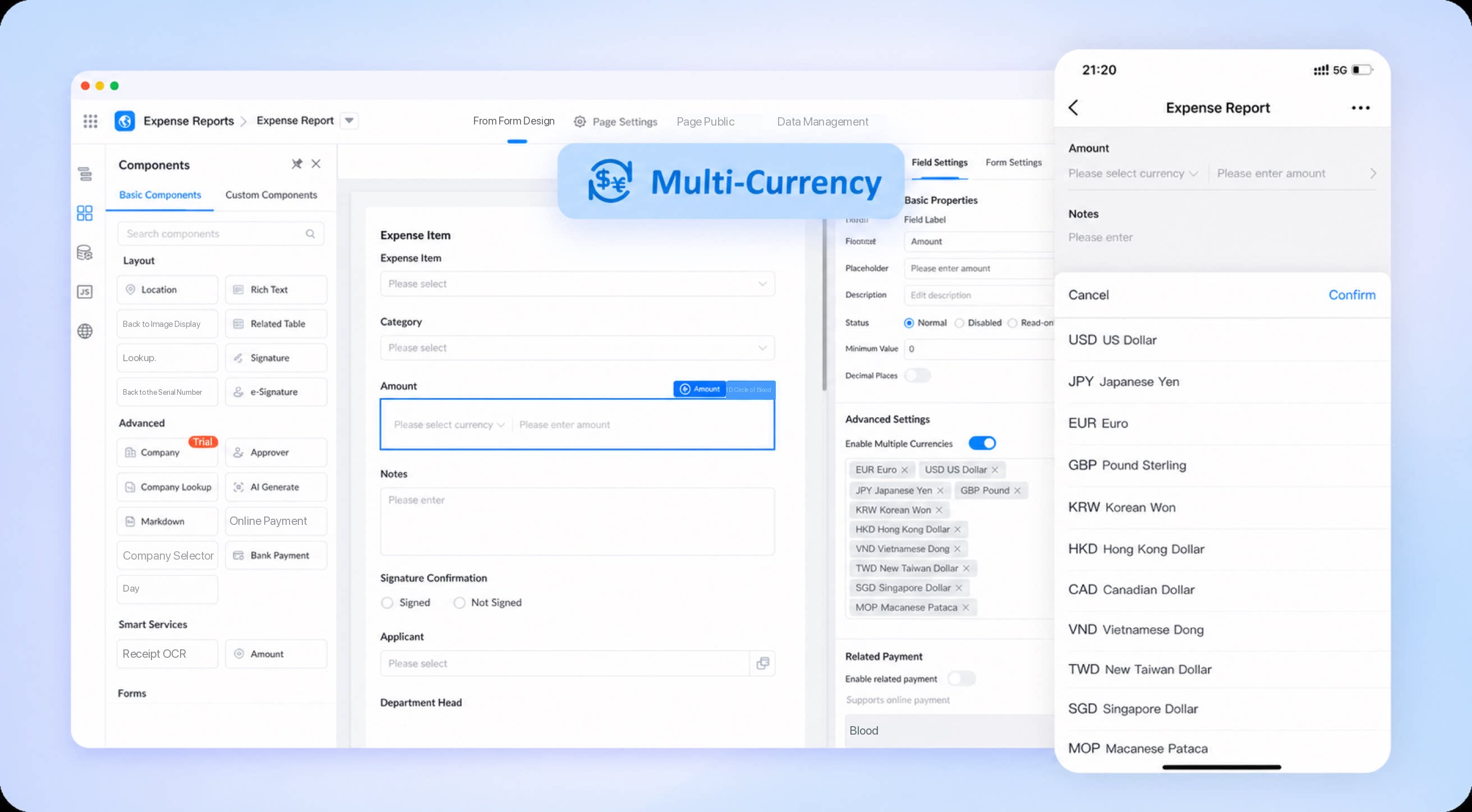
1.2 Feature Benefits
- International adaptation: Supports currencies from multiple countries and regions, making it easier for multinational companies and international users to handle expense reimbursement, and enhancing the global applicability of the system.
- Convenient user experience: An intuitive Form design and clear currency selection interface simplify operations and improve efficiency.
- Comprehensive scenario coverage: Designed for both desktop and mobile devices, meeting the needs of office and mobile work environments alike.
- Improved efficiency: Automatic switching between currencies eliminates manual conversion, saving time and reducing labor costs caused by errors.
2. Steps
- Entry: Sign in to the YiDA workbench.
- In the Plugin Center, Install the “Smart Finance” Plugin. See details.
- Select the target App and go to its Page Management page.
- Create a Form.
- Configure Field options.
- Publish the Form.