

 Chats
Chats Calendar
 Meetings
 Contacts
 Mail
Mail Docs
Docs Drive
Drive AI Table
 AI Minutes
 Attendance
 Approval
 YiDA
YiDA Admin Console
Note:YiDA Dedicated currently exposes its high-frequency data service APIs. Based on the YiDA API capabilities available on the DingTalk Open Platform as of December 31, 2023, a total of 52 OpenAPIs are available.
Call Flow
Calling YiDA APIs in a cluster environment is similar to calling them on the DingTalk Open Platform. All related OpenAPIs on the DingTalk Open Platform are called via api.dingtalk.com. For cluster-edition OpenAPI, simply replace api.dingtalk.com with your organization’s cluster-edition YiDA domain.- Obtain the domain of your organization’s YiDA dedicated cluster, for example, ddyd.corp.com.
- Obtain the AK and SK for your organization’s cluster edition.
Contact your organization’s DingTalk admin. Sign in to the DingTalk Open Platform, search for “YiDA Dedicated Cluster” under internal apps, and get the relevant information from the app named YiDA Dedicated Cluster Authentication App.
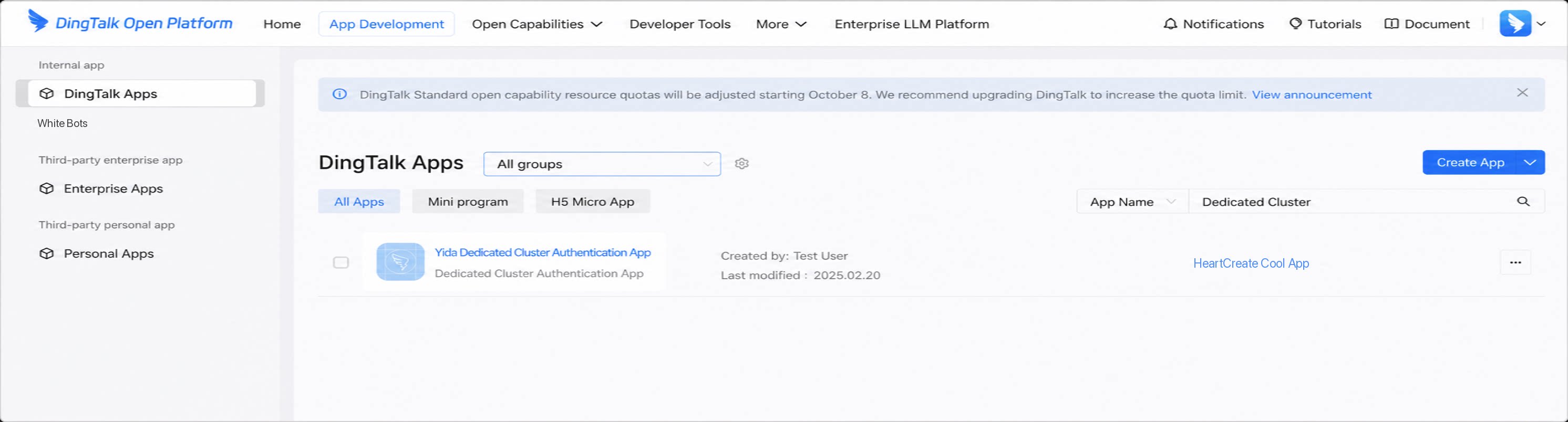
1
Step 1
Use the AK/SK obtained in the previous step to call the /v1.0/oauth2/accessToken endpoint and obtain the app’s access_token. For request parameters, refer to Obtain the access_token for an internal app.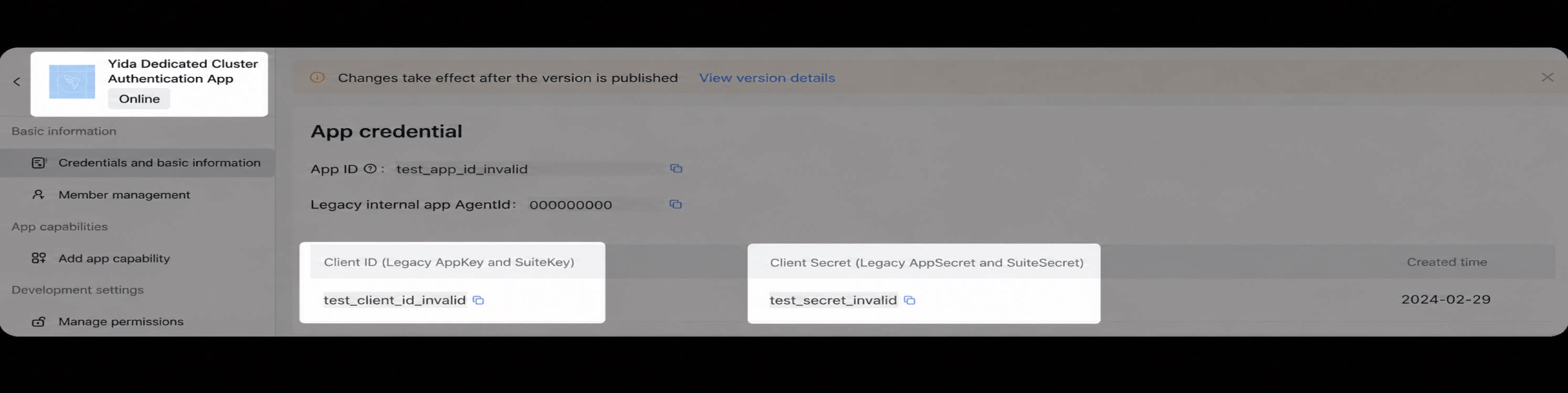
2
Call YiDA APIs with the access_token
Internal apps and third-party enterprise apps share the same Server-side SDK. Click either of the links below to download it.
- Internal app: Download the Server-side SDK.
- Third-party enterprise app: Download the Server-side SDK.
- If you use the DingTalk Open Platform SDK, apply the following changes:
Cluster API List
YiDA provides a rich set of open API capabilities, enabling developers to integrate YiDA with enterprise business systems. Currently, APIs are primarily open for forms, workflows, and apps.| Module | Standard Server API | Description |
| Workflow | Start a YiDA approval process | Start a YiDA approval process on the DingTalk Open Platform. |
| Delete a workflow instance | Delete a workflow instance. | |
| Terminate a workflow instance | Terminate a workflow instance. | |
| Get a list of instance IDs | Get a list of instance IDs. | |
| Get multiple workflow instances in bulk | Get details of multiple workflow instances by their IDs in bulk. | |
| Get a workflow instance | Get workflow instance information from YiDA. | |
| Get a workflow instance by ID | Get the details of a workflow instance by its ID. | |
| Form | Get the form list of a specified app | Get the form list of an app with pagination. |
| Get component information in a form | Get component information in a form or workflow form by form ID. | |
| Query form instance data | Query form instance data. | |
| Save form data | Create a YiDA form instance without an approval process. | |
| Update form data | Update form data. | |
| Query form data | Query form data by form instance ID. | |
| Get the value of an employee component | Get the value of an employee component. | |
| Get the list of form component definitions | Get the list of form component definitions. | |
| Get subform component data | Get subform component data by form instance ID and subform component ID. | |
| Delete form data | Delete form data. | |
| Get multiple form instance IDs | Get multiple form instance IDs. | |
| Get multiple form instances in bulk | Get details of multiple form instances in bulk. | |
| Delete multiple form instances in bulk | Delete multiple form instance records in bulk. | |
| Create multiple form instances in bulk | Create multiple form instance records in bulk. | |
| Update component values in form instances in bulk | Update component values in YiDA form instances in bulk by form instance ID. | |
| Create or update a form instance | Create or update a form instance using filters. | |
| Query form instance data with advanced query conditions (including subform component data) | Get form instance details using filters. | |
| Query form instance data with advanced query conditions (excluding subform component data) | Get form instance details using filters, excluding subform component data. | |
| Update form instances in bulk with form instance data | Update form instance information in bulk using YiDA form component data. | |
| Query form change records | Query form change records. | |
| Approval task | Get approval records | Get approval records. |
| Accept or decline a YiDA approval task | Accept or decline a YiDA approval task. | |
| Transfer a task | Transfer a task. | |
| Submit a comment | Submit a comment on a form or workflow instance. | |
| Query comments on YiDA form instances in bulk | Query all comments on YiDA forms in bulk. | |
| App | Query the YiDA app list | Query the list of YiDA apps in your organization. |