Chats
Chats Calendar
 Meetings
 Contacts
 Mail
Mail Docs
Docs Drive
Drive AI Table
 AI Minutes
 Attendance
 Approval
 YiDA
YiDA Admin Console
What Are Parent and Subordinate Organizations
DingTalk parent and subordinate organizations give medium and large organizations powerful Organization Structure management capabilities. Contacts and apps are interconnected across organizations, so parent and subordinate organizations can communicate and collaborate seamlessly. Use this feature to easily connect a group headquarters with its subsidiaries, optimize the Organization Structure, and improve work efficiency.- Unified management: Combine the Organization Structure of the group headquarters and its subsidiaries for unified management and collaboration. This avoids maintaining duplicate Organization Structure and user information across the group and its subsidiaries, reducing redundant work and errors.
- Fast communication and collaboration: Communication and collaboration between the group headquarters and its subsidiaries become easier. Users in the trunk organization can communicate and collaborate directly with users in branch organizations, without extra steps to add or search for them, saving time and effort.
- Cross-organization teamwork: Users in branch organizations can access the workbench of the trunk organization and use apps to work together. This enables cross-organization project management, task assignment, document sharing, and more, improving collaboration efficiency and results.
- Real-time sync of user changes: When user information changes in a subsidiary, the changes sync automatically with the group structure. This keeps the Organization Structure up to date and prevents inaccurate information and collaboration issues caused by user changes.
- Unified permission management: The group headquarters can manage permissions for its subsidiaries. The group headquarters defines the permission scope of each subsidiary to ensure security and confidentiality.
For more information, see Introduction to DingTalk parent and subordinate organizations.
YiDA Capabilities for Parent and Subordinate Organizations
Building on parent and subordinate organizations, YiDA supports apps for cross-organization collaboration, which enables the following scenarios:- The parent organization builds a YiDA app.
- The parent organization distributes the app to the workbench of subordinate organizations.
- Associated users or industry contacts in the subordinate organization access the app to enter data and submit requests.
- The parent organization manages all submitted data and approval requests in one place.
Activate Parent and Subordinate Organizations
Parent and subordinate organizations is a paid feature. Follow the steps below to activate it.Activate on Desktop
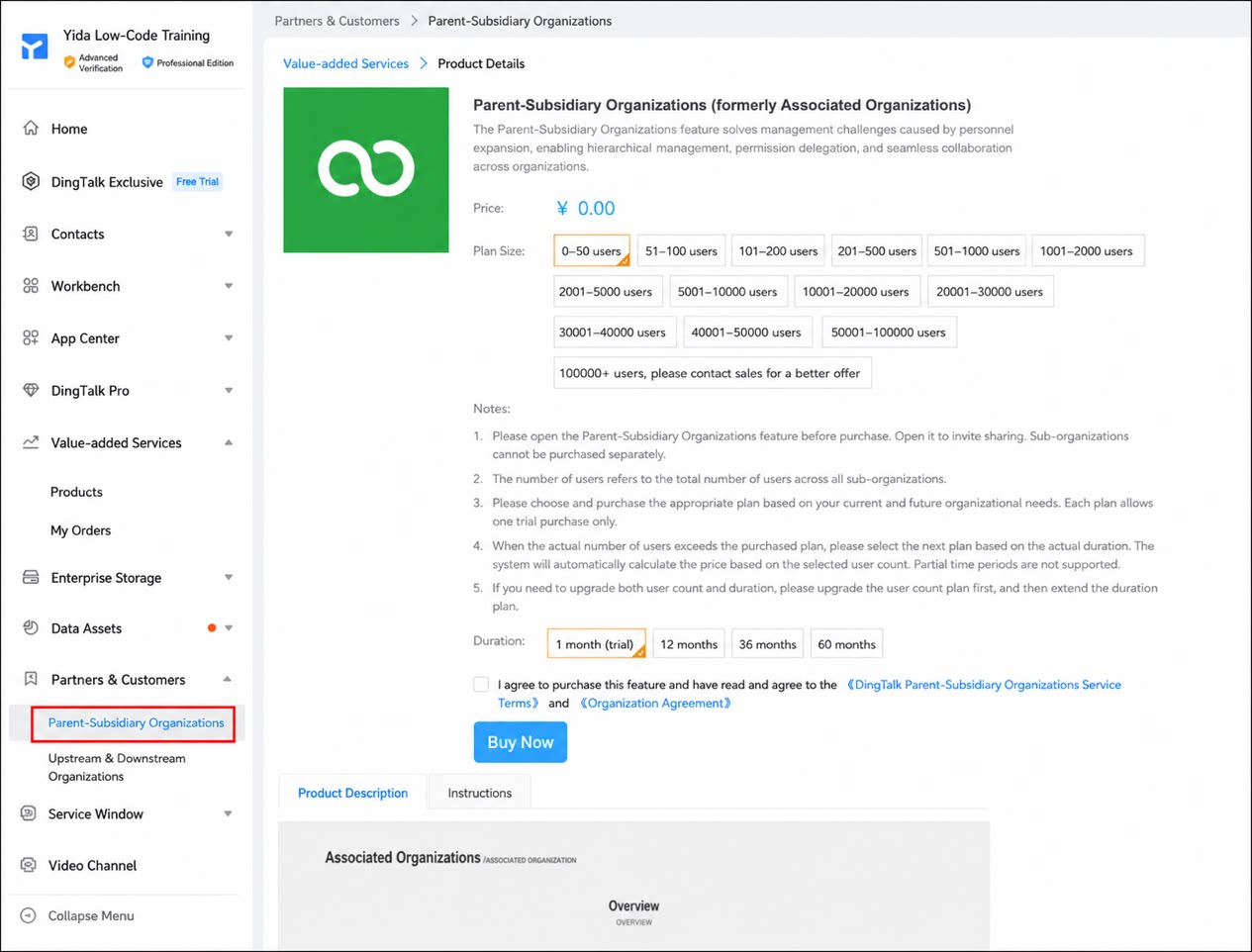
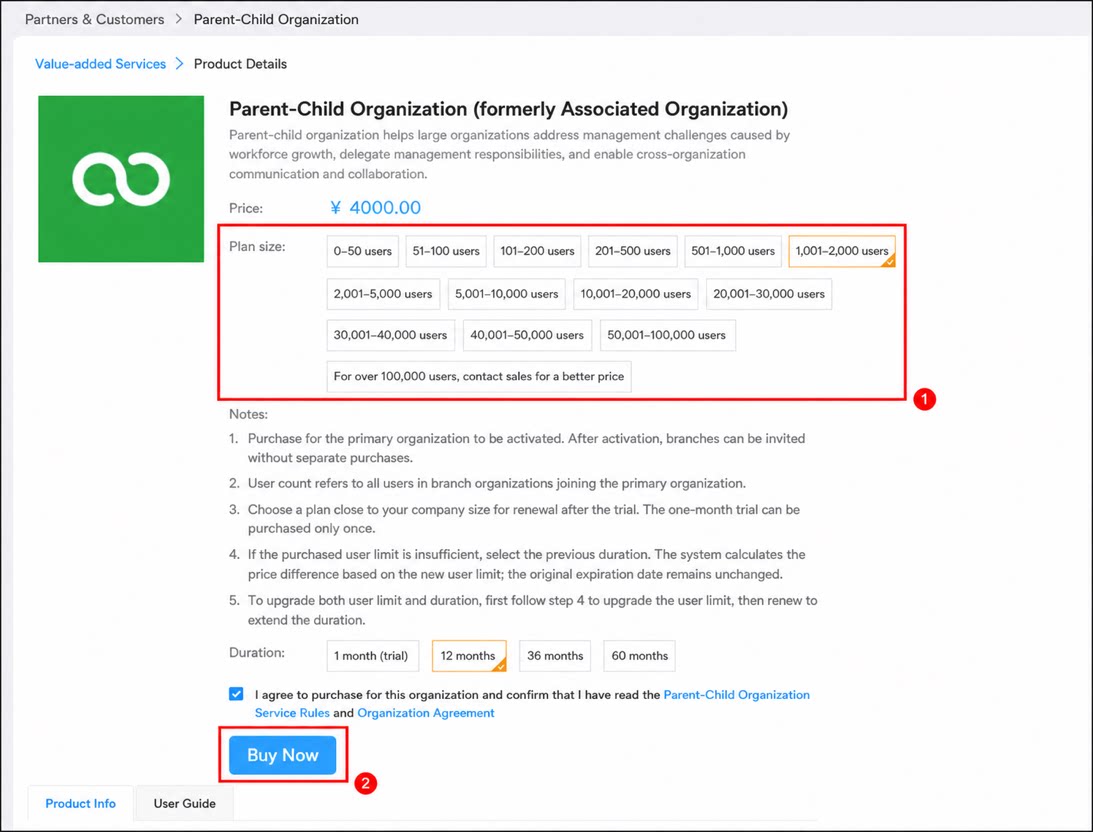
- Sign in to the DingTalk Admin Console.
- Select Partners and Customers > Parent and Subordinate Organizations.
- Select the plan you need, then click Buy Now.
Activate on Mobile
- Open DingTalk on your mobile device and tap Contacts at the bottom of the page.
- Select the organization that needs parent and subordinate organizations, then tap Manage.
- Select Interconnection Platform > Parent and Subordinate Organizations.
- Tap Start Trial.
Pricing Policy
- Parent and subordinate organizations is a separate paid DingTalk feature. To use it in YiDA, purchase the feature first.
- In YiDA, parent and subordinate organization apps are free, but they are supported only in the Professional edition and Dedicated edition.
- The number of users and the resource quota available to parent and subordinate organization apps depend on the YiDA edition and resource quota of the parent organization.
Example:
The parent organization has 100 users in total, 60 of whom use YiDA. Branch organization A has 50 users, 30 of whom use YiDA. Branch organization B has 80 users, all of whom use YiDA.
In this case, the number of YiDA licenses to purchase is:
(Parent organization: 60 users) + (Branch A: 30 users) + (Branch B: 80 users) = 170 usersFAQ
Q: Can a subordinate organization access the contacts of the parent organization? For example, can users in a subordinate organization select users or departments from the parent organization in a YiDA form? No. Subordinate organizations cannot access the contacts of the parent organization. Q: When an App Management admin in the parent organization configures process rules, can they select any user in a subordinate organization as an approval participant? No. You can configure and select only the departments and users included in the association. Q: Can the parent organization control whether users in a subordinate organization submit forms or query data? Yes, you can control this. Q: Is there a limit on the number of apps that can be distributed to subordinate organizations? No. There is currently no limit. Q: How do accounts in a subordinate organization get licensed? Do they need to purchase YiDA separately? If the subordinate organization does not need to build apps and only uses the apps distributed by the parent organization, it does not need to purchase a paid edition of YiDA. To access YiDA in the parent organization, users in the subordinate organization must be licensed by the parent organization, and they consume the parent organization’s licenses. Industry contacts (resident contacts and school-parent contacts) cannot be associated with the parent organization. To access apps in the parent organization, they must be licensed by the subordinate organization.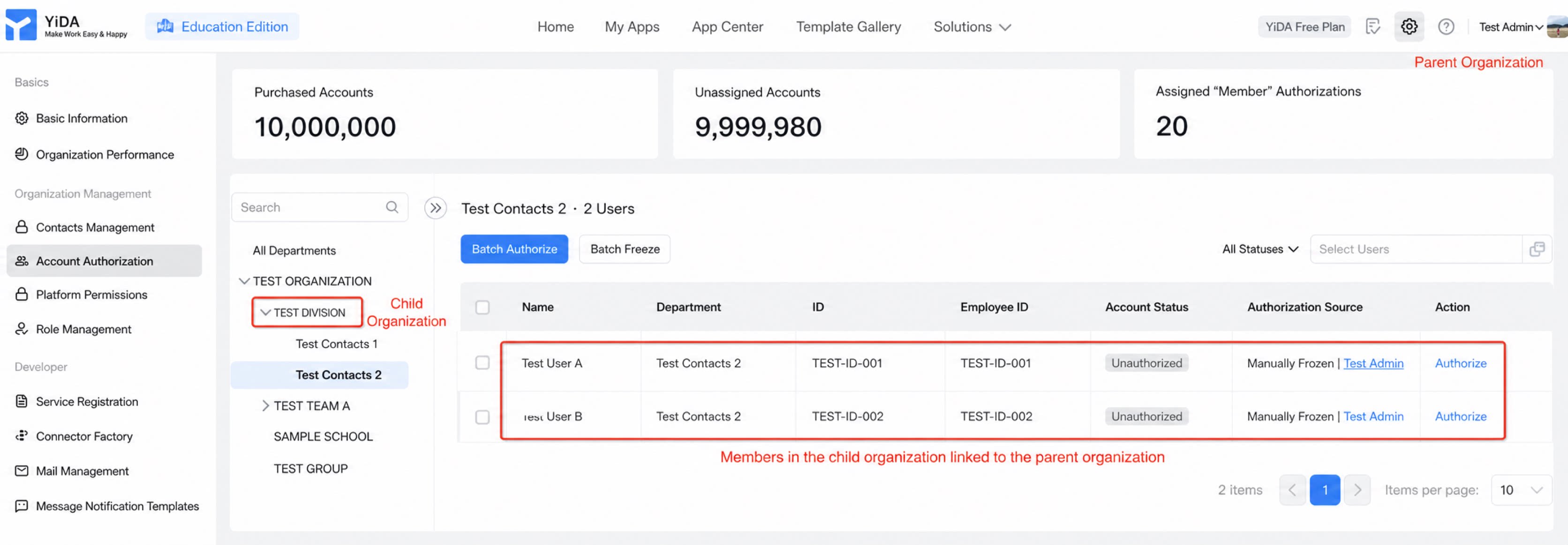
- Open API
- Data editing and deletion by subordinate organizations
- Logic flow and integration & automation
- Reports
- DingTalk To-Do
- Editing submitted data by users in subordinate organizations
- Processes