

 Chats
Chats Calendar
 Meetings
 Contacts
 Mail
Mail Docs
Docs Drive
Drive AI Table
 AI Minutes
 Attendance
 Approval
 YiDA
YiDA Admin Console
Configuration Steps
Go to the YiDA Workbench > Platform management > Platform dedicated customization > Storage configuration to configure database storage.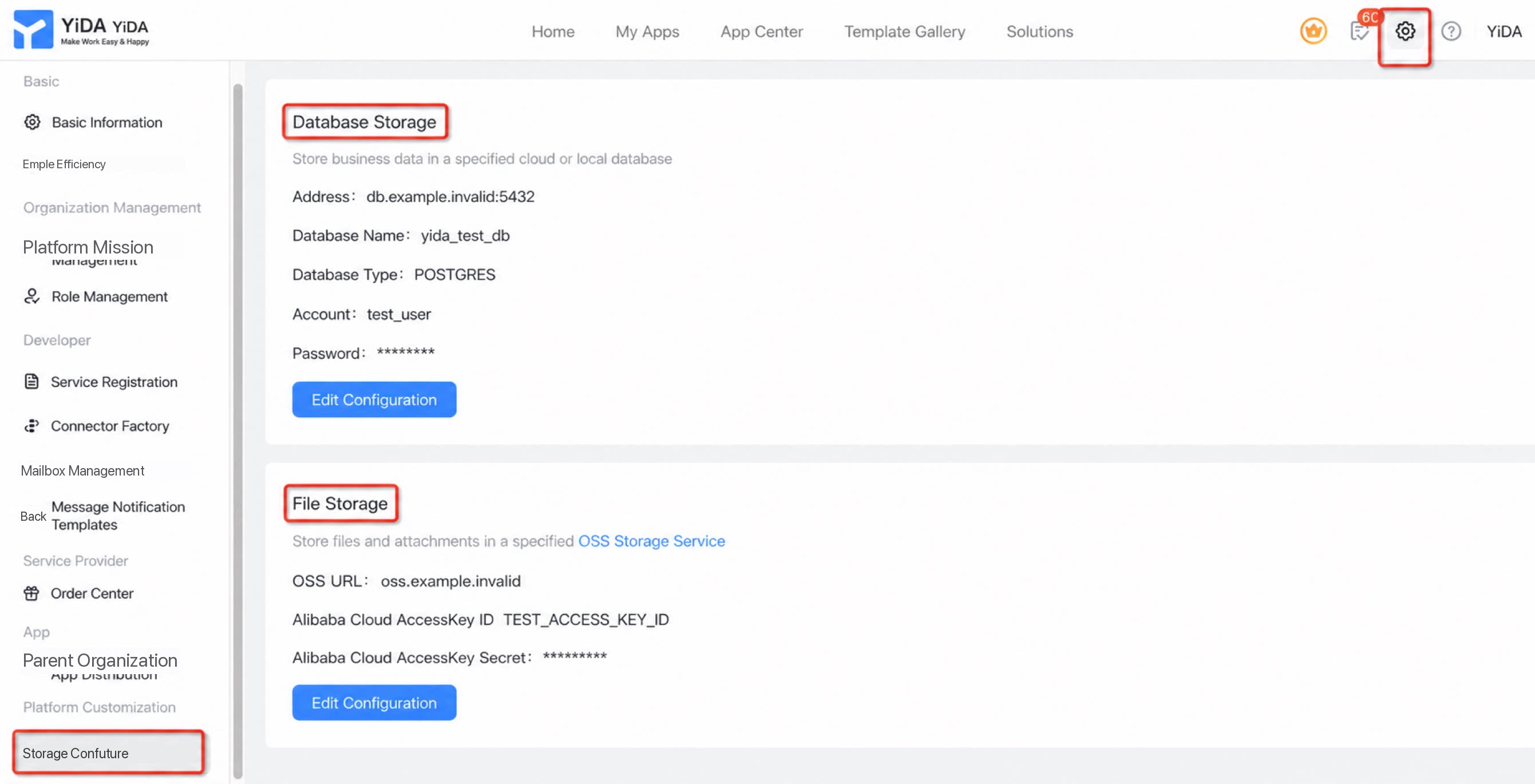
Primary Business Database
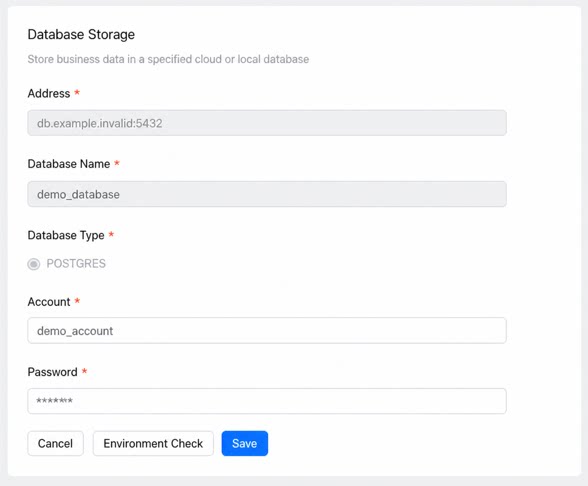
Once configured, business data submitted in YiDA automatically creates the required tables and indexes, so form, workflow, and other business data is stored in this database. Use a brand-new database and avoid sharing the connection with non-YiDA systems to keep data maintenance consistent.- Cloud database address accessible over the public internet: typically a domain name plus a port number.
- Database name: the name of the target database.
- Database type: PostgreSQL. Alibaba Cloud RDS PostgreSQL is recommended. For higher performance, ADB (analytical) PostgreSQL is an option.
- Account: the account used to access the database.
- Password: the password used to access the database.
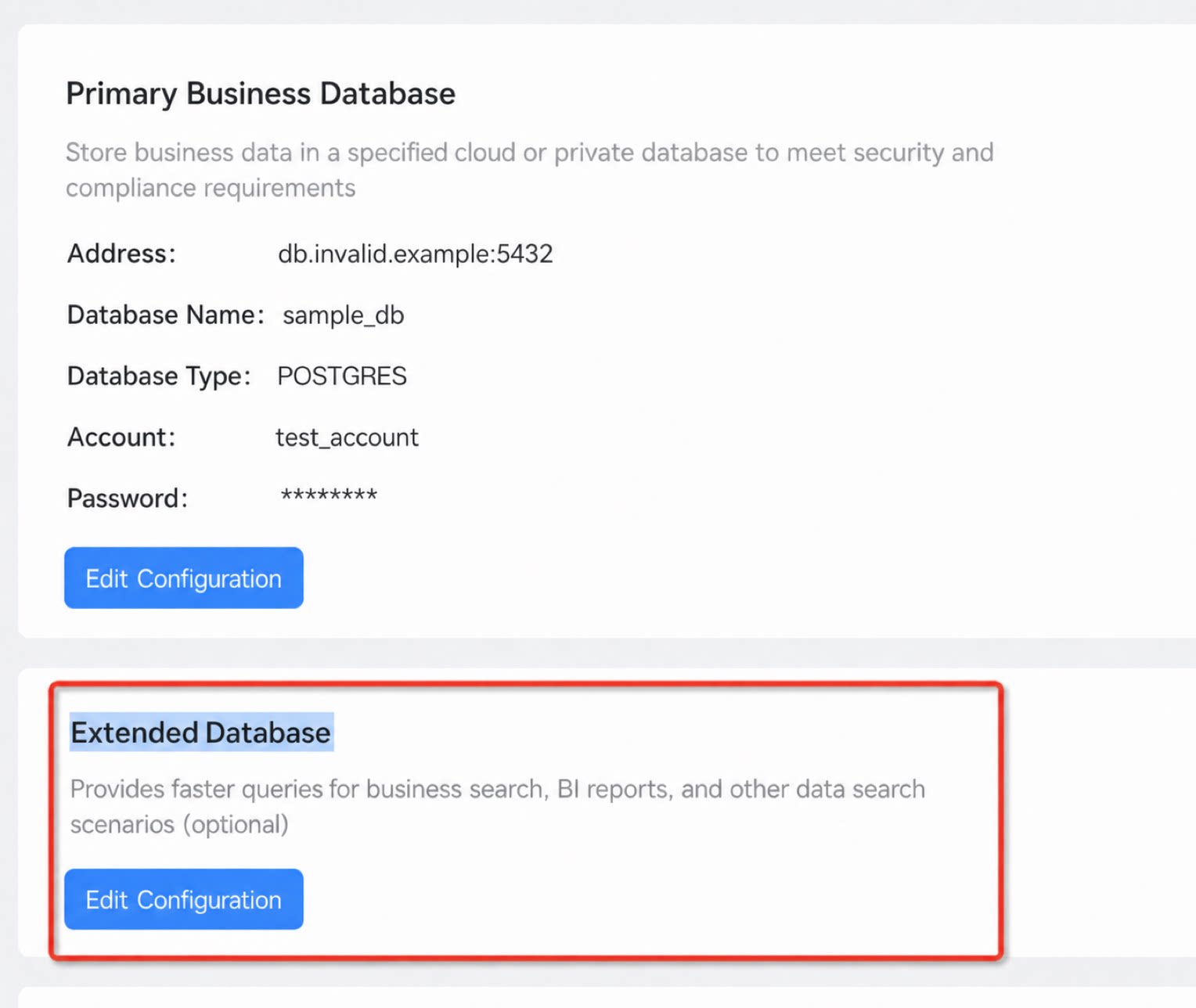
Extension Database
- By separating data submission (primary business database) from data query (extension database) through automation, this design provides a sharding strategy for high-load scenarios and delivers faster query performance for business search, BI reports, and other data-lookup use cases.
- In large-volume query scenarios such as Quick integration, choose the configuration that best fits your actual needs.
Dedicated Environment Self-Check
- Before going live, run availability tests for the database and OSS object storage.
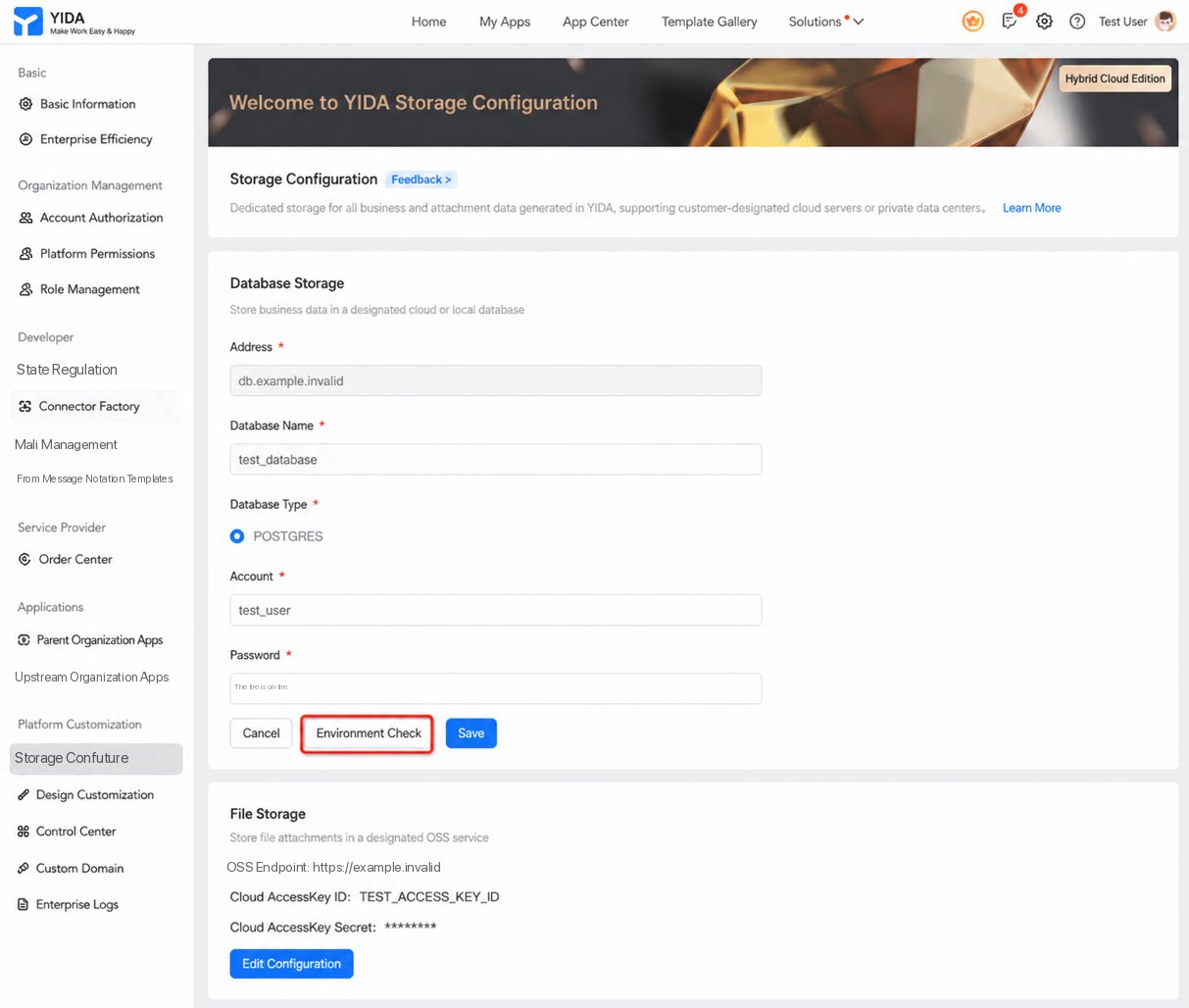
Database Checks
| Start check | Check result |
|---|---|
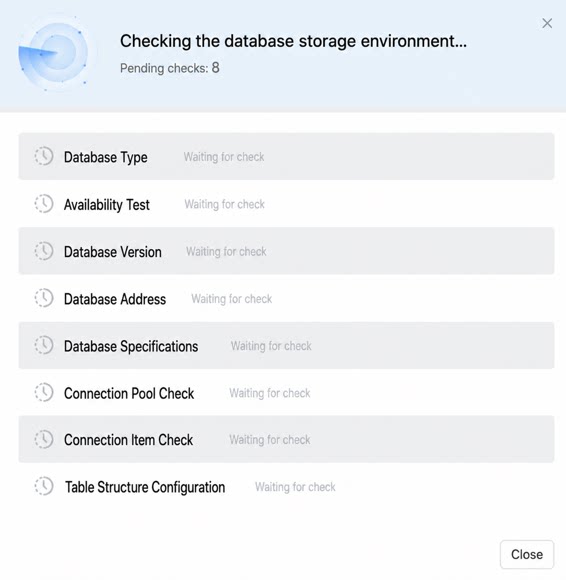 | 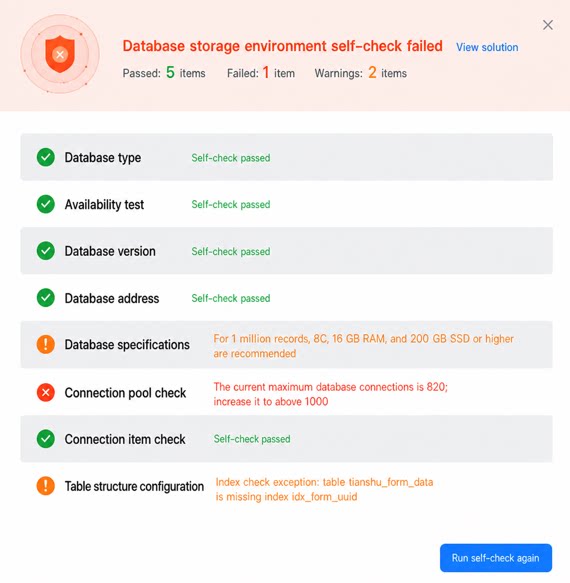 |
On-Demand Activation (App Level)
1. Optional Activation When Creating a New App
When creating a new app, choose whether the app’s business data is stored on the public cloud (default) or in the dedicated hybrid cloud database (for core, sensitive data).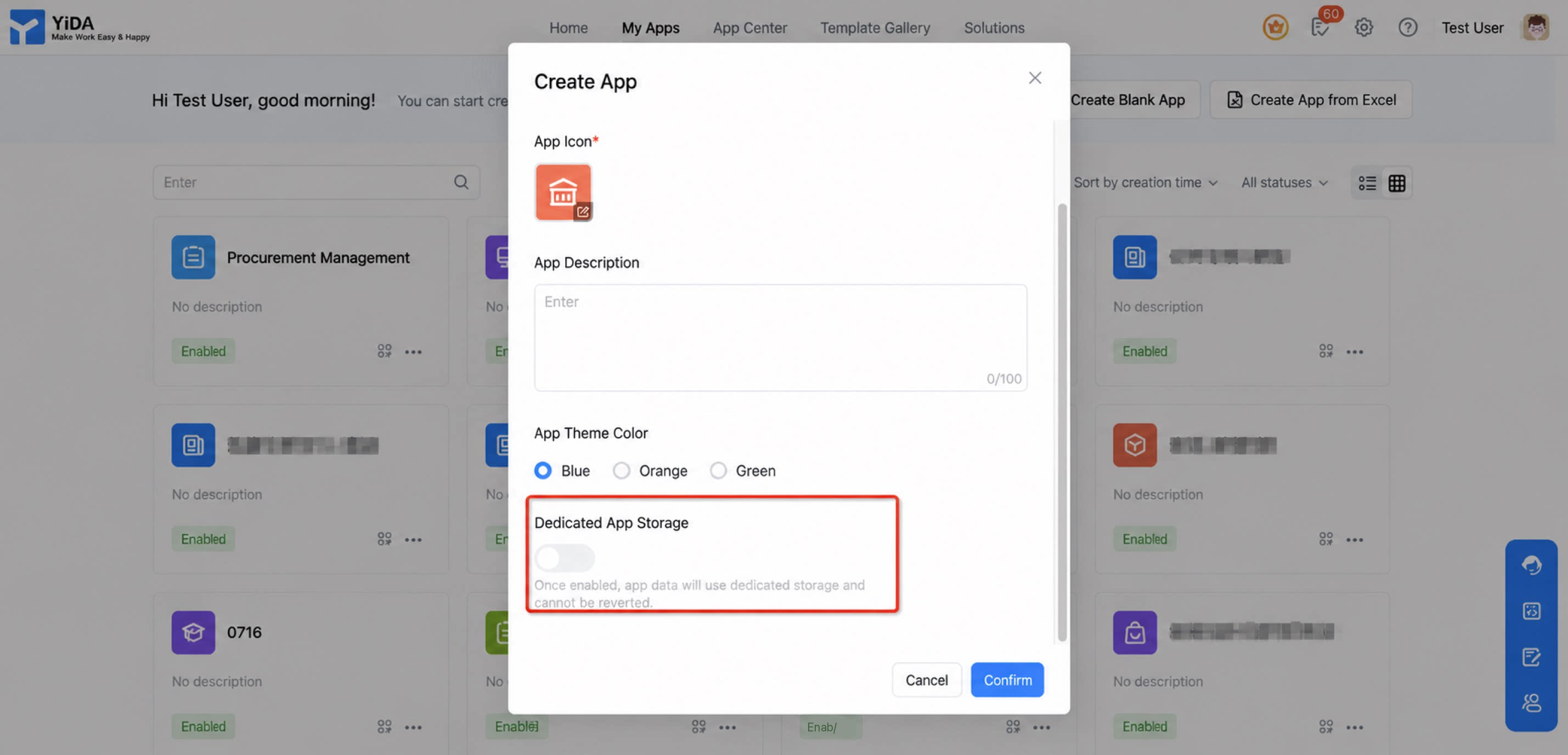
2. Manual Activation for Existing Apps
- App admins can enable dedicated storage in the app backend under App settings > Basic settings > App dedicated storage.
- Once enabled, both existing and new data for the app is stored in the dedicated database (PostgreSQL) and the dedicated attachment OSS configured in platform management.
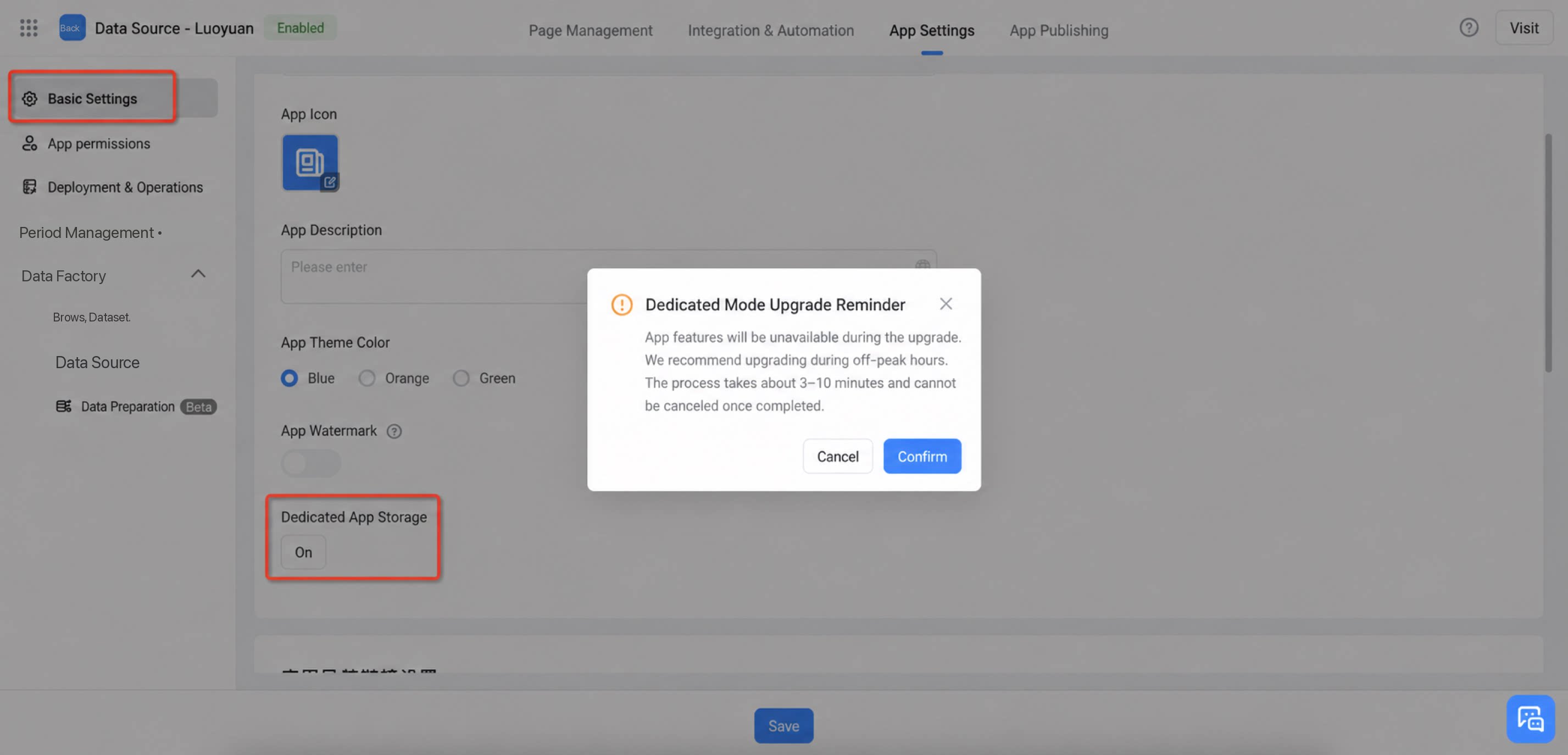
3. Platform-Level Global Configuration
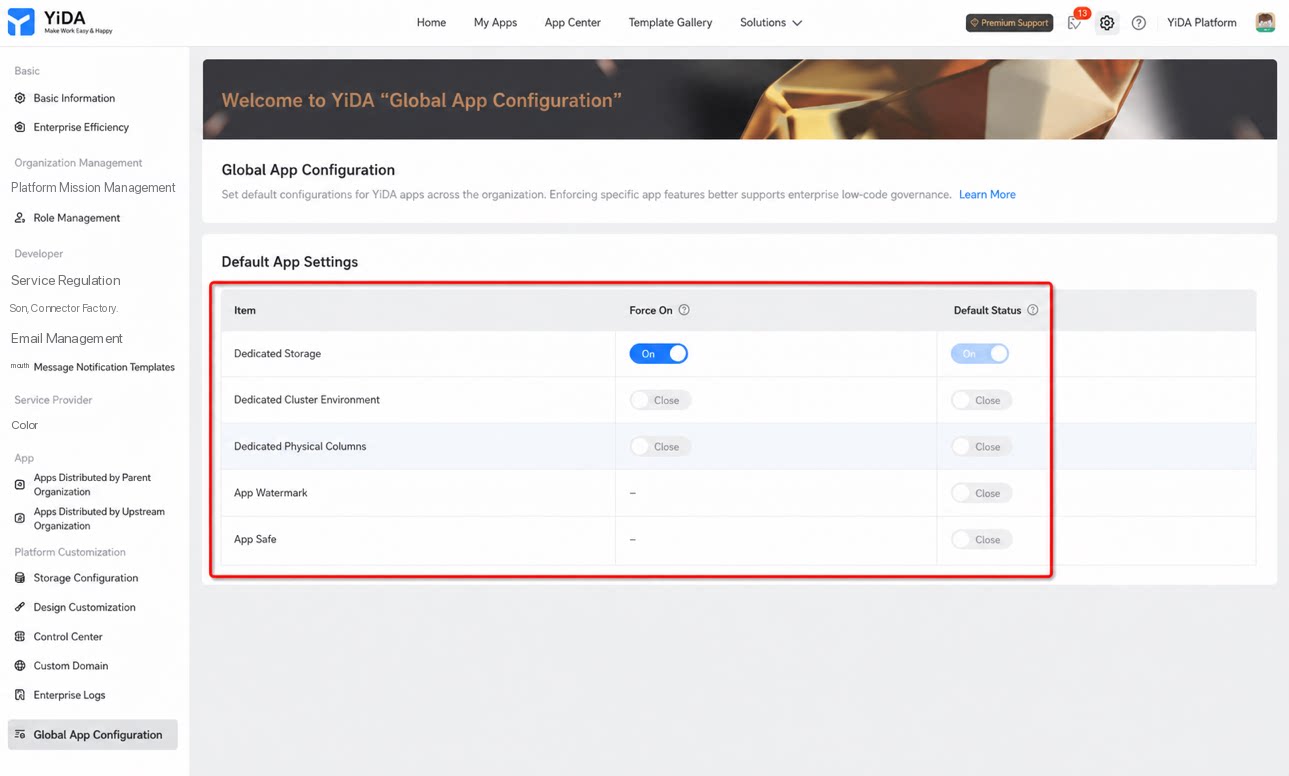
Platform admins can apply storage policies in bulk to newly created apps through global app configuration, managing the organization’s default app behavior.- Simplifies bulk premium configuration for apps and ensures that every new app follows organization-wide policies with consistent default settings.
- Lets admins define a set of basic operations settings that are applied as defaults to every app created on the platform.
Database Table List
The following are the main core database tables. For more detailed field descriptions, existing customers can contact their account manager.- odin_open_application_data: form instance data table (shared by forms and reports).
- tianshu_form_data_operation_log: form data activity log table.
- tianshu_proc_inst_carbon: workflow instance CC recipients table.
- tianshu_data_form_version: instance data to form version mapping table.
- tianshu_form_data_stash: form cache table.
- tianshu_form_remark: comments feature.
- tianshu_instance_relation: form instance relationship table. Used by legacy YiDA Dedicated storage. Deprecated.
- yida_entity_instance: form instance data table. Used by legacy YiDA Dedicated storage. Deprecated.
- tianshu_form_data: form data table. Used by legacy YiDA Dedicated storage. Deprecated.
- ecds_xxxx: YiDA internal system tables. Any table with the ecds prefix is an internal runtime table. Do not perform any operations on it.
- yida_app_data_xxx: physical list tables. The structure matches odin_open_application_data, but JSON fields are flattened. Each form has its own table, and sub-tables are also independent tables.
Dedicated Storage Environment Requirements
| Check type | Item | Configuration | Description |
| Database | 1. Database location | Alibaba Cloud PostgreSQL is recommended (either RDS or ADB). | Alibaba Cloud databases are recommended for guaranteed operations support, stable networking, and consistent performance. |
| 2. Database version | PostgreSQL 14 or later. | Versions earlier than 14 cannot deliver optimal performance. | |
| 3. Database specifications | 8 vCPU, 16 GB RAM, SSD 200 GB or higher. | Supports up to 1 million records per table. | |
| 4. Database address | Provide a domain name rather than an IP address. | Using a domain name simplifies scaling and improves configuration flexibility and service availability. | |
| 5. Database connectivity test | Use the connectivity test in YiDA Dedicated configuration to verify network connectivity. Enable public internet access and configure the network egress IP allowlist. | If you do not want to expose the database to the public internet, you must also purchase and connect to a DingTalk dedicated security gateway. This check verifies whether the network is reachable and whether the Data Source can be initialized. | |
| 6. Database connection pool | At least 1,000 available connections. | YiDA runs in a clustered deployment. To guarantee the number of connections per node, the server side must provide a larger pool. | |
| 7. Connection keep-alive configuration | tcp_keepalives_idle=30 tcp_keepalives_interval=5 | Increases the keep-alive frequency to avoid stale connections caused by network issues. | |
| 8. Database monitoring | Enables DBA or DevOps teams to troubleshoot issues. | Simplifies daily troubleshooting. Without monitoring, performance issues cannot be located quickly. | |
| 9. Database bandwidth | A dedicated bandwidth of at least 10 Mbps for YiDA is recommended. | Increase the bandwidth appropriately if traffic is heavy or if uploads and downloads are frequent. | |
| OSS object storage | 1. OSS type | Alibaba Cloud OSS. | YiDA file storage supports only Alibaba Cloud OSS. |
| 2. Network IP allowlist | Add the YiDA network egress IP to the OSS Safety Policy allowlist. | For VPC environments, the network must be configured to allow access from YiDA. | |
| 3. Network configuration | OSS must be accessible over the public internet. | ||
| 4. Connectivity test | Use the connectivity test in YiDA Dedicated configuration to verify network connectivity. | Verifies that the network is reachable. | |
| 5. CORS settings | Allow cross-origin access from the organization’s YiDA domain, with Header set to *. | YiDA uploads and downloads files directly to and from OSS, so CORS must be enabled. | |
| 6. Hotlink protection | Check whether hotlink protection is enabled. If it is, add the YiDA domain to the allowlist. | Hotlink protection blocks requests from domains that are not on the allowlist. | |
| 7. Time server | If the organization operates a time server, verify that the time is accurate. | OSS requests are time-sensitive. YiDA sets the timeout to 30 seconds, and expired requests are invalid. |
FAQ
Q: After enabling dedicated storage for an existing app, will historical data be synced? What should I watch out for?
Q: After enabling dedicated storage for an existing app, will historical data be synced? What should I watch out for?
- Historical data is synced. Sync time depends on the app’s data volume and database specifications: the larger the data volume, the longer it takes. Sync is complete when the loading indicator on the toggle button stops.
- During the sync, the database restricts writes. Prevent users from accessing or submitting data in the app while syncing to avoid errors or dirty data.
Q: After configuring the organization's own OSS object storage, is there still a cap on attachment uploads?
Q: After configuring the organization's own OSS object storage, is there still a cap on attachment uploads?
- Attachments uploaded in apps with dedicated storage enabled are stored directly in the organization’s dedicated storage. (The overall attachment quota for apps using public cloud storage still applies, but attachments stored in the dedicated OSS are not counted toward the platform-side limit.) This protects organizational data security, and the total attachment cap for apps using dedicated storage is limited only by the organization’s OSS capacity.
Q: With dedicated storage enabled, data is stored in the organization's own Alibaba Cloud database or OSS. Will the YiDA platform back up this data?
Q: With dedicated storage enabled, data is stored in the organization's own Alibaba Cloud database or OSS. Will the YiDA platform back up this data?
Q: Are view tables stored in a separate data table?
Q: Are view tables stored in a separate data table?
Q: After enabling dedicated storage for an existing app, will historical data be synced? What should I watch out for?
Q: After enabling dedicated storage for an existing app, will historical data be synced? What should I watch out for?
- Historical data is synced. Sync time depends on the app’s data volume and database specifications: the larger the data volume, the longer it takes. Sync is complete when the loading indicator on the toggle button stops.
- During the sync, the database restricts writes. Prevent users from accessing or submitting data in the app while syncing to avoid errors or dirty data.
Q: Do YiDA Dedicated fees include the cost of the storage media and their operations?
Q: Do YiDA Dedicated fees include the cost of the storage media and their operations?
- YiDA Dedicated fees cover only the YiDA product functionality itself. They do not include the cost of the storage media or their operations. The platform only requires a valid, reliable, publicly accessible dedicated storage service to be configured.
- YiDA Dedicated services also do not cover the implementation and delivery of the database or OSS required for dedicated storage, ongoing DevOps stability operations, firewall and network operations, or the cost of the dedicated storage itself.
- Before deployment, fully evaluate your capability to operate the dedicated storage reliably. We recommend having qualified professionals within the organization maintain the dedicated storage to avoid business disruption caused by issues with the storage media or environment.
Q: Can I modify DB data directly in the database?
Q: Can I modify DB data directly in the database?
- Dedicated storage is designed to meet data security requirements and large-scale BI analytics needs. When using dedicated storage, you can perform necessary queries on local data. However, because the platform’s features are tightly coupled and involve synchronization across multiple tables and system caches, we strongly recommend against manipulating data directly in the database.
- To change data, use the official operations provided by the platform, such as manual editing, OpenAPI, integration & automation, Import, and bulk edit.
Q: Which features behave differently when dedicated storage is enabled?
Q: Which features behave differently when dedicated storage is enabled?
| Dedicated database | ||
| Before enabling | After enabling | |
| View table | Cloud storage | Still not stored locally. (View tables are not stored separately. They are calculated on demand from the underlying entity tables and do not involve persistent storage.) |
| Data preparation | Cloud storage | Still not stored locally. (Data preparation involves distributed data processing, and intermediate tables and processed data are still stored in the cloud environment.) |
| Increased performance limits for large-scale imports and automation | Three performance improvements for YiDA Dedicated: Form data import (10x improvement, up to 50,000 records) Workflow data import (10x improvement, up to 10,000 records) Integration & automation and business rules (20x improvement, up to 2,000 records) | These high-performance capabilities are not available after dedicated storage is enabled.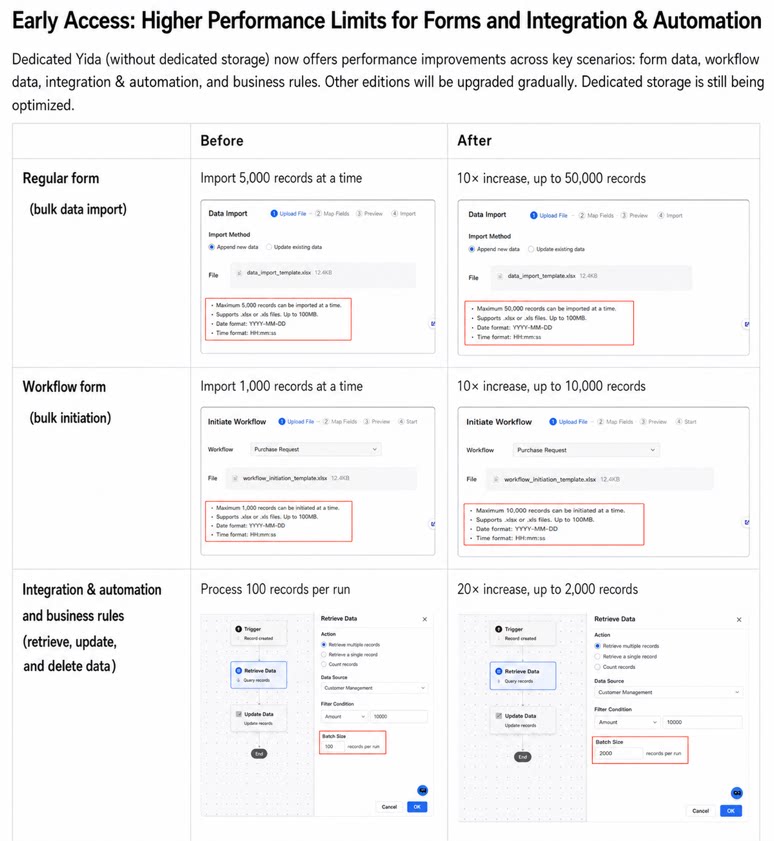 |
| Basic statistics | Provides unified business instance volume statistics as part of the organization’s basic information. | For apps using dedicated storage, the organization monitors data in the dedicated database on its own.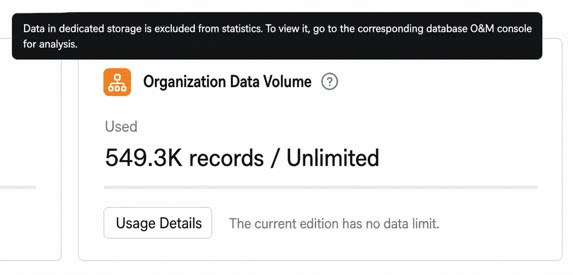 |
| Domestic Xinchuang compatibility | Alibaba Cloud in-house database. | If you require a Xinchuang-qualified database, contact us for a commercial evaluation. |
| Cool App factory apps | Cloud storage | Dedicated storage is not supported. |
Q: After enabling the dedicated database for an app, can I see pending approval tasks in the dedicated database?
Q: After enabling the dedicated database for an app, can I see pending approval tasks in the dedicated database?
Q: After the YiDA Dedicated edition subscription expires, is historical data affected?
Q: After the YiDA Dedicated edition subscription expires, is historical data affected?