Chats
Chats Calendar
 Meetings
 Contacts
 Mail
Mail Docs
Docs Drive
Drive AI Table
 AI Minutes
 Attendance
 Approval
 YiDA
YiDA Admin Console
What Is a Group Chat Cool App
Each scenario unlocks its own unique Cool App interaction capabilities. This section explains the open capabilities and development approach for in-group Cool Apps. A Cool App can be extended into a group. Once installed, group members can efficiently view and use the data and features provided by the Cool App during their conversations to complete business collaboration. About Cool App: About DingTalk Cool App About the YiDA Cool App FactoryCore Capabilities of Group Chat Cool Apps
For example, DingDang OKR is a published in-group Cool App. In a Group Chat, it lets users create OKRs and interact with them while chatting. The core interactions are shown below.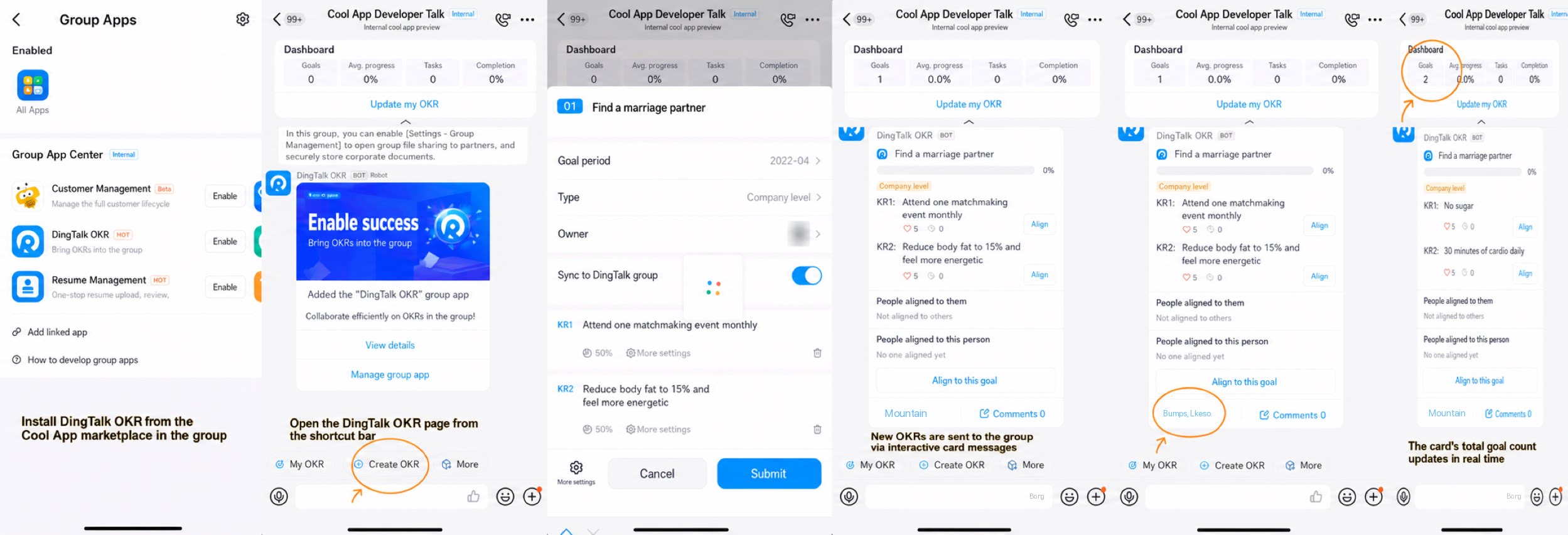
- Detect the install event — Feature: Install the Cool App Users access the Cool App marketplace within a group to install the Cool App. DingDang OKR listens for the OKR install event from DingTalk, and once the event is detected, sends usage guidance.
- Open the half-floating Page — Feature: Open OKR Use the Chat quick access bar to open the half-floating page in the group, keeping all interactions within the group.
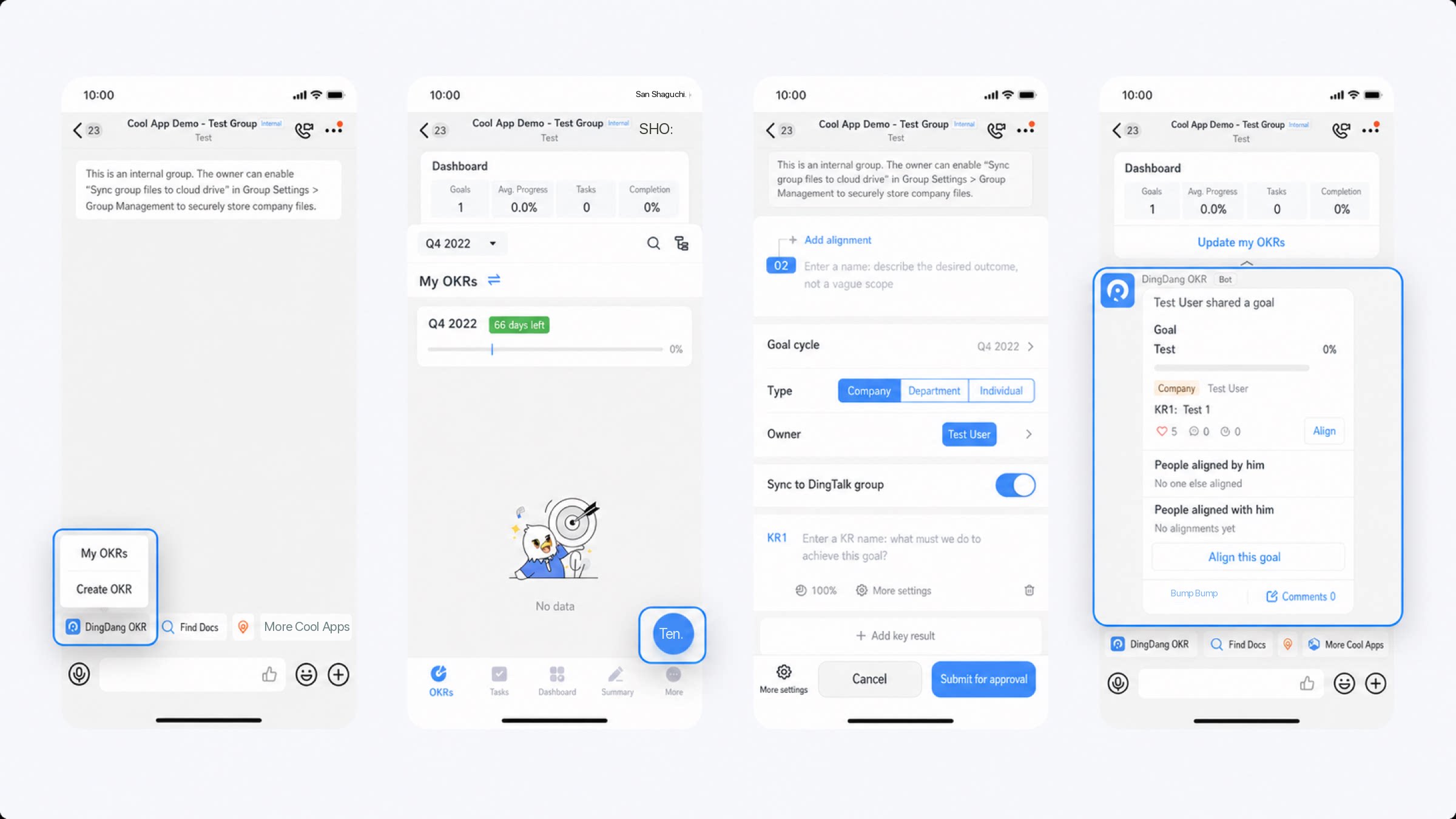
- Send interactive Cards — Feature: Create an OKR When a new OKR is created via the in-group quick entry, the new OKR content is instantly sent to the group as an interactive Card.
- Click Interaction / Update Card — Feature: Like an OKR Other group members can quickly like and comment on each other through the interactive Card message, and all interactions are updated in real time on the interactive Cards seen by other group members.
- Send pinned Card / Update interactive Card — Feature: OKR pinned summary After an OKR is created in the group, a pinned Card is sent to the group. It permanently displays the OKR summary and updates in real time.
Develop a Group Chat Cool App
- Immersive experience: Stay within the chat context so current work is not interrupted.
- Scenario-based collaboration: Information flows in real time and efficiently around scenarios and specific matters.
- Instant data analytics: Use the structured data generated by efficient collaboration for instant analysis and effective insights.
Process Overview
Before you begin, make sure you have completed the prerequisite Become a DingTalk developer. Follow these steps:- Create a Group Chat Cool App to complete the creation of the Group Chat Cool App.
- Configure the quick entry content to display it on the Chat quick access bar.
- After Group Chat Cool App development is complete, publish and use the Cool App to complete app release and usage.
- Configure the message content sent by the Group Chat Cool App.
- Complete premium interactions for the Group Chat Bots. For details, see Implement bot conversations.
- Combine the app’s existing features with Group Management using the Group Management APIs. For details, see Group Management.
- Use Group Chat Cool App callback events to detect Cool App installation and uninstallation within a group, and implement initialization services such as onboarding guidance and termination services such as data permissions reclamation. For details, see Detect group changes (event subscription).
Glossary
Chat Quick Access Bar
The Chat quick access bar is a group of app feature entries available to all group members. Each feature entry is called a quick entry. Developers can define quick entries within a Cool App, and installing the Cool App displays these quick entries in the user’s group. For details, see Configure quick entry.Interactive Card
In Group Chat scenarios, interactive Cards are a critical capability that integrates app features with the scenario. Through interactive Cards, your app can deliver some of its data and features to users via a message card and interact with users directly. For details, see Interactive Card.Pinned Card
A pinned Card is a special type of interactive Card that delivers data and features to users through a message card and interacts with them directly. Both interactive Cards and pinned Cards are built on the interactive Card capability. For details, see Pinned Card.FAQ
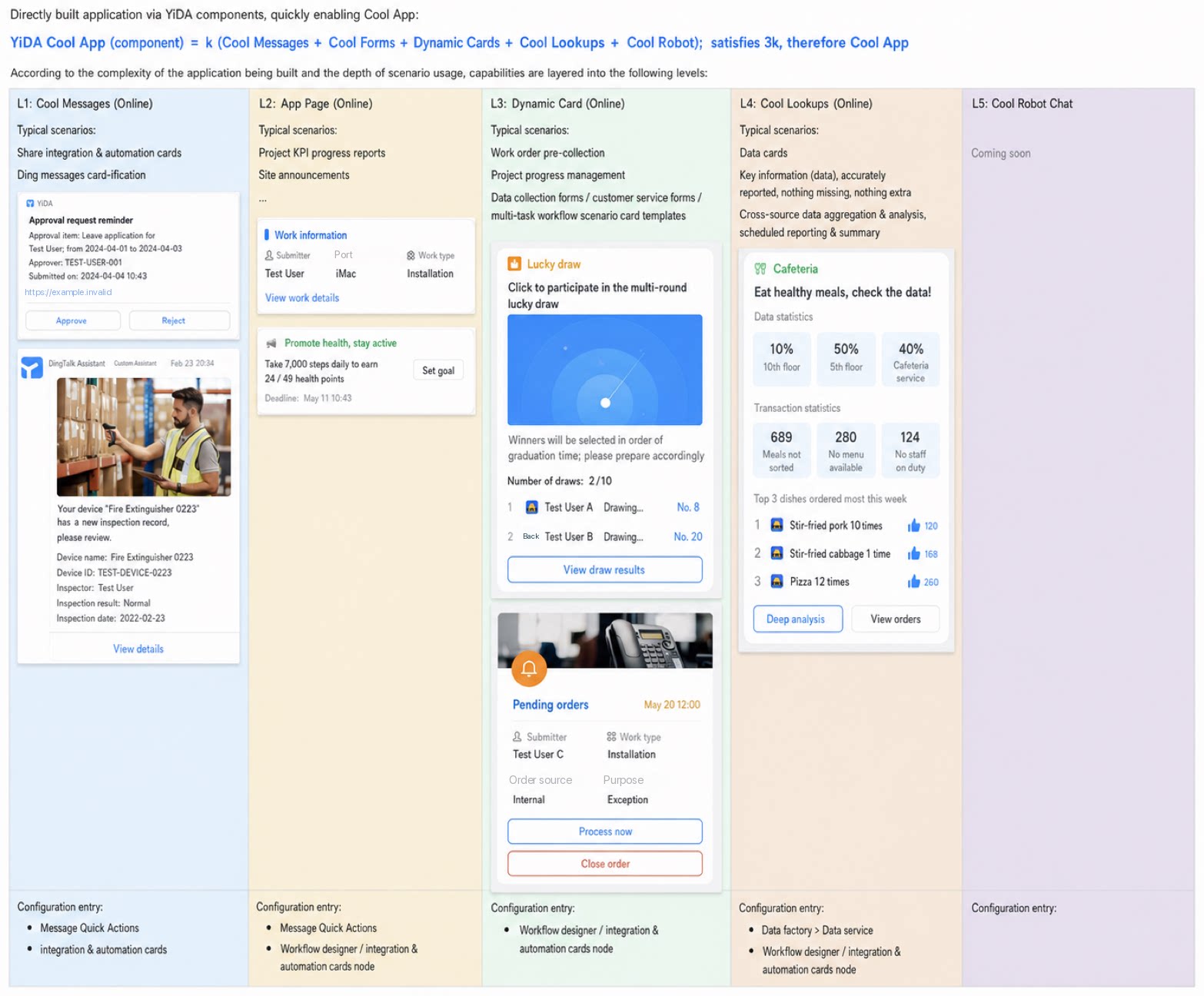
Q1: What is the relationship between YiDA apps and Cool Apps? Where do I create a Cool App? A: Currently, a Cool App is not a standalone YiDA app. Cool App capabilities mainly include Cool Chats, Cool Activity Cards, Cool Pinned Cards, Cool Kanban, Cool Bots, and more. These capabilities are embedded across YiDA features, so apps built on YiDA include Cool App capabilities by default. Learn more. You can build Cool capabilities at the corresponding configuration entry based on the effect you want.