

 Chats
Chats Calendar
 Meetings
 Contacts
 Mail
Mail Docs
Docs Drive
Drive AI Table
 AI Minutes
 Attendance
 Approval
 YiDA
YiDA Admin Console
Syntax
The syntax of theINSERT() function is as follows:
- Target Table: the Form into which data is inserted.
- Target Column: a Component in the target Table. INSERT only supports inserting data into standard Components in the target Table. Inserting data into subforms within the target Table is not supported.
- Target Value:
Use Cases
The following two use cases help you better understand and apply theINSERT() function.
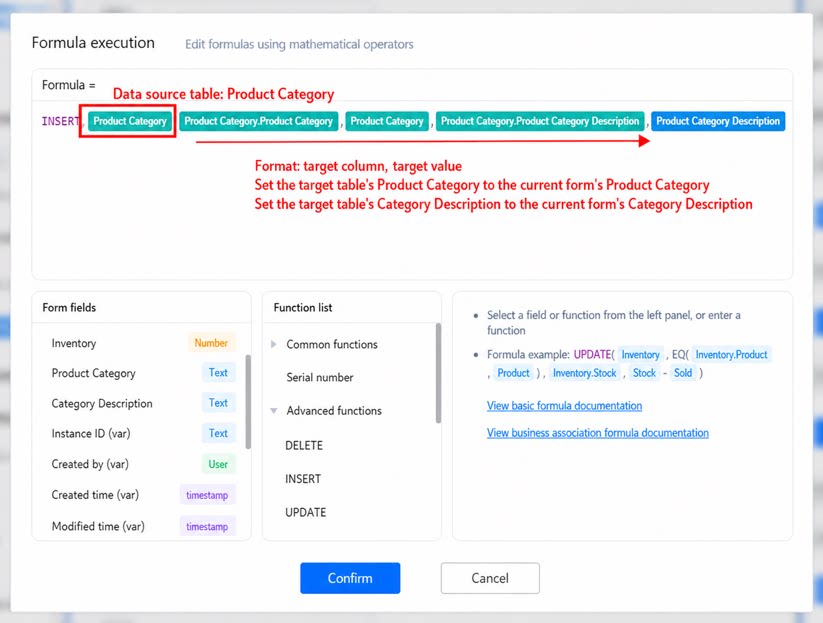
Case 1: Target Value Comes from a Standard Component
Scenario- Product Table: Product name, Stock quantity, Product category, Product category description
- Product Category Table: Product category, Product category description
Case 2: Target Value Comes from a Subform Component
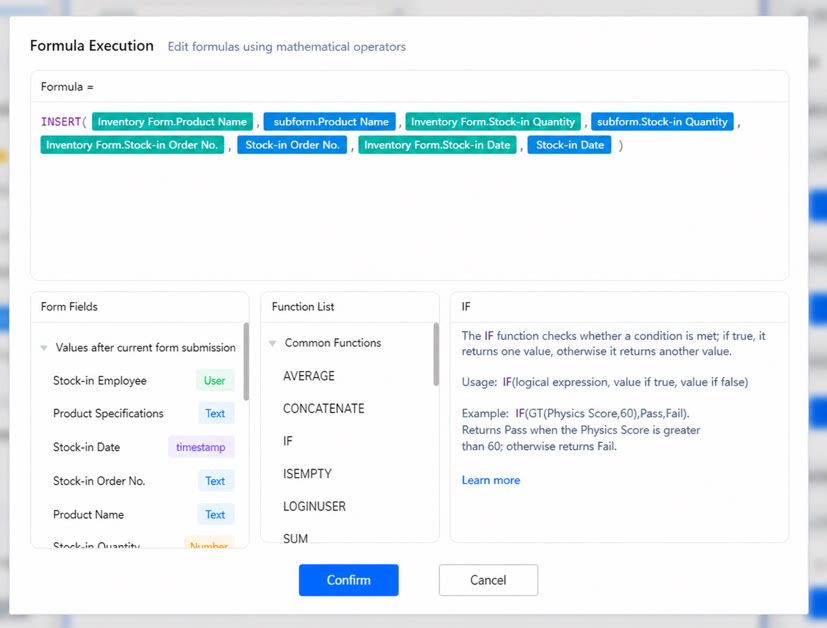
If the target value contains a subform Component, the number of records inserted into the target Table equals the number of rows in the subform. Scenario- The current entry Form is the Purchase Table, which contains Purchase order number, Purchase date, and a Subform (containing Product name and Purchase quantity).
- The target Table for insertion is the Inventory Table, which contains four Components: Purchase order number, Purchase date, Product name, and Purchase quantity.
- Configure the INSERT function in the Business Association Rules of the Purchase Table as follows:
- Set the target Table to Inventory Table, the target Column to Inventory Table.Product name, and the target value to the product name from the Subform under the Current Submitted Data Form.
- The number of records inserted into the Inventory Table equals the number of products in the subform of the Purchase Table. For fields outside the subform, such as Purchase order number and Purchase date, the values are identical across every inserted record.
Notes
- Differences between INSERT and UPSERT use cases
- The following Components are supported by Premium formulas.
- Limits on the number of records that INSERT can insert.
- Scenarios where the target value comes from multiple subform Components are not currently supported.