Chats
Chats Calendar
 Meetings
 Contacts
 Mail
Mail Docs
Docs Drive
Drive AI Table
 AI Minutes
 Attendance
 Approval
 YiDA
YiDA Admin Console
1. Use Cases
 Data preparation is a key feature of the YiDA low-code platform. It helps enterprise users cleanse, integrate, and transform raw data before conducting data analysis or building apps. Data preparation uses a zero-code ETL (Extraction Transformation Loading) approach to process data from YiDA apps, external enterprise databases, file-based data, and DingTalk official data sources (including Employee Roster, OA, Smart HR, and Attendance). By building data processing pipelines, it consolidates scattered data into standardized datasets that support visual analysis and data-driven decision-making.
3. Formula Configuration Entry
Path: App settings > Data Factory > Data Preparation > Create data preparation > Select dataset. Formulas can be configured on association, aggregation, and cleansing nodes. Watch the video below for setup instructions:4. Logical Processing
CASEWHEN
Usage 1: CASEWHEN(<condition>,<value>,<condition>,<value>…). Equivalent to the CASE WHEN syntax in SQL. Example: CASEWHEN(<Gender field>=“Male”,“male”,<Gender field>=“Female”,“female”). Values of “Male” are replaced with “male”, and values of “Female” are replaced with “female”. Usage 2: CASEWHEN(<condition>,<value>,<condition>,<value>…<value>). Equivalent to the CASE WHEN syntax in SQL. Example: CASEWHEN(<Gender field>=“Male”,“male”,“female”). Values of “Male” are replaced with “male”, and any other value is replaced with “female”.5. Text Processing
LEN
Usage: LEN([string field]). Returns the length of the string. Example: LEN(“test”) returns 4. LEN(“测试”) returns 2. One Chinese character counts as one English character.LEFT
Usage: LEFT(<measure field>,< n >). Returns a string of length n starting from the first character on the left of the <field> value. Example: LEFT(Field1,3) returns “ABC” when the value of Field1 is “ABCDEF”.RIGHT
Usage: RIGHT(<measure field>,< n >). Returns a string of length n counted from the right of the <field> value. Example: RIGHT(Field1,3) returns “DEF” when the value of Field1 is “ABCDEF”.MID
Usage: MID(<measure field>, < start >, < n >). Returns a string of length n starting from the start-th character (counted from the left) of the <field> value. Example: MID(Field1, 3, 3) returns “CDE” when the value of Field1 is “ABCDEF”.POS
Usage: POS(<measure field>,<substring>). Returns the position of <substring> in <text>. Returns 0 if no match is found. Example: POS(Field1,“DE”) returns 4 when the value of Field1 is “ABCDEF”.UPPER
Usage: UPPER(<measure field>). Converts the value of <field> to uppercase. Example: UPPER(Field1) returns “ABCDEF” when the value of Field1 is “AbcdeF”.LOWER
Usage: LOWER(<measure field>). Converts the value of <field> to lowercase. Example: LOWER(Field1) returns “abcdef” when the value of Field1 is “AbcdeF”.VAL
Usage: VAL(<measure field>). Converts a text-type <field> value to a numeric type. Example: VAL(Field1) returns 123 when the value of Field1 is “123”.LEFTTRIM
Usage: LEFTTRIM(<measure field>). Removes leading spaces from the <field> value. Example: LEFTTRIM(Field1) returns “ABC” when the value of Field1 is ” ABC”.RIGHTTRIM
Usage: RIGHTTRIM(<measure field>). Removes trailing spaces from the <field> value. Example: RIGHTTRIM(Field1) returns “ABC” when the value of Field1 is “ABC ”.NUMBERTOSTRING
Usage: NUMBERTOSTRING(<number>). Converts numeric data to a string. Example: NUMBERTOSTRING(Field1) returns “12345” when the value of Field1 is “12345 ”.SPLITPART
Usage: SPLITPART(<string field>, delimiter, substring position). Splits a string into N substrings by the delimiter (where N equals the number of delimiters plus 1). The substring position is counted from 1 (left to right) or from -1 (right to left). Example: SPLITPART(<Field1>,A,2) returns “BCD” when the value of Field1 is “ABCDABHABC”. Setting the substring position to -5 also returns “BCD”.CONCAT
Usage: CONCAT(<field>,<field>,…). Concatenates multiple fields into a single string. Input parameters must be string-type fields. Example: CONCAT(<Field1>,<Field2>) returns “ABCD” when the value of Field1 is “A” and the value of Field2 is “BCD”.REPLACE
Usage: REPLACE([string], [search string], [replacement string]). Returns the string after replacement. Example: REPLACE([Field1], [Field2], [Field3]) returns “a12345efg” when Field1 is “abcdefg”, Field2 is “bcd”, and Field3 is “12345”.6. Time Processing
NOW
Usage: NOW(). Returns the current time, accurate to the second. Example: N/ADATEFORMAT
Usage: DATEFORMAT(<Date field>,<time format>). Formats a date as a string. The format for both functions follows the Java date formatting convention. The supported format types are:- yyyy: Year
- MM: Month
- dd: Day
- hh: 12-hour clock (1-12)
- HH: 24-hour clock (0-23)
- mm: Minute
- ss: Second
DATEADD
Usage:DATEADD(<Time field>,<offset>,<time granularity>). Adds an <offset> of the specified <time granularity> to the <Time field>.
- Time granularity values:
- The offset is a specific number to add or subtract. A positive value adds, and a negative value subtracts.
DATEADD(Date component,10,"DAY") = 20200911.
Example 2:
If the Date component value is “20200901”, then DATEADD(Date component,-1,"DAY") = 20200831.
The default date display format is
yyyyMMdd. To change the display format, refer to the example in the DATEFORMAT function.DATEDIFF
Usage: DATEDIFF(<Time field 1>,<Time field 2>,<time granularity>). Returns the difference between Time field 1 and Time field 2 at the specified time granularity. Time granularity options:- YEAR Year
- MONTH Month
- DAY Day
- HOUR Hour
- MINUTE Minute
- SECOND Second
FROMUNIXTIME
Usage: Converts a numeric Unix time value to a date value. Function declaration:- unixtime: Bigint type. The number of seconds in Unix date-time format. Values of string, double, or decimal type are implicitly converted to bigint before the operation.
- Return value: Datetime type. Returns NULL if unixtime is NULL.
WEEK
Usage: WEEK([date], [start day (optional)]). Calculates the week of the year for the given date. If the start day is not specified, Monday is used as the first day of the week by default. Start day values 1-7 indicate Monday through Sunday as the first day of the week. Example: WEEK([date],) returns “20202” when the field value is “2020-01-08”. The start day can be omitted and defaults to empty.QUARTER
Usage: QUARTER([date], [fiscal year flag (optional)]). Calculates the quarter of the year for the given date. Set the fiscal year flag to 1 to use fiscal year (starting from April) or 0 to use calendar year. Example: QUARTER([Field1], 0) returns “1” when the value of Field1 is “2020-02-02”.7. Basic Statistics
ROUND
Usage: ROUND(<field>,<precision>). Rounds the field to the specified number of decimal places. Example: ROUND(<Field1>,<precision>) returns “12.33” when the value of Field1 is “12.33333” and the precision is 2.MOD
Usage: MOD(<field>,<field>). Performs a modulo operation and returns the remainder. Note: To get the quotient of a division, use the / arithmetic operator. For example, 6/4 returns a quotient of 1 with a remainder of 2. Example: MOD(<Field1>,<Field2>) returns “2” when the value of Field1 is “6” and the value of Field2 is “4”.ParseDouble
Usage: ParseDouble(<field>). Converts a string or integer to a floating-point number. Example: ParseDouble(<field>) returns 3.0 when the field value is 3 or “3”.ParseInt
Usage: ParseInt(<field>). Converts a string or floating-point number to an integer. Example: ParseInt(<field>) returns 3 when the field value is 3.2 or “3.2”.8. Array
ArrayToString
Usage: ArrayToString(<array field>,[delimiter (optional)]). Converts an array to a string. Example: ArrayToString(<Field1>,<Field2>) returns “Product Dept-Tech Dept-Business Dept” when the value of Field1 is “[Product Dept, Tech Dept, Business Dept]” and the value of Field2 is ”-”. If Field2 is empty, it returns “Product Dept,Tech Dept,Business Dept”.StringToArray
Usage: StringToArray(<string field>,[delimiter (optional)]). Parses a string into an array. Example: StringToArray(<Field1>,<Field2>) returns “[Product Dept, Tech Dept, Business Dept]” when the value of Field1 is “Product Dept-Tech Dept-Business Dept” and the value of Field2 is ”-”.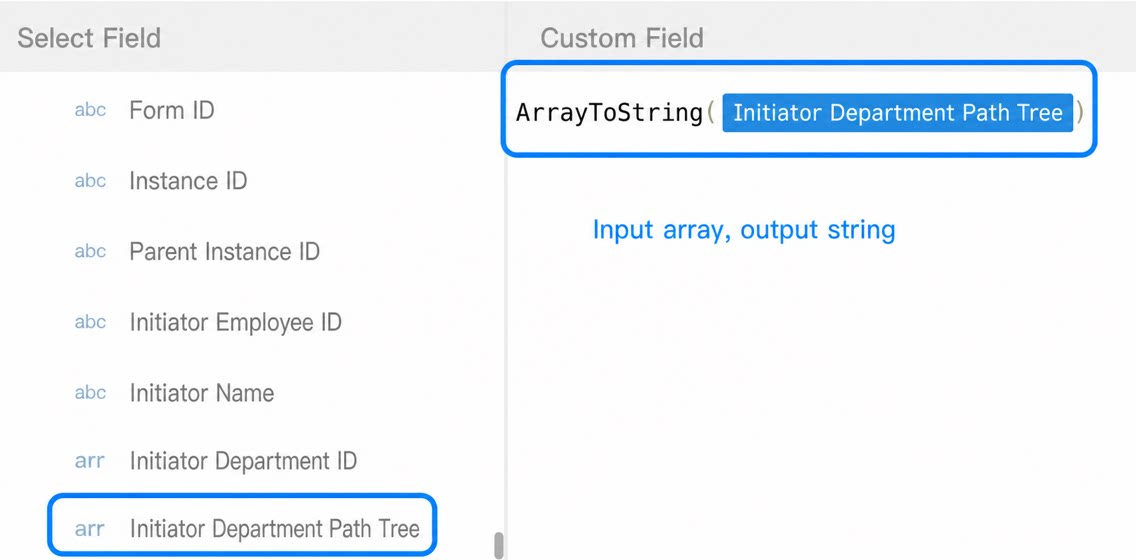
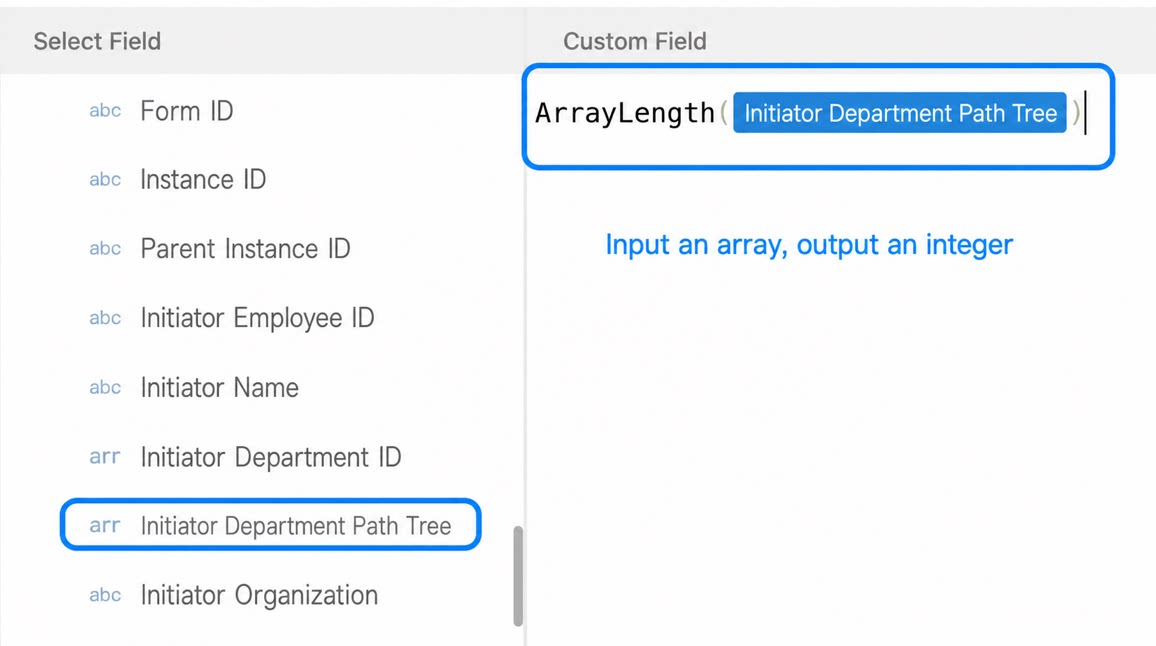
ArrayLength
Usage: ArrayLength(<array field>). Returns the length of the array. Example: ArrayLength(<Multiselect or other array field>) returns “3” when the field value is “Department” with options “Product Dept, Tech Dept, Business Dept”.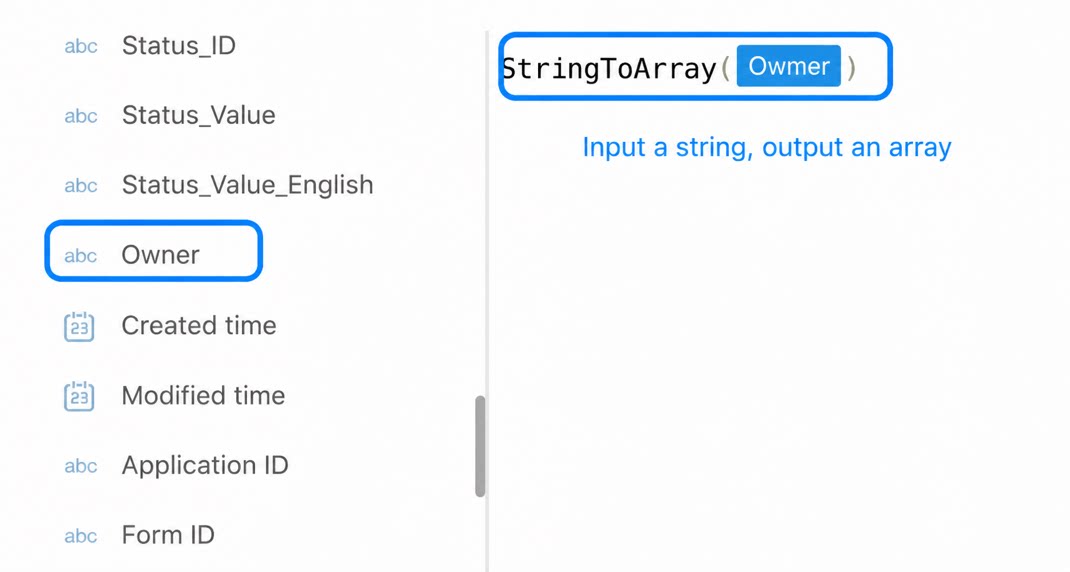
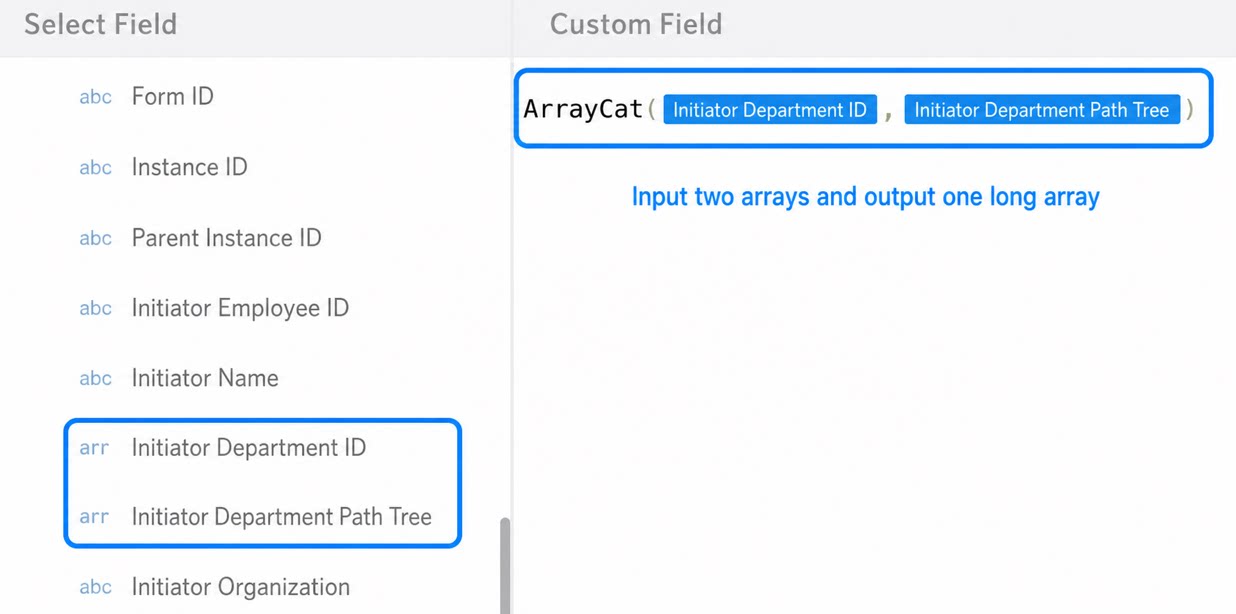
ArrayCat
Usage: ArrayCat(<array field 1>,<array field 2>,…). Concatenates multiple arrays. Example: ArrayCat(<Multiselect or other array field 1>,<Multiselect or other array field 2>,…) returns “Product Dept, Tech Dept, Business Dept, Product staff, Tech staff, Business staff” when the value of Field1 is “Product Dept, Tech Dept, Business Dept” and the value of Field2 is “Product staff, Tech staff, Business staff”.