

 Chats
Chats Calendar
 Meetings
 Contacts
 Mail
Mail Docs
Docs Drive
Drive AI Table
 AI Minutes
 Attendance
 Approval
 YiDA
YiDA Admin Console
Add a Stat Number
In the upper-left of the dashboard, click Add chart. Pick Stat number.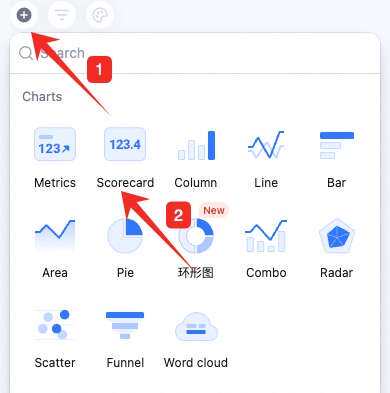
Configure the Stat Number
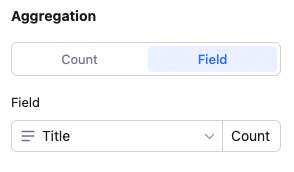
The config panel covers data and aggregation. Data: pick source — table and data range. All data enables filters.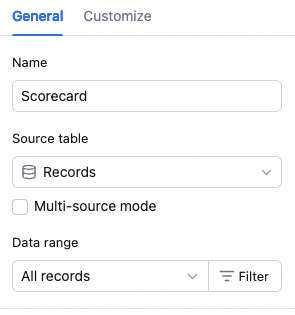 Aggregation: switch to “stat from field value” — pick a field and how to aggregate. Depending on field type: count, distinct count, sum, average, max, min. Sum/average/max/min only apply to numeric fields.
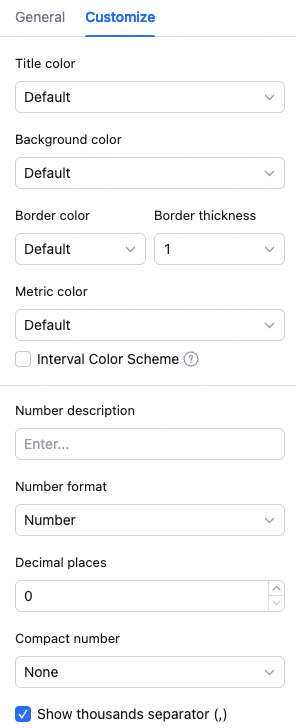
 Custom style: configure background color, number color, value description, and number format. Formats: number, percentage, RMB, USD — with decimal places and large-number abbreviation.
Manage the Stat Number
Hover over the widget — find the icon in the upper-right. Click for: configure, rename, copy, add to dashboard center, copy as image, export as image, delete.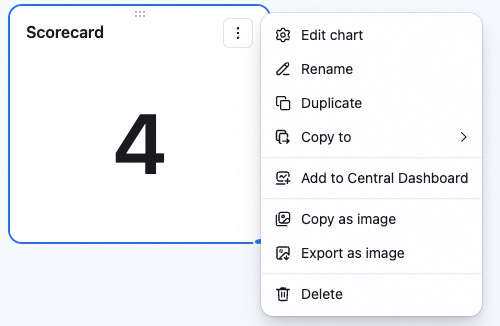 Drag the lower-right corner to resize. Drag the top to reposition.