

 Chats
Chats Calendar
 Meetings
 Contacts
 Mail
Mail Docs
Docs Drive
Drive AI Table
 AI Minutes
 Attendance
 Approval
 YiDA
YiDA Admin Console
Q: Do database table names support both Chinese and English?
Q: Do database table names support both Chinese and English?
- Only English table names are supported.
Q: How do I resolve Data Source errors (partial list)?
Q: How do I resolve Data Source errors (partial list)?
| Error message | Solution |
|---|---|
| data source validate failed.connectionInfo isn’t correct | YiDA only supports the public network. If the database does not expose a public network endpoint, YiDA cannot access it.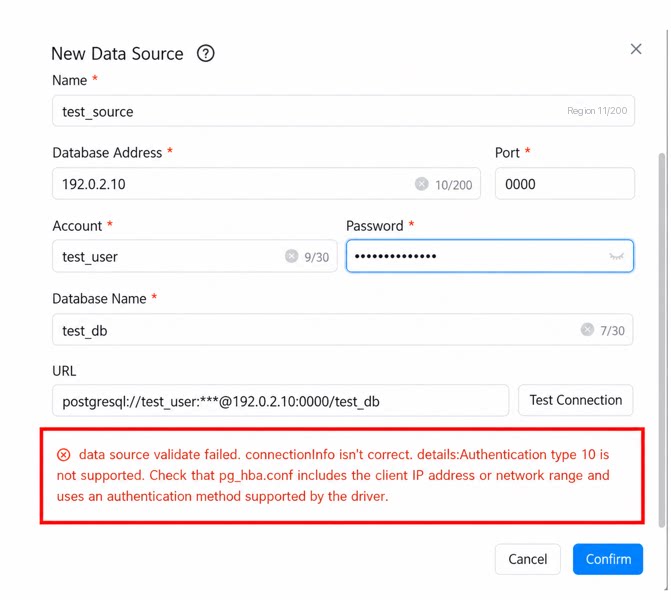 |
| ORA-00972: identifier is too long | The field alias is too long. For Oracle databases, keep the alias within 64 characters. |
| When the Data Source retrieves SQL Server data and the report uses aggregation, the error “concat ws is not a recognized built-in function name” appears | To use concat_ws, upgrade to SQL Server 2017 or later. |
Q: When Creating a Data Source, the Error “Connection Test Timed Out. Check the Connection Information and Firewall, Then Try Again” Appears
- When integrating a Data Source with your own system, ensure your database or system is accessible over the public network. Otherwise, this error occurs.
Q: When Using SQL Server (Versions Earlier Than 2012), the Error “Xxx Field Is Not a Recognized Built-In Function Name” Appears
- YiDA is not currently compatible with SQL Server versions earlier than 2012. Data may occasionally display correctly, but these versions are not recommended.
Q: Trigger Rules Between Form Submission, Bulk Import (Trigger on Selection), OPEN API / Page Data Source, and Business Association Rules or Integration & Automation
Q: Are database view connections supported?
Q: Are database view connections supported?
- Not supported.
Q: How do I configure the IP firewall allowlist?
Q: How do I configure the IP firewall allowlist?
| If your organization’s database uses a public network IP allowlist, add the following entries to avoid being blocked by firewalls or other network settings: • 106.11.0.0/16 • 203.119.128.0/17 • 59.82.0.0/16 • 140.205.0.0/16 | Failed to connect to a database-type Data Source, with a prompt to check the firewall.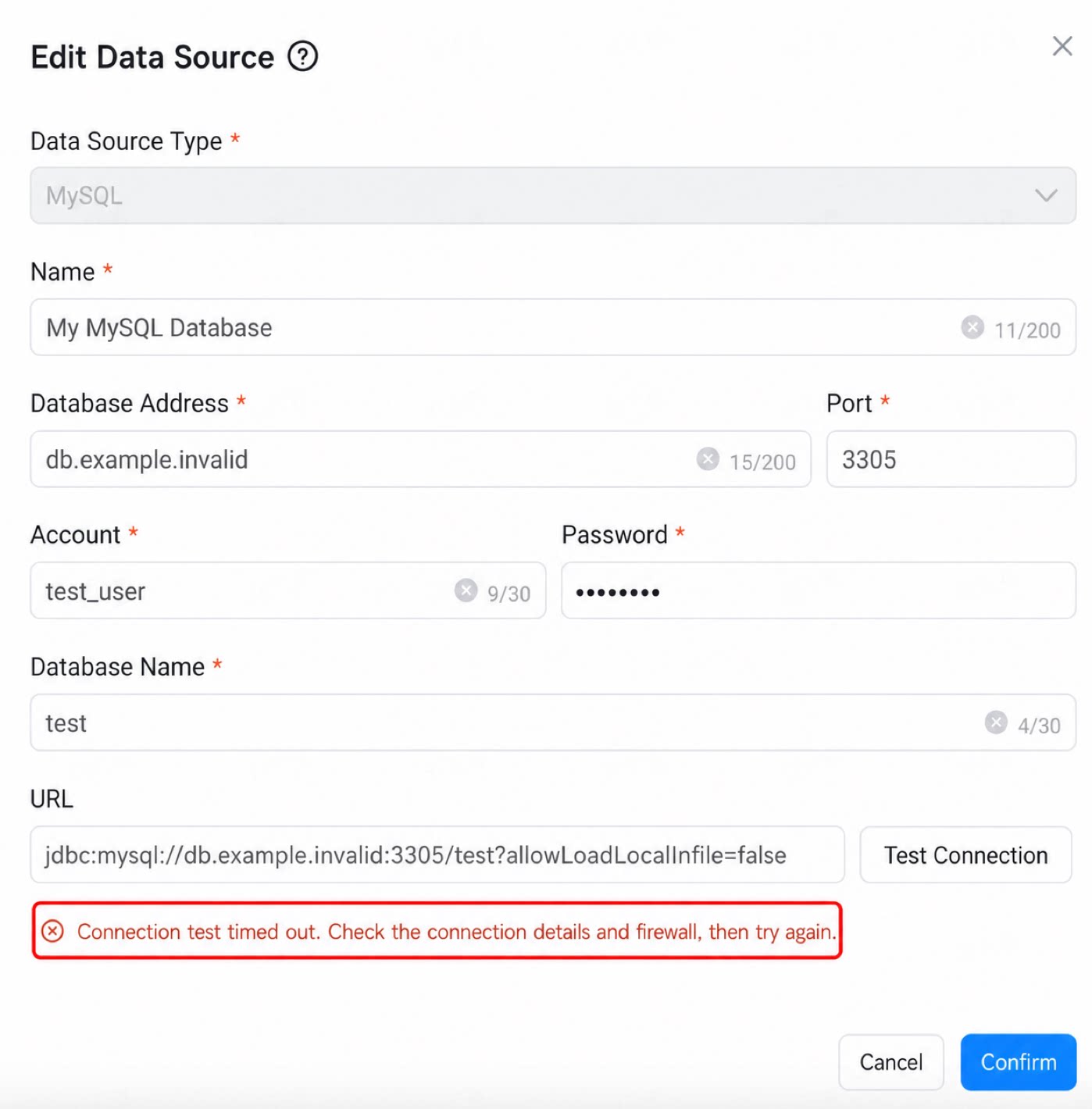 |
|---|
Q: Can subform data be retrieved across apps?
Q: Can subform data be retrieved across apps?
Q: In which scenarios can cross-app data be used?
Q: In which scenarios can cross-app data be used?
Q: When Will the Attendance Dataset Be Available?
A: It is on the roadmap and will be considered for delivery in future iterations.Q: Why Can’t I Preview the Latest Data in the Official Dataset I Connected To?
A: You currently need to manually click the test button to refresh the data. A refresh button for preview data will be added later.Q: Is the Data Real-Time or Updated the Next Day?
A: Currently, only [OA Approval] data is real-time. General metrics, employee roster, Smart HR (onboarding, transfer, promotion, resignation), and similar datasets are updated by default at 00:00 the next day.Q: After an Admin with Data Permissions for a First-Party App Creates a Dataset via Data Factory, How Can Data Permissions Be Further Configured?
A: Data processed through Data Preparation generates a new independent dataset based on the data permissions of the most recent publisher. The default row and column permissions of this dataset depend on the last publisher’s permissions. On this basis, you can configure independent dataset permissions.Q: What is the data range of OA Approval? Does it include all OA Approval data?
Q: What is the data range of OA Approval? Does it include all OA Approval data?
Q: Are there precision issues when using division in Data Preparation?
Q: Are there precision issues when using division in Data Preparation?
Q: The dataset does not update after adding new components?
Q: The dataset does not update after adding new components?
Q: The Data Preparation node preview result does not match the local calculate result?
Q: The Data Preparation node preview result does not match the local calculate result?
Q: Under what conditions does modifying the field type of a Data Preparation node take effect?
Q: Under what conditions does modifying the field type of a Data Preparation node take effect?
Q: Why do the field IDs of output nodes change?
Q: Why do the field IDs of output nodes change?
- If the content of a preceding processing node changes (for example, it contains a field A with field ID = xxx001), including deleting and re-adding the node, a completely new field ID is dynamically generated for subsequent fields (the ID of field A may be randomly regenerated as yyy789, for illustration). This causes existing node ID configurations in downstream business consumption scenarios such as reports and dashboards to fail.
Q: When Data Preparation retrieves DingTalk attendance data, the 'first check-in time of the day' shows null for some Users even though they do have check-in records. Why?
Q: When Data Preparation retrieves DingTalk attendance data, the 'first check-in time of the day' shows null for some Users even though they do have check-in records. Why?
yyyy-MM-dd HH:mm:ss.Display rules:- If the user has a shift schedule and clocks in for the first work shift, the time is recorded as the first check-in time of the day.
- For Approval forms, out-of-office, leave, supplementary check-in, and field work records are not counted.
- For check-in records, field work and admin-modified records are not counted.